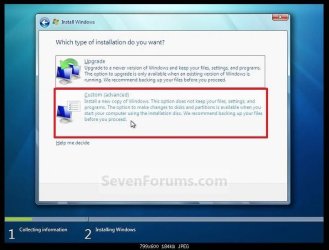
Should I reformat Windows partition before re-installing?

OldGrantonian

New member
Member
Local time
10:41 AM
Messages
52
Location
Scotland
.
I have Win 7 Home Premium SP1 on Dell Inspiron 17R 5720, 4 GB RAM.

I have Windows and programs on C: partition. Data is on E: partition.

I want to do a clean re-install of Win 7 SP1, and leave all the data on E:

My question is: Should I format the C: partition before re-install?

I saw this post by Alejandro85 here:

http://www.sevenforums.com/installa...format-c-drive-when-reinstalling-windows.html

There is no need to delete (or even format) any partition to reinstall Windows.

My problem is that I'm so old I remember when disks used to frequently develop bad sectors during use. These bad sectors were marked in the FAT during formatting, so that they would not be used by DOS.

Is this no longer true? :)

Thanks.
.

.
 

My Computer

Computer type
Laptop
Computer Manufacturer/Model Number
Dell Inspiron 17R
OS
Win 7 64-bit Home Premium
Memory
4 GB

My Computer

Computer type
PC/Desktop
Computer Manufacturer/Model Number
Custom assembled by me :}
OS
Win-7-Pro64bit 7-H-Prem-64bit
CPU
i7-5930K 2nd i9-9940x both water blocked VRM's too
Motherboard
ASUS SABERTOOTH X99 2nd ASUS x299 Apex
Memory
Trident-z 3200C14 2nd Trident-z 3600C16
Graphics Card(s)
EVGA 1080ti ftw3 2nd Titan Xp both water blocked
Sound Card
Built-in Realtek
Monitor(s) Displays
1-AOC G2460PG 24"G-Sync 144Hz/ 2nd 1-ASUS VG248QE 24" 144Hz
Screen Resolution
1920 x 1080 144Hz
Hard Drives
2-Samsung M.2 Evo & Evo Plus
2-Samsung 850 EVO 500GB SSD's/ 3-2.5 W.D. Black 1tb-&3-1tb/3-3.5 WD Black 1tb hdd's
PSU
EVGA SuperNOVA 1000-P2 2nd 1200-P2
Case
2-Corsair Obsidian Series 450D Black ATX Mid Tower
Cooling
Custom water loops
Keyboard
Logitech G710+/ 2nd Logitech G910
Mouse
2-RedDragon M901 Perdition 16400 dpi Gaming mouse = wired
Internet Speed
Comcast Ping 19ms 89.31mbps download speed 6.12mbps upload
Antivirus
Malwarebytes Pro/ Superantispyware Pro
Browser
FireFox & Pale moon
Other Info
2nd ASUS X299 Apex/Intel i9-9940x with Custom water loop/7H-Prem-x64/Corsair 450D case/Ram Trident-z 3600C16 4x8gb / Samsung970Evo plus 500gb SSD/Dual ssd EZ swap evo/PSU EVGA SuperNova 1200w-P2 80+Platinum/GPU Titan Xp /8-ML-140 on push-pull on 2-280GTX rads
This is very IMPORTANT: Disconnect ALL other drives, leaving on only the target disk that you want to have Windows installed.
If you don't do it, you may end with windows installed on one disk and the boot loader on another.

As it is a OEM the main drive may have Dell services partitions and the factory recover partition.
The laptop probably came with Win 8. Did you do the factory recover disks?

I would only format the (big) Windows partition and reinstall win 7 on it.
 
Last edited:

My Computers

System One System Two

  • Computer type
    PC/Desktop
    Computer Manufacturer/Model Number
    custom build
    OS
    Windows 7 HP 64
    CPU
    i5 6600K - 800MHz to 4200MHz
    Motherboard
    GA-Z170-HD3P
    Memory
    4+4G GSkill DDR4 3000
    Graphics Card(s)
    IG - Intel 530
    Monitor(s) Displays
    Samsung 226BW
    Screen Resolution
    1680x1050
    Hard Drives
    (1) -1 SM951 – 128GB M.2 AHCI PCIe SSD drive for Windows 7 and Lubuntu
    (2) -1 WD SATA 3 - 1T for Data
    (3) -1 WD SATA 3 - 1T for backup
    PSU
    Thermaltake 450W TR2 gold
    Keyboard
    Old and good Chicony mechanical keyboard
    Mouse
    Logitech mX performance - 9 buttons (had to disable some)
    Internet Speed
    500Mb/s
    Browser
    Firefox 64
    Other Info
    TinyWall firewall
  • Computer type
    Laptop
    System Manufacturer/Model Number
    Asus Q550LF
    OS
    Windows 7 Pro
    CPU
    i7-4500U 800MHz to 3.0GHz
    Motherboard
    Asus Q550LF
    Memory
    (4+4)G DDR3 1600
    Graphics Card(s)
    IG intel 4400 + NVIDIA GeForce GT 745M
    Sound Card
    Realtek
    Monitor(s) Displays
    LG Display LP156WF4-SPH1
    Screen Resolution
    1920 x 1080
    Hard Drives
    BX500 120G SSD for Windows and programs +
    1T HDD for data
    Internet Speed
    500 Mb/s
    Browser
    Firefox
    Other Info
    TinyWall firewall

Attachments

  • Capture.JPG
    Capture.JPG
    62.6 KB · Views: 1
Last edited:

My Computer

Computer type
PC/Desktop
Computer Manufacturer/Model Number
Skylake Special #666
OS
Windows 10 Pro x64
CPU
Intel Core i7 6700K
Motherboard
Asus Sabertooth Z170 Mark 1
Memory
GSkill TridentZ RGB 16GB 3600 16-16-16-36
Graphics Card(s)
EVGA GTX 980 Ti SC x2
Sound Card
Realtek High Definition
Monitor(s) Displays
AOC G2460PG
Screen Resolution
1920 x 1080 144Hz
Hard Drives
Samsung 860 Pro 256GB, Seagate Barracuda 4TB x2
PSU
EVGA 1000 P2, EVGA White Custom Braided Cables
Case
Corsair Vengeance C70 Gunmetal Black
Cooling
Corsair H100i v2, Corsair ML120 x2, Thermal Grizzly Kryonaut
Keyboard
Logitech G910 Orion Spectrum
Mouse
Logitech G700s
Internet Speed
Verizon Fios Quantum Gateway 75/75
Antivirus
Windows Defender, Malwarebytes Free 3.8.3
Browser
Chrome
Other Info
Corsair SP120 x4, LG Blu-ray Drive, Durabrand HT-395 100 Watt Dolby Digital Amp, Corsair H2100 Wireless 7.1 Headset
While not strictly necessary it is always a good idea to format the partition. This is normally done as part of the install process.
Again, while not strictly necessary it is a good idea to delete all system, but not data partitions. Disconnecting other drives is also highly recommended. These things simplify the installation and avoid unpleasant surprises if things proceed different than anticipated.

And always do a backup of your data before proceeding. Never rely on some Windows feature to do this for you. Many people have made some mistake and end up formatting and installing the OS on the wrong partition or drive. Even experts make mistakes. But experienced computer users anticipate that problems may occur and prepare accordingly (with backups).
 

My Computer

Computer type
PC/Desktop
Computer Manufacturer/Model Number
HP
OS
Windows 7 Pro 64 bit
CPU
Xeon W3520
Memory
8 GB
Graphics Card(s)
Nvidia Geforce 210
There is no reason to delete the install partition.

If someone were to delete the install partition and they did not want a system reserved partition, then the installer would create it.

It would be nice if the OP could post a shot of Disk Management before he reinstalls windows.
 

My Computer

Computer type
PC/Desktop
Computer Manufacturer/Model Number
Skylake Special #666
OS
Windows 10 Pro x64
CPU
Intel Core i7 6700K
Motherboard
Asus Sabertooth Z170 Mark 1
Memory
GSkill TridentZ RGB 16GB 3600 16-16-16-36
Graphics Card(s)
EVGA GTX 980 Ti SC x2
Sound Card
Realtek High Definition
Monitor(s) Displays
AOC G2460PG
Screen Resolution
1920 x 1080 144Hz
Hard Drives
Samsung 860 Pro 256GB, Seagate Barracuda 4TB x2
PSU
EVGA 1000 P2, EVGA White Custom Braided Cables
Case
Corsair Vengeance C70 Gunmetal Black
Cooling
Corsair H100i v2, Corsair ML120 x2, Thermal Grizzly Kryonaut
Keyboard
Logitech G910 Orion Spectrum
Mouse
Logitech G700s
Internet Speed
Verizon Fios Quantum Gateway 75/75
Antivirus
Windows Defender, Malwarebytes Free 3.8.3
Browser
Chrome
Other Info
Corsair SP120 x4, LG Blu-ray Drive, Durabrand HT-395 100 Watt Dolby Digital Amp, Corsair H2100 Wireless 7.1 Headset
We never bother. Just put the image over the top or if disk install, custom allow this option so its all im one job format / install in steps of cause

really if you can only have the target HDD connected and clean all is best if possible

FDisk
format should be enough thou
 

My Computer

Computer type
PC/Desktop
Computer Manufacturer/Model Number
Dell (Assorted)
OS
Win 7 Pro x86
What is the purpose of wanting to re-install your Windows 7 system.

Do take note that is to install using OEM Recovery disk, there is this 1st partition for Boot, which is hidden.

That is why in post #2 ThrashZone recommended should be done.

If you find that your system is slow, then do "disk defragmenter" the C:\ drive.
But do go to C:\Windows\Temp to delete all these useless files, just skip the files that cannot be deleted.
Also, go to C:\Users\Eric\AppData\Local\Temp <replace Eric to your User name> and deleted as mentioned above.
Finally then run the Disk Defragmenter.

Any re-install will required you to re-install other program, application, etc

Finally, you have to do Windows updates which may take a long time and sometimes it is very slow like not working, But it is work in-progress.
For short-cut on this do refer to post #2 ThrashZone to show you how.

Your decision, as these replies are of several options for you to decide.
 

My Computer

Computer type
Laptop
Computer Manufacturer/Model Number
Toshiba L630 and L735
OS
Windows 7 x64
Hard Drives
240 GB SSD
Back
Top