
You are using an out of date browser. It may not display this or other websites correctly.
You should upgrade or use an alternative browser.
You should upgrade or use an alternative browser.
Format partition before installing Win7, or not?
- Thread starter apex2000
- Start date

- Local time
- 2:25 PM
- Messages
- 16,784
Hi,
Mine is here - 7068x64

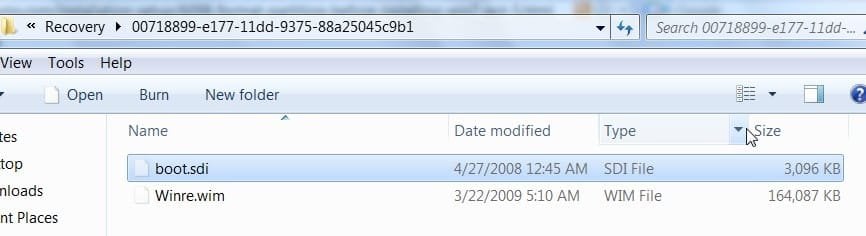
It is for the benefit of others reading the thread who not that familiar with BCD.
I extracted it some time back and it contains bootsect.exe, which presumably will be on the recovery cd you can create. That will be useful for those with oem preinstalls.
The Vista recovery cd distributed by Neosmart did not contain that.
Mine is here - 7068x64
It is for the benefit of others reading the thread who not that familiar with BCD.
I extracted it some time back and it contains bootsect.exe, which presumably will be on the recovery cd you can create. That will be useful for those with oem preinstalls.
The Vista recovery cd distributed by Neosmart did not contain that.
My Computers
System One System Two
-
- Computer type
- PC/Desktop
- OS
- 7 X64
- CPU
- i5 8400
- Motherboard
- gigabyte b365m ds3h
- Memory
- 2x8gb 3200mhz
- Hard Drives
- various
- PSU
- pure power 11 400w cm
- Case
- Coolermaster
- Cooling
- cryorig m9i
-
- Computer type
- PC/Desktop
- OS
- 7x64
- CPU
- g5400
- Motherboard
- ga b365m ds3h
- Memory
- 8gb ddr4 2400
- PSU
- xfx pro 450w
It is for the benefit of others reading the thread who not that familiar with BCD.
Ahh ok, by the way my screen shots are from the 32 bit version so that could explain the size difference in the Winre.wim.
My Computer
- OS
- Win 7

I hate to burst all the bubbles in here, but guess what?
I clean installed build 7068 by deleting all partitions from one of my Seagate 500 GB Barracudas, and then using the Win7 Setup program created a single 60 GB partition. I then told Windows to install into that partition, and the setup program informed me that it was going to create a small ~100 MB partition for recovery(?) purposes and would allocate the rest of the space to the Windows Partition.
And it did:
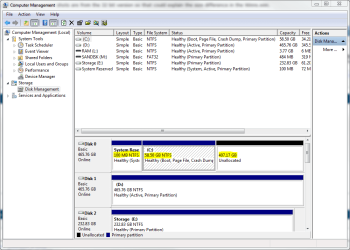
I clean installed build 7068 by deleting all partitions from one of my Seagate 500 GB Barracudas, and then using the Win7 Setup program created a single 60 GB partition. I then told Windows to install into that partition, and the setup program informed me that it was going to create a small ~100 MB partition for recovery(?) purposes and would allocate the rest of the space to the Windows Partition.
And it did:
My Computers
System One System Two
-
- Computer type
- PC/Desktop
- Computer Manufacturer/Model Number
- The Beast Model A (homebrew)
- OS
- Windows 11 21H2 Current build
- CPU
- AMD Ryzen 9 3950X
- Motherboard
- MSI MEG X570 GODLIKE
- Memory
- 4 * 32 GB - Corsair Vengeance 3600 MHz
- Graphics Card(s)
- EVGA GeForce RTX 3080 Ti XC3 ULTRA GAMING (12G-P5-3955-KR)
- Sound Card
- Realtek® ALC1220 Codec
- Monitor(s) Displays
- 2x Eve Spectrum ES07D03 4K Gaming Monitor (Matte) | Eve Spec
- Screen Resolution
- 3x 3840 x 2160
- Hard Drives
- 3x Samsung 980 Pro NVMe PCIe 4 M.2 2 TB SSD (MZ-V8P2T0B/AM) } 3x Sabrent Rocket NVMe 4.0 1 TB SSD
- PSU
- PC Power & Cooling’s Silencer Series 1050 Watt, 80 Plus Plat
- Case
- Fractal Design Define 7 XL Dark ATX Full Tower Case
- Cooling
- SteelSeries Apex Pro Wired Gaming Keyboard
- Keyboard
- SteelSeries Apex Pro
- Mouse
- Logitech MX Master 3S | MX Master 3 for business
- Internet Speed
- AT&T LightSpeed Gigabit Duplex Ftth
- Antivirus
- Windows Defender + MB 3
- Browser
- Nightly (default) + Firefox (stable),Chrome, Edge
-
- Computer type
- PC/Desktop
- System Manufacturer/Model Number
- Dell Latitude E5470
- OS
- ChromeOS Flex Dev Channel (current)
- CPU
- Intel(R) Core(TM) i5-6300U CPU @ 2.40GHz, 2501 Mhz, 2 Core(s), 4 Logical Processor(s)
- Motherboard
- Dell
- Memory
- 16 GB
- Graphics Card(s)
- Intel(R) HD Graphics 520
- Sound Card
- Intel(R) HD Graphics 520 + RealTek Audio
- Monitor(s) Displays
- Dell laptop display 15"
- Screen Resolution
- 1920 * 1080
- Hard Drives
- Toshiba 128GB M.2 22300 drive
INTEL Cherryville 520 Series SSDSC2CW180A 180 GB SATA III SSD
- PSU
- Dell
- Case
- Dell
- Cooling
- Dell
- Keyboard
- Dell
- Mouse
- Logitech MX Master 3S (shared w. Sys 1) | Dell TouchPad
- Internet Speed
- AT&T LightSpeed Gigabit Duplex Ftth

My Computer
- Computer type
- PC/Desktop
- Computer Manufacturer/Model Number
- Custom built, several laptops HP/ASUS
- OS
- Linux CENTOS 7 / various Windows OS'es and servers
- CPU
- Intel i7 Intel i5
- Memory
- 8GB, 16GB
- Graphics Card(s)
- On Motherboard
- Sound Card
- Realtek HD audio
- Monitor(s) Displays
- Apple Cinema display, Samsung LCD
- Screen Resolution
- 1920 X 1080
- Hard Drives
- 4 X 1TB SATA
- Mouse
- Toshiba wireless laser
- Internet Speed
- > 20MB up
I hate to burst all the bubbles in here, but guess what?
I clean installed build 7068 by deleting all partitions from one of my Seagate 500 GB Barracudas, and then using the Win7 Setup program created a single 60 GB partition. I then told Windows to install into that partition, and the setup program informed me that it was going to create a small ~100 MB partition for recovery(?) purposes and would allocate the rest of the space to the Windows Partition.
And it did:
View attachment 6946
It may be because that is the first drive. In all my tests with an active partition present before the drive i install on, not once did it create the partition.
My Computer
- OS
- Win 7

It may be because that is the first drive. In all my tests with an active partition present before the drive i install on, not once did it create the partition.
Installed each version leaked at least 3 times the same way and I concur with YupYup, no "warnings" that it was going to create anything. It just did it. Maybe I never saw the warning because I wanted to let the installer partition the space I allowed it however it chose. I just pointed it at unpartitioned space and let 'er rip. That result was a partition ( C: ) a tad smaller than what I'd guessed and this itty bitty partition with no drive letter assigned. Didn't bother me in the least since other operating systems had been doing that as a best practice seemingly forever.
My Computer
- Computer type
- Laptop
- Computer Manufacturer/Model Number
- Apple
- OS
- El Capitan / Windows 10
- CPU
- i7-4980HQ
- Memory
- 16GB
- Graphics Card(s)
- Iris 5200
It should work
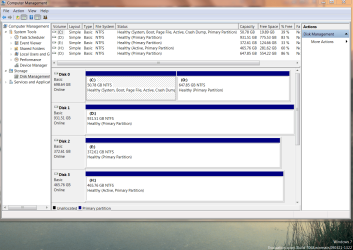
Don't know what you did but here is a copy of my current configuration
( I did format the C partition first however)
cheers
jimbo
The format could be a key - I created my partition but did not format....
It may be because that is the first drive. In all my tests with an active partition present before the drive i install on, not once did it create the partition.
That could be it as well....
Installed each version leaked at least 3 times the same way and I concur with YupYup, no "warnings" that it was going to create anything. It just did it. Maybe I never saw the warning because I wanted to let the installer partition the space I allowed it however it chose. I just pointed it at unpartitioned space and let 'er rip. That result was a partition ( C: ) a tad smaller than what I'd guessed and this itty bitty partition with no drive letter assigned. Didn't bother me in the least since other operating systems had been doing that as a best practice seemingly forever.
I never saw a warning until 7068....
My Computers
System One System Two
-
- Computer type
- PC/Desktop
- Computer Manufacturer/Model Number
- The Beast Model A (homebrew)
- OS
- Windows 11 21H2 Current build
- CPU
- AMD Ryzen 9 3950X
- Motherboard
- MSI MEG X570 GODLIKE
- Memory
- 4 * 32 GB - Corsair Vengeance 3600 MHz
- Graphics Card(s)
- EVGA GeForce RTX 3080 Ti XC3 ULTRA GAMING (12G-P5-3955-KR)
- Sound Card
- Realtek® ALC1220 Codec
- Monitor(s) Displays
- 2x Eve Spectrum ES07D03 4K Gaming Monitor (Matte) | Eve Spec
- Screen Resolution
- 3x 3840 x 2160
- Hard Drives
- 3x Samsung 980 Pro NVMe PCIe 4 M.2 2 TB SSD (MZ-V8P2T0B/AM) } 3x Sabrent Rocket NVMe 4.0 1 TB SSD
- PSU
- PC Power & Cooling’s Silencer Series 1050 Watt, 80 Plus Plat
- Case
- Fractal Design Define 7 XL Dark ATX Full Tower Case
- Cooling
- SteelSeries Apex Pro Wired Gaming Keyboard
- Keyboard
- SteelSeries Apex Pro
- Mouse
- Logitech MX Master 3S | MX Master 3 for business
- Internet Speed
- AT&T LightSpeed Gigabit Duplex Ftth
- Antivirus
- Windows Defender + MB 3
- Browser
- Nightly (default) + Firefox (stable),Chrome, Edge
-
- Computer type
- PC/Desktop
- System Manufacturer/Model Number
- Dell Latitude E5470
- OS
- ChromeOS Flex Dev Channel (current)
- CPU
- Intel(R) Core(TM) i5-6300U CPU @ 2.40GHz, 2501 Mhz, 2 Core(s), 4 Logical Processor(s)
- Motherboard
- Dell
- Memory
- 16 GB
- Graphics Card(s)
- Intel(R) HD Graphics 520
- Sound Card
- Intel(R) HD Graphics 520 + RealTek Audio
- Monitor(s) Displays
- Dell laptop display 15"
- Screen Resolution
- 1920 * 1080
- Hard Drives
- Toshiba 128GB M.2 22300 drive
INTEL Cherryville 520 Series SSDSC2CW180A 180 GB SATA III SSD
- PSU
- Dell
- Case
- Dell
- Cooling
- Dell
- Keyboard
- Dell
- Mouse
- Logitech MX Master 3S (shared w. Sys 1) | Dell TouchPad
- Internet Speed
- AT&T LightSpeed Gigabit Duplex Ftth
? I have not had that experience. over the years. Of the partition programs I have used - not many, but including Microsoft's built in manager, I always have to format the partition again. But, perhaps I have not understood what you are indicating by "recreating", or again, is this with SATA drives. I don't have that facility (yet).
Sorry fella, i might have been a little bit vague. In my experience of install countless Vista PCs/Laptops & now Se7en when I delete the primary partition (only ever worked with 1 partition so far) as soon as the new 1 is added i find no need to format as Windows already sees it as primary & formatted.
Additional: This is all from within the Windows setup program
Last edited:
My Computer
- Computer Manufacturer/Model Number
- Compaq Desktop
- OS
- Windows 7 Ultimate x64
- CPU
- AMD Sempron Dual Core
- Memory
- 3GB
- Graphics Card(s)
- NVIDIA GeForce 6150SE nForce 430
- Screen Resolution
- 1024x768
- Hard Drives
- 150GB Sata
Similar threads
- Replies
- 9
- Views
- 3K
- Replies
- 8
- Views
- 2K
- Replies
- 11
- Views
- 3K


- Replies
- 12
- Views
- 2K