Should I return the gpu?

takumiv1

New member
Local time
2:27 PM
Messages
11
Location
United States
So today I was finally able build my dad's computer after the gpu and mobo arrived and everything worked fine. After many computer reboots later the computer stopped posting and the gpu fan would spin fast(in intervals which I assumed was the computer rebooting). I took out the gpu and stuck it back in and nothing and when I switched gpus it posted. So I thought we had gotten a bad gpu and decided to return it. Being the curious person I am, I continued to mess around and it posted! I don't know if it's because I stuck it back in in a different way or something but it posted. So after contemplating on whither I should return it or not, I decided to come here to ask if someone can perhaps tell me why the gpu acted the way it did.

cpu: AMD x4 645
mobo: biostar TA870U3+
gpu: xfx radeon hd 4850
psu: 620watts

gpu used in switch: gtx 460
 

My Computer

Computer Manufacturer/Model Number
Custom
OS
Windows 10 Pro x64
CPU
AMD 1090t 3.21GHz
Motherboard
Asus m5A97 LE 2.0
Memory
2x2gb mushkin DDR3 and 2x4gb G.Skill Ripjaws DDR3
Graphics Card(s)
Sapphire 280
Monitor(s) Displays
Asus VH236H 23''
Screen Resolution
1920x1080
Hard Drives
Intel 335 Series 240GB SSD
WD Blue 1TB (WD10EZEX)
PSU
Thermaltake toughpower 775watts
Case
NZXT mid tower case
Cooling
CoolerMaster V8, 3 120mm case fans and a 140mm case fan
Keyboard
Rosewill RK-9000RE Red switch
Mouse
Logitech G500
Check your dad's new motherboard for bios updates. Some boards have compatibility updates for them. I could point you in the right direction, but I would need the specific make and model of the motherboard.
 

My Computer

Computer Manufacturer/Model Number
Insane hobo technologies. ;-)
OS
Windows 7 x64
CPU
Intel i7 2600k
Motherboard
Asrock z68 extreme 4 gen 3
Memory
G.skill Ripjaw 16gigs @ 1866
Graphics Card(s)
Nvidia gtx580 (evga)
Sound Card
Integrated HD audio + hdmi
Monitor(s) Displays
24" ASUS widescreen + 42" insignia
Screen Resolution
1080p (1920x1080)
Hard Drives
128 Samsung 830
256 Samsung 840
3 x 1tb storage drive (various)
1 western digital 1tb (eSATA)
1 Seagate 1tb (eSATA)
PSU
1 kilowatt SLI/Crossfire rated Silverstone modular
Case
NZXT Phantom + additional 220 fan
Cooling
Zalmann
Keyboard
Microsoft wireless 3000 (v2)
Mouse
MS - wireless 5000 (bluetrack)
Internet Speed
depends on if you ask me or my provider.
Other Info
The above information is provided as is, and the author assumes no responsibility for issues it may cause with your sanity or fanboyism.
Oh I forgot to mention that I stuck the gpu into my computer and it did the same thing.
 

My Computer

Computer Manufacturer/Model Number
Custom
OS
Windows 10 Pro x64
CPU
AMD 1090t 3.21GHz
Motherboard
Asus m5A97 LE 2.0
Memory
2x2gb mushkin DDR3 and 2x4gb G.Skill Ripjaws DDR3
Graphics Card(s)
Sapphire 280
Monitor(s) Displays
Asus VH236H 23''
Screen Resolution
1920x1080
Hard Drives
Intel 335 Series 240GB SSD
WD Blue 1TB (WD10EZEX)
PSU
Thermaltake toughpower 775watts
Case
NZXT mid tower case
Cooling
CoolerMaster V8, 3 120mm case fans and a 140mm case fan
Keyboard
Rosewill RK-9000RE Red switch
Mouse
Logitech G500
no harm in getting a replacement man, get it replaced then try again. if it does the same thing, you might want to look at your BIOS and even your motherboard.
theres alot of things that can go wrong.
 

My Computer

Computer Manufacturer/Model Number
-
OS
windows 7 ultimate x64
CPU
Intel i7 950
Motherboard
gigabyte usb3
Memory
3x2gb corsair xms 1600mhz ddr3
Graphics Card(s)
ATI saphire 5770 OC 1GB
Sound Card
-
Monitor(s) Displays
22'' acer
Screen Resolution
1680 1050
Hard Drives
320gb WD blue
PSU
cooler master modular silent pro 850watt
Case
thermaltake soprano
Internet Speed
20mbps
the gpu fan would spin fast(in intervals which I assumed was the computer rebooting).

Upon starting, normally it will ramp up quickly once. It shouldn't be be ramping in intervals.


I decided to come here to ask if someone can perhaps tell me why the gpu acted the way it did.


Did you happen to notice if the were any red lights on the back of the card at the time? Depending on the lights, it can point towards the issue

HD 4850 LEDs

D1601 - Over temp protection enabled

D1602 - EXT 12V fault


The fact that it did POST, tends to rule out a BIOS issue.

The fact that it did the same thing in your PC rules out the PSU being at fault.


I suspect the card may be a dud. I had an XFX 4890 that did the same thing - intermittently failed to POST, fans ramped in intervals. When it worked, it seemed to be fine but it became worse over time causing a lot of Black/Red/Grey screens of Death. (never a BSOD because the system always froze before it could trigger a crash dump)

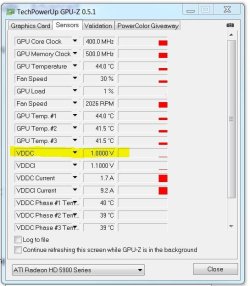
On my card it looked like the VREGS were faulty because when the card was working, I monitored the VDDC (card voltage) and it was fluctuating wildly and well out of spec. Normally it will adjust between the powerplay states according to 2D/3D clocks, but it should be uniform voltages, and not constantly changing and all over the place.

It may be worth while to download GPU-Z and monitor the voltage:


GPU-Z voltage.JPG

I'm not saying this is what happened with your card, but it is one possibility.

It may be nothing, but if the same behavior occurred in two separate machines, it's not a coincidence and it may be worthwhile returning it simply for peace of mind.

(perhaps even a different brand - XFX cheaped out on some batches of their 48xx cards)
 

My Computer

Computer type
PC/Desktop
Computer Manufacturer/Model Number
Systems by SmartEyeball
OS
8 Pro x64
CPU
i7 3770K 4.6GHz
Motherboard
ASUS P8Z77 WS
Memory
16GB G.Skill Trident X 2666mhz
Graphics Card(s)
x2 EVGA 780 Ti Superclocked SLI
Sound Card
SB X-FI Surround 5.1 PRO USB / ATH-AD900 Headphones
Monitor(s) Displays
x3 Dell U2410 / 58" Samsung
Screen Resolution
5760*1200/ 1920*1200
Hard Drives
2x Intel 520 240GB (RAID 0) * 2x WD Caviar Blacks 2TB (RAID 0) * 2TB WD Caviar Black * Sony Optirac DVD
PSU
Silverstone Strider Evolution 1200W
Case
Thermaltake Level 10 GT Snow Edition
Cooling
Noctua NH-D14
Keyboard
Topre Realforce // Ducky Shine MX Black // Filco Ninja TKL
Mouse
Thermaltake Theron (Highly Recommended) + Razer Imperator
Antivirus
MSE
Browser
IE, FF, WaterFox
Other Info
GT Extreme V2 Sim Racing Cockpit + 40" LCD and K/B Mouse stand ▼
Fanatec CSR Elite Wheel + Clubsport V1 Pedals + CSR shifter/7G-H ▼Saitek X52 Pro ▼ TrackIR 5 Pro
Buttkicker v2 Seat Rumbler with Dedicated 5.1 and Sub Woofer attached to frame ▼
=
Bloody Big Grin
I already submitted an RMA form to newegg for a replacement. I would check gpu-z if my dad's hdd didnt die. And since he needs a new hdd anyways I'll just return the gpu and hopefully we'll have a new hdd by then. Thanks for info guys, appreciated it.
 

My Computer

Computer Manufacturer/Model Number
Custom
OS
Windows 10 Pro x64
CPU
AMD 1090t 3.21GHz
Motherboard
Asus m5A97 LE 2.0
Memory
2x2gb mushkin DDR3 and 2x4gb G.Skill Ripjaws DDR3
Graphics Card(s)
Sapphire 280
Monitor(s) Displays
Asus VH236H 23''
Screen Resolution
1920x1080
Hard Drives
Intel 335 Series 240GB SSD
WD Blue 1TB (WD10EZEX)
PSU
Thermaltake toughpower 775watts
Case
NZXT mid tower case
Cooling
CoolerMaster V8, 3 120mm case fans and a 140mm case fan
Keyboard
Rosewill RK-9000RE Red switch
Mouse
Logitech G500
No worries, good luck with the replacements.
 

My Computer

Computer type
PC/Desktop
Computer Manufacturer/Model Number
Systems by SmartEyeball
OS
8 Pro x64
CPU
i7 3770K 4.6GHz
Motherboard
ASUS P8Z77 WS
Memory
16GB G.Skill Trident X 2666mhz
Graphics Card(s)
x2 EVGA 780 Ti Superclocked SLI
Sound Card
SB X-FI Surround 5.1 PRO USB / ATH-AD900 Headphones
Monitor(s) Displays
x3 Dell U2410 / 58" Samsung
Screen Resolution
5760*1200/ 1920*1200
Hard Drives
2x Intel 520 240GB (RAID 0) * 2x WD Caviar Blacks 2TB (RAID 0) * 2TB WD Caviar Black * Sony Optirac DVD
PSU
Silverstone Strider Evolution 1200W
Case
Thermaltake Level 10 GT Snow Edition
Cooling
Noctua NH-D14
Keyboard
Topre Realforce // Ducky Shine MX Black // Filco Ninja TKL
Mouse
Thermaltake Theron (Highly Recommended) + Razer Imperator
Antivirus
MSE
Browser
IE, FF, WaterFox
Other Info
GT Extreme V2 Sim Racing Cockpit + 40" LCD and K/B Mouse stand ▼
Fanatec CSR Elite Wheel + Clubsport V1 Pedals + CSR shifter/7G-H ▼Saitek X52 Pro ▼ TrackIR 5 Pro
Buttkicker v2 Seat Rumbler with Dedicated 5.1 and Sub Woofer attached to frame ▼
=
Bloody Big Grin

My Computer

Computer type
PC/Desktop
Computer Manufacturer/Model Number
Custom built by me.
OS
Windows 10 Pro
CPU
Intel Core i7-4770K (3.5Ghz)
Motherboard
Gigabyte G1 Sniper 5 (F10 Bios)
Memory
32 gig Corsair Dominator Platinum (4x8Gig)
Graphics Card(s)
Sapphire Tri-X R9 Fury
Sound Card
Soundblaster ZXR
Monitor(s) Displays
NEC PA242W 24" LCD Monitor
Screen Resolution
1920 x 1200
Hard Drives
Primary - Samsung 850 Pro (512gig), Samsung 840 Pro (256gig), 2TB WD Caviar Black.
PSU
EVGA Supernova 1000 G2
Case
Cooler Master HAF X
Cooling
Corsair H100i with Corsair Air Series SP120 Quiet Fans
Keyboard
Logitech Wireless Wave
Mouse
Logitech Performance MX
Internet Speed
High Speed Cable
Antivirus
Norton Security
Browser
IE11
Other Info
Memory Timings - 1866MHz @ 9-9-9-27-1T @ 1.5 volts
Thanks Drew :)

There was a post at TPU forums. Unfortunately it only goes up to the 4xxx series.
 

My Computer

Computer type
PC/Desktop
Computer Manufacturer/Model Number
Systems by SmartEyeball
OS
8 Pro x64
CPU
i7 3770K 4.6GHz
Motherboard
ASUS P8Z77 WS
Memory
16GB G.Skill Trident X 2666mhz
Graphics Card(s)
x2 EVGA 780 Ti Superclocked SLI
Sound Card
SB X-FI Surround 5.1 PRO USB / ATH-AD900 Headphones
Monitor(s) Displays
x3 Dell U2410 / 58" Samsung
Screen Resolution
5760*1200/ 1920*1200
Hard Drives
2x Intel 520 240GB (RAID 0) * 2x WD Caviar Blacks 2TB (RAID 0) * 2TB WD Caviar Black * Sony Optirac DVD
PSU
Silverstone Strider Evolution 1200W
Case
Thermaltake Level 10 GT Snow Edition
Cooling
Noctua NH-D14
Keyboard
Topre Realforce // Ducky Shine MX Black // Filco Ninja TKL
Mouse
Thermaltake Theron (Highly Recommended) + Razer Imperator
Antivirus
MSE
Browser
IE, FF, WaterFox
Other Info
GT Extreme V2 Sim Racing Cockpit + 40" LCD and K/B Mouse stand ▼
Fanatec CSR Elite Wheel + Clubsport V1 Pedals + CSR shifter/7G-H ▼Saitek X52 Pro ▼ TrackIR 5 Pro
Buttkicker v2 Seat Rumbler with Dedicated 5.1 and Sub Woofer attached to frame ▼
=
Bloody Big Grin
Thanks. I'll have to do some research to see If I can find a list for the newer cards for record keeping.

Thanks.
 

My Computer

Computer type
PC/Desktop
Computer Manufacturer/Model Number
Custom built by me.
OS
Windows 10 Pro
CPU
Intel Core i7-4770K (3.5Ghz)
Motherboard
Gigabyte G1 Sniper 5 (F10 Bios)
Memory
32 gig Corsair Dominator Platinum (4x8Gig)
Graphics Card(s)
Sapphire Tri-X R9 Fury
Sound Card
Soundblaster ZXR
Monitor(s) Displays
NEC PA242W 24" LCD Monitor
Screen Resolution
1920 x 1200
Hard Drives
Primary - Samsung 850 Pro (512gig), Samsung 840 Pro (256gig), 2TB WD Caviar Black.
PSU
EVGA Supernova 1000 G2
Case
Cooler Master HAF X
Cooling
Corsair H100i with Corsair Air Series SP120 Quiet Fans
Keyboard
Logitech Wireless Wave
Mouse
Logitech Performance MX
Internet Speed
High Speed Cable
Antivirus
Norton Security
Browser
IE11
Other Info
Memory Timings - 1866MHz @ 9-9-9-27-1T @ 1.5 volts
Back
Top