Solved should I upgrade to Windows 10?

Kyafield

New member
Member
Local time
1:24 AM
Messages
24
I have everything operating smoothly with Windows 7 home premium. Windows is offering to give me a free upgrade to Windows 10 home. I do not have a touchscreen nor do I intend to ever have a touchscreen monitor. Should I take this free"upgrade" or keep running my 7 home premium?
My pc has the resources to run 10 but why do it. Thanks.
Carl
 

My Computer My Computer

At a glance

windows 7 home premium 64 bitXeon X54608gbmsi afterburner/GeForce GTX 650
Computer type
PC/Desktop
Computer Manufacturer/Model Number
custom build
OS
windows 7 home premium 64 bit
CPU
Xeon X5460
Motherboard
Gigabyte GA-P43-ES3G
Memory
8gb
Graphics Card(s)
msi afterburner/GeForce GTX 650
Internet Speed
30
Antivirus
AVG
Browser
IE 11
It would be best to download and try the preview in a virtual machine. That way you can see if you like it. There is no single right answer for everybody.
 

My Computer My Computer

At a glance

Windows 7 Pro 64 bitXeon W35208 GBNvidia Geforce 210
Computer type
PC/Desktop
Computer Manufacturer/Model Number
HP
OS
Windows 7 Pro 64 bit
CPU
Xeon W3520
Memory
8 GB
Graphics Card(s)
Nvidia Geforce 210
You don't need a touchscreen monitor to use Windows 10. I've been using it for months now and have it set up as my 7 install is set up and to be honest I love it. As LMiller7 has said, give it a spin in a VM and see what you think.
 

My Computer My Computer

At a glance

W7 Pro x64 SP1 | W10 Pro IP x64 | W8.1 Pro x6...i7-4790k @ 4GHz (4.4GHz Boost)16GB DDR3 Kingston HyperX Fury @ 1600MHz CL 9...EVGA GTX 980 Classified
Computer type
PC/Desktop
Computer Manufacturer/Model Number
Custom Build
OS
W7 Pro x64 SP1 | W10 Pro IP x64 | W8.1 Pro x64 VM | Linux Mint VM
CPU
i7-4790k @ 4GHz (4.4GHz Boost)
Motherboard
ASUS Sabertooth Z87 (BIOS Rev 2004)
Memory
16GB DDR3 Kingston HyperX Fury @ 1600MHz CL 9-9-9-27
Graphics Card(s)
EVGA GTX 980 Classified
Sound Card
Realtek Onboard
Monitor(s) Displays
Samsung S27D390
Screen Resolution
1920 x 1080
Hard Drives
240GB Intel 520 Series SSD |
Samsung 850 EVO 120GB SSD |
2TB WD Caviar Black |
2TB WD Caviar Green
PSU
Corsair HX850-80 Gold Modular
Case
Cooler Master Silencio 650
Cooling
Corsair H80i w/2 x Corsair SP120 | 2 x 120mm Noctua NF-S12B
Keyboard
Microsoft Sidewinder X4
Mouse
Gigabyte M6900 optical
Internet Speed
152mb
Antivirus
F-Secure
Browser
Firefox 38.0
Other Info
Backup Rig: Win 7 Pro 64-bit | AMD A10-5800k | ASUS F2A85-V Pro | 8GB Samsung DDR3 @1600MHz | 120GB Toshiba SDD | 2TB Seagate HDD | Cooler Master Silencio 550
I've been running the preview of Win 10 in a VM for months now and, for me, there is nothing compelling about it. I have multiple Win 7 and Win 8 machines that are eligible to be upgraded but I don't plan to upgrade any of them. I'm not much for upgrading which is why I didn't upgrade my Win 7 machines to Win 8 and why I don't plan to upgrade to Win 10. Eventually, I'll build or buy a new machine and it will have Win10 on it, I don't see any reason to upgrade before then.

Just as with Win 8, Win 10 runs just fine without a touchscreen. The thing that most people are looking forward to in Win 10 (the Start menu) is the thing I like least about Win 10. It is very clunky and cumbersome. If I wanted a Start menu (I don't) I would much rather use Classic Shell than Win 10's Start menu.

At any rate, you have a full year to decide if you want the upgrade so there's no need to rush and install it when it's first released.
 

My Computer My Computer

At a glance

W10 Pro desktop, W11 laptop, W11 Pro tablet (...3.7Ghz 8700K i7, i7-11800H, i7-1065G716G desktop, 16G laptop, 4G tabletAMD Radeon RX580, RTX 3060, Intel Iris Plus
Computer type
PC/Desktop
Computer Manufacturer/Model Number
Home Built desktop, Dell G15 5511 Gaming laptop,MS Surface Pro 7 tablet
OS
W10 Pro desktop, W11 laptop, W11 Pro tablet (all 64-bit)
CPU
3.7Ghz 8700K i7, i7-11800H, i7-1065G7
Motherboard
ASUS TUF Z370-Pro Gaming in desktop
Memory
16G desktop, 16G laptop, 4G tablet
Graphics Card(s)
AMD Radeon RX580, RTX 3060, Intel Iris Plus
Sound Card
High Definition Audio (Built-in to mobo)
Monitor(s) Displays
Samsung U32J59 32" (2x), 15.6", 12"
Screen Resolution
3840x2160, 3840x2160, 1920x1080, 2160x1440
Hard Drives
500G SSD for OS; 2T, 10T & 15T HDDs for Data on Desktop, 1TB SSD laptop, 128G SSD tablet.
PSU
Corsair CX 750M
Case
Antec 100
Cooling
CM 212+
Keyboard
IBM Model M - used continuously since 1986
Mouse
Microsoft Pro IntelliMouse
Internet Speed
400M down 8M up
Antivirus
Windows Defender
Browser
FireFox
Other Info
Built my first computer (8Mhz 8088cpu, 640K RAM, 20MB HDD, 2 360K floppy drives) in 1985 and have been building them for myself, relatives and friends ever since.
If you don't like tinkering or fixing things, I would suggest you wait until Win10 is deployed then wait for the first major fix (like Win7 did with SP1). That will give MS time to fix more of the bugs in the software that they don't know about yet.
 

My Computer My Computer

At a glance

Windows 7 Home Premiumi3 2100T
OS
Windows 7 Home Premium
CPU
i3 2100T
Motherboard
ASRock H67M-ITX
First off I agree with everyone who thinks you should delay until it has been out for a few months. There are a lot of machines and software combinations out there that it has not been fully tested with.

As far as my opinion, I found it to be far better than Windows 7-8.1. I thought it was much more functional, and placing the 8 startmenu inside of the traditional - therefore never leaving the desktop was a good fix as far as going along with the designs they have, and also pleasing the consumers.

Windows 10 is coming with a lot of new components built in that would usually be aftermarket, such as virtual desktops for more work space. I have caught wind from my professors that Microsoft has been informing them of new software coming out, and they claim to be incorporating Linux platforms into things such as Visual Studio.

With some of the recent bugs popping up in 7, and the end of XP support, I think many users will soon be forced, to some degree, to upgrade - more than they ever had to in the past. 8 and 8.1 were far more messy than 7 in my opinion, but possibly not as bad as Vista. The Windows 8 machines I have been around lately have been largely problematic, and they get infected with a very large amount of viruses compared to other machines as far as I can tell.

As far as myself, I would only use Windows 7, or 10, and once 10 has come out it will be my go to Windows system - though, I am an amid Linux user, so I do not rely on Windows as my main system. I liked Windows 10, and it gave me a feeling like they were really trying to make it how consumers wanted it versus how they wanted it.

 

My Computer My Computer

At a glance

Debian CustomI5 / I7Never enough
Computer type
Laptop
Computer Manufacturer/Model Number
Thinkpad'
OS
Debian Custom
CPU
I5 / I7
Memory
Never enough
Monitor(s) Displays
4+
Hard Drives
SSD
Internet Speed
NOS
Antivirus
What?
Browser
Mozilla
Also be aware that if you use Windows Media Center (WMC) it is not available/compatible with Windows 10 so you will need to find an alternative program. Win10 will still be able to play music and such, but you won't have all the features of WMC - if that matters to you.
 

My Computer My Computer

At a glance

Windows 7 Home Premiumi3 2100T
OS
Windows 7 Home Premium
CPU
i3 2100T
Motherboard
ASRock H67M-ITX
I have everything operating smoothly with Windows 7 home premium.

I especially love this part. It makes me assume you have fought for this 'functionality' for 'x' amount of time, and therefore are considering the chances of losing hard work. Though, was this hard work building a solid system, or keeping a buggy system tied together? I have to poke at this because it seems to be the norm that Windows users leap through hoops to keep their systems simply 'functional'. The question should be restated to include this calculation: will the system be outdated enough in the near future to create unfunctionality, and what effort will that entail - versus - the functionality of the new system, and what that will entail.

:party:
 

My Computer My Computer

At a glance

Debian CustomI5 / I7Never enough
Computer type
Laptop
Computer Manufacturer/Model Number
Thinkpad'
OS
Debian Custom
CPU
I5 / I7
Memory
Never enough
Monitor(s) Displays
4+
Hard Drives
SSD
Internet Speed
NOS
Antivirus
What?
Browser
Mozilla
If you decide to upgrade to Windows 10, make an image backup of your current Windows 7 system first.
Buy an external USB hard drive and use Macrium Reflect Free to make an image backup. Then if you don't like Windows 10, you can restore your computer back to exactly where it was when you created the backup.

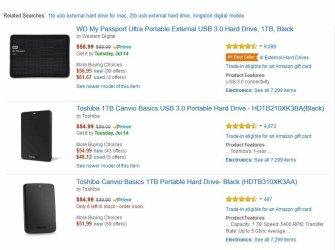
Something like these:

ExtUSB3HDDs.jpg

If you have Amazon Prime then no shipping charge and 2 day delivery.
 

My Computer My Computer

At a glance

Windows 10 Pro X64Intel Quad Core i7-4770 @ 3.4Ghz16.0GB PC3-12800 DDR3 SDRAM 1600 MHzIntel Integrated HD Graphics
Computer type
PC/Desktop
Computer Manufacturer/Model Number
Lenovo IdeaCenter 450
OS
Windows 10 Pro X64
CPU
Intel Quad Core i7-4770 @ 3.4Ghz
Memory
16.0GB PC3-12800 DDR3 SDRAM 1600 MHz
Graphics Card(s)
Intel Integrated HD Graphics
Sound Card
Realtek HD Audio
Monitor(s) Displays
HP 22" LCD
Screen Resolution
1680 x 1050
Hard Drives
250GB Samsung EVO SATA-3 SSD
2TB Seagate ST2000DM001 SATA-2
1.5TB Seagate ST3150041AS SATA
Keyboard
Dell USB
Mouse
Lenovo USB
Internet Speed
Cable via Road Runner 3MB Upload, 30MB Download
Antivirus
Windows Defender, MBAM Pro, MBAE
Browser
Seamonkey
Other Info
UEFI/GPT
PLDS DVD-RW DH16AERSH
If you decide to upgrade to Windows 10, make an image backup of your current Windows 7 system first.
Buy an external USB hard drive and use Macrium Reflect Free to make an image backup. Then if you don't like Windows 10, you can restore your computer back to exactly where it was when you created the backup.

That is only good if the key he purchases is based on his Microsoft account right? If I am correct, there are one time keys that could be lost if he later decided to remove Windows 10. Correct me if I cam wrong. I would simply assume it would be smart to make a disk image of the Windows 10 even if you do not like it.
 

My Computer My Computer

At a glance

Debian CustomI5 / I7Never enough
Computer type
Laptop
Computer Manufacturer/Model Number
Thinkpad'
OS
Debian Custom
CPU
I5 / I7
Memory
Never enough
Monitor(s) Displays
4+
Hard Drives
SSD
Internet Speed
NOS
Antivirus
What?
Browser
Mozilla
I've been running the preview of Win 10 in a VM for months now and, for me, there is nothing compelling about it. I have multiple Win 7 and Win 8 machines that are eligible to be upgraded but I don't plan to upgrade any of them. I'm not much for upgrading which is why I didn't upgrade my Win 7 machines to Win 8 and why I don't plan to upgrade to Win 10. Eventually, I'll build or buy a new machine and it will have Win10 on it, I don't see any reason to upgrade before then.

Just as with Win 8, Win 10 runs just fine without a touchscreen. The thing that most people are looking forward to in Win 10 (the Start menu) is the thing I like least about Win 10. It is very clunky and cumbersome. If I wanted a Start menu (I don't) I would much rather use Classic Shell than Win 10's Start menu.

At any rate, you have a full year to decide if you want the upgrade so there's no need to rush and install it when it's first released.

I agree with this assessment. I, too, am totally a desktop guy and have no need or use for touchscreen. I've been using the previews since last October, and they have surely come a long way and gotten fairly usable. But the new Start Menu is not worth upgrading for, nor are the marginal improvements (if that's what they are) to the desktop. To be frank, I think Windows 7 is far more pleasing. I will not be upgrading my Windows 7 installation. I reckon that my next computer will have Windows 10 preinstalled, and I am familiar enough with it by now that I know I'll be able to work with it. But this computer will run 7 to the bitter end...
 

My Computer My Computer

At a glance

Windows 7 Home Premium 64bitIntel Pentium Dual Core E2180 @2GHz4 GBNVIDIA GeForce 8500 GT
Computer Manufacturer/Model Number
Compaq Presario SR5518F (desktop)
OS
Windows 7 Home Premium 64bit
CPU
Intel Pentium Dual Core E2180 @2GHz
Motherboard
MSI "Boston"
Memory
4 GB
Graphics Card(s)
NVIDIA GeForce 8500 GT
Sound Card
Integrated - Realtek High Definition Audio
Monitor(s) Displays
Acer
Hard Drives
Hitachi HDP725025GLA380 ATA Device
Optiarc DVD RW AD-7201S5 ATA Device
Internet Speed
5 Mbps
You do not have to give up 7 to install 10, 10 will be free for everyone running the Technical Preview. If you are here asking us about 10, then this tells me you don`t know anything about it, buy another drive and test out 10 before you even think of cough, hack, upgrading to it.

You will either love it or hate it.

Download Windows 10 Insider Preview ISO - Microsoft Windows
 

My Computer My Computer

At a glance

Windows 10 Pro x64Intel Core i7 6700KGSkill TridentZ RGB 16GB 3600 16-16-16-36EVGA GTX 980 Ti SC x2
Computer type
PC/Desktop
Computer Manufacturer/Model Number
Skylake Special #666
OS
Windows 10 Pro x64
CPU
Intel Core i7 6700K
Motherboard
Asus Sabertooth Z170 Mark 1
Memory
GSkill TridentZ RGB 16GB 3600 16-16-16-36
Graphics Card(s)
EVGA GTX 980 Ti SC x2
Sound Card
Realtek High Definition
Monitor(s) Displays
AOC G2460PG
Screen Resolution
1920 x 1080 144Hz
Hard Drives
Samsung 860 Pro 256GB, Seagate Barracuda 4TB x2
PSU
EVGA 1000 P2, EVGA White Custom Braided Cables
Case
Corsair Vengeance C70 Gunmetal Black
Cooling
Corsair H100i v2, Corsair ML120 x2, Thermal Grizzly Kryonaut
Keyboard
Logitech G910 Orion Spectrum
Mouse
Logitech G700s
Internet Speed
Verizon Fios Quantum Gateway 75/75
Antivirus
Windows Defender, Malwarebytes Free 3.8.3
Browser
Chrome
Other Info
Corsair SP120 x4, LG Blu-ray Drive, Durabrand HT-395 100 Watt Dolby Digital Amp, Corsair H2100 Wireless 7.1 Headset
... You will either love it or hate it. ...
Personally, I neither love nor hate Win 10. It's no better and no worse than either Win 7 or Win 8. I can accomplish what I want/need to do on my computers with any of them. I switch back and forth between 7 and 8 all day long and don't even think about which OS I'm using. Once 10 gets introduced to the mix, I'm sure I'll be jumping around between all 3 OSes all day. Heck, I do that now with the TP in a VM!
 

My Computer My Computer

At a glance

W10 Pro desktop, W11 laptop, W11 Pro tablet (...3.7Ghz 8700K i7, i7-11800H, i7-1065G716G desktop, 16G laptop, 4G tabletAMD Radeon RX580, RTX 3060, Intel Iris Plus
Computer type
PC/Desktop
Computer Manufacturer/Model Number
Home Built desktop, Dell G15 5511 Gaming laptop,MS Surface Pro 7 tablet
OS
W10 Pro desktop, W11 laptop, W11 Pro tablet (all 64-bit)
CPU
3.7Ghz 8700K i7, i7-11800H, i7-1065G7
Motherboard
ASUS TUF Z370-Pro Gaming in desktop
Memory
16G desktop, 16G laptop, 4G tablet
Graphics Card(s)
AMD Radeon RX580, RTX 3060, Intel Iris Plus
Sound Card
High Definition Audio (Built-in to mobo)
Monitor(s) Displays
Samsung U32J59 32" (2x), 15.6", 12"
Screen Resolution
3840x2160, 3840x2160, 1920x1080, 2160x1440
Hard Drives
500G SSD for OS; 2T, 10T & 15T HDDs for Data on Desktop, 1TB SSD laptop, 128G SSD tablet.
PSU
Corsair CX 750M
Case
Antec 100
Cooling
CM 212+
Keyboard
IBM Model M - used continuously since 1986
Mouse
Microsoft Pro IntelliMouse
Internet Speed
400M down 8M up
Antivirus
Windows Defender
Browser
FireFox
Other Info
Built my first computer (8Mhz 8088cpu, 640K RAM, 20MB HDD, 2 360K floppy drives) in 1985 and have been building them for myself, relatives and friends ever since.
Thanks for all the answers. I think I will wait until windows support for 7 is nearing or after a 10 service pack is issued.
 

My Computer My Computer

At a glance

windows 7 home premium 64 bitXeon X54608gbmsi afterburner/GeForce GTX 650
Computer type
PC/Desktop
Computer Manufacturer/Model Number
custom build
OS
windows 7 home premium 64 bit
CPU
Xeon X5460
Motherboard
Gigabyte GA-P43-ES3G
Memory
8gb
Graphics Card(s)
msi afterburner/GeForce GTX 650
Internet Speed
30
Antivirus
AVG
Browser
IE 11
The latest build (10240) is very stable and I'm using it more and more as my main OS. You can learn a lot mroe about it at our sister forum Windows 10 Forums
 

My Computer My Computer

At a glance

W7 Pro x64 SP1 | W10 Pro IP x64 | W8.1 Pro x6...i7-4790k @ 4GHz (4.4GHz Boost)16GB DDR3 Kingston HyperX Fury @ 1600MHz CL 9...EVGA GTX 980 Classified
Computer type
PC/Desktop
Computer Manufacturer/Model Number
Custom Build
OS
W7 Pro x64 SP1 | W10 Pro IP x64 | W8.1 Pro x64 VM | Linux Mint VM
CPU
i7-4790k @ 4GHz (4.4GHz Boost)
Motherboard
ASUS Sabertooth Z87 (BIOS Rev 2004)
Memory
16GB DDR3 Kingston HyperX Fury @ 1600MHz CL 9-9-9-27
Graphics Card(s)
EVGA GTX 980 Classified
Sound Card
Realtek Onboard
Monitor(s) Displays
Samsung S27D390
Screen Resolution
1920 x 1080
Hard Drives
240GB Intel 520 Series SSD |
Samsung 850 EVO 120GB SSD |
2TB WD Caviar Black |
2TB WD Caviar Green
PSU
Corsair HX850-80 Gold Modular
Case
Cooler Master Silencio 650
Cooling
Corsair H80i w/2 x Corsair SP120 | 2 x 120mm Noctua NF-S12B
Keyboard
Microsoft Sidewinder X4
Mouse
Gigabyte M6900 optical
Internet Speed
152mb
Antivirus
F-Secure
Browser
Firefox 38.0
Other Info
Backup Rig: Win 7 Pro 64-bit | AMD A10-5800k | ASUS F2A85-V Pro | 8GB Samsung DDR3 @1600MHz | 120GB Toshiba SDD | 2TB Seagate HDD | Cooler Master Silencio 550
Hi,
I'm not sure if anyone would notice a service pack or if M$ would announce any update as a service pack...

Updates are updates as far as I've read beside a continuing build number change I don't know if M$ would continue anything like sp1... :/

Always wise to wait but now you can have it if you join the siders program so updating a existing os is really purely optional.
 

My Computer My Computer

At a glance

Win-7-Pro64bit 7-H-Prem-64biti7-5930K 2nd i9-9940x both water blocked VRM'...Trident-z 3200C14 2nd Trident-z 3600C16EVGA 1080ti ftw3 2nd Titan Xp both water blocked
Computer type
PC/Desktop
Computer Manufacturer/Model Number
Custom assembled by me :}
OS
Win-7-Pro64bit 7-H-Prem-64bit
CPU
i7-5930K 2nd i9-9940x both water blocked VRM's too
Motherboard
ASUS SABERTOOTH X99 2nd ASUS x299 Apex
Memory
Trident-z 3200C14 2nd Trident-z 3600C16
Graphics Card(s)
EVGA 1080ti ftw3 2nd Titan Xp both water blocked
Sound Card
Built-in Realtek
Monitor(s) Displays
1-AOC G2460PG 24"G-Sync 144Hz/ 2nd 1-ASUS VG248QE 24" 144Hz
Screen Resolution
1920 x 1080 144Hz
Hard Drives
2-Samsung M.2 Evo & Evo Plus
2-Samsung 850 EVO 500GB SSD's/ 3-2.5 W.D. Black 1tb-&3-1tb/3-3.5 WD Black 1tb hdd's
PSU
EVGA SuperNOVA 1000-P2 2nd 1200-P2
Case
2-Corsair Obsidian Series 450D Black ATX Mid Tower
Cooling
Custom water loops
Keyboard
Logitech G710+/ 2nd Logitech G910
Mouse
2-RedDragon M901 Perdition 16400 dpi Gaming mouse = wired
Internet Speed
Comcast Ping 19ms 89.31mbps download speed 6.12mbps upload
Antivirus
Malwarebytes Pro/ Superantispyware Pro
Browser
FireFox & Pale moon
Other Info
2nd ASUS X299 Apex/Intel i9-9940x with Custom water loop/7H-Prem-x64/Corsair 450D case/Ram Trident-z 3600C16 4x8gb / Samsung970Evo plus 500gb SSD/Dual ssd EZ swap evo/PSU EVGA SuperNova 1200w-P2 80+Platinum/GPU Titan Xp /8-ML-140 on push-pull on 2-280GTX rads
If you decide to upgrade to Windows 10, make an image backup of your current Windows 7 system first.
Buy an external USB hard drive and use Macrium Reflect Free to make an image backup. Then if you don't like Windows 10, you can restore your computer back to exactly where it was when you created the backup.

That is only good if the key he purchases is based on his Microsoft account right? If I am correct, there are one time keys that could be lost if he later decided to remove Windows 10. Correct me if I cam wrong. I would simply assume it would be smart to make a disk image of the Windows 10 even if you do not like it.

Agree it would be smart. Don't know about a one time key though. It has not been mentioned at all on tenforums.com. I do know one you upgrade to 10 you can then do as many clean installs as you want from a Win 10 ISO you download or create using the ESDtoISO tool, so I think this means there is no one time key.
 

My Computer My Computer

At a glance

Windows 10 Pro X64Intel Quad Core i7-4770 @ 3.4Ghz16.0GB PC3-12800 DDR3 SDRAM 1600 MHzIntel Integrated HD Graphics
Computer type
PC/Desktop
Computer Manufacturer/Model Number
Lenovo IdeaCenter 450
OS
Windows 10 Pro X64
CPU
Intel Quad Core i7-4770 @ 3.4Ghz
Memory
16.0GB PC3-12800 DDR3 SDRAM 1600 MHz
Graphics Card(s)
Intel Integrated HD Graphics
Sound Card
Realtek HD Audio
Monitor(s) Displays
HP 22" LCD
Screen Resolution
1680 x 1050
Hard Drives
250GB Samsung EVO SATA-3 SSD
2TB Seagate ST2000DM001 SATA-2
1.5TB Seagate ST3150041AS SATA
Keyboard
Dell USB
Mouse
Lenovo USB
Internet Speed
Cable via Road Runner 3MB Upload, 30MB Download
Antivirus
Windows Defender, MBAM Pro, MBAE
Browser
Seamonkey
Other Info
UEFI/GPT
PLDS DVD-RW DH16AERSH
The latest build (10240) is very stable and I'm using it more and more as my main OS. You can learn a lot mroe about it at our sister forum Windows 10 Forums

Oh my Lord, there`s another build :doh:

Just 9 more days, I wonder how things will go, you know what`s amazing, No advertising about 10 whatsoever, the only advertising I`ve seen is on the hood of a car at a Nascar race :eek:

I like that blue windows wallpaper with 10162, was it replaced ????
 

My Computer My Computer

At a glance

Windows 10 Pro x64Intel Core i7 6700KGSkill TridentZ RGB 16GB 3600 16-16-16-36EVGA GTX 980 Ti SC x2
Computer type
PC/Desktop
Computer Manufacturer/Model Number
Skylake Special #666
OS
Windows 10 Pro x64
CPU
Intel Core i7 6700K
Motherboard
Asus Sabertooth Z170 Mark 1
Memory
GSkill TridentZ RGB 16GB 3600 16-16-16-36
Graphics Card(s)
EVGA GTX 980 Ti SC x2
Sound Card
Realtek High Definition
Monitor(s) Displays
AOC G2460PG
Screen Resolution
1920 x 1080 144Hz
Hard Drives
Samsung 860 Pro 256GB, Seagate Barracuda 4TB x2
PSU
EVGA 1000 P2, EVGA White Custom Braided Cables
Case
Corsair Vengeance C70 Gunmetal Black
Cooling
Corsair H100i v2, Corsair ML120 x2, Thermal Grizzly Kryonaut
Keyboard
Logitech G910 Orion Spectrum
Mouse
Logitech G700s
Internet Speed
Verizon Fios Quantum Gateway 75/75
Antivirus
Windows Defender, Malwarebytes Free 3.8.3
Browser
Chrome
Other Info
Corsair SP120 x4, LG Blu-ray Drive, Durabrand HT-395 100 Watt Dolby Digital Amp, Corsair H2100 Wireless 7.1 Headset
Rolling Updates

Thanks for all the answers. I think I will wait until windows support for 7 is nearing or after a 10 service pack is issued.
I don't think there will be any Service Packs.

MS plans to use "rolling updates" like some Linux Distros (e.g. Arch).
 

My Computer My Computer

At a glance

W7 Ultimate SP1, LM19.2 MATE, W10 Home 1703, ...AMD Phenom II x6 1100T, 3.3 GHz12GB DDR3 1333 G-Skill (4GB x 2), G-Skill (2G...NVIDIA GeForce GTX 660
Computer type
PC/Desktop
Computer Manufacturer/Model Number
n/a
OS
W7 Ultimate SP1, LM19.2 MATE, W10 Home 1703, W10 Pro 1703 VM, #All 64 bit
CPU
AMD Phenom II x6 1100T, 3.3 GHz
Motherboard
ASUS M4A88T-M/USB3 (AM3)
Memory
12GB DDR3 1333 G-Skill (4GB x 2), G-Skill (2GB x 2)
Graphics Card(s)
NVIDIA GeForce GTX 660
Sound Card
Realtek?
Monitor(s) Displays
Samsung S23B350
Screen Resolution
1920x1080
Hard Drives
WD Green 2TB (SATA), WD Green 3TB (SATA), WD Blue 4TB (SATA), WD Blue 6TB (SATA)
PSU
Cooler Master
Case
Antec GX300 Tower
Cooling
3x Antec TRICOOL 120mm Fans
Mouse
Wired Optical
Internet Speed
DSL
Antivirus
Avast
Browser
Pale Moon (64 bit)
Other Info
2018-12-27 Upgraded HDDs
2015-12-10 Upgraded case, graphics card, storage
2015-08-15 Upgraded motherboard & RAM
2015-07-15 Upgraded LM17.1 to LM17.2
Updated :thumbsup:
 

My Computer My Computer

At a glance

Windows 10 Pro x64Intel Core i7 6700KGSkill TridentZ RGB 16GB 3600 16-16-16-36EVGA GTX 980 Ti SC x2
Computer type
PC/Desktop
Computer Manufacturer/Model Number
Skylake Special #666
OS
Windows 10 Pro x64
CPU
Intel Core i7 6700K
Motherboard
Asus Sabertooth Z170 Mark 1
Memory
GSkill TridentZ RGB 16GB 3600 16-16-16-36
Graphics Card(s)
EVGA GTX 980 Ti SC x2
Sound Card
Realtek High Definition
Monitor(s) Displays
AOC G2460PG
Screen Resolution
1920 x 1080 144Hz
Hard Drives
Samsung 860 Pro 256GB, Seagate Barracuda 4TB x2
PSU
EVGA 1000 P2, EVGA White Custom Braided Cables
Case
Corsair Vengeance C70 Gunmetal Black
Cooling
Corsair H100i v2, Corsair ML120 x2, Thermal Grizzly Kryonaut
Keyboard
Logitech G910 Orion Spectrum
Mouse
Logitech G700s
Internet Speed
Verizon Fios Quantum Gateway 75/75
Antivirus
Windows Defender, Malwarebytes Free 3.8.3
Browser
Chrome
Other Info
Corsair SP120 x4, LG Blu-ray Drive, Durabrand HT-395 100 Watt Dolby Digital Amp, Corsair H2100 Wireless 7.1 Headset
Back
Top