Should I use RAID 0 or 5?

Bryce

New member
Local time
10:16 AM
Messages
168
Location
Raleigh, NC
I'm going to buy 4 WD Black 640gb's and I'm wondering should I just do a RAID 0 as I'll be using all the space on the drives or should I do RAID 5? My motherboard supports up to RAID 5 (Asus P5Q SE PLUS), but I'm kinda nervous about it seeing how my other Asus drivers aren't working right. Opinions?
 

My Computer

OS
Vista Ultimate x64, Windows 7 RC 7100
CPU
Intel C2D E8400 @ 3.8ghz
Motherboard
ASUS P5Q SE PLUS
Memory
4x 2gb G.Skill DDR2 1600
Graphics Card(s)
nVidia GTX260 896mb
Sound Card
Onboard 5.1 Surround Sound
Monitor(s) Displays
22" Acer LCD and 19" Westinghouse LCD
Screen Resolution
1680x1050 and 1280x1024
Hard Drives
Seagate Barracuda 7200rpm 750gb
Western Digital 500gb
PSU
Corsair H520X 520w
Case
Antec 300
Keyboard
Old G15
Mouse
Logitech G5
Internet Speed
15mbps down .34mbps up
Do not, under ANY circumstances use RAID-0 for anything you can't afford to lose. RAID-5 is the better option, RAID-10 is ideal (but not for you) or even RAID-7. Best choice for you in 5. Trust me, trying to fix a RAID-0 stripe is NOT fun.
 

My Computer

Computer type
PC/Desktop
Computer Manufacturer/Model Number
Custom Build/Mod
OS
Windows 7 Home Premium x64
CPU
Intel QX9650 Extreme 4.0 GHz
Motherboard
ASUS Rampage Extreme Rev2
Memory
8GB (4x2) Corsair Dominator DDR3
Graphics Card(s)
2x Radeon R390X [8GB]
Sound Card
SupremeFX X-Fi
Monitor(s) Displays
Dell 2408WFP 26" Panel
Screen Resolution
1920x1200
Hard Drives
4x WD 2TB (8TB+ Total)
2x Crucial SSD 128GB (RAID-0)
1x LG Blu-ray read/write
1x Phillips LightScribe DVD read/write
PSU
Corsair HX1000
Case
CoolerMaster - Cosmos S
Cooling
Custom Liquid - 320mm rad w/ 3x 80mm fans, CPU/NB/SB Blocks
Keyboard
Logitech Illuminater Pro
Mouse
Logitech
Internet Speed
Fractional T1 - 125Mbps
Antivirus
ESET Security Suite / Microsoft Security Essentials
Browser
Cyberfox Intel x64
Other Info
OC'd to 5.0GHz @ 44c under full load
So, do I need more than 4 drives for RAID 5 or no? Does it still offer the performance that RAID 0 offers as well as the redunacy? I'm looking for the fastest possible read/write times I can get out of these.
 

My Computer

OS
Vista Ultimate x64, Windows 7 RC 7100
CPU
Intel C2D E8400 @ 3.8ghz
Motherboard
ASUS P5Q SE PLUS
Memory
4x 2gb G.Skill DDR2 1600
Graphics Card(s)
nVidia GTX260 896mb
Sound Card
Onboard 5.1 Surround Sound
Monitor(s) Displays
22" Acer LCD and 19" Westinghouse LCD
Screen Resolution
1680x1050 and 1280x1024
Hard Drives
Seagate Barracuda 7200rpm 750gb
Western Digital 500gb
PSU
Corsair H520X 520w
Case
Antec 300
Keyboard
Old G15
Mouse
Logitech G5
Internet Speed
15mbps down .34mbps up
You may find this and this useful reading.
 

My Computer

Computer type
PC/Desktop
Computer Manufacturer/Model Number
Custom Build/Mod
OS
Windows 7 Home Premium x64
CPU
Intel QX9650 Extreme 4.0 GHz
Motherboard
ASUS Rampage Extreme Rev2
Memory
8GB (4x2) Corsair Dominator DDR3
Graphics Card(s)
2x Radeon R390X [8GB]
Sound Card
SupremeFX X-Fi
Monitor(s) Displays
Dell 2408WFP 26" Panel
Screen Resolution
1920x1200
Hard Drives
4x WD 2TB (8TB+ Total)
2x Crucial SSD 128GB (RAID-0)
1x LG Blu-ray read/write
1x Phillips LightScribe DVD read/write
PSU
Corsair HX1000
Case
CoolerMaster - Cosmos S
Cooling
Custom Liquid - 320mm rad w/ 3x 80mm fans, CPU/NB/SB Blocks
Keyboard
Logitech Illuminater Pro
Mouse
Logitech
Internet Speed
Fractional T1 - 125Mbps
Antivirus
ESET Security Suite / Microsoft Security Essentials
Browser
Cyberfox Intel x64
Other Info
OC'd to 5.0GHz @ 44c under full load
It all comes down to your intended application. You purchased 2+ TB for what reason? You need at least 3 drives for a RAID5.

RAID5 on 4 drives is tempting, but writing files will be slower on RAID5 than using a single drive. 1.8 TB effective

With 4 drives: RAID0+1, mirror of stripes (1.2 TB effective)
RAID1+0, striped across mirrors, 1.2TB effective

I would go for RAID0 on two drives with a dedicated backup routine.

Want crazy speed? RAID0 on three of 'em.
Want stupid crazy speed? RAID0 all four of 'em. Still only 5.9 in WEI I think.
 
It all comes down to your intended application. You purchased 2+ TB for what reason? You need at least 3 drives for a RAID5.

RAID5 on 4 drives is tempting, but writing files will be slower on RAID5 than using a single drive. 1.8 TB effective

With 4 drives: RAID0+1, mirror of stripes (1.2 TB effective)
RAID1+0, striped across mirrors, 1.2TB effective

I would go for RAID0 on two drives with a dedicated backup routine.

Want crazy speed? RAID0 on three of 'em.
Want stupid crazy speed? RAID0 all four of 'em. Still only 5.9 in WEI I think.
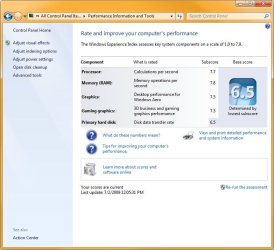
I got my WEI up to 6.5 on 4x 1.5TB RAID 10 by shutting off all caching! Moving to 4x RAID 0 didn't improve the WEI, although it did improve the speed :). Go figure.
 

Attachments

  • WEI 1.jpg
    WEI 1.jpg
    61.5 KB · Views: 437

My Computer

Computer Manufacturer/Model Number
Custom workstation /// Lenovo X61t tablet notebook
OS
Windows 7 RTM x64
CPU
Core i7 980X @ 4.04GHz OC /// Core Duo L7500 @ 1.6GHz
Motherboard
Asus P6T6 WS Revolution ///
Memory
12GB G. Skill @ DDR-1600 OC /// 4GB
Graphics Card(s)
Saphire HD4870 Toxic 1GB /// Intel Mobile GMA X3100
Monitor(s) Displays
Dual Eizo 24" SX2461W /// 12"
Screen Resolution
1920x1200 /// 1400x1050
Hard Drives
Workstation:
5x 750GB Barracuda-11 on Areca ARC-1220;
4x 1.5TB Barracuda-11 on Intel ICH10R;
Volumes:
300GB RAID 0, 2.7TB RAID 10 on Intel;
100GB RAID 0, 1.4TB RAID 10 on Areca ///
Notebook: G.Skill Titan 256GB SSD
PSU
Tagan ITZ 1100
Case
GHS-1500 ///
Cooling
Thermalright IFX-14 + a slew of stealth fans ///
Keyboard
Logitech Edge ///
Mouse
Logitech Wireless Optical Trackball
Internet Speed
5Mbps down / 820Kbps up
Other Info
Main use: photography;
DVD Drive: L.G GGW-H20L Blu-Ray / DVD;
OC: QPI/DRAM @ 1.33v, CPU @ 1.293v, DRAM Bus @ 1.65v, CPU PLL @ 1.88v, CPU mult = 25x, BCLK = 160, DDR3-1604 @ 7-8-7-24
I thought they sold houses

I stand corrected re: the WEI max. I am not certain where I got that idea.

Let DJ's example show that playing around with various configs can be fun. Also let disk imaging be a part of your fun.

Just recently, I took two 500GB disks out of RAID0 just because they are now about 2.5 years old.
 
Back
Top