Should I use restore image to fix updating issue

dcc

New member
Local time
1:37 PM
Messages
3
I had Win 7 running in BootCamp on a 2007 Macbook. As Apple no longer supports Lion, or hardware that old, I decided to wipe the drive, install Ubuntu, and run Win 7 as a Virtualbox guest. I have this all set up and working, but the Win 7 will not update, and the Macbook running very hot, 100% cpu and fans on all the time. I ahev let it go for periods of 5, 8 and 18 hours, but still stucck on searching for updates. If I thought it just needed more time, I woudl let it go, but I donlt think it is doing anything. If I turn off automatic updating, the fans turn off, the cpu drops to 12%, and everything seems to work. The issue is I am concerned about running Win 7 SP1, from 2009, connected to the internet, without the updates. I have tried, Microsoft Tech support chat, twice, allowing them remote access the computer. While they are willing to help, it seems like they just follow a script and don't know what to do. Anyway, I have a backup image from 2014. While I wanted a clean install from scratch, I am wondering if restoring this image might allow it to update from that point. Any ideas?
 

My Computer My Computer

At a glance

64 bit Win 7Core 2 duo4 gbIntel
Computer type
PC/Desktop
Computer Manufacturer/Model Number
Apple
OS
64 bit Win 7
CPU
Core 2 duo
Memory
4 gb
Graphics Card(s)
Intel
Hard Drives
500gb

My Computer My Computer

At a glance

Windows 7 Home Premium 64bitiNTEL Core i7 2630QM 2GHz8GBNVIDIA GeForce GT 555M
Computer type
Laptop
Computer Manufacturer/Model Number
Alienware
OS
Windows 7 Home Premium 64bit
CPU
iNTEL Core i7 2630QM 2GHz
Memory
8GB
Graphics Card(s)
NVIDIA GeForce GT 555M
Hard Drives
INTEL SSDSC2CW240A3
Antivirus
Windows Defender
Browser
Google Chrome
Microsoft put out a Convenience Rollup for Windows 7, it's similar to SP2. Here is a guide on how to install it.

How to Update Windows 7 All at Once with Microsoft?s Convenience Rollup

Thanks for the reply. I had tried that but could not access the Windows Update Catalog page, due to IE8. I downloaded IE11, and then the page said it was not for my version of Windows. Of course, I tried several times, ensuring I had the correct link for Win 7 64 bit. I did try again after your post, and was able to directly download the installer and rollup from the links, ven though I could not access teh Catalog page. After installing, I seem to still have the same problem. The system still stays at 100% cpu and is stuck on searching for updates, and unusable. After turning off automatic updates, the cpu usage goes down and the system is usable, but still wont update manually, of even update Defender. At this point, I have just disabled the network connection, (no internet), and can use it to run some proprietary software. I hope to eventually get it resolved, but have run out of ideas.
 

My Computer My Computer

At a glance

64 bit Win 7Core 2 duo4 gbIntel
Computer type
PC/Desktop
Computer Manufacturer/Model Number
Apple
OS
64 bit Win 7
CPU
Core 2 duo
Memory
4 gb
Graphics Card(s)
Intel
Hard Drives
500gb
Hi and welcome to SevenForums,
I have all 3 updates KB3020369 & KB3125574 & KB3172605 needed for a clean install on my OneDrive
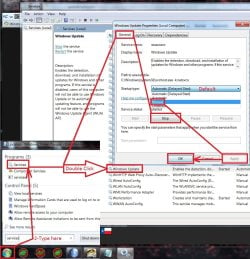
Just install them in that order without and internet connection and if need be stop and switch the windows update service to Manual first before attempting to manually install them.
https://1drv.ms/f/s!AsjD7o6P3KLKj2TjShn8-SumV1rr

service stop windows update.jpg

On an existing install all that can be used is KB3020369 & KB3172605 to fix it.
 

My Computer My Computer

At a glance

Win-7-Pro64bit 7-H-Prem-64biti7-5930K 2nd i9-9940x both water blocked VRM'...Trident-z 3200C14 2nd Trident-z 3600C16EVGA 1080ti ftw3 2nd Titan Xp both water blocked
Computer type
PC/Desktop
Computer Manufacturer/Model Number
Custom assembled by me :}
OS
Win-7-Pro64bit 7-H-Prem-64bit
CPU
i7-5930K 2nd i9-9940x both water blocked VRM's too
Motherboard
ASUS SABERTOOTH X99 2nd ASUS x299 Apex
Memory
Trident-z 3200C14 2nd Trident-z 3600C16
Graphics Card(s)
EVGA 1080ti ftw3 2nd Titan Xp both water blocked
Sound Card
Built-in Realtek
Monitor(s) Displays
1-AOC G2460PG 24"G-Sync 144Hz/ 2nd 1-ASUS VG248QE 24" 144Hz
Screen Resolution
1920 x 1080 144Hz
Hard Drives
2-Samsung M.2 Evo & Evo Plus
2-Samsung 850 EVO 500GB SSD's/ 3-2.5 W.D. Black 1tb-&3-1tb/3-3.5 WD Black 1tb hdd's
PSU
EVGA SuperNOVA 1000-P2 2nd 1200-P2
Case
2-Corsair Obsidian Series 450D Black ATX Mid Tower
Cooling
Custom water loops
Keyboard
Logitech G710+/ 2nd Logitech G910
Mouse
2-RedDragon M901 Perdition 16400 dpi Gaming mouse = wired
Internet Speed
Comcast Ping 19ms 89.31mbps download speed 6.12mbps upload
Antivirus
Malwarebytes Pro/ Superantispyware Pro
Browser
FireFox & Pale moon
Other Info
2nd ASUS X299 Apex/Intel i9-9940x with Custom water loop/7H-Prem-x64/Corsair 450D case/Ram Trident-z 3600C16 4x8gb / Samsung970Evo plus 500gb SSD/Dual ssd EZ swap evo/PSU EVGA SuperNova 1200w-P2 80+Platinum/GPU Titan Xp /8-ML-140 on push-pull on 2-280GTX rads
Follow up

Before reading Thrashzone's reply, I had put the old hard drive, with win 7 in a bootcamp partion, back in the macbook. Not having used this for a while, I noticed it hadn't been updated since June. It showed 4 updates available but hung on preparing to install for a couple hours before I gave up. I applying the rollup offline, per Thrashzone's instructions. This worked. Anyway, I am going to put the new drive back in, and try applying the rollup offline. If that doesn't work, I'll wipe the disk and start over, applying the rollup first thing after install. This is probably more info than anyone cares about, but I wanted to give an update, and say thanks for the help. I'll post again, after seeing how it how's.
 

My Computer My Computer

At a glance

64 bit Win 7Core 2 duo4 gbIntel
Computer type
PC/Desktop
Computer Manufacturer/Model Number
Apple
OS
64 bit Win 7
CPU
Core 2 duo
Memory
4 gb
Graphics Card(s)
Intel
Hard Drives
500gb
Hi,
Yea it's been a pretty consistent process fortunately :)
Why well that is still up in the air but no doubt past update clients more than likely causes the issue I believe it was KB3112343 personally ?
 

My Computer My Computer

At a glance

Win-7-Pro64bit 7-H-Prem-64biti7-5930K 2nd i9-9940x both water blocked VRM'...Trident-z 3200C14 2nd Trident-z 3600C16EVGA 1080ti ftw3 2nd Titan Xp both water blocked
Computer type
PC/Desktop
Computer Manufacturer/Model Number
Custom assembled by me :}
OS
Win-7-Pro64bit 7-H-Prem-64bit
CPU
i7-5930K 2nd i9-9940x both water blocked VRM's too
Motherboard
ASUS SABERTOOTH X99 2nd ASUS x299 Apex
Memory
Trident-z 3200C14 2nd Trident-z 3600C16
Graphics Card(s)
EVGA 1080ti ftw3 2nd Titan Xp both water blocked
Sound Card
Built-in Realtek
Monitor(s) Displays
1-AOC G2460PG 24"G-Sync 144Hz/ 2nd 1-ASUS VG248QE 24" 144Hz
Screen Resolution
1920 x 1080 144Hz
Hard Drives
2-Samsung M.2 Evo & Evo Plus
2-Samsung 850 EVO 500GB SSD's/ 3-2.5 W.D. Black 1tb-&3-1tb/3-3.5 WD Black 1tb hdd's
PSU
EVGA SuperNOVA 1000-P2 2nd 1200-P2
Case
2-Corsair Obsidian Series 450D Black ATX Mid Tower
Cooling
Custom water loops
Keyboard
Logitech G710+/ 2nd Logitech G910
Mouse
2-RedDragon M901 Perdition 16400 dpi Gaming mouse = wired
Internet Speed
Comcast Ping 19ms 89.31mbps download speed 6.12mbps upload
Antivirus
Malwarebytes Pro/ Superantispyware Pro
Browser
FireFox & Pale moon
Other Info
2nd ASUS X299 Apex/Intel i9-9940x with Custom water loop/7H-Prem-x64/Corsair 450D case/Ram Trident-z 3600C16 4x8gb / Samsung970Evo plus 500gb SSD/Dual ssd EZ swap evo/PSU EVGA SuperNova 1200w-P2 80+Platinum/GPU Titan Xp /8-ML-140 on push-pull on 2-280GTX rads
Back
Top