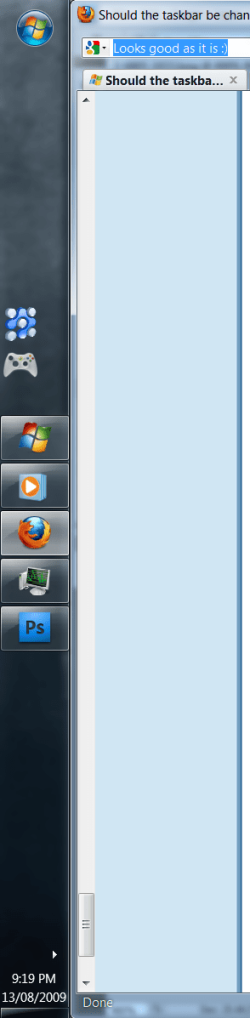
Should the taskbar be changed in 7 final?

StephenJay

New member
Does anyone else think the taskbar should be changed in the final of Windows 7?
I don't mean the way it works, I love the new "icon only" thing going on.
But the appearance of it is too blocky in my opinion.
I think it should be smoothed off a little, because it looks squarish.
But yeah, I'm picky & fussy :p
 

My Computer

Computer Manufacturer/Model Number
Packard Bell EasyNote SL51
OS
Windows 7
CPU
AMD Turion X2 Dual Core Mobile RM-72 (2 CPUs), ~2.1GHz
Memory
3GB
Graphics Card(s)
ATI Radeon 3100 256MB Dedicated
Screen Resolution
1440x900
Hard Drives
250GB
Does anyone else think the taskbar should be changed in the final of Windows 7?
I don't mean the way it works, I love the new "icon only" thing going on.
But the appearance of it is too blocky in my opinion.
I think it should be smoothed off a little, because it looks squarish.
But yeah, I'm picky & fussy :p
It too late to ask now...Windows 7 is FINAL...this is what you are going to get
 

My Computer

Computer Manufacturer/Model Number
Compal JFT02 (Custom Build Laptop)
OS
Windows 7 Home Premium x64 - Mac OS X 10.6.4 x64
CPU
Intel Core 2 Duo T9300 2.5 GHz
Motherboard
JFT02
Memory
4GB Kingston DDR2-800
Graphics Card(s)
NVIDIA Geforce 8600M GT (512MB Model)
Sound Card
Realtek HD Audio
Monitor(s) Displays
WUXGA Standard Laptop Display
Screen Resolution
1680*1050
Hard Drives
Toshiba 320GB 5400RPM Laptop HD
PSU
Standard Laptop Power Supply
Case
Standard Laptop Case
Cooling
Standard Laptop Cooling
Keyboard
Standard Laptop 105 Key-Keyboard
Mouse
Synaptics Touchpad
Internet Speed
Verizion Online DSL 3360/864 kbs (dl/up)

My Computer

Computer Manufacturer/Model Number
Packard Bell EasyNote SL51
OS
Windows 7
CPU
AMD Turion X2 Dual Core Mobile RM-72 (2 CPUs), ~2.1GHz
Memory
3GB
Graphics Card(s)
ATI Radeon 3100 256MB Dedicated
Screen Resolution
1440x900
Hard Drives
250GB
MS half-assed it. For starters, they could add more ways of making people notice active windows, like magnification/zoom, dimming/brightening icons, etc. Also, the icons should be centered. I'd actually be happy if MS just ripped off Mac OS X's dock by default.
 

My Computer

Computer Manufacturer/Model Number
Dell Studio 540
OS
Windows 7 RTM
CPU
Intel Q660 Quad-Core CPU (2.40GHz)
Memory
4GB Dual Channel DDR2 SDRAM (800MHz)
Graphics Card(s)
ATI Radeon HD 4850 (512MB)
Monitor(s) Displays
20'' Dell E207WFP
Screen Resolution
1680x1050
Hard Drives
500GB Serial ATA Hard Drive (7200RPM)

250GB Serial ATA Hard Drive (7200RPM)
PSU
400 Watt DC Power Supply
Case
H: 14.2 inches | W: 6.7 inches | D: 17.1 inches
Keyboard
Dell Multimedia Keyboard
Mouse
Dell Premium Optical USB Mouse
Internet Speed
Download Rate: 5533 KB/s | Upload Rate: 2085 KB/s
MS half-assed it. For starters, they could add more ways of making people notice active windows, like magnification/zoom, dimming/brightening icons, etc. Also, the icons should be centered.
Or they could make an OS that works well, stable, and gets things done. Honestly launching complaint after complaint about how icons are implemented or how an active windows is being shown is getting old. I am sorry for being offensive but those details in software development are not a forefront...having the product works as intended without fail is far more importaint
 

My Computer

Computer Manufacturer/Model Number
Compal JFT02 (Custom Build Laptop)
OS
Windows 7 Home Premium x64 - Mac OS X 10.6.4 x64
CPU
Intel Core 2 Duo T9300 2.5 GHz
Motherboard
JFT02
Memory
4GB Kingston DDR2-800
Graphics Card(s)
NVIDIA Geforce 8600M GT (512MB Model)
Sound Card
Realtek HD Audio
Monitor(s) Displays
WUXGA Standard Laptop Display
Screen Resolution
1680*1050
Hard Drives
Toshiba 320GB 5400RPM Laptop HD
PSU
Standard Laptop Power Supply
Case
Standard Laptop Case
Cooling
Standard Laptop Cooling
Keyboard
Standard Laptop 105 Key-Keyboard
Mouse
Synaptics Touchpad
Internet Speed
Verizion Online DSL 3360/864 kbs (dl/up)
MS half-assed it. For starters, they could add more ways of making people notice active windows, like magnification/zoom, dimming/brightening icons, etc. Also, the icons should be centered. I'd actually be happy if MS just ripped off Mac OS X's dock by default.
BTW if your looking for the pretty looks of OSX than just go to OSX...simple as that. OSX is OSX...Windows is Windows
 

My Computer

Computer Manufacturer/Model Number
Compal JFT02 (Custom Build Laptop)
OS
Windows 7 Home Premium x64 - Mac OS X 10.6.4 x64
CPU
Intel Core 2 Duo T9300 2.5 GHz
Motherboard
JFT02
Memory
4GB Kingston DDR2-800
Graphics Card(s)
NVIDIA Geforce 8600M GT (512MB Model)
Sound Card
Realtek HD Audio
Monitor(s) Displays
WUXGA Standard Laptop Display
Screen Resolution
1680*1050
Hard Drives
Toshiba 320GB 5400RPM Laptop HD
PSU
Standard Laptop Power Supply
Case
Standard Laptop Case
Cooling
Standard Laptop Cooling
Keyboard
Standard Laptop 105 Key-Keyboard
Mouse
Synaptics Touchpad
Internet Speed
Verizion Online DSL 3360/864 kbs (dl/up)
MS half-assed it. For starters, they could add more ways of making people notice active windows, like magnification/zoom, dimming/brightening icons, etc. Also, the icons should be centered. I'd actually be happy if MS just ripped off Mac OS X's dock by default.

It initially was more evident, and it turned out to be distracting apparently, so they subtled it down.

Having the icons centered goes against the idea behind the taskbar. If you added something else everything would shift. I idea behind 7 is to have everything in the same place.
 

My Computer

OS
7264x64/7260x86
It initially was more evident, and it turned out to be distracting apparently, so they subtled it down.

Having the icons centered goes against the idea behind the taskbar. If you added something else everything would shift. I idea behind 7 is to have everything in the same place.

I like how it is not centred myself, I just think the taskbar seems blocky, and when I swich to basic mode is reminds me of a chunky Win95 bar. :rolleyes:
 

My Computer

Computer Manufacturer/Model Number
Packard Bell EasyNote SL51
OS
Windows 7
CPU
AMD Turion X2 Dual Core Mobile RM-72 (2 CPUs), ~2.1GHz
Memory
3GB
Graphics Card(s)
ATI Radeon 3100 256MB Dedicated
Screen Resolution
1440x900
Hard Drives
250GB
i love the new taskbar myself. yes they're chunky - but on today's high-res screens, they have to be. they're easy to see, easy to recognize, and easy to click. and i like the fact that they're nice and square. in fact, i don't think the buttons are square enough, and i'm in the process of making the corners sharper...
 

My Computer

OS
7600 x86
CPU
Core 2 Duo e7200, 2.53 ghz
Motherboard
Micro-Star MS-7529
Memory
2x DDR2 PC5300 1gb, 667 mhz
Graphics Card(s)
GeForce 9500gt, 512mb
Monitor(s) Displays
22" LG Flatron w2234s
Screen Resolution
1680x1050
Hard Drives
Excelstor SATA-II 250gb 7200rpm, 8mb cache
PSU
CoolerMaster M520
Internet Speed
30/20 mbits
OMG!! Windows 7 is now final & people are complaining about the taskbar. There's nothing wrong with it IMHO, it's simple, user friendly and shows you what you need to see regarding running apps/windows.

If anything MS could offer small 'Updates' for icons etc. as the bland notification area icons are just that.....bland.....but they do the job ;)
 

My Computer

Computer Manufacturer/Model Number
Compaq Desktop
OS
Windows 7 Ultimate x64
CPU
AMD Sempron Dual Core
Memory
3GB
Graphics Card(s)
NVIDIA GeForce 6150SE nForce 430
Screen Resolution
1024x768
Hard Drives
150GB Sata
i love the new taskbar myself. yes they're chunky - but on today's high-res screens, they have to be. they're easy to see, easy to recognize, and easy to click. and i like the fact that they're nice and square. in fact, i don't think the buttons are square enough, and i'm in the process of making the corners sharper...

To each their own :)
 

My Computer

Computer Manufacturer/Model Number
Packard Bell EasyNote SL51
OS
Windows 7
CPU
AMD Turion X2 Dual Core Mobile RM-72 (2 CPUs), ~2.1GHz
Memory
3GB
Graphics Card(s)
ATI Radeon 3100 256MB Dedicated
Screen Resolution
1440x900
Hard Drives
250GB
plus the buttons have to be big enough to click with a finger... since windows 7 was built to run on multitouch displays
 

My Computer

Computer Manufacturer/Model Number
Custom
OS
6.1.7600 Build 7600 Professional 64bit
CPU
AMD Phenom II x4 overclocked to 3.2GHZ
Motherboard
MSI 880gm-e43
Memory
8gb Patriot DDR3
Graphics Card(s)
ATI Radeon HD 5670
Monitor(s) Displays
1
Screen Resolution
1920 x 1080
Hard Drives
1TB
PSU
450 Watt
Case
ThermalTake
Cooling
Air
Keyboard
Saitek
Mouse
Cyborg R.A.T. 3
Internet Speed
Horrible...
plus the buttons have to be big enough to click with a finger... since windows 7 was built to run on multitouch displays

I wasn't saying smaller is better, i just think it looks blocky :geek:
 

My Computer

Computer Manufacturer/Model Number
Packard Bell EasyNote SL51
OS
Windows 7
CPU
AMD Turion X2 Dual Core Mobile RM-72 (2 CPUs), ~2.1GHz
Memory
3GB
Graphics Card(s)
ATI Radeon 3100 256MB Dedicated
Screen Resolution
1440x900
Hard Drives
250GB
I guess I simplify things too much.
I have no views about the taskbar! I have turned it off. I prefer shortcuts on the desktop.
 

My Computer

Computer Manufacturer/Model Number
Three desktops and one laptop with good specs..
OS
Vista and now 7 in 32 and 64 bit.
I have a couple of minor "nice to Have" improvements to the taskbar

  1. It would be useful if you could lock an item in its current position - taking the ease of finding things one stage further. I would personally find it useful to align one or two icons to the right side
  2. More with the jump list than the taskbar but I would find it more intuitive with mouse/keyboard if the pinned/most recent items were at the bottom of the jumplist rather than the top.
Neither of these are showstopper issues but personal preferences as for the shape of the actual icons and the indication of active applications, I'm sure there will be skins developed to provide all this "bling"
 

My Computers

System One System Two

  • Computer type
    PC/Desktop
    Computer Manufacturer/Model Number
    ChillBlast - Custom to my design
    OS
    Windows 11 Pro x64 [Latest Release and Release Preview]
    CPU
    Ryzen 9 5950X, 3.8 - 5.2 MHz
    Motherboard
    Asus Prime X570-Pro
    Memory
    64GB [2 x 32GB] DDR4 3200MHz
    Graphics Card(s)
    4GB NVIDIA GEFORCE GTX 1650 Ti
    Sound Card
    On-board SPDIF to 5.1 System + HDMI [5.1 system]
    Monitor(s) Displays
    32" UHD 32 Bit HDR Monitor + 43" UHD 4K 32Bit HDR TV
    Screen Resolution
    2 x 3840 x 2160 @60Hz
    Hard Drives
    1TB M2 SSD OS, 500GB Fast Access SSD, 2 x 8TB Data + Various Externals from 1TB to 4TB, 10TB NAS
    PSU
    NZXT C750 80 PLUS Gold 750W Modular PSU
    Case
    Workstation Case [Matt Black]
    Cooling
    NZXT Kraken X63 280mm CPU Cooler +2x Quiet Case fans
    Keyboard
    Logitech Wireless MX Keys & K400 + others
    Mouse
    Logitech Wireless MX Master 3S
    Internet Speed
    920 MB Down 50 MB Up
    Antivirus
    BitDefender Total Security Pro
    Browser
    Chrome (always run latest Non-Beta)
    Other Info
    Also run ...
    Laptop - Quad 8GB - Windows 10 Pro x64
    Nexus 7 Android tablet x2
    Samsung 10.2" tablet
    Blackview TAB 8 4G Android Tablet c/w Keyboard
    Wacom Intuos Pro Medium Pen Pad
    Wacom Intuos Pro Small Pen Pad
    Wacom Expresskeys Remote
    Loopdeck+ Graphics Controller
    Shuttle Pro v2 Control
  • Computer type
    Laptop
    System Manufacturer/Model Number
    Dell XPS 17 10750H
    OS
    Windows 11 Pro x64 Latest RP
    CPU
    Intel I7 10750H 5.0GHz
    Motherboard
    Dell XPS
    Memory
    32GB [2x16GB] DDR4 2933 MHz
    Graphics Card(s)
    nVidia GTX1650Ti 4 GB GDDR6
    Sound Card
    Stock [Realtek] 4 Speaker
    Monitor(s) Displays
    17" IPS UHD+ Infinity Edge Touchscreen
    Screen Resolution
    3840 x 2400
    Hard Drives
    2TB M2 NVMe, 4TB External + various 500GB & 1TB External NVMe (also have access to spinner HDD from
    PSU
    Stock
    Case
    Stock XPS Aluminium & Carbon Fibre
    Cooling
    Stock - Active Fan Control
    Keyboard
    Backlit + Various Logitech
    Mouse
    Stock Track Pad + Logitech MX Trackball
    Internet Speed
    72 MB Down 18MB Up
    Browser
    Chrome
    Other Info
    Also run ...
    Laptop - Quad 8GB - Windows 10 Pro x64
    Nexus 7 Android tablet x2
    10.2" tablet
    Sony Z3 Android Smartphone
    Wacom Intuos Pro Medium Pen Pad
    Wacom Intuos Pro Small Pen Pad
    Wacom Expresskeys Remote
    Loopdeck+ Graphics Controller
    Shuttle Pro v2 Control Pad
    10TB NAS
Personally, I quite like the Taskbar. I do like things a little centred though ;)

looks good.PNG
 

My Computer

Computer type
PC/Desktop
Computer Manufacturer/Model Number
Systems by SmartEyeball
OS
8 Pro x64
CPU
i7 3770K 4.6GHz
Motherboard
ASUS P8Z77 WS
Memory
16GB G.Skill Trident X 2666mhz
Graphics Card(s)
x2 EVGA 780 Ti Superclocked SLI
Sound Card
SB X-FI Surround 5.1 PRO USB / ATH-AD900 Headphones
Monitor(s) Displays
x3 Dell U2410 / 58" Samsung
Screen Resolution
5760*1200/ 1920*1200
Hard Drives
2x Intel 520 240GB (RAID 0) * 2x WD Caviar Blacks 2TB (RAID 0) * 2TB WD Caviar Black * Sony Optirac DVD
PSU
Silverstone Strider Evolution 1200W
Case
Thermaltake Level 10 GT Snow Edition
Cooling
Noctua NH-D14
Keyboard
Topre Realforce // Ducky Shine MX Black // Filco Ninja TKL
Mouse
Thermaltake Theron (Highly Recommended) + Razer Imperator
Antivirus
MSE
Browser
IE, FF, WaterFox
Other Info
GT Extreme V2 Sim Racing Cockpit + 40" LCD and K/B Mouse stand ▼
Fanatec CSR Elite Wheel + Clubsport V1 Pedals + CSR shifter/7G-H ▼Saitek X52 Pro ▼ TrackIR 5 Pro
Buttkicker v2 Seat Rumbler with Dedicated 5.1 and Sub Woofer attached to frame ▼
=
Bloody Big Grin

My Computer

Computer Manufacturer/Model Number
Packard Bell EasyNote SL51
OS
Windows 7
CPU
AMD Turion X2 Dual Core Mobile RM-72 (2 CPUs), ~2.1GHz
Memory
3GB
Graphics Card(s)
ATI Radeon 3100 256MB Dedicated
Screen Resolution
1440x900
Hard Drives
250GB
Windows 7s taskbar is way better than Vista/XPs in my opinion. Mac OSX has its own feel to it. Personally I like Win7 better right now.
 

My Computer

Computer Manufacturer/Model Number
NewEgg
OS
Windows 7
CPU
Intel Core 2 Quad Q6600 Kentsfield 2.4GHz
Motherboard
Gigabyte 965P-DQ6
Memory
OCZ Gold - 4GB DDR2 1100 PC2 8800
Graphics Card(s)
EVGA GeForce 8800 GTS 640MB 320-bit GDDR3
Sound Card
onboard
Monitor(s) Displays
Samsung Syncmaster T260
Hard Drives
Western Digital VelociRaptor 300GB 10000k
Western Digital Caviar SE16 250GB 7200k
PSU
ENERMAX Liberty ELT620AWT 620W ATX12V
Case
Antec 900
Back
Top