
Show Desktop button

fillup

New member
Member
Local time
6:02 PM
Messages
65
I just noticed that my 'Show Desktop' button looks bigger than before. It's like double wide. Not that I'm complaining, just wondering how it changed size like that. I kinda like it.
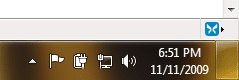
Untitled-1.png
 

My Computer

Computer Manufacturer/Model Number
Self Build
OS
Windows 7 Ultimate 64bit
CPU
Intel Xeon 3110 (Same as Core 2 Duo E8400) 3.0Ghz @ 3.6Ghz
Motherboard
Gigabyte EX38-DS4
Memory
8GB G. Skill PC2-8500
Graphics Card(s)
PALiT GeForce 9600 GT PCI Express 2.0
Sound Card
OnBoard - Realtek ALC889A High Definition Audio
Monitor(s) Displays
Dell 24" LCD
Screen Resolution
1920x1200
Hard Drives
Western Digital VelociRaptor WD3000GLFS - 300GB | Western Digital Caviar SE16 WD7500AAKS - 750GB | LaCie d2Next-Quadra external - 1TB
PSU
Corsair HS620W
Case
Lian Li PC-V1100b Plus II
Cooling
Thermalright Ultra 120 eXtreme
Keyboard
Logitech
Mouse
Logitech MX Laser
Internet Speed
SLOW - HughesNet Satellite Internet - SUCKS!
Unique question. Just a guess, did you remove any of the other icons, possibly giving more space to the show desktop icon?
 

My Computer

Computer type
PC/Desktop
Computer Manufacturer/Model Number
Dell XPS 420
OS
Windows 10, Home Clean Install
CPU
Intel Core2 processsor Q8200(2.33Ghz 1333FSB) Quad Core Tech
Motherboard
Dell
Memory
6 gb
Graphics Card(s)
ATI Radeon 256MB HD3650
Sound Card
Intergrated 7.1 Channel Audio
Monitor(s) Displays
Dell SP2009W 20"
Hard Drives
640 GB Serial ATA Hard drive
Cooling
Fan
Keyboard
Dell USB Keyboard
Mouse
Dell Premium Optical USB
Internet Speed
DSL 2.85
Unique question. Just a guess, did you remove any of the other icons, possibly giving more space to the show desktop icon?


Nope. I haven't messed with any of the icons. I just noticed it was bigger today. It used to be skinny like the one below. I wish I knew how to change the size. I'd like to have it big like that on my laptop also.

Untitled-2.png
 

My Computer

Computer Manufacturer/Model Number
Self Build
OS
Windows 7 Ultimate 64bit
CPU
Intel Xeon 3110 (Same as Core 2 Duo E8400) 3.0Ghz @ 3.6Ghz
Motherboard
Gigabyte EX38-DS4
Memory
8GB G. Skill PC2-8500
Graphics Card(s)
PALiT GeForce 9600 GT PCI Express 2.0
Sound Card
OnBoard - Realtek ALC889A High Definition Audio
Monitor(s) Displays
Dell 24" LCD
Screen Resolution
1920x1200
Hard Drives
Western Digital VelociRaptor WD3000GLFS - 300GB | Western Digital Caviar SE16 WD7500AAKS - 750GB | LaCie d2Next-Quadra external - 1TB
PSU
Corsair HS620W
Case
Lian Li PC-V1100b Plus II
Cooling
Thermalright Ultra 120 eXtreme
Keyboard
Logitech
Mouse
Logitech MX Laser
Internet Speed
SLOW - HughesNet Satellite Internet - SUCKS!
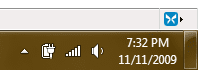
same problem :cry:
shock.jpg
 

My Computer

OS
Windows 7 Ultimate x64
CPU
Core i7 920
Motherboard
ASUS Rampage II Extreme
Memory
12GB Samsung DDR3
Graphics Card(s)
SLI x2 GTX280
Monitor(s) Displays
LG FLATRON 24"
Screen Resolution
1920x1200
Hard Drives
Raid 0 x2 MAXTOR 500GB 7200rpm 64mb
PSU
1000W
Mouse
A4Tech X6-80D
Internet Speed
8 mb/sec aDSL 2.0
Unique question. Just a guess, did you remove any of the other icons, possibly giving more space to the show desktop icon?


Nope. I haven't messed with any of the icons. I just noticed it was bigger today. It used to be skinny like the one below. I wish I knew how to change the size. I'd like to have it big like that on my laptop also.

View attachment 36328

Try going to desktop> right click> personalize> settings

Hope it works
 

My Computer

Computer type
PC/Desktop
Computer Manufacturer/Model Number
Dell XPS 420
OS
Windows 10, Home Clean Install
CPU
Intel Core2 processsor Q8200(2.33Ghz 1333FSB) Quad Core Tech
Motherboard
Dell
Memory
6 gb
Graphics Card(s)
ATI Radeon 256MB HD3650
Sound Card
Intergrated 7.1 Channel Audio
Monitor(s) Displays
Dell SP2009W 20"
Hard Drives
640 GB Serial ATA Hard drive
Cooling
Fan
Keyboard
Dell USB Keyboard
Mouse
Dell Premium Optical USB
Internet Speed
DSL 2.85
you have a touchscreen (or tablet) installed. Windows adapts the user interface for touch screens so it is easier to use with fingers. One of the most noticeable is the big show desktop button. You might also notice that if you drag up on a taskbar pinned item, that there is alot more space in between items (this one can be intermittent). It allows more room for your finger.
Try disabling your touchscreen or tablet if you want it to go back to skinny.
 

My Computer

Computer Manufacturer/Model Number
Dell Inspiron 1545
OS
Windows 7 build 7100 x86
CPU
Intel Core 2 Duo 2.1GHz
Motherboard
GM45 chipset
Memory
3GB
Graphics Card(s)
Intel(TM) Graphics Media Accelerator X4500HD
Sound Card
Realtek HD
Monitor(s) Displays
15.6" WLED 720p
Screen Resolution
1366x768
Hard Drives
320GB 5400rpm hard drive
Problem solved
Just DISABLE Service -> Tablet PC Input Service

BEFORE:
shock.jpg


AFTER:
solved.jpg
 

My Computer

OS
Windows 7 Ultimate x64
CPU
Core i7 920
Motherboard
ASUS Rampage II Extreme
Memory
12GB Samsung DDR3
Graphics Card(s)
SLI x2 GTX280
Monitor(s) Displays
LG FLATRON 24"
Screen Resolution
1920x1200
Hard Drives
Raid 0 x2 MAXTOR 500GB 7200rpm 64mb
PSU
1000W
Mouse
A4Tech X6-80D
Internet Speed
8 mb/sec aDSL 2.0
Problem solved
Just DISABLE Service -> Tablet PC Input Service

How do I do that?

I hope it will not also disable my Wacom graphics tablet, which I do want to use. Just do not need the Tablet PC Input Panel on my desktop.
 

My Computer

OS
Windows 7 Home Premium 32bit
CPU
Intel Core 2 Quad 2.33Ghz x4 1333FSB (Q8200)
Memory
3GB
Graphics Card(s)
PCI Express 1GB NVidia 9600X
Sound Card
Sound Blaster X-Fi Xtreme Audio
Monitor(s) Displays
LG Flatron L1942P
Screen Resolution
1280 x 1024
Hard Drives
500GB S-ATA
Maxtor 200GB External
Western Digital 500GB My Book External
Keyboard
Saitek Eclipse
Mouse
Microsoft Optical Wheel Mouse
Internet Speed
Could be better
Problem solved
Just DISABLE Service -> Tablet PC Input Service
How do I do that?

I hope it will not also disable my Wacom graphics tablet, which I do want to use. Just do not need the Tablet PC Input Panel on my desktop.

Press Start and type 'services'. Click on services and look for the tablet PC input service. Then right click it, and select properties. Set the startup type to 'disabled'. This will disable the service. Try it and see if your wacom still works, if it doesnt just set the startup type back to automatic.
 

My Computer

Computer Manufacturer/Model Number
Dell Inspiron 1545
OS
Windows 7 build 7100 x86
CPU
Intel Core 2 Duo 2.1GHz
Motherboard
GM45 chipset
Memory
3GB
Graphics Card(s)
Intel(TM) Graphics Media Accelerator X4500HD
Sound Card
Realtek HD
Monitor(s) Displays
15.6" WLED 720p
Screen Resolution
1366x768
Hard Drives
320GB 5400rpm hard drive
Problem persists

Thanks for that antt have found it and disabled it and even after a re-start the Show Desktop Button has remained HUGE :rolleyes:

I also tried disabling the Tablet Service Pen, with no success, but this also disabled the menu for calibrating my Wacom Pen Tablet to have set it back to Automatic.

Could it be that the Show Desktop Button will remain HUGE because I have a graphics tablet installed?
 

My Computer

OS
Windows 7 Home Premium 32bit
CPU
Intel Core 2 Quad 2.33Ghz x4 1333FSB (Q8200)
Memory
3GB
Graphics Card(s)
PCI Express 1GB NVidia 9600X
Sound Card
Sound Blaster X-Fi Xtreme Audio
Monitor(s) Displays
LG Flatron L1942P
Screen Resolution
1280 x 1024
Hard Drives
500GB S-ATA
Maxtor 200GB External
Western Digital 500GB My Book External
Keyboard
Saitek Eclipse
Mouse
Microsoft Optical Wheel Mouse
Internet Speed
Could be better
Back
Top