
"Show desktop icons" does not stay unchecked

Giltrap

New member
Local time
4:16 AM
Messages
7
Hello,

Since I want a pretty minimal interface I don't want my desktop icons to show. However, whenever I uncheck "show desktop icons" they always return whenever I restart my computer or plug/unplug my power supply. Also, whenever I try to uncheck "show desktop icons" I usually have to do it twice before it actually works.

I am running an ASUS Notebook K51AE/K70AE Series running 7 Home Premium 64-bit. It has 4GB of RAM and an AMD Turion 2.20 GHz Dual Core processor and ATI Mobility Radeon HD 4200 graphics.

I have read other threads where people have similar problems with ASUS laptops but they haven't been able to solve it properly either. I have tried all the things in this thread (Show Desktop Icons won't stay unchecked - Windows 7 Forums) and tried some things from several others but nothing has worked so far. I haven't yet tried anything with the registry as I'd rather leave that alone unless I have to.

Thanks!
 

My Computer My Computer

At a glance

Windows 7 Home PremiumAMD Turion(tm) II Dual-Core Mobile M500 2.20GHz4.00GB (3.25GB usable)AMD M880G with ATI Mobility Radeon HD 4200
Computer Manufacturer/Model Number
ASUSTeK Computer Inc. - K51AE/K70AE Series
OS
Windows 7 Home Premium
CPU
AMD Turion(tm) II Dual-Core Mobile M500 2.20GHz
Memory
4.00GB (3.25GB usable)
Graphics Card(s)
AMD M880G with ATI Mobility Radeon HD 4200

My Computer My Computer

At a glance

Windows 10, Home Clean InstallIntel Core2 processsor Q8200(2.33Ghz 1333FSB)...6 gbATI Radeon 256MB HD3650
Computer type
PC/Desktop
Computer Manufacturer/Model Number
Dell XPS 420
OS
Windows 10, Home Clean Install
CPU
Intel Core2 processsor Q8200(2.33Ghz 1333FSB) Quad Core Tech
Motherboard
Dell
Memory
6 gb
Graphics Card(s)
ATI Radeon 256MB HD3650
Sound Card
Intergrated 7.1 Channel Audio
Monitor(s) Displays
Dell SP2009W 20"
Hard Drives
640 GB Serial ATA Hard drive
Cooling
Fan
Keyboard
Dell USB Keyboard
Mouse
Dell Premium Optical USB
Internet Speed
DSL 2.85
I did the first one earlier, and have just tried the second, and neither have worked unfortunately. :(
 

My Computer My Computer

At a glance

Windows 7 Home PremiumAMD Turion(tm) II Dual-Core Mobile M500 2.20GHz4.00GB (3.25GB usable)AMD M880G with ATI Mobility Radeon HD 4200
Computer Manufacturer/Model Number
ASUSTeK Computer Inc. - K51AE/K70AE Series
OS
Windows 7 Home Premium
CPU
AMD Turion(tm) II Dual-Core Mobile M500 2.20GHz
Memory
4.00GB (3.25GB usable)
Graphics Card(s)
AMD M880G with ATI Mobility Radeon HD 4200
There may be some small corruption in your system. Then again, it may be a bug. I did not hear about this situation before but, Try this

Type cmd in search (do not hit enter) right click run as administrator. In cmd type
sfc /scannow. Run 3 times if errors are found, then report back.
 

My Computer My Computer

At a glance

Windows 10, Home Clean InstallIntel Core2 processsor Q8200(2.33Ghz 1333FSB)...6 gbATI Radeon 256MB HD3650
Computer type
PC/Desktop
Computer Manufacturer/Model Number
Dell XPS 420
OS
Windows 10, Home Clean Install
CPU
Intel Core2 processsor Q8200(2.33Ghz 1333FSB) Quad Core Tech
Motherboard
Dell
Memory
6 gb
Graphics Card(s)
ATI Radeon 256MB HD3650
Sound Card
Intergrated 7.1 Channel Audio
Monitor(s) Displays
Dell SP2009W 20"
Hard Drives
640 GB Serial ATA Hard drive
Cooling
Fan
Keyboard
Dell USB Keyboard
Mouse
Dell Premium Optical USB
Internet Speed
DSL 2.85
It said "Windows Resource Protection did not find any integrity violations" after the first time, so I've not run it any more times.

Just remembered something. In one thread they suggested making another admin account and seeing if it did the same thing on there. Well when I did that it did the exact same thing on that account, but when I went back to my main account with the new one still logged in the icons remained hidden even when I unplugged my power supply. When I logged the other account out the problem returned.

I'm thinking that whatever is causing the icons to change is something to do with the power monitoring thing, and when I have another account logged in that account might take over, causing the problem to move onto that account. Of course, this is pure speculation, but it might help.
 

My Computer My Computer

At a glance

Windows 7 Home PremiumAMD Turion(tm) II Dual-Core Mobile M500 2.20GHz4.00GB (3.25GB usable)AMD M880G with ATI Mobility Radeon HD 4200
Computer Manufacturer/Model Number
ASUSTeK Computer Inc. - K51AE/K70AE Series
OS
Windows 7 Home Premium
CPU
AMD Turion(tm) II Dual-Core Mobile M500 2.20GHz
Memory
4.00GB (3.25GB usable)
Graphics Card(s)
AMD M880G with ATI Mobility Radeon HD 4200
My Computer My Computer

At a glance

Windows 10, Home Clean InstallIntel Core2 processsor Q8200(2.33Ghz 1333FSB)...6 gbATI Radeon 256MB HD3650
Computer type
PC/Desktop
Computer Manufacturer/Model Number
Dell XPS 420
OS
Windows 10, Home Clean Install
CPU
Intel Core2 processsor Q8200(2.33Ghz 1333FSB) Quad Core Tech
Motherboard
Dell
Memory
6 gb
Graphics Card(s)
ATI Radeon 256MB HD3650
Sound Card
Intergrated 7.1 Channel Audio
Monitor(s) Displays
Dell SP2009W 20"
Hard Drives
640 GB Serial ATA Hard drive
Cooling
Fan
Keyboard
Dell USB Keyboard
Mouse
Dell Premium Optical USB
Internet Speed
DSL 2.85
I tried installing IconsOff normally and in a few compatibility modes but it didn't have any effect on the icons whatsoever. As for the 2nd post in that thread, removing all of the desktop items individually would work, but isn't really a proper fix. I'd rather the problem be properly fixed rather than avoided, and I'd also simply like to know what's causing it, because I'm curious like that. :D
 

My Computer My Computer

At a glance

Windows 7 Home PremiumAMD Turion(tm) II Dual-Core Mobile M500 2.20GHz4.00GB (3.25GB usable)AMD M880G with ATI Mobility Radeon HD 4200
Computer Manufacturer/Model Number
ASUSTeK Computer Inc. - K51AE/K70AE Series
OS
Windows 7 Home Premium
CPU
AMD Turion(tm) II Dual-Core Mobile M500 2.20GHz
Memory
4.00GB (3.25GB usable)
Graphics Card(s)
AMD M880G with ATI Mobility Radeon HD 4200
I would like to know, too; but so far we are not doing too well. I searched the forums and google, but no definitive answer, yet.
 

My Computer My Computer

At a glance

Windows 10, Home Clean InstallIntel Core2 processsor Q8200(2.33Ghz 1333FSB)...6 gbATI Radeon 256MB HD3650
Computer type
PC/Desktop
Computer Manufacturer/Model Number
Dell XPS 420
OS
Windows 10, Home Clean Install
CPU
Intel Core2 processsor Q8200(2.33Ghz 1333FSB) Quad Core Tech
Motherboard
Dell
Memory
6 gb
Graphics Card(s)
ATI Radeon 256MB HD3650
Sound Card
Intergrated 7.1 Channel Audio
Monitor(s) Displays
Dell SP2009W 20"
Hard Drives
640 GB Serial ATA Hard drive
Cooling
Fan
Keyboard
Dell USB Keyboard
Mouse
Dell Premium Optical USB
Internet Speed
DSL 2.85
Just did another experiment regarding my power theory. Whenever I change power modes without unplugging the power, the same thing happens. I'm going to try uninstalling the ASUS power management thing to see if that's what is causing the problem.

Update:
It worked!
I didn't really use the ASUS power management program at all, so it's no big deal not having it. The power programs I used were the built in windows ones, so I've not lost any important functionality.

Thanks for your help! :D
 
Last edited:

My Computer My Computer

At a glance

Windows 7 Home PremiumAMD Turion(tm) II Dual-Core Mobile M500 2.20GHz4.00GB (3.25GB usable)AMD M880G with ATI Mobility Radeon HD 4200
Computer Manufacturer/Model Number
ASUSTeK Computer Inc. - K51AE/K70AE Series
OS
Windows 7 Home Premium
CPU
AMD Turion(tm) II Dual-Core Mobile M500 2.20GHz
Memory
4.00GB (3.25GB usable)
Graphics Card(s)
AMD M880G with ATI Mobility Radeon HD 4200
Try any theory that you have. Just be careful that you do not make matters worse. Something that I have seen many, many times at the Forum.
 

My Computer My Computer

At a glance

Windows 10, Home Clean InstallIntel Core2 processsor Q8200(2.33Ghz 1333FSB)...6 gbATI Radeon 256MB HD3650
Computer type
PC/Desktop
Computer Manufacturer/Model Number
Dell XPS 420
OS
Windows 10, Home Clean Install
CPU
Intel Core2 processsor Q8200(2.33Ghz 1333FSB) Quad Core Tech
Motherboard
Dell
Memory
6 gb
Graphics Card(s)
ATI Radeon 256MB HD3650
Sound Card
Intergrated 7.1 Channel Audio
Monitor(s) Displays
Dell SP2009W 20"
Hard Drives
640 GB Serial ATA Hard drive
Cooling
Fan
Keyboard
Dell USB Keyboard
Mouse
Dell Premium Optical USB
Internet Speed
DSL 2.85
I made sure to make a system restore point before I did anything, but everything is working fine now (details in my previous post). I've caused many a disaster by testing my theories, so I've learnt to make backups and the like. :D

Thanks again.
 

My Computer My Computer

At a glance

Windows 7 Home PremiumAMD Turion(tm) II Dual-Core Mobile M500 2.20GHz4.00GB (3.25GB usable)AMD M880G with ATI Mobility Radeon HD 4200
Computer Manufacturer/Model Number
ASUSTeK Computer Inc. - K51AE/K70AE Series
OS
Windows 7 Home Premium
CPU
AMD Turion(tm) II Dual-Core Mobile M500 2.20GHz
Memory
4.00GB (3.25GB usable)
Graphics Card(s)
AMD M880G with ATI Mobility Radeon HD 4200
I am really happy for you giltrap.
 

My Computer My Computer

At a glance

Windows 10, Home Clean InstallIntel Core2 processsor Q8200(2.33Ghz 1333FSB)...6 gbATI Radeon 256MB HD3650
Computer type
PC/Desktop
Computer Manufacturer/Model Number
Dell XPS 420
OS
Windows 10, Home Clean Install
CPU
Intel Core2 processsor Q8200(2.33Ghz 1333FSB) Quad Core Tech
Motherboard
Dell
Memory
6 gb
Graphics Card(s)
ATI Radeon 256MB HD3650
Sound Card
Intergrated 7.1 Channel Audio
Monitor(s) Displays
Dell SP2009W 20"
Hard Drives
640 GB Serial ATA Hard drive
Cooling
Fan
Keyboard
Dell USB Keyboard
Mouse
Dell Premium Optical USB
Internet Speed
DSL 2.85
I made sure to make a restore point before I did anything. With how many disasters I have made with all my ideas, I've formed a habit of making backups and things.

Fortunately, this theory worked. I put my explanation in my previous post.

Thanks again. :D
 

My Computer My Computer

At a glance

Windows 7 Home PremiumAMD Turion(tm) II Dual-Core Mobile M500 2.20GHz4.00GB (3.25GB usable)AMD M880G with ATI Mobility Radeon HD 4200
Computer Manufacturer/Model Number
ASUSTeK Computer Inc. - K51AE/K70AE Series
OS
Windows 7 Home Premium
CPU
AMD Turion(tm) II Dual-Core Mobile M500 2.20GHz
Memory
4.00GB (3.25GB usable)
Graphics Card(s)
AMD M880G with ATI Mobility Radeon HD 4200
Uninstall of Power4Gear is not necessary.

I know this thread is forever old, but this is directly related and this thread is the first one that pops up on a Google search for this problem, so... here it is.

For anyone who hasn't already uninstalled Power4Gear, this is a less harsh solution.
The screens provided are from my Asus G53J running Windows 7 x64.

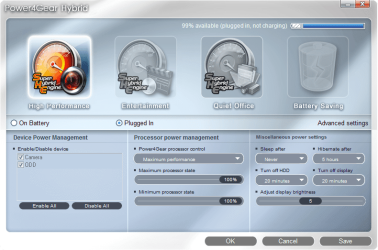
Go to your start menu and start typing Power4Gear. Windows will put the Power4Gear app right at the top so, click to open the app.

attachment.php

The app looks like this on my Laptop. Click the Advanced Settings button (toward the right on mine).

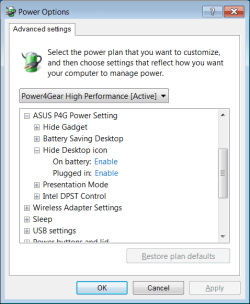
attachment.php

I've already scrolled so that the option you need to look for is right at the top of the list. Hide Desktop Icons was disabled on battery AND Plugged. Change those to enabled and use the drop-down to perform the same action for the other power modes. Don't forget to click apply.

Once you're done, you can close out of P4G, re-hide the icons and feel confident that your next reboot won't throw those damned icons in your face again.

I give all credit for this find to the poster who discovered that removing P4G stopped the problem and changing P4G modes brought the icons back. If not for those discoveries, I would have NEVER thought to check the P4G settings. Thank you Giltrap! :)
 

Attachments

  • Power4Gear Hybrid.png
    Power4Gear Hybrid.png
    113 KB · Views: 80
  • Power4Gear Hybrid Advanced Settings.png
    Power4Gear Hybrid Advanced Settings.png
    13.6 KB · Views: 79

My Computer My Computer

At a glance

Windows 7 x64
OS
Windows 7 x64
Back
Top