
Show folder content the way i want it.

premier69

New member
Member
VIP
Local time
10:25 AM
Messages
139
Modifying this **** customize folder function in windows 7, I so loath it...ever since XP introduced it seldom has it gotten it right.

My mp3 folder should always show as list, plain list. as much objects as possible makes use of the screen real estate as possible but every time i it resets to whatever...music detailed list.

And when sort by should have the default, becouse i always for my music use the last modified since i listen to music in winamp in the order of latest "purchased".

And the option to show all folders the same has been dimmed out and can't be set.

In vista this was possible but it always forgot the settings after a short time.
 
Last edited by a moderator:

My Computer My Computer

At a glance

Windows 7 RTM x64Core 2 Quad 2.6GHz4GB RamAsus nvidia 260
Computer Manufacturer/Model Number
White Box
OS
Windows 7 RTM x64
CPU
Core 2 Quad 2.6GHz
Motherboard
Gigabyte Ga-x48-ds5
Memory
4GB Ram
Graphics Card(s)
Asus nvidia 260
Sound Card
Built in, Using Optical Out with Logitech Z-5500 5.1
Monitor(s) Displays
Acer T230H & Samsung LCD TV FULL HD "LE46B530"
Screen Resolution
1920x1080 + 1920x1080
Hard Drives
8 of them, about 6.5TB
PSU
750 watt
Case
Antec P180
Cooling
Default Intel stock
Keyboard
Logitech Dinovo edge
Mouse
wireless laser mouse
Internet Speed
15mbit Cable
Other Info
Primary monitor is multitouch (yay)
Doesn't this work for you?
 

Attachments

  • Untitled.png
    Untitled.png
    11.5 KB · Views: 16

My Computer My Computer

At a glance

Windows 7 RC 7100 32bit/64bitIntel Core2Duo E4500 2.20 GHz2x1GB Kinsgston DDR2 800MHzNvidia 8500GT
Computer Manufacturer/Model Number
ENIAC
OS
Windows 7 RC 7100 32bit/64bit
CPU
Intel Core2Duo E4500 2.20 GHz
Motherboard
ASUS P5LD2-X/1333
Memory
2x1GB Kinsgston DDR2 800MHz
Graphics Card(s)
Nvidia 8500GT
Sound Card
Onboard High Definition Audio Device
Monitor(s) Displays
Sony Bravia 42"
Case
LINKW 2222
Cooling
Standard Intel
Keyboard
Some cheap one
Mouse
Microsoft Intellimouse something
Internet Speed
24MBps ADSL
no, i go into a folder and it's not the way i want it so i change everything, and then i go to the place in your picture and both those 2 options are dimmed.
 

My Computer My Computer

At a glance

Windows 7 RTM x64Core 2 Quad 2.6GHz4GB RamAsus nvidia 260
Computer Manufacturer/Model Number
White Box
OS
Windows 7 RTM x64
CPU
Core 2 Quad 2.6GHz
Motherboard
Gigabyte Ga-x48-ds5
Memory
4GB Ram
Graphics Card(s)
Asus nvidia 260
Sound Card
Built in, Using Optical Out with Logitech Z-5500 5.1
Monitor(s) Displays
Acer T230H & Samsung LCD TV FULL HD "LE46B530"
Screen Resolution
1920x1080 + 1920x1080
Hard Drives
8 of them, about 6.5TB
PSU
750 watt
Case
Antec P180
Cooling
Default Intel stock
Keyboard
Logitech Dinovo edge
Mouse
wireless laser mouse
Internet Speed
15mbit Cable
Other Info
Primary monitor is multitouch (yay)
Hello Premier69,

You will need to open Folder Options from within that window you want to apply instead of from the Control Panel for those options not to be grayed out.

Hope this helps,
Shawn
 

My Computer My Computer

At a glance

64-bit Windows 11 Pro for WorkstationsIntel i7-8700K OC'd to 5 GHz64 GB (4x16GB) G.SKILL TridentZ RGB DDR4 3600...ASUS ROG-STRIX-GTX1080TI-O11G-GAMING
Computer type
PC/Desktop
Computer Manufacturer/Model Number
Self built custom
OS
64-bit Windows 11 Pro for Workstations
CPU
Intel i7-8700K OC'd to 5 GHz
Motherboard
ASUS ROG Maximus XI Formula Z390
Memory
64 GB (4x16GB) G.SKILL TridentZ RGB DDR4 3600 MHz
Graphics Card(s)
ASUS ROG-STRIX-GTX1080TI-O11G-GAMING
Sound Card
Integrated
Monitor(s) Displays
2 x Samsung Odyssey G7 27"
Screen Resolution
2560x1440
Hard Drives
1TB Samsung 990 PRO M.2,
4TB Samsung 990 PRO PRO M.2,
TerraMaster F8 SSD Plus NAS
PSU
Seasonic Prime Titanium 850W
Case
Thermaltake Core P3
Cooling
Corsair Hydro H115i
Keyboard
Logitech wireless K800
Mouse
Logitech MX Master 4
Internet Speed
2 Gb/s Download and 100 Mb/s Upload
Antivirus
Malwarebyte Anti-Malware Premium
Browser
Google Chrome
Other Info
Logitech Z625 speaker system,
Logitech BRIO 4K Pro webcam,
HP Color LaserJet Pro MFP M477fdn,
APC SMART-UPS RT 1000 XL - SURT1000XLI,
Galaxy S23 Plus phone
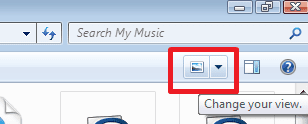
Premier69, you're trying to do this from within a Library folder.

You cannot set defaults for other folders from within a Library folder. You can do this in every other folder , except for the libraries.

To set all folders in your computer to have the same layout, open a standard folder like c:\ and you will see those buttons.

To change layout in the library folder, use this button instead:
 

Attachments

  • Untitled.png
    Untitled.png
    3.9 KB · Views: 7

My Computer My Computer

At a glance

Windows 7 RC 7100 32bit/64bitIntel Core2Duo E4500 2.20 GHz2x1GB Kinsgston DDR2 800MHzNvidia 8500GT
Computer Manufacturer/Model Number
ENIAC
OS
Windows 7 RC 7100 32bit/64bit
CPU
Intel Core2Duo E4500 2.20 GHz
Motherboard
ASUS P5LD2-X/1333
Memory
2x1GB Kinsgston DDR2 800MHz
Graphics Card(s)
Nvidia 8500GT
Sound Card
Onboard High Definition Audio Device
Monitor(s) Displays
Sony Bravia 42"
Case
LINKW 2222
Cooling
Standard Intel
Keyboard
Some cheap one
Mouse
Microsoft Intellimouse something
Internet Speed
24MBps ADSL
why not alt+v then l for list? but i want it to stay that way even next time after reboot and not for it to go and try to customize folder based on content, in fact, how do i turn this "feature" off?
 

My Computer My Computer

At a glance

Windows 7 RTM x64Core 2 Quad 2.6GHz4GB RamAsus nvidia 260
Computer Manufacturer/Model Number
White Box
OS
Windows 7 RTM x64
CPU
Core 2 Quad 2.6GHz
Motherboard
Gigabyte Ga-x48-ds5
Memory
4GB Ram
Graphics Card(s)
Asus nvidia 260
Sound Card
Built in, Using Optical Out with Logitech Z-5500 5.1
Monitor(s) Displays
Acer T230H & Samsung LCD TV FULL HD "LE46B530"
Screen Resolution
1920x1080 + 1920x1080
Hard Drives
8 of them, about 6.5TB
PSU
750 watt
Case
Antec P180
Cooling
Default Intel stock
Keyboard
Logitech Dinovo edge
Mouse
wireless laser mouse
Internet Speed
15mbit Cable
Other Info
Primary monitor is multitouch (yay)
Back
Top