Show us your hard drive performance

Okay, Thats cool because I didn't know that!:D

FYI: If you don't have any already and you buy an OEM SATA drive the cable will probably not be included. So you will need to pickup a SATA cable for each OEM SATA drive. Otherwise, the performance boost going from PATA/IDE to SATA II is your biggest bang for the buck option performance wise at this point, IMO.

Edit: Screws too - pirate them from old computer....

Go SATA II young man!
 

My Computer

OS
XP Pro & Vista Home Premium (x86); Windows Ultimate 7600 x64 Retail
The mother board came with SATA cables.:D
 

My Computer

Computer Manufacturer/Model Number
Custom
OS
Windows 7 Professional 32-bit
CPU
Intel(R) Pentium(R) D CPU 3.00 GHz
Motherboard
Asus P5B-VM
Memory
Kingston DDR2 3 gigs total Dual channels Symmetric
Graphics Card(s)
NVIDIA GeForce 8600 GT
Sound Card
Hi defonition Sound max
Monitor(s) Displays
CisNet
Screen Resolution
1280*1024
Hard Drives
WDC WD16000AA-00L7A0 SATA DRIVE
WDC IDE Drive 80 gigs.
PSU
Raidmax 380 watt
Case
Generic brand
Cooling
Standard fan
Keyboard
Logitech Cordless desktop EX100
Mouse
Logitech Cordless desktop EX100
Internet Speed
5.0 mbs
Other Info
MSE anti-virus
The mother board came with SATA cables.:D

:thumbsup:

Edit: For your OS boot drive many say to NOT use the "green" power saving drives. Get a performance drive. Lots of review out there.​
 

My Computer

OS
XP Pro & Vista Home Premium (x86); Windows Ultimate 7600 x64 Retail
Sounds good. any way who wants a slow drive. I ran the test again with most background programs closed went much better.:D
 
Last edited:

My Computer

Computer Manufacturer/Model Number
Custom
OS
Windows 7 Professional 32-bit
CPU
Intel(R) Pentium(R) D CPU 3.00 GHz
Motherboard
Asus P5B-VM
Memory
Kingston DDR2 3 gigs total Dual channels Symmetric
Graphics Card(s)
NVIDIA GeForce 8600 GT
Sound Card
Hi defonition Sound max
Monitor(s) Displays
CisNet
Screen Resolution
1280*1024
Hard Drives
WDC WD16000AA-00L7A0 SATA DRIVE
WDC IDE Drive 80 gigs.
PSU
Raidmax 380 watt
Case
Generic brand
Cooling
Standard fan
Keyboard
Logitech Cordless desktop EX100
Mouse
Logitech Cordless desktop EX100
Internet Speed
5.0 mbs
Other Info
MSE anti-virus
For $80-some, the Western Digital Black 1TB drive is a steal. If you want cheaper, go with a Western Digital Blue series, but don't use the Green series as other pointed out. Seagate is also a good choice, but I'd avoid other brands.
 

My Computer

Computer Manufacturer/Model Number
custom build
OS
Windows 7 Ultimate 64-bit RTM
CPU
Intel Core i7 920 (D0), overclocked @ 3.6GHz (4.2GHz stable)
Motherboard
EVGA X58 A1
Memory
6GB of OCZ DDR3-1600 triple channel @ 7-7-7-20
Graphics Card(s)
EVGA GTX 295 Co-Op
Sound Card
Auzentech X Meridian 7.1
Monitor(s) Displays
(3x) Samsung 943BX, (1x) Samsung 2333HD, (1x) BenQ FP202W
Screen Resolution
3840x1024 + 1920x1080 + 1680x1050
Hard Drives
(4x) OCZ Vertex 30GB SATA2 SSDs on RAID 0 for 120GB total
(2x) Western Digital Black 1TB SATA2 on RAID 0
(1x) Lite-on DVD Burner and Blu-Ray player
PSU
PC Power & Cooling Super-quiet Silencer 910
Case
(modified) Tagan Black Pearl full tower, WCR edition
Cooling
Scythe Mugen2 CPU cooler, (5x) Scythe SFF21F, Zalaman cntrl.
Keyboard
Logitech G19
Mouse
Logitech G9x
Internet Speed
Comcast Cable, 22Mbps down and 5Mbps up
Other Info
Logitech Z-5500 Digital speaker system
Thanks
 

My Computer

Computer Manufacturer/Model Number
Custom
OS
Windows 7 Professional 32-bit
CPU
Intel(R) Pentium(R) D CPU 3.00 GHz
Motherboard
Asus P5B-VM
Memory
Kingston DDR2 3 gigs total Dual channels Symmetric
Graphics Card(s)
NVIDIA GeForce 8600 GT
Sound Card
Hi defonition Sound max
Monitor(s) Displays
CisNet
Screen Resolution
1280*1024
Hard Drives
WDC WD16000AA-00L7A0 SATA DRIVE
WDC IDE Drive 80 gigs.
PSU
Raidmax 380 watt
Case
Generic brand
Cooling
Standard fan
Keyboard
Logitech Cordless desktop EX100
Mouse
Logitech Cordless desktop EX100
Internet Speed
5.0 mbs
Other Info
MSE anti-virus
For $80-some, the Western Digital Black 1TB drive is a steal. If you want cheaper, go with a Western Digital Blue series, but don't use the Green series as other pointed out. Seagate is also a good choice, but I'd avoid other brands.

I was going to let him shop around then ask. ;)

But yes, the WD Caviar Black series has good reviews. Personally I am waiting on the 2 platter 640GB WD6401AALS model to go on sale at a good price.
 

My Computer

OS
XP Pro & Vista Home Premium (x86); Windows Ultimate 7600 x64 Retail
I've got a 1TB WD Caviar Black and am very happy with it's performance. I too was interested in the 2 platter 640...but the price difference between the 2 wasn't much at all. I'm getting just over 90MB/s in HDTune with this drive and I don't find it to be particularly noisy. It is a bit warmer than my previous Seagate drive...but with a single hard drive in my rather large case and great airflow...heat really isn't much of a concern.
 

My Computer

Computer Manufacturer/Model Number
Self-Built in July 2009
OS
Windows 7 Ultimate x64
CPU
Intel Q9550 2.83Ghz OC'd to 3.40Ghz
Motherboard
Gigabyte GA-EP45-UD3R rev. 1.1, F12 BIOS
Memory
8GB G.Skill PI DDR2-800, 4-4-4-12 timings
Graphics Card(s)
EVGA 1280MB Nvidia GeForce GTX570
Sound Card
Realtek ALC899A 8 channel onboard audio
Monitor(s) Displays
23" Acer x233H
Screen Resolution
1920x1080
Hard Drives
Intel X25-M 80GB Gen 2 SSD
Western Digital 1TB Caviar Black, 32MB cache. WD1001FALS
PSU
Corsair 620HX modular
Case
Antec P182
Cooling
stock
Keyboard
ABS M1 Mechanical
Mouse
Logitech G9 Laser Mouse
Internet Speed
15/2 cable modem
Other Info
Windows and Linux enthusiast. Logitech G35 Headset.

My Computer

Computer Manufacturer/Model Number
Arvutikeskus AMD Pro Gamer II(Was orginali)
OS
7 Ultimate 64/XP 32bit/XP 64bit/Google OS
CPU
AMD Phenom II X2 550 3.1GHz
Motherboard
GIGABYTE GA-MA770-UD3
Memory
3x2GB DDRII DDR800
Graphics Card(s)
AMD HD4850 512MB GDDR3
Sound Card
Realtek 7.1
Monitor(s) Displays
Samsung SyncMaster 2033SN
Screen Resolution
1600x900
Hard Drives
640GB SATAII 7200rpm
3x1TB SATAII 7200
PSU
ATX400W
Case
Vento A9
Keyboard
Microsoft Wireless Multimedia Keyboard 1.1
Mouse
Microsoft Standard Wireless Optical Mouse
Hi guys I am new to your forum I like it so far lot's of good info I am running 6 pc in my house on W7 RC it is a lot better than vista IMO. This rig is running W7 RC 64BIT I would like to change to W7RTM If I could fine a good download for it. Ok guys here is some benchmarks on W7 RC with raid 0 set-up with OCZ vertex SSD 120gb in raid0 on a AMD platform and it is very fast boot time 22sec
 

My Computer

Computer Manufacturer/Model Number
CUSTOM BUILT AMD PLATFORM 4.3GHz 24/7 STABLE
OS
WINDOWS 7 ULTIMATE X64
CPU
PHENOM II 1090T
Motherboard
MSI 890FXA-GD70
Memory
4 GHz DOMINATOR GT
Graphics Card(s)
2X5970 CROSSFIRE
Sound Card
CREATIVE X-fi TITANIUM FATAL1TY
Monitor(s) Displays
ACER G-24
Hard Drives
6 VERTEX2 RAID 0 EACH DRIVE 120GB
PSU
1600 WATT ULTRA
Case
THERMALTAKE XASER VI
Cooling
CUSTOM WATER COOLING
Other Info
LSI 9260-8i Raid Card
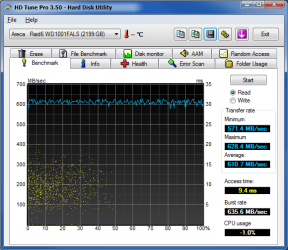
Areca 1231ML Raid 6 (9x1TB WD1001FALS)
HDTune_Benchmark_Areca___Raid6_WD1001FALS.png

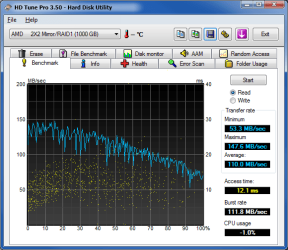
OnBaord Raid 10 (4x500GB WD5000AAKS)
HDTune_Benchmark_AMD_____2X2_Mirror_RAID1.png

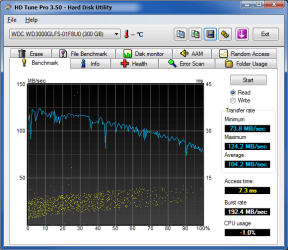
WD VelociRaptor (WD3000GLFS)
HDTune_Benchmark_WDC_WD3000GLFS-01F8U0.png
 
Last edited:

My Computer

OS
Windows 7 x64 Ultimate
CPU
AMD Phenom(tm) II X4 940 Processor OC 3.4Ghz
Motherboard
GA-MA790X-UD4P
Memory
6.00 GB
Graphics Card(s)
EVGA 896-P3-1257-AR GeForce GTX 260 Core 216 Superclocked
Sound Card
Onboard
Monitor(s) Displays
Primary ASUS VK246H 24" | Secondary Samsung LN46A950 46"
Screen Resolution
Primary 1920x1080p | Secondary 1920x1080p
Hard Drives
Areca 1231ML Raid Controller |
Intel X25-M G2 "74.5GB" (SSDSA2MH080G2) |
Raid 6 (9x1TB) "6.36TB" (WD1001FALS) |
WD VelociRaptor "279GB" (WD3000GLFS)
PSU
PC Power & Cooling Silencer PPCS910 910W
Case
Lian Li PC-A70B
Cooling
Freezone Elite
Keyboard
Logitech S 510 Silver/Black RF Wireless Slim Cordless
Mouse
Logitech S 510 Silver/Black RF Wireless Slim Cordless
Internet Speed
Intel EXPI9300PT 10/100/1000Mbps PCI-Express|Optimum Online
Other Info
ZALMAN VF700-CU 2 Ball VGA COOLER used for Areca 1231ML
Microsoft JR9-00001 Xbox 360 Wireless Controller for Windows
it's a squiggly line - but it's fast..
 

Attachments

  • hdtest.jpg
    hdtest.jpg
    78.4 KB · Views: 43

My Computer

Computer type
PC/Desktop
Computer Manufacturer/Model Number
benchtec, built to personal specs
OS
Windows10 Pro - 64Bit vs.10547
CPU
i7-965 Extreme Edition (8 Cores) at 3.3GHz (no OC)
Motherboard
BloodRageX58 (Socket1366)
Memory
12G Corsair Dominator DDR3 - tripled
Graphics Card(s)
2xAMD SapphireNITRO R9 380(4G) crossfire
Sound Card
Sonar(SB)X-Fi onboard
Monitor(s) Displays
SyncMaster P2050 20"
Screen Resolution
1600x900 (widescreen)
Hard Drives
480G\OCZSolid3SSD, 64G\OCZVertex3SSD,60G\OCZVertex2SSD, 1TB\spinpointF1SATAHDD
PSU
1200w Power Station Gold
Case
ANTEC 900/2 all blue lights, etc..
Cooling
Noctua SE1366 NH-U12P - a tight fit, but a monster cooler!!
Keyboard
Logitech G19 (wired)
Mouse
Logitech G9 Laser (wired)
Internet Speed
150mb unlimited
Browser
IE11(RP)
Other Info
Xbox One, Nokia735 Windows10 mobile, LG HD/DVD/Blu-Ray r/w, CyberlinkPowerDVD15, LogitechZ5500-SS(5.1), LogitechG35Phones-SS(7.1),MSOffice 2007,CorelDrawX7,Painter2016, Wacom Intuos Pro-SE
I upgraded my PC recently, using up all of my on-board SATA slots (7 total). I have a completely new layout and some fun benchmarks to share.

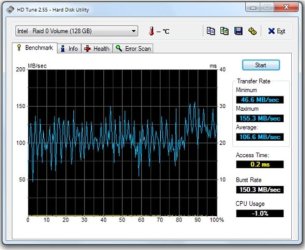
  • Four OCZ Vertex 30GB SSDs in one 120GB RAID 0 array on an built-in Intel ICH10R controller (one partition for games & high-demand apps, write-back caching enabled):

    cipher_ocz_vertex_120gb_raid0_intel_read1.jpg

    .
  • Two WDC Black 1TB HDDs in one 2TB RAID 0 array on a built-in JMicron JMB363 controller (one 500GB partition for Windows and some programs and one 1.5TB partition for my documents/projects, no write-back caching):

    cipher_wdc_black_2tb_raid0_jmicron_read1.jpg
 

My Computer

Computer Manufacturer/Model Number
custom build
OS
Windows 7 Ultimate 64-bit RTM
CPU
Intel Core i7 920 (D0), overclocked @ 3.6GHz (4.2GHz stable)
Motherboard
EVGA X58 A1
Memory
6GB of OCZ DDR3-1600 triple channel @ 7-7-7-20
Graphics Card(s)
EVGA GTX 295 Co-Op
Sound Card
Auzentech X Meridian 7.1
Monitor(s) Displays
(3x) Samsung 943BX, (1x) Samsung 2333HD, (1x) BenQ FP202W
Screen Resolution
3840x1024 + 1920x1080 + 1680x1050
Hard Drives
(4x) OCZ Vertex 30GB SATA2 SSDs on RAID 0 for 120GB total
(2x) Western Digital Black 1TB SATA2 on RAID 0
(1x) Lite-on DVD Burner and Blu-Ray player
PSU
PC Power & Cooling Super-quiet Silencer 910
Case
(modified) Tagan Black Pearl full tower, WCR edition
Cooling
Scythe Mugen2 CPU cooler, (5x) Scythe SFF21F, Zalaman cntrl.
Keyboard
Logitech G19
Mouse
Logitech G9x
Internet Speed
Comcast Cable, 22Mbps down and 5Mbps up
Other Info
Logitech Z-5500 Digital speaker system
Too bad i dont have my Raid 0 array anymore...

Too bad i dont have my Raid 0 array anymore... i had 4x 250 Gigs in raid 0 and was getting around 230 -250 MB/s reads. never benched the writes.

EDIT: then a drive died :(
 
Last edited:

My Computer

Computer Manufacturer/Model Number
Custom system number 2
OS
Windows 7
CPU
Intel Core i7 920 @ 3.6 GHz
Motherboard
Asus P6T
Memory
3 x1 GB OCZ platinum @ 1866 MHz 9-9-9-24
Graphics Card(s)
EVGA GTX 260 Superclocked 720/1220 (using a voltage bump)
Sound Card
Soundblaster Audigy 7.1
Monitor(s) Displays
Samsung 20" 2ms 3000:1 @1680x1050
Screen Resolution
1680 x 1050
Hard Drives
250GB Seagate HDD
PSU
OCZ GamexStream 700Watt
Case
Antec 900
Cooling
3 x 120mm case fans, 1x 200mm casefan (top) 1x 120 mm (PSU)
Keyboard
Saitek Eclipse II
Mouse
A4 tech Laser mouse.
Internet Speed
7 Mbit Bell
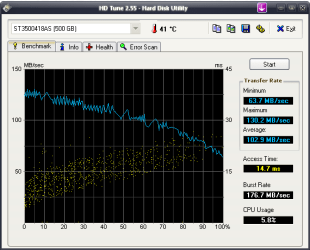
I got two tests!
One from Windows 7 Enterprise x64 -another from Windows XP PRO SP3 x86 - testing the same HDD!
 

Attachments

  • HDTune_Benchmark_ST3500418AS7777777777.png
    HDTune_Benchmark_ST3500418AS7777777777.png
    50.9 KB · Views: 78
  • HDTune_Benchmark_ST3500418AS.png
    HDTune_Benchmark_ST3500418AS.png
    31.2 KB · Views: 1,371

My Computer

OS
Windows 7 Enterprise x64
Too bad i dont have my Raid 0 array anymore... i had 4x 250 Gigs in raid 0 and was getting around 230 -250 MB/s reads. never benched the writes.

EDIT: then a drive died :(

Yeah, while performance in benchmarks looks great, the liklihood of failure increases x2,x3,x4 when you have multiple drives. And a majority of the time, the drives are never moving anywhere near the speeds that the RAID provides...so I don't usually feel the increased risk is worth it.
 

My Computer

Computer Manufacturer/Model Number
Self-Built in July 2009
OS
Windows 7 Ultimate x64
CPU
Intel Q9550 2.83Ghz OC'd to 3.40Ghz
Motherboard
Gigabyte GA-EP45-UD3R rev. 1.1, F12 BIOS
Memory
8GB G.Skill PI DDR2-800, 4-4-4-12 timings
Graphics Card(s)
EVGA 1280MB Nvidia GeForce GTX570
Sound Card
Realtek ALC899A 8 channel onboard audio
Monitor(s) Displays
23" Acer x233H
Screen Resolution
1920x1080
Hard Drives
Intel X25-M 80GB Gen 2 SSD
Western Digital 1TB Caviar Black, 32MB cache. WD1001FALS
PSU
Corsair 620HX modular
Case
Antec P182
Cooling
stock
Keyboard
ABS M1 Mechanical
Mouse
Logitech G9 Laser Mouse
Internet Speed
15/2 cable modem
Other Info
Windows and Linux enthusiast. Logitech G35 Headset.
Yeah, while performance in benchmarks looks great, the liklihood of failure increases x2,x3,x4 when you have multiple drives. And a majority of the time, the drives are never moving anywhere near the speeds that the RAID provides...so I don't usually feel the increased risk is worth it.

And your performance loss is my performance gain. ;)

It really depends on what you use your drives for in a RAID array. If you store your own data on there, you'd be more at risk of losing something. As for me, I use my RAID 0 array of four SSDs to install games and high-priority applications only. If one drive fails in that array, no big deal. I just replace the drive (or run on one less drive) and reinstall the games. My own data, projects, and media files goes on other drives and is backed-up monthly.

As for RAID 0 vs. one drive, the risk difference is negligible considering how reliable some manufacturers' drives are these days. If you lose one drive in your RAID array, you (or someone else had you not bought X number of the drives) would have lost the drive anyways in a single drive setup. Only if you run a RAID 1, 5, 10 or such array would you have redundancy and be able to recover from a drive failure.
 

My Computer

Computer Manufacturer/Model Number
custom build
OS
Windows 7 Ultimate 64-bit RTM
CPU
Intel Core i7 920 (D0), overclocked @ 3.6GHz (4.2GHz stable)
Motherboard
EVGA X58 A1
Memory
6GB of OCZ DDR3-1600 triple channel @ 7-7-7-20
Graphics Card(s)
EVGA GTX 295 Co-Op
Sound Card
Auzentech X Meridian 7.1
Monitor(s) Displays
(3x) Samsung 943BX, (1x) Samsung 2333HD, (1x) BenQ FP202W
Screen Resolution
3840x1024 + 1920x1080 + 1680x1050
Hard Drives
(4x) OCZ Vertex 30GB SATA2 SSDs on RAID 0 for 120GB total
(2x) Western Digital Black 1TB SATA2 on RAID 0
(1x) Lite-on DVD Burner and Blu-Ray player
PSU
PC Power & Cooling Super-quiet Silencer 910
Case
(modified) Tagan Black Pearl full tower, WCR edition
Cooling
Scythe Mugen2 CPU cooler, (5x) Scythe SFF21F, Zalaman cntrl.
Keyboard
Logitech G19
Mouse
Logitech G9x
Internet Speed
Comcast Cable, 22Mbps down and 5Mbps up
Other Info
Logitech Z-5500 Digital speaker system
As for me, I use my RAID 0 array of four SSDs to install games and high-priority applications only.
I'd love to see a stopwatch timing of how much faster these games and applications open up on the 4 drive RAID0 array, versus a single drive SSD. We all know there is a massive cost difference....but is there enough time savings to justify the cost?

Also, a number of people elect to run RAID0's for the OS....and obviously a loss of 1 drive here, means significantly more effort to get things up and running again since this would entail an entire OS reinstall.


As for RAID 0 vs. one drive, the risk difference is negligible considering how reliable some manufacturers' drives are these days.
But in working for large corporations with thousands of desktop...you would be surprised at how many hard drives this very small percentage adds up to.

if you run a RAID 1, 5, 10 or such array would you have redundancy and be able to recover from a drive failure.
Of course, RAID 1 at home is usually not that great because if you accidentally delete a file or get a virus which deletes files, you lose it on your backup drive immediately. Most home users aren't running RAID 5 or RAID 10 configurations for sheer performance as the parity calc of RAID 5 slows performance and the 50% disk loss in RAID 10 leads to high prices and lower capacities.


I'm not criticizing the use of RAID...especially the redundant configurations....but it's the all out performance versions (RAID 0) with the OS that I just don't think are worth the risk. Most people love 'em till 1 drive goes bad. And I've talked to numerous people that I work with and advice on forums against doing RAID0 who have suffered drive failures and lost stuff who no longer opt for the small edge in performance anymore. Which brings me back to my comment about the % of drives and what it really equates to. And 3 sets of friends were using either Raptors or Velociraptors when they lost a drive...and these are highly regarded as being fantastic drives.
 

My Computer

Computer Manufacturer/Model Number
Self-Built in July 2009
OS
Windows 7 Ultimate x64
CPU
Intel Q9550 2.83Ghz OC'd to 3.40Ghz
Motherboard
Gigabyte GA-EP45-UD3R rev. 1.1, F12 BIOS
Memory
8GB G.Skill PI DDR2-800, 4-4-4-12 timings
Graphics Card(s)
EVGA 1280MB Nvidia GeForce GTX570
Sound Card
Realtek ALC899A 8 channel onboard audio
Monitor(s) Displays
23" Acer x233H
Screen Resolution
1920x1080
Hard Drives
Intel X25-M 80GB Gen 2 SSD
Western Digital 1TB Caviar Black, 32MB cache. WD1001FALS
PSU
Corsair 620HX modular
Case
Antec P182
Cooling
stock
Keyboard
ABS M1 Mechanical
Mouse
Logitech G9 Laser Mouse
Internet Speed
15/2 cable modem
Other Info
Windows and Linux enthusiast. Logitech G35 Headset.
I'd love to see a stopwatch timing of how much faster these games and applications open up on the 4 drive RAID0 array, versus a single drive SSD. We all know there is a massive cost difference....but is there enough time savings to justify the cost?

Also, a number of people elect to run RAID0's for the OS....and obviously a loss of 1 drive here, means significantly more effort to get things up and running again since this would entail an entire OS reinstall.


But in working for large corporations with thousands of desktop...you would be surprised at how many hard drives this very small percentage adds up to.

Of course, RAID 1 at home is usually not that great because if you accidentally delete a file or get a virus which deletes files, you lose it on your backup drive immediately. Most home users aren't running RAID 5 or RAID 10 configurations for sheer performance as the parity calc of RAID 5 slows performance and the 50% disk loss in RAID 10 leads to high prices and lower capacities.


I'm not criticizing the use of RAID...especially the redundant configurations....but it's the all out performance versions (RAID 0) with the OS that I just don't think are worth the risk. Most people love 'em till 1 drive goes bad. And I've talked to numerous people that I work with and advice on forums against doing RAID0 who have suffered drive failures and lost stuff who no longer opt for the small edge in performance anymore. Which brings me back to my comment about the % of drives and what it really equates to. And 3 sets of friends were using either Raptors or Velociraptors when they lost a drive...and these are highly regarded as being fantastic drives.


I agree with your points when the discussion pertains to home users in general. And this opinion is based on having worked with a number of RAID 0+1 configurations in the commercial sector. The cost/benefit ratio for the home environment may only be attractive to the serious enthusiast.

But I still love this video on the 24 disk Samsung SSD RAID array!

24 Samsung SSD RAID Array – 2 GB/sec | The "Break it Down" Blog
 

My Computer

OS
XP Pro & Vista Home Premium (x86); Windows Ultimate 7600 x64 Retail
I'd love to see a stopwatch timing of how much faster these games and applications open up on the 4 drive RAID0 array, versus a single drive SSD. We all know there is a massive cost difference....but is there enough time savings to justify the cost?

The gains are there and significant, otherwise people wouldn't bother with it at all. For RAID 0 of HDDs the gains trail off after 3 drives are linked. For SSDs, there is no trail off at all, but the processing demand gets higher unless you have a dedicated RAID controller card. But any RAID array of 4 or less drives on a built-in RAID controller isn't much processing overhead.

If you look at my performance graph, you will see an almost straight line (compared to single drives) of 588 to 638MB/sec transfer speeds with a sustained average of 613MB/sec. The benchmarks don't lie, as they test file sizes of all different types. My RAID 0 array of SSDs will transfer data 8 times faster than a single performance HDD like a Raptor. And it will transfer data 4x faster than top-notch SSDs. Here's the price to performance comparison:

Do the math. RAID 0 and RAID 10 of top-dog SSDs give you more of a performance ratio for the money than a single top-dog HDD. And if you want redundancy? Change it to a RAID 10 and half the performance, which is still 4x faster for 3x the money. Then you'll have performance and redundancy, but be 60GB instead of 120GB. Still good for a second drive system to install games and other apps.

I still run my OS on HDDs (WDC Black) to overcome the SSD stuttering issues. If I was to use only HDDs, I'd still use a different HDD (or RAID array of them) to run my applications and games.

By comparison, from my original, single WD Black 1TB vs. my new RAID 0 array of four OCZ Vertex 30GB drives, my game loading screens (going from one area to another) went from 3-5+ seconds to virtually no time.

More importantly, I wasn't able to smoothly run high-res textures in a couple of games since I game at 3840x1024 (three 19" 5:4 monitors). Turning around with high-res textures on a normal, single drive would cause stuttering. With my RAID array of SSDs, it's buttery smooth.

If you're running a single monitor and regular resolutions (ie: 1920x1200 or less), you probably won't notice a difference for most games. The higher the resolution, the more pixels, and the more the pixels, the more the demand on the PC for loading textures. For large textures, the performance bottleneck is typically the storage system, not the video card, and not system memory.

Don't be jealous of RAID 0. ;) If people really wanted the performance of RAID 0 with redundancy, there is always RAID 10. RAID 5 works well too, but not as high-performing as RAID 0 or RAID 10. RAID 5 also requires more processing power, hence necessitating a dedicated RAID processor (ie: RAID controller card). Of course, all of this is more expensive, but if you can afford it and are a hardware enthusiast, it's more than worth it. If you're not, they why debate it? ... it's obviously not for you.

I'm not criticizing the use of RAID...especially the redundant configurations....but it's the all out performance versions (RAID 0) with the OS that I just don't think are worth the risk. Most people love 'em till 1 drive goes bad. And I've talked to numerous people that I work with and advice on forums against doing RAID0 who have suffered drive failures and lost stuff who no longer opt for the small edge in performance anymore. Which brings me back to my comment about the % of drives and what it really equates to. And 3 sets of friends were using either Raptors or Velociraptors when they lost a drive...and these are highly regarded as being fantastic drives.

And you have no personal experience with RAID 0 from the looks of it? All of that is what you've heard? Rumors are a dime a dozen. I've had no issues with my RAID 0 array for months. And I do backups of the entire volume on a separate, external drive. If I do lose a drive, I just clone the partition back. No worries at all.

If you really don't see the value in RAID 0 or RAID 10 performance for your storage system (the worst bottleneck on a PC), then you really have never experienced it for yourself or you just don't care? Whatever it is, your loss. ;)

 

My Computer

Computer Manufacturer/Model Number
custom build
OS
Windows 7 Ultimate 64-bit RTM
CPU
Intel Core i7 920 (D0), overclocked @ 3.6GHz (4.2GHz stable)
Motherboard
EVGA X58 A1
Memory
6GB of OCZ DDR3-1600 triple channel @ 7-7-7-20
Graphics Card(s)
EVGA GTX 295 Co-Op
Sound Card
Auzentech X Meridian 7.1
Monitor(s) Displays
(3x) Samsung 943BX, (1x) Samsung 2333HD, (1x) BenQ FP202W
Screen Resolution
3840x1024 + 1920x1080 + 1680x1050
Hard Drives
(4x) OCZ Vertex 30GB SATA2 SSDs on RAID 0 for 120GB total
(2x) Western Digital Black 1TB SATA2 on RAID 0
(1x) Lite-on DVD Burner and Blu-Ray player
PSU
PC Power & Cooling Super-quiet Silencer 910
Case
(modified) Tagan Black Pearl full tower, WCR edition
Cooling
Scythe Mugen2 CPU cooler, (5x) Scythe SFF21F, Zalaman cntrl.
Keyboard
Logitech G19
Mouse
Logitech G9x
Internet Speed
Comcast Cable, 22Mbps down and 5Mbps up
Other Info
Logitech Z-5500 Digital speaker system
Back
Top