Show Us Your Rig [6]

Status
Not open for further replies.
Seems to me that I got 99 cent fan extensions off eBay ;)
 

My Computer My Computer

Computer type
PC/Desktop
Computer Manufacturer/Model Number
Built them myself, Science Experiments !
OS
Win7 Enterprise, Win7 x86 (Ult 7600), Win7 x64 Ult 7600, TechNet RTM on AMD x64 (2.8Ghz)
CPU
AMD fx8350 4ghz, AMD-32 2400mhz, AMD-64 3200mhz, AMDx64 2.8G
Motherboard
SIS 755, ECS-K8M890M-M (Ult 7600), GigaByte & others
Memory
2gb, 4gb on the Ult 7600, 4gb on Technet RTM, 32gb on FX8350
Graphics Card(s)
Draw my own Graphics, several nVidia cards
Sound Card
on motherboard
Monitor(s) Displays
19" flat scr, 28" I-Inc widescr,22" Emprex Widescr, 23" Acer
Screen Resolution
1280 x 1024, 1440 x 900, 1920 x 1080
Hard Drives
6 pata Ide HD's & 2 Sata HD's
added 80gb external on Ult 7600 computer,
numerous extra 1tb, 2TB, 3Tb SATA HD's
A collection of ext HD Docks w/ HDs
PSU
430w, 550w, 600w, 700, 800, etc
Case
All Generic Full Towers
Cooling
Open Air & a few fans, some w/ colored LEDs
Keyboard
Compaq & Dell recycled from GoodWill
Mouse
Made in China Optical Wired Mouse
Internet Speed
Fast Cable InterNet
Antivirus
AVG Free on 24 different Desktops, NO Problems!
Browser
IE 8 is preferred, but use FireFox sometimes
Other Info
Linksys Routers, switches, & Hubs
Too Many USB Flash Drives to count, Biggest is 64GB !
Eight computers in my home network.
Sixteen computers at my business network.
Linked via TeamViewer !
Lots of old used spare computer parts everywhere!

My Computer My Computer

Computer type
PC/Desktop
Computer Manufacturer/Model Number
Weekend Warrior Rig
OS
Windows 10 Pro
CPU
Intel i7-3770K 4.4GHz
Motherboard
ASUS P8Z77-V Pro
Memory
8GB G.SKILL Ripjaws 1866 MHz
Graphics Card(s)
EVGA GTX 980 Classified
Monitor(s) Displays
Asus VH238H 23" 2ms
Screen Resolution
1920x1080
Hard Drives
Intel 330 120GB SSD /
WD Blue 1TB /
WD Black 500GB
PSU
Corsair CX750M
Case
NZXT H440
Cooling
Corsair H80i- CPU / Corsair H90- GPU
Keyboard
Logitech K360 LE
Mouse
Logitech G500
Antivirus
Avast
Browser
Chrome
Other Info
1200W 2.1 Surround Sound Audio
I keep fan extensions and (Y) extensions along with Sata extension on hand because you never know when you want to add something or move things around.
 

My Computer My Computer

Computer type
PC/Desktop
Computer Manufacturer/Model Number
Home made Desktop
OS
Windows 10 Pro. 64/ version 1709 Windows 7 Pro/64
CPU
Intel i7-6800K @ 4.3
Motherboard
ASUS X-99 Deluxe II
Memory
Corsair Platinum 16 gig @2400
Graphics Card(s)
EVGA GTX 1070 OC
Monitor(s) Displays
Asus 27" LED LCD/VE278Q
Screen Resolution
1920-1080 or 1280-720 HDMI
Hard Drives
INTEL SSD 730-240 Gb Sata 3.0/
PSU
EVGA Platium 1200W
Case
Phanteks Luxe Tempered Glass 8 fans/ one radiator
Cooling
XSPC/ Water Cooled CPU
Keyboard
Das 4 Professional
Mouse
Logitech M705/MX Anywhere 2-S
Internet Speed
100 mbits
Antivirus
Microsoft Security Essentials/ Malwarebytes Premium 3.0/ SAS
Browser
I.E. 11 default/Firefox/ ISP Time Warner Cable/Spectrum
Other Info
LG BluRay Burner/
Sound system-KLipsch-THX/
Icy Dock ssd Hot Swap bays.
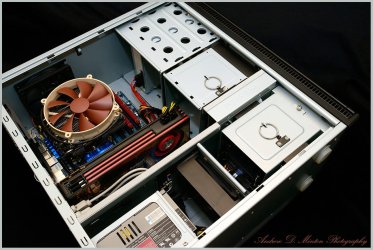
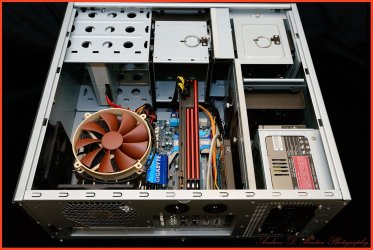
My Backup Rig...

About a month ago I upgraded to an Haswell system posted here - http://www.sevenforums.com/pc-custo...6779-show-us-your-rig-6-a-67.html#post2611417
Well the parts from the old system went towards upgrading my backup system. Moving from an old Q6600 system to this first gen i7-950 system....

Antec-P182-Case.jpg

Antec-P182-Case2.jpg


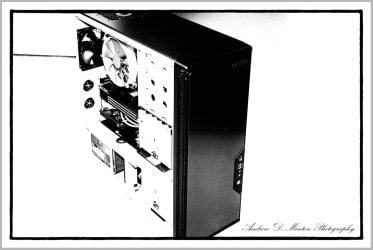
Antec-P182-Case-B&W.jpg

System Specs….
  • Antec P182 Case
  • Gigabyte GA-X58A-UD5
  • Intel i7-950 (3.06gig)
  • 12 Gig Corsair Dominator GT RAM
  • Noctua NH-C12P SE14
  • OCZ 128Gig Vertex 2
  • Western Digital 500Gig Caviar Black HD
  • AMD (Sapphire) HD 6950 GPU (2gig)
  • Lite-on Optical Drive
  • SoundBlaster X-Fi Titanium Pro
  • Antec Neo HE 550 power supply
  • Windows 7 Ultimate (64-bit)
Unfortunately it looks like I’ll have to upgrade my PS as my board isn’t holding my overclocks. I Keep getting a BIOS notice basically stating it can’t hold my assigned specs due to changes in voltage. Pretty much everything in this case is the same as was in my HAF X case other than the PS. I had an Antec 850watt there, here its a 550. It also looks like I’ll have to upgrade the case seeing how tight and cramped things are, especially for air flow.
 

My Computer My Computer

Computer type
PC/Desktop
Computer Manufacturer/Model Number
Custom built by me.
OS
Windows 10 Pro
CPU
Intel Core i7-4770K (3.5Ghz)
Motherboard
Gigabyte G1 Sniper 5 (F10 Bios)
Memory
32 gig Corsair Dominator Platinum (4x8Gig)
Graphics Card(s)
Sapphire Tri-X R9 Fury
Sound Card
Soundblaster ZXR
Monitor(s) Displays
NEC PA242W 24" LCD Monitor
Screen Resolution
1920 x 1200
Hard Drives
Primary - Samsung 850 Pro (512gig), Samsung 840 Pro (256gig), 2TB WD Caviar Black.
PSU
EVGA Supernova 1000 G2
Case
Cooler Master HAF X
Cooling
Corsair H100i with Corsair Air Series SP120 Quiet Fans
Keyboard
Logitech Wireless Wave
Mouse
Logitech Performance MX
Internet Speed
High Speed Cable
Antivirus
Norton Security
Browser
IE11
Other Info
Memory Timings - 1866MHz @ 9-9-9-27-1T @ 1.5 volts
Drew, that's a banging backup rig and you captured if with amazing images !
 

My Computer My Computer

Computer type
PC/Desktop
Computer Manufacturer/Model Number
A blend of brains, brawn and dumb luck.
OS
Windows 7 Ultimate 64
CPU
i7 3770k OC'd 4.6 @ 1.17v, also FX 8120 & i5 miniITX
Motherboard
MSI P67A-GD80 b3
Memory
32 gb G.Skill Sniper DDR3 10-12-12-31 @ 2133
Graphics Card(s)
XFX Radeon 7870 2GB DDR5
Sound Card
Sound Blaster Z Series Card
Monitor(s) Displays
(2) LG LED 23" 1920 x 1080 2ms Monitors via mini d-port
Screen Resolution
1680 X 1050 p
Hard Drives
Samsung 256 gb 830 SSD sata III
(1) 1 tb WD Black
(2) 1 tb Hitachi deskmates/sata II
(2) 1 tb WD green/sata II
(2) 3 tb Seagate Barracuda
(1) 120 gb OCZ Vertex SS
(1) Drobo 5N w/5 Seagate 3tb
PSU
EVGA modular 1000G2 80% gold rating & APC 1200 RS
Case
CoolerMaster Storm Styker
Cooling
7 case fans 140mm & 120mm, NZXT Kraken X60
Keyboard
(2) Logitech Illuminated Keyboards (1) usb (1) wireless
Mouse
Logitech G700 & T-BC21 - nano nx for the laptop
Internet Speed
Basic 120mbps down
Antivirus
Trend Micro Titanium Max Security & Malwarebytes Premium
Browser
Chrome and IE 10
Other Info
5 Noctua case fans + 3 Noctua in p/p on NZXT cooler
Integrated hot swap drive bays for 2.5" Drives
(2) Lite-on dvd/cd/Blu Ray optical 22X
Integrated fan controller and led on/off
HP Officejet Pro 8630 all-n-one
Hot-swappable 3.5" hard drive bay
Netgear Nighthawk router
Asus USB 3 & sata 6 PCIe card
Vantec IDE to sata adptr./Ultra sata adptr
Lenovo L420 i5 lappy with m sata
Drobo 5N advanced NAS
Drew, that's what I call a backup system! Really, there are many on this Forum who would be proud to have that as a main system. Great job. A new PSU is not such a high price for a system like that. You've done well for yourself, congratulations. Very well done indeed. Also, you take some great pictures and from some unusual perspectives too, which I really like and appreciate.
 

My Computers My Computers

System One System Two

  • Computer type
    PC/Desktop
    Computer Manufacturer/Model Number
    ALWAYS UNDER CONSTRUCTION
    OS
    Windows 11 Pro
    CPU
    Ryzen 9 5900X
    Motherboard
    Asus X570 Crosshair Viii Hero
    Memory
    32GB G Skill DDR4-3600
    Graphics Card(s)
    EVGA RTX 3080 FTW 3 Ultra
    Sound Card
    On Board/Sennheiser PC37X Headset
    Monitor(s) Displays
    3 X Asus 27"
    Screen Resolution
    2560x1440
    Hard Drives
    2 X 1 TB NVME drives
    PSU
    EVGA 850
    Case
    Phanteks Eclipse P400A
    Cooling
    EVGA 280 AIO
    Keyboard
    Logitech G510s/ Logitech G13
    Mouse
    Logitech G502
    Internet Speed
    24/1
    Antivirus
    ESET/MBAM Pro/SAS Pro
    Browser
    Chrome/ Firefox/ Edge
  • Computer type
    Laptop
    System Manufacturer/Model Number
    Dell 16 Plus
    OS
    Windows 11 Pro
    CPU
    Intel Ultra 9 288V
    Memory
    32 GB LPDDR5X 8533
    Monitor(s) Displays
    16" Mini-LED HDR600 Touch 90 Hz
    Screen Resolution
    2560X1600
    Hard Drives
    1 TB NVME
sygnus21 That is a good looking build. Very clean and tidy and organized.
I agree that build is worth and deserves a nice new power supply. I'm thinking a Corsair or Seasonic 650w or higher.

I'm also thinking a new motherboard battery (bios) might be helpful.
 

My Computer My Computer

Computer type
PC/Desktop
Computer Manufacturer/Model Number
Home made Desktop
OS
Windows 10 Pro. 64/ version 1709 Windows 7 Pro/64
CPU
Intel i7-6800K @ 4.3
Motherboard
ASUS X-99 Deluxe II
Memory
Corsair Platinum 16 gig @2400
Graphics Card(s)
EVGA GTX 1070 OC
Monitor(s) Displays
Asus 27" LED LCD/VE278Q
Screen Resolution
1920-1080 or 1280-720 HDMI
Hard Drives
INTEL SSD 730-240 Gb Sata 3.0/
PSU
EVGA Platium 1200W
Case
Phanteks Luxe Tempered Glass 8 fans/ one radiator
Cooling
XSPC/ Water Cooled CPU
Keyboard
Das 4 Professional
Mouse
Logitech M705/MX Anywhere 2-S
Internet Speed
100 mbits
Antivirus
Microsoft Security Essentials/ Malwarebytes Premium 3.0/ SAS
Browser
I.E. 11 default/Firefox/ ISP Time Warner Cable/Spectrum
Other Info
LG BluRay Burner/
Sound system-KLipsch-THX/
Icy Dock ssd Hot Swap bays.
Drew, nice back up machine and nice lighting on the rig as well. do you use an umbrella reflector or tent lighting? I always get a crappy flash reflection.
 

My Computer My Computer

Computer type
PC/Desktop
Computer Manufacturer/Model Number
Home Built Desktop By DataTech
OS
Windows 7 Ultimate X64 SP1
CPU
Intel i5-2550K, Differing ~4.4-4.8GHz No built in GPU
Motherboard
ASUS P8Z68-V PRO/GEN3
Memory
16GB G.Skill Sniper 1866MHz @ 2133MHz 2x8GB
Graphics Card(s)
ASUS GTX650TIB-DC2OC-2GD5, (650TI Boost)
Sound Card
Onboard Realtek 5-1
Monitor(s) Displays
Samsung P2570HD
Screen Resolution
1920x1080
Hard Drives
Samsung 840 Pro 256GB SSD for OS, 500GB Seagate Constellation (Enterprise drive) for Data
PSU
Corsair HX650W
Case
Inwin Dragon Rider
Cooling
Hyper 212 EVO w/two Noctua fans, push-pull, @1300 RPM
Keyboard
E-Z Eyes, bright yellow keys with large characters
Mouse
steelseries SENSEI Laser Pro Gaming
Internet Speed
48-51Mbs Mbs down, 11 Mbs up Xfinity Cable
Antivirus
Norton Internet Security 2013
Browser
IE 10, Opera, Pale Moon if needed
Other Info
4 case fans, LG BluRay-RE, ASUS DVD-RW, Mr. Fusion power supply, 1.21 gigawatts.
Thanks guys... :D

Drew, that's a banging backup rig and you captured if with amazing images !

Yeah I have to agree it is a nice backup rig, and it served me well as a main rig :)

And yeah, I have to say that high-key image is banging, if I say so myself :D

Drew, that's what I call a backup system! Really, there are many on this Forum who would be proud to have that as a main system. Great job. A new PSU is not such a high price for a system like that. You've done well for yourself, congratulations. Very well done indeed. Also, you take some great pictures and from some unusual perspectives too, which I really like and appreciate.

Appreciate that Steve, I always try looking at things from a different angle. Helps with perspective, even in life :)

sygnus21 That is a good looking build. Very clean and tidy and organized.
I agree that build is worth and deserves a nice new power supply. I'm thinking a Corsair or Seasonic 650w or higher.

I'm also thinking a new motherboard battery (bios) might be helpful.

Unless Antec fell to the depths of garbage, they'll always be in my heart. Just love Antec power supplies, but definitely at least an 850 ;)

Drew, nice back up machine and nice lighting on the rig as well. do you use an umbrella reflector or tent lighting? I always get a crappy flash reflection.

I have a flash with a tilt/swivel head so I point it at the ceiling and reflect light back on the subject. This way it helps defuse the light as not to wash things out. Plus it helps with evening the light.

Appreciate all the kind comments :)
 

My Computer My Computer

Computer type
PC/Desktop
Computer Manufacturer/Model Number
Custom built by me.
OS
Windows 10 Pro
CPU
Intel Core i7-4770K (3.5Ghz)
Motherboard
Gigabyte G1 Sniper 5 (F10 Bios)
Memory
32 gig Corsair Dominator Platinum (4x8Gig)
Graphics Card(s)
Sapphire Tri-X R9 Fury
Sound Card
Soundblaster ZXR
Monitor(s) Displays
NEC PA242W 24" LCD Monitor
Screen Resolution
1920 x 1200
Hard Drives
Primary - Samsung 850 Pro (512gig), Samsung 840 Pro (256gig), 2TB WD Caviar Black.
PSU
EVGA Supernova 1000 G2
Case
Cooler Master HAF X
Cooling
Corsair H100i with Corsair Air Series SP120 Quiet Fans
Keyboard
Logitech Wireless Wave
Mouse
Logitech Performance MX
Internet Speed
High Speed Cable
Antivirus
Norton Security
Browser
IE11
Other Info
Memory Timings - 1866MHz @ 9-9-9-27-1T @ 1.5 volts
. I say that as I send off my Maximus V Extreme for RMA for the 5Th time in about 15 months. An almost $400 motherboard that Asus has had more than I have. But, honestly, when it works right, there is not another board like it. It's a crime they can't figure out how to make it work and keep it that way. Jack would agree, I'm sure. [/RANT]
I had a dead AM3 Asus board I returned to ASUS in Jeffersonville in Southern Indiana and got a different board back which was not dead but none of the PCI sockets worked at all. Cost me $25 to ship it first time so I have decided to forget about shipping it back as that will be $50 total and soon we will be in cost of motherboard territory. Frankly ASUS support is absolutely CRAP and although I have just bought 2 Sabertooth boards with 5 year warranty's what good is the warranty if you get a failure and they send you someone else's crap board that does not work. I have read horror stories on Overclockers Forums about Asus support. I am positive it is a 3rd part company who does not give a toss about repairing anything properly. It should be known that the failure rate is low but if it does fail the chances of getting the motherboard fixed IMHO from what I have read is zero. I would complain to their head office in CA and demand a replacement. My experience is I have a board that runs a videocard and CPU but forget about using any add on cards and it is not worth sending it back.:mad:

RMA Thru Brand Companies - Overclockers Forums
Asus RMA for repairs under warranty, or lack thereof - Overclockers Forums
Asus... is starting to suck - Overclockers Forums
 

My Computer My Computer

Computer type
PC/Desktop
Computer Manufacturer/Model Number
Bluethunder II
OS
Windows 7 x64 Ultimate and numerous virtual machines
CPU
AMD FX-8350 Vishera 32nm Technology @ 4.2 GHz default
Motherboard
ASUSTeK COMPUTER INC. SABERTOOTH 990FX R2.0 (Socket 942)
Memory
G Skill 32.0GB Dual-Channel DDR3 @ 1204MHz (11-13-13-31)
Graphics Card(s)
EVGA GeForce GTX 960 4GB Super SC ACX 2.0+ with Back Plate
Sound Card
Creative X-Fi Titanium HD Audiophile PCIe
Monitor(s) Displays
LG L227WTG x 3
Screen Resolution
1680 x 1050 16:10
Hard Drives
238GB Samsung850 PRO SATA Disk Device (SSD)
1863GB Seagate ST2000DM 001-1CH164 (SATA)
1397GB Seagate ST1500DL 003-9VT16L(SATA)
466GB Western Digital WDC WD50 03AZEX-00K1GA0 (SATA) x 2
932GB Seagate ST310005 28AS SATA Disk Device (SATA)
PSU
Enermax Revolution87+ 1000 Watts Gold Certified Power Supply
Case
Rocketfish Full Tower
Cooling
Cooler Master Hyper 212 EVO Push Pull 120mm Fans
Keyboard
Logitech K740
Mouse
Logitech G100S Laser LED + Logitech Gamepad F310
Internet Speed
500 mbs down and 30mbs up
Antivirus
Malwarebytes Pro & Avast and MSE on certain Virtual Machines
Browser
Firefox (Main) Chrome, Internet Explorer (Back Up)
Other Info
Logitech X 230 2.1 Stereo System and 5.1 Yamaha RX V2090
B&W DM6 Monitor Speakers + Center and Surround Speakers
Using Mouse Without Borders (Google it)
...OK, I will freely admit to being crazy. I do a lot of backups to at least 3 different hard drives. I'm obsessive compulsive enough that I have backups of the backups. So, I use a lot of esata ports in my obsessivness. But, I do need a sale on Hard drives. I'm running low. I think I have only about 6 or 7 TB of extra drives. And crankypenguin thought he was crazy. He hasn't met me yet, really. I'm way over the top; about a lot of things.

You think you're crazy? I maintain four backup HDDs for each one in use: two kept locally and two kept in my safe deposit box at my credit union.

I had to add a couple of e-SATA ports to my rig but rarely use them. Instead, I use the hot swap bays installed in my computer to park the backup HDDs during backups. When not in use, I keep them in a foam "egg crate" in a dresser drawer where I can get to them easily.
 

My Computer My Computer

Computer type
PC/Desktop
Computer Manufacturer/Model Number
Custom Build
OS
Win 7 Ultimate 64 bit
CPU
Intel i7-3930K
Motherboard
ASUS P9X79 WS
Memory
Kingston HyperX Genesis 32GB Kit (8x4GB Modules) 1600MHz DDR
Graphics Card(s)
MSI R7850 Twin Frozr 2GD5/OC Radeon HD 7850 2GB 256-bit GDDR
Sound Card
Asus Xonar Essence STX
Monitor(s) Displays
3x Asus VG248QE 24", Vizio 32" TV
Screen Resolution
1920 x 1080, ?
Hard Drives
Samsung 128GB 840 Pro SSD (1),
Samsung 4TB 850 EVO SSDs (4)
Samsung 4TB 850 EVO SSDs (16) external backup drives used in 2.5" hot swap bays in the computer.
PSU
Corsair HX750w
Case
Antec Two Hundred v2 (modified)
Cooling
Cooler Master GeminII S524 120mm (fan replaced with a 140mm)
Keyboard
Logitech G510s
Mouse
Logitech M525 (two in use)
Internet Speed
=< 32Mbps down, 8Mbps up
Antivirus
AVAST!, MBAM, SAS, Spybot S&D (all but MBAM free) Glary Util
Browser
IE11
Other Info
LSI 9211-8i HBA card (8 SATA III ports), 2.5" & 3.5" Hot Swap Bays, HooToo HT-CR001 PCI-E to USB 3.0 Internal Hub + 6 Slot Card Reader, and LG Model CH12LS28 BD-ROM Optical Drive. Also, ScanSnap S1500 ADF duplexing scanner, Canon 9000F flat bed scanner, Corsair SP2500 2.1 speakers, Samsung CLP 415nw laser color printer, Cyberpower PP2200SW UPS
Tony, as hard as I may want to try, I cannot argue with anything you said. You are right on in my experience with Asus so far. The starnge thing is, they must have bins they throw the boards in, bad memory, bad cpu pins, bad pcie slots and all of that. It just depends which bin the pulll the board from thet deside to send back to you. They seem to send you one from the same bin yours is going into. I just got this board back from RMA because it was running the pcie X16_1 slot at X1 instead of X16. This one, runs the PCIE _1 X16 slot at X8 instead of x16. So, I guess they figured I got a better board. Only problem is, is that X16 slot is the only slot on the whole board that works at all. We're talking about an Eatx board with 5 X16 slots. So, I can't argue with anything you are saying. I have a Maximus V Gene and a Sabertooth that work great (knocks on wood), bit their flagship Extreme model, they can't seem to get to work at all. I need to talk to or write somebody. The real strange thing is, because i wanted a board that would be trouble free, I bought their flagship. I know if I owned the company heads would roll if my flagship model was not an excellent performer and excellent quality control. I would listen to no excuses. I will give it credit for performance, when it works, that is. I guess because I feel that way is why I'm not CEO of asus.
 

My Computers My Computers

System One System Two

  • Computer type
    PC/Desktop
    Computer Manufacturer/Model Number
    ALWAYS UNDER CONSTRUCTION
    OS
    Windows 11 Pro
    CPU
    Ryzen 9 5900X
    Motherboard
    Asus X570 Crosshair Viii Hero
    Memory
    32GB G Skill DDR4-3600
    Graphics Card(s)
    EVGA RTX 3080 FTW 3 Ultra
    Sound Card
    On Board/Sennheiser PC37X Headset
    Monitor(s) Displays
    3 X Asus 27"
    Screen Resolution
    2560x1440
    Hard Drives
    2 X 1 TB NVME drives
    PSU
    EVGA 850
    Case
    Phanteks Eclipse P400A
    Cooling
    EVGA 280 AIO
    Keyboard
    Logitech G510s/ Logitech G13
    Mouse
    Logitech G502
    Internet Speed
    24/1
    Antivirus
    ESET/MBAM Pro/SAS Pro
    Browser
    Chrome/ Firefox/ Edge
  • Computer type
    Laptop
    System Manufacturer/Model Number
    Dell 16 Plus
    OS
    Windows 11 Pro
    CPU
    Intel Ultra 9 288V
    Memory
    32 GB LPDDR5X 8533
    Monitor(s) Displays
    16" Mini-LED HDR600 Touch 90 Hz
    Screen Resolution
    2560X1600
    Hard Drives
    1 TB NVME
Alan, The CPU socket takes up half the board. That thing is really small, but it looks pretty nice. Have you had a chance to bench test it yet? I, for one, would like a report on the pros and cons. It gives me some ideas.
Lady F. I know it may mess up your internal wiring slightly, but they do make internal USB expansions that will add a couple of USB Headers to the board, but the piece also has slots for 2 USB flash drives to be mounted to it internally. Something you aren't going to be changing a lot is what I'm sure they would be used for. Something like maybe a USB TV tuner, maybe. I bought one, but haven't done the build with it yet so can't give you a report. The best part for you though, is it does not use a PCIE lane. It just attaches to a motherboard USB header. If you have any interest, I can find the link fairly easily for you. Maybe Gary could give you some info on it, if I'm not wrong, I think he bought one I gave him the link for. I needed it be cause Asus, in their infinite wisdom, decided that on their most expensive and flagship Z77 board, they would only put 2 USB 2.0 headers on it. So, I ran out just from connecting FP connections, then needed one for the Corsair, link, card reader and a couple of other things. I've said this about dozens of things on here, but I have to wonder if the manufacturers who sell some of these components have ever tried to use them for themselves and install everyday stuff. If they did, people like us wouldn't complain about boards, cases, pcie lanes and stuff quite as much. And, I forgot the part about making them work right, for something real new, different and unusual. I say that as I send off my Maximus V Extreme for RMA for the 5Th time in about 15 months. An almost $400 motherboard that Asus has had more than I have. But, honestly, when it works right, there is not another board like it. It's a crime they can't figure out how to make it work and keep it that way. Jack would agree, I'm sure. [/RANT] back to your issues. Let me know if you would like a link to the USB expansion thing. If you have any interest at all, I think they are pretty cheap, so no big risk if you don't like it. Technically, you only gain 2 USB headers as it gives you 3 but takes 1 to make it work. But, that's a 100% gain for me. LOL

EDIT: OK here it is. It's only about 6" long Amazon.com : NZXT IU01 Internal USB Expansion (Black) : Desktop Computer Usb Port Cards : Electronics


View attachment 299899


.

Steve you're a mind reader, I just PM'ed Jeannie about the USB expander and blamed you for it. I have hooked it up to test it but haven't "installed" it anywhere. It works nicely and takes power from a Molex connector. As a test I booted a flash drive with it and read/wrote some too. Just like having them on the board.

I agree with the rant, I have two mid range ASUS boards that both have 4 USB 2.0 headers, the more expensive Sabertooth has only 3.

I currently have a vacant PCI-e slot available for a dual TV tuner. If I decide I need a second dual tuner, I can change out the card reader and give up two of my current USB 3.0 rear ports. So far, I'm using only one USB 3.0 port for the 2 port hub I'm using on my desk. That can be sacrificed if ever I need to use both of the remaining rear USB 3.0 ports. If push comes to shove and I need more USB 3.0 ports after adding the second tuner, I can use the PCI-e slot that is paired to my GPU card for an expansion card and just settle for running the GPU card on only 8 lanes. I don't see many USB 3.0 devices being connected to a rear port anytime in my foreseeable future, however. The printer is wireless. The two scanners and the UPS connect via USB 2.0. Even if I replace my current ADF scanner with the newer model, which will run on both USB 3.0 and Wi-Fi, I can just run it on Wi-Fi (it will also run on USB 2.0; it would just be a bit slower). The only USB 3.0 device I can see adding is an AC Wi-Fi adapter.

The whole argument is moot for now until I determine if I need more than one tuner anyway. Also, I haven't found any USB dual TV tuners. Adding a USB expansion card and multiple USB tuners inside my case would be just too crowded, if I could even get them all to fit.
 

My Computer My Computer

Computer type
PC/Desktop
Computer Manufacturer/Model Number
Custom Build
OS
Win 7 Ultimate 64 bit
CPU
Intel i7-3930K
Motherboard
ASUS P9X79 WS
Memory
Kingston HyperX Genesis 32GB Kit (8x4GB Modules) 1600MHz DDR
Graphics Card(s)
MSI R7850 Twin Frozr 2GD5/OC Radeon HD 7850 2GB 256-bit GDDR
Sound Card
Asus Xonar Essence STX
Monitor(s) Displays
3x Asus VG248QE 24", Vizio 32" TV
Screen Resolution
1920 x 1080, ?
Hard Drives
Samsung 128GB 840 Pro SSD (1),
Samsung 4TB 850 EVO SSDs (4)
Samsung 4TB 850 EVO SSDs (16) external backup drives used in 2.5" hot swap bays in the computer.
PSU
Corsair HX750w
Case
Antec Two Hundred v2 (modified)
Cooling
Cooler Master GeminII S524 120mm (fan replaced with a 140mm)
Keyboard
Logitech G510s
Mouse
Logitech M525 (two in use)
Internet Speed
=< 32Mbps down, 8Mbps up
Antivirus
AVAST!, MBAM, SAS, Spybot S&D (all but MBAM free) Glary Util
Browser
IE11
Other Info
LSI 9211-8i HBA card (8 SATA III ports), 2.5" & 3.5" Hot Swap Bays, HooToo HT-CR001 PCI-E to USB 3.0 Internal Hub + 6 Slot Card Reader, and LG Model CH12LS28 BD-ROM Optical Drive. Also, ScanSnap S1500 ADF duplexing scanner, Canon 9000F flat bed scanner, Corsair SP2500 2.1 speakers, Samsung CLP 415nw laser color printer, Cyberpower PP2200SW UPS
...OK, I will freely admit to being crazy. I do a lot of backups to at least 3 different hard drives. I'm obsessive compulsive enough that I have backups of the backups. So, I use a lot of esata ports in my obsessivness. But, I do need a sale on Hard drives. I'm running low. I think I have only about 6 or 7 TB of extra drives. And crankypenguin thought he was crazy. He hasn't met me yet, really. I'm way over the top; about a lot of things.

You think you're crazy? I maintain four backup HDDs for each one in use: two kept locally and two kept in my safe deposit box at my credit union.

I had to add a couple of e-SATA ports to my rig but rarely use them. Instead, I use the hot swap bays installed in my computer to park the backup HDDs during backups. When not in use, I keep them in a foam "egg crate" in a dresser drawer where I can get to them easily.

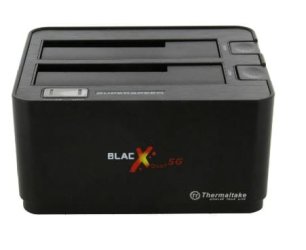
But, I am not the repository of the NSC's evesdropping program :roflmao: But, seriously, my set up leaves me no 5.25" drive bays left to use, so I have 2 to 3 of these filled with drives connected at almost all times. I find it easy and convienent, and I've had good luck with them. BTW, I keep a spare around just in case.

black x.JPG
 

My Computers My Computers

System One System Two

  • Computer type
    PC/Desktop
    Computer Manufacturer/Model Number
    ALWAYS UNDER CONSTRUCTION
    OS
    Windows 11 Pro
    CPU
    Ryzen 9 5900X
    Motherboard
    Asus X570 Crosshair Viii Hero
    Memory
    32GB G Skill DDR4-3600
    Graphics Card(s)
    EVGA RTX 3080 FTW 3 Ultra
    Sound Card
    On Board/Sennheiser PC37X Headset
    Monitor(s) Displays
    3 X Asus 27"
    Screen Resolution
    2560x1440
    Hard Drives
    2 X 1 TB NVME drives
    PSU
    EVGA 850
    Case
    Phanteks Eclipse P400A
    Cooling
    EVGA 280 AIO
    Keyboard
    Logitech G510s/ Logitech G13
    Mouse
    Logitech G502
    Internet Speed
    24/1
    Antivirus
    ESET/MBAM Pro/SAS Pro
    Browser
    Chrome/ Firefox/ Edge
  • Computer type
    Laptop
    System Manufacturer/Model Number
    Dell 16 Plus
    OS
    Windows 11 Pro
    CPU
    Intel Ultra 9 288V
    Memory
    32 GB LPDDR5X 8533
    Monitor(s) Displays
    16" Mini-LED HDR600 Touch 90 Hz
    Screen Resolution
    2560X1600
    Hard Drives
    1 TB NVME
I have a single slot external dock I used before I built my present rig I keep around just in case. It connects via e-SATA.

I have a USB 3.0 external card reader that connects via a cable so I could gain an additional 5.25" bay if push came to shove. I'm using an Antec EasySATA for my 3.5" internal dock (the 2.5" dock came built into my case:
antec_easysata.jpg

The cable is for the e-SATA port on the front. It's been discontinued so I managed to scare up a spare one while I could as well as some extra connector cards:

connettore.jpg

I recently spotted this internal dock online:

1347920016_docking-stations-startech~com-satadock525-satadock525.jpg

It looks pretty slick but there are four things I don't like about it. The doors look like they could let a lot of dust in, a 3.5" HDD will stick out about halfway, there is no way to lock or latch the drives in like the EasySATAs do, and the reviews have been less than stellar (mostly quality control issues; pity that).

One thing I like about the Corsair Obsidian 650d case is has a combination 3.5"/2.5" swap bay built in and has four 5.25" bays. Pity it's too big for me.
 

My Computer My Computer

Computer type
PC/Desktop
Computer Manufacturer/Model Number
Custom Build
OS
Win 7 Ultimate 64 bit
CPU
Intel i7-3930K
Motherboard
ASUS P9X79 WS
Memory
Kingston HyperX Genesis 32GB Kit (8x4GB Modules) 1600MHz DDR
Graphics Card(s)
MSI R7850 Twin Frozr 2GD5/OC Radeon HD 7850 2GB 256-bit GDDR
Sound Card
Asus Xonar Essence STX
Monitor(s) Displays
3x Asus VG248QE 24", Vizio 32" TV
Screen Resolution
1920 x 1080, ?
Hard Drives
Samsung 128GB 840 Pro SSD (1),
Samsung 4TB 850 EVO SSDs (4)
Samsung 4TB 850 EVO SSDs (16) external backup drives used in 2.5" hot swap bays in the computer.
PSU
Corsair HX750w
Case
Antec Two Hundred v2 (modified)
Cooling
Cooler Master GeminII S524 120mm (fan replaced with a 140mm)
Keyboard
Logitech G510s
Mouse
Logitech M525 (two in use)
Internet Speed
=< 32Mbps down, 8Mbps up
Antivirus
AVAST!, MBAM, SAS, Spybot S&D (all but MBAM free) Glary Util
Browser
IE11
Other Info
LSI 9211-8i HBA card (8 SATA III ports), 2.5" & 3.5" Hot Swap Bays, HooToo HT-CR001 PCI-E to USB 3.0 Internal Hub + 6 Slot Card Reader, and LG Model CH12LS28 BD-ROM Optical Drive. Also, ScanSnap S1500 ADF duplexing scanner, Canon 9000F flat bed scanner, Corsair SP2500 2.1 speakers, Samsung CLP 415nw laser color printer, Cyberpower PP2200SW UPS
Frankly ASUS support is absolutely CRAP and although I have just bought 2 Sabertooth boards with 5 year warranty's what good is the warranty if you get a failure and they send you someone else's crap board that does not work. I have read horror stories on Overclockers Forums about Asus support. I am positive it is a 3rd part company who does not give a toss about repairing anything properly. It should be known that the failure rate is low but if it does fail the chances of getting the motherboard fixed IMHO from what I have read is zero.

Wow. For me this kind of validates my reluctance to get an Asus board when I was looking to pick a Z87 board - http://www.sevenforums.com/pc-custo...-z87-motherboard-suggestions.html#post2589840 - There were suggestions to go with an Asus board but I said no due to my personal experience with Asus's horrendous support on my Asus laptop.
It's too bad though because Asus is said to make some really good stuff but what's the use in taking a chance with them if you're going to get screwed by their customer service later on should you need them.

As I said before anyone can have a bad day, but when those bad days become consistent, that's when word gets out, and people shy away. I did.
 

My Computer My Computer

Computer type
PC/Desktop
Computer Manufacturer/Model Number
Custom built by me.
OS
Windows 10 Pro
CPU
Intel Core i7-4770K (3.5Ghz)
Motherboard
Gigabyte G1 Sniper 5 (F10 Bios)
Memory
32 gig Corsair Dominator Platinum (4x8Gig)
Graphics Card(s)
Sapphire Tri-X R9 Fury
Sound Card
Soundblaster ZXR
Monitor(s) Displays
NEC PA242W 24" LCD Monitor
Screen Resolution
1920 x 1200
Hard Drives
Primary - Samsung 850 Pro (512gig), Samsung 840 Pro (256gig), 2TB WD Caviar Black.
PSU
EVGA Supernova 1000 G2
Case
Cooler Master HAF X
Cooling
Corsair H100i with Corsair Air Series SP120 Quiet Fans
Keyboard
Logitech Wireless Wave
Mouse
Logitech Performance MX
Internet Speed
High Speed Cable
Antivirus
Norton Security
Browser
IE11
Other Info
Memory Timings - 1866MHz @ 9-9-9-27-1T @ 1.5 volts
Drew, the real unfortunate part is that is standard operating procedure for the industry. Neither Asrock, Gigabyte, MSI or anyone else is any better. I've had the opportunity to deal with all of them. I really think the issue lies not with the customer suport people. Actually I have had good service from the customer support people at Asus. I believe the problem lies with the actual technitians who actually do the 'repairs' to the board. I have actually received the same board back from an RMA to install new bios EEPROMs and waht I received still had my exact overclock settings in bios which meant they just put it in another box and sent it right back. They didn't even touch it.
 

My Computers My Computers

System One System Two

  • Computer type
    PC/Desktop
    Computer Manufacturer/Model Number
    ALWAYS UNDER CONSTRUCTION
    OS
    Windows 11 Pro
    CPU
    Ryzen 9 5900X
    Motherboard
    Asus X570 Crosshair Viii Hero
    Memory
    32GB G Skill DDR4-3600
    Graphics Card(s)
    EVGA RTX 3080 FTW 3 Ultra
    Sound Card
    On Board/Sennheiser PC37X Headset
    Monitor(s) Displays
    3 X Asus 27"
    Screen Resolution
    2560x1440
    Hard Drives
    2 X 1 TB NVME drives
    PSU
    EVGA 850
    Case
    Phanteks Eclipse P400A
    Cooling
    EVGA 280 AIO
    Keyboard
    Logitech G510s/ Logitech G13
    Mouse
    Logitech G502
    Internet Speed
    24/1
    Antivirus
    ESET/MBAM Pro/SAS Pro
    Browser
    Chrome/ Firefox/ Edge
  • Computer type
    Laptop
    System Manufacturer/Model Number
    Dell 16 Plus
    OS
    Windows 11 Pro
    CPU
    Intel Ultra 9 288V
    Memory
    32 GB LPDDR5X 8533
    Monitor(s) Displays
    16" Mini-LED HDR600 Touch 90 Hz
    Screen Resolution
    2560X1600
    Hard Drives
    1 TB NVME
No matter who's at fault, you can't as a company bury your head in the sand a pretend to not hear the cries of your customers. This to me only makes the company worse.

And though this may be SOP, which I reluctantly agree, some don't always go out their way to make you feel like they're doing you a favor by providing you customer support.

But yes, unfortunately many many companies are going the KOA (kiss our a..) way of customer service. All we, the consumers can do is speak with our wallet. if enough consumers do this, companies will have to start listening because their profits will suffer.

Yes, all may be doing the same thing, but when some are louder than others, I stay away from them.

My two cents.
 

My Computer My Computer

Computer type
PC/Desktop
Computer Manufacturer/Model Number
Custom built by me.
OS
Windows 10 Pro
CPU
Intel Core i7-4770K (3.5Ghz)
Motherboard
Gigabyte G1 Sniper 5 (F10 Bios)
Memory
32 gig Corsair Dominator Platinum (4x8Gig)
Graphics Card(s)
Sapphire Tri-X R9 Fury
Sound Card
Soundblaster ZXR
Monitor(s) Displays
NEC PA242W 24" LCD Monitor
Screen Resolution
1920 x 1200
Hard Drives
Primary - Samsung 850 Pro (512gig), Samsung 840 Pro (256gig), 2TB WD Caviar Black.
PSU
EVGA Supernova 1000 G2
Case
Cooler Master HAF X
Cooling
Corsair H100i with Corsair Air Series SP120 Quiet Fans
Keyboard
Logitech Wireless Wave
Mouse
Logitech Performance MX
Internet Speed
High Speed Cable
Antivirus
Norton Security
Browser
IE11
Other Info
Memory Timings - 1866MHz @ 9-9-9-27-1T @ 1.5 volts
I have not had a problem with Asus or msi <yet>.....msi has been great to me, upgraded two motherboards that I rma'd, asus took a while to replace a sound card <xonar d1> but it was a painless process.
 

My Computer My Computer

Computer type
Laptop
Computer Manufacturer/Model Number
Dell Latitude E6410
OS
Windows 7 Home Premium (64 bit)
CPU
Intel I5 520m
Memory
8 GB
Graphics Card(s)
Intel integrated
Sound Card
IDT Digital Audio
Monitor(s) Displays
Dell ST2010
Screen Resolution
1600X900
Hard Drives
WD Scorpio Black 750GB
Keyboard
Microsoft Wireless Comfort Keyboard 5000
Mouse
Microsoft Wireless Mouse 5000
Internet Speed
350 mb/s down 12 mb/s up
Antivirus
NIS
Browser
Firefox
Other Info
Repaired trash lappy
No matter who's at fault, you can't as a company bury your head in the sand a pretend to not hear the cries of your customers. This to me only makes the company worse.

And though this may be SOP, which I reluctantly agree, some don't always go out their way to make you feel like they're doing you a favor by providing you customer support.

But yes, unfortunately many many companies are going the KOA (kiss our a..) way of customer service. All we, the consumers can do is speak with our wallet. if enough consumers do this, companies will have to start listening because their profits will suffer.

Yes, all may be doing the same thing, but when some are louder than others, I stay away from them.

My two cents.

I very much agree with you. I just wish there was some company that gave even mediocre service and good products that we could by from and send the other's a message they understand. That company would be EVGA if only they would start making decent boards.
 

My Computers My Computers

System One System Two

  • Computer type
    PC/Desktop
    Computer Manufacturer/Model Number
    ALWAYS UNDER CONSTRUCTION
    OS
    Windows 11 Pro
    CPU
    Ryzen 9 5900X
    Motherboard
    Asus X570 Crosshair Viii Hero
    Memory
    32GB G Skill DDR4-3600
    Graphics Card(s)
    EVGA RTX 3080 FTW 3 Ultra
    Sound Card
    On Board/Sennheiser PC37X Headset
    Monitor(s) Displays
    3 X Asus 27"
    Screen Resolution
    2560x1440
    Hard Drives
    2 X 1 TB NVME drives
    PSU
    EVGA 850
    Case
    Phanteks Eclipse P400A
    Cooling
    EVGA 280 AIO
    Keyboard
    Logitech G510s/ Logitech G13
    Mouse
    Logitech G502
    Internet Speed
    24/1
    Antivirus
    ESET/MBAM Pro/SAS Pro
    Browser
    Chrome/ Firefox/ Edge
  • Computer type
    Laptop
    System Manufacturer/Model Number
    Dell 16 Plus
    OS
    Windows 11 Pro
    CPU
    Intel Ultra 9 288V
    Memory
    32 GB LPDDR5X 8533
    Monitor(s) Displays
    16" Mini-LED HDR600 Touch 90 Hz
    Screen Resolution
    2560X1600
    Hard Drives
    1 TB NVME
Status
Not open for further replies.
Back
Top