Show us your Unigine Heaven benchmark scores!

I know the feeling :o
 

My Computer My Computer

At a glance

8 Pro x64i7 3770K 4.6GHz16GB G.Skill Trident X 2666mhzx2 EVGA 780 Ti Superclocked SLI
Computer type
PC/Desktop
Computer Manufacturer/Model Number
Systems by SmartEyeball
OS
8 Pro x64
CPU
i7 3770K 4.6GHz
Motherboard
ASUS P8Z77 WS
Memory
16GB G.Skill Trident X 2666mhz
Graphics Card(s)
x2 EVGA 780 Ti Superclocked SLI
Sound Card
SB X-FI Surround 5.1 PRO USB / ATH-AD900 Headphones
Monitor(s) Displays
x3 Dell U2410 / 58" Samsung
Screen Resolution
5760*1200/ 1920*1200
Hard Drives
2x Intel 520 240GB (RAID 0) * 2x WD Caviar Blacks 2TB (RAID 0) * 2TB WD Caviar Black * Sony Optirac DVD
PSU
Silverstone Strider Evolution 1200W
Case
Thermaltake Level 10 GT Snow Edition
Cooling
Noctua NH-D14
Keyboard
Topre Realforce // Ducky Shine MX Black // Filco Ninja TKL
Mouse
Thermaltake Theron (Highly Recommended) + Razer Imperator
Antivirus
MSE
Browser
IE, FF, WaterFox
Other Info
GT Extreme V2 Sim Racing Cockpit + 40" LCD and K/B Mouse stand ▼
Fanatec CSR Elite Wheel + Clubsport V1 Pedals + CSR shifter/7G-H ▼Saitek X52 Pro ▼ TrackIR 5 Pro
Buttkicker v2 Seat Rumbler with Dedicated 5.1 and Sub Woofer attached to frame ▼
=
Bloody Big Grin
From what i have read on surround/ eyefinity AMD support multiscreen gaming better than Nvidia with a lot less hassle. This is only from reading online though and not tested by myself.
 

My Computer My Computer

At a glance

Win7 Home Premium x64 SP1i7 4770k8Gb Kingston HyperX Beast 2400MHz @2133MHz 11...MSI GTX 780ti Gaming Oc x2
Computer type
PC/Desktop
Computer Manufacturer/Model Number
Custom build
OS
Win7 Home Premium x64 SP1
CPU
i7 4770k
Motherboard
Asus maximus VI Hero
Memory
8Gb Kingston HyperX Beast 2400MHz @2133MHz 11-12-11-30
Graphics Card(s)
MSI GTX 780ti Gaming Oc x2
Sound Card
Onboard ROG SupremeFX
Monitor(s) Displays
Asus VG248QE
Screen Resolution
3840X1080 144Hz
Hard Drives
Samung Evo 256Gb, OCZ Agility4 128Gb
1x1TB hitachi storage
PSU
EVGA Supernova 1000w Platinum
Case
Corsair Air 540
Cooling
Corsair H100i
Keyboard
Coolermaster Quickfire Pro
Mouse
Corsair M65 RGB
Internet Speed
74mb dwn/16up
Antivirus
MSE,Malwarebytes
Browser
Chrome
From what i have read on surround/ eyefinity AMD support multiscreen gaming better than Nvidia with a lot less hassle. This is only from reading online though and not tested by myself.

Yes I read that too Ryan on quite a few sites/reviews/benchmarks etc, but that was a few years back, things might have changed now, but smarteyeball is running a higher resolution on his 3 screens than the regular 1080 so that's gonna have a big impact on frame rates.

I expect if his monitors were all 1920x1080 then "maybe" you could get away with 2 cards. I think Vram plays a big part too when you go for a 3 monitor setup, I know the more you have the better as it uses a lot more.
I remember reading that somewhere, but again it was a while back.


At any rate, that is a kick ass rig smarteyeball has:cool:
 

My Computer My Computer

At a glance

Windows 7 Professional 64 bit
OS
Windows 7 Professional 64 bit
Yeah that res is a proper fps killer :P
Vram is getting used a lot more nowadays enit as even the likes of BF3 will easilly use 2Gb of vram on a full 64 payer map. If i remember rightly 2Gb vram is just about ok for 3x 1920x1080 but at a low fps. Any higher res though and 4Gb is a must.

+1 thats a bostin rig you have there Smarty :p
 

My Computer My Computer

At a glance

Win7 Home Premium x64 SP1i7 4770k8Gb Kingston HyperX Beast 2400MHz @2133MHz 11...MSI GTX 780ti Gaming Oc x2
Computer type
PC/Desktop
Computer Manufacturer/Model Number
Custom build
OS
Win7 Home Premium x64 SP1
CPU
i7 4770k
Motherboard
Asus maximus VI Hero
Memory
8Gb Kingston HyperX Beast 2400MHz @2133MHz 11-12-11-30
Graphics Card(s)
MSI GTX 780ti Gaming Oc x2
Sound Card
Onboard ROG SupremeFX
Monitor(s) Displays
Asus VG248QE
Screen Resolution
3840X1080 144Hz
Hard Drives
Samung Evo 256Gb, OCZ Agility4 128Gb
1x1TB hitachi storage
PSU
EVGA Supernova 1000w Platinum
Case
Corsair Air 540
Cooling
Corsair H100i
Keyboard
Coolermaster Quickfire Pro
Mouse
Corsair M65 RGB
Internet Speed
74mb dwn/16up
Antivirus
MSE,Malwarebytes
Browser
Chrome
I expect if his monitors were all 1920x1080 then "maybe" you could get away with 2 cards. I think Vram plays a big part too when you go for a 3 monitor setup, I know the more you have the better as it uses a lot more.
I remember reading that somewhere, but again it was a while back.

While there is a difference between 1080 and 1200 in FPS, at 5760 x 1*** it's not that big a difference.

You can get away with 2 cards and surround/ef. Although I wouldn't use any less than a pair of 7950 or 670's unless you have x3 22" screens.

The main difference between 2 and 3 cards I have noticed is that areas with 2 cards, it would either top out or drop to say 45FPS. With a 3rd card, the drop is less and it would go up to 60FPS more often.

Luckily some games are playable maxed with 2 cards already. Others like Bioshock INF, it gave the frames a boost enough to keep it @ 60FPS. The only time it dips, is when entering a new area. It quickly dips down to ~30FPS and then shoots back up to 60 and virtually stays there. For two cards, some detail lowering is a must but you can find a happy speed/quality mix.

Overall the 3rd card adds between ~0-30FPS+ and higher minimum frames. That higher can be the difference between kind of jerky 45FPS to smooth 60. Some games like Arma2 however, make zero difference.

Concerning VRAM, most games handle 2GB of VRAM +Surround quite well. I wouldn't tackle it with anything lese than 1.5GB/2GB though. MSAA is a big VRAM eater at high resolutions. Each step adds ~200MB+ to usage. Without AA, or FXAA, a lot of games sit at about 1.5-1.7GB already. Add x4AA and you might hit the buffer. Without, it's still under the limit.

But the biggest frame killer I've seen so far is SSAA (Screen Space Ambient Occlusion). With surround, that has to be turned off in all games.


At any rate, that is a kick ass rig smarteyeball has:cool:

+1 thats a bostin rig you have there Smarty :p

Thanks guys - I do love my setup. It took years to evolve, but evolve into man awesomeness it did :D

(Here's what it actually looks like)


*NB ▲ - I had a very loving and understanding wife with no kids... that was the result :p
 

My Computer My Computer

At a glance

8 Pro x64i7 3770K 4.6GHz16GB G.Skill Trident X 2666mhzx2 EVGA 780 Ti Superclocked SLI
Computer type
PC/Desktop
Computer Manufacturer/Model Number
Systems by SmartEyeball
OS
8 Pro x64
CPU
i7 3770K 4.6GHz
Motherboard
ASUS P8Z77 WS
Memory
16GB G.Skill Trident X 2666mhz
Graphics Card(s)
x2 EVGA 780 Ti Superclocked SLI
Sound Card
SB X-FI Surround 5.1 PRO USB / ATH-AD900 Headphones
Monitor(s) Displays
x3 Dell U2410 / 58" Samsung
Screen Resolution
5760*1200/ 1920*1200
Hard Drives
2x Intel 520 240GB (RAID 0) * 2x WD Caviar Blacks 2TB (RAID 0) * 2TB WD Caviar Black * Sony Optirac DVD
PSU
Silverstone Strider Evolution 1200W
Case
Thermaltake Level 10 GT Snow Edition
Cooling
Noctua NH-D14
Keyboard
Topre Realforce // Ducky Shine MX Black // Filco Ninja TKL
Mouse
Thermaltake Theron (Highly Recommended) + Razer Imperator
Antivirus
MSE
Browser
IE, FF, WaterFox
Other Info
GT Extreme V2 Sim Racing Cockpit + 40" LCD and K/B Mouse stand ▼
Fanatec CSR Elite Wheel + Clubsport V1 Pedals + CSR shifter/7G-H ▼Saitek X52 Pro ▼ TrackIR 5 Pro
Buttkicker v2 Seat Rumbler with Dedicated 5.1 and Sub Woofer attached to frame ▼
=
Bloody Big Grin
I expect if his monitors were all 1920x1080 then "maybe" you could get away with 2 cards. I think Vram plays a big part too when you go for a 3 monitor setup, I know the more you have the better as it uses a lot more.
I remember reading that somewhere, but again it was a while back.

While there is a difference between 1080 and 1200 in FPS, at 5760 x 1*** it's not that big a difference.

You can get away with 2 cards and surround/ef. Although I wouldn't use any less than a pair of 7950 or 670's unless you have x3 22" screens.

The main difference between 2 and 3 cards I have noticed is that areas with 2 cards, it would either top out or drop to say 45FPS. With a 3rd card, the drop is less and it would go up to 60FPS more often.

Luckily some games are playable maxed with 2 cards already. Others like Bioshock INF, it gave the frames a boost enough to keep it @ 60FPS. The only time it dips, is when entering a new area. It quickly dips down to ~30FPS and then shoots back up to 60 and virtually stays there. For two cards, some detail lowering is a must but you can find a happy speed/quality mix.

Overall the 3rd card adds between ~0-30FPS+ and higher minimum frames. That higher can be the difference between kind of jerky 45FPS to smooth 60. Some games like Arma2 however, make zero difference.

Concerning VRAM, most games handle 2GB of VRAM +Surround quite well. I wouldn't tackle it with anything lese than 1.5GB/2GB though. MSAA is a big VRAM eater at high resolutions. Each step adds ~200MB+ to usage. Without AA, or FXAA, a lot of games sit at about 1.5-1.7GB already. Add x4AA and you might hit the buffer. Without, it's still under the limit.

But the biggest frame killer I've seen so far is SSAA (Screen Space Ambient Occlusion). With surround, that has to be turned off in all games.


At any rate, that is a kick ass rig smarteyeball has:cool:

+1 thats a bostin rig you have there Smarty :p

Thanks guys - I do love my setup. It took years to evolve, but evolve into man awesomeness it did :D

(Here's what it actually looks like)


*NB ▲ - I had a very loving and understanding wife with no kids... that was the result :p
This single card right here is enough to run what you run by itself because Vram is very important for what you are using 5760/1200 or what ever this card 6Gb is what you need to run smooth I would be ok with this because I have that much Vram already so I would be ok with 2 cards I would get the 4 gb Versions of Nvidia to make it really run tops

you have 4.5gb with all three cards
 

My Computer My Computer

At a glance

Windows 10 Home Premium 64bit sp1Intel I7-6700K @ 4.6 Ghz 1.344 volts everyday OC32GB G-Skill TridentZ 3200mhz 16-18-18-38 DDR4Sli Gigabyte Windforce GTX 980 G1
Computer type
PC/Desktop
Computer Manufacturer/Model Number
CoreI7-6700K MrFingerIII Special Builds
OS
Windows 10 Home Premium 64bit sp1
CPU
Intel I7-6700K @ 4.6 Ghz 1.344 volts everyday OC
Motherboard
Asrock Fatality K6 Z170 Socket 1151
Memory
32GB G-Skill TridentZ 3200mhz 16-18-18-38 DDR4
Graphics Card(s)
Sli Gigabyte Windforce GTX 980 G1
Sound Card
AC97 Creative Rage Tactic 3D Headphones Bluetooth
Monitor(s) Displays
27" Asus ROG Swift PG278Q G-Sync 48" Vizio Smart HD TV
Screen Resolution
2560x1440p 27"- 48" Currently Gaming at 2560x1440p Res 2K
Hard Drives
250GB Samsung Evo840SSD Seagate baracuda 500 GB WD Mybook 500Gb 1TB Seagate Barracuda
PSU
HX1050w Corsair Silver 80plus certified crosfire/sli
Case
Enthod Pro Full Tower
Cooling
Corsair H110i GT 280 mm High Performance WaterBlock
Keyboard
Logitech wireless keyboard
Mouse
Logitech wireless mouse
Internet Speed
Cox Cable 100+ mb
Antivirus
WebRoot Spysweeper with Antivirus
Browser
IE-10, Chrome, Opera
Other Info
My Other Rig is a AMD FX8320E @4.6Ghz 16GB Ballistic Sport Ram
Mobo Asrock Fatality 990FX 120GB OCZ SSD 1TB Seagate Barracuda Corsair H75 Cooling PSU Corsair CX750
GPU GTX Gigabyte 970G1
At this stage, 6GB is overkill for most games. Handy for x3 2560x1400 surround though ;)

4GB is a real sweet spot. 2GB still good for most. Had a quick blast on Stalker COP. 1.4GB + x2AA

Games like Max Payne 3 seem to share RAM pretty well when going overboard of limit.
 

My Computer My Computer

At a glance

8 Pro x64i7 3770K 4.6GHz16GB G.Skill Trident X 2666mhzx2 EVGA 780 Ti Superclocked SLI
Computer type
PC/Desktop
Computer Manufacturer/Model Number
Systems by SmartEyeball
OS
8 Pro x64
CPU
i7 3770K 4.6GHz
Motherboard
ASUS P8Z77 WS
Memory
16GB G.Skill Trident X 2666mhz
Graphics Card(s)
x2 EVGA 780 Ti Superclocked SLI
Sound Card
SB X-FI Surround 5.1 PRO USB / ATH-AD900 Headphones
Monitor(s) Displays
x3 Dell U2410 / 58" Samsung
Screen Resolution
5760*1200/ 1920*1200
Hard Drives
2x Intel 520 240GB (RAID 0) * 2x WD Caviar Blacks 2TB (RAID 0) * 2TB WD Caviar Black * Sony Optirac DVD
PSU
Silverstone Strider Evolution 1200W
Case
Thermaltake Level 10 GT Snow Edition
Cooling
Noctua NH-D14
Keyboard
Topre Realforce // Ducky Shine MX Black // Filco Ninja TKL
Mouse
Thermaltake Theron (Highly Recommended) + Razer Imperator
Antivirus
MSE
Browser
IE, FF, WaterFox
Other Info
GT Extreme V2 Sim Racing Cockpit + 40" LCD and K/B Mouse stand ▼
Fanatec CSR Elite Wheel + Clubsport V1 Pedals + CSR shifter/7G-H ▼Saitek X52 Pro ▼ TrackIR 5 Pro
Buttkicker v2 Seat Rumbler with Dedicated 5.1 and Sub Woofer attached to frame ▼
=
Bloody Big Grin
At this stage, 6GB is overkill for most games. Handy for x3 2560x1400 surround though ;)

4GB is a real sweet spot. 2GB still good for most. Had a quick blast on Stalker COP. 1.4GB + x2AA

Games like Max Payne 3 seem to share RAM pretty well when going overboard of limit.
Max payne 3 for me toped out at 3gb something like that or 2gb because I remember 2x 6870's was like 1.6gb of vram
 

My Computer My Computer

At a glance

Windows 10 Home Premium 64bit sp1Intel I7-6700K @ 4.6 Ghz 1.344 volts everyday OC32GB G-Skill TridentZ 3200mhz 16-18-18-38 DDR4Sli Gigabyte Windforce GTX 980 G1
Computer type
PC/Desktop
Computer Manufacturer/Model Number
CoreI7-6700K MrFingerIII Special Builds
OS
Windows 10 Home Premium 64bit sp1
CPU
Intel I7-6700K @ 4.6 Ghz 1.344 volts everyday OC
Motherboard
Asrock Fatality K6 Z170 Socket 1151
Memory
32GB G-Skill TridentZ 3200mhz 16-18-18-38 DDR4
Graphics Card(s)
Sli Gigabyte Windforce GTX 980 G1
Sound Card
AC97 Creative Rage Tactic 3D Headphones Bluetooth
Monitor(s) Displays
27" Asus ROG Swift PG278Q G-Sync 48" Vizio Smart HD TV
Screen Resolution
2560x1440p 27"- 48" Currently Gaming at 2560x1440p Res 2K
Hard Drives
250GB Samsung Evo840SSD Seagate baracuda 500 GB WD Mybook 500Gb 1TB Seagate Barracuda
PSU
HX1050w Corsair Silver 80plus certified crosfire/sli
Case
Enthod Pro Full Tower
Cooling
Corsair H110i GT 280 mm High Performance WaterBlock
Keyboard
Logitech wireless keyboard
Mouse
Logitech wireless mouse
Internet Speed
Cox Cable 100+ mb
Antivirus
WebRoot Spysweeper with Antivirus
Browser
IE-10, Chrome, Opera
Other Info
My Other Rig is a AMD FX8320E @4.6Ghz 16GB Ballistic Sport Ram
Mobo Asrock Fatality 990FX 120GB OCZ SSD 1TB Seagate Barracuda Corsair H75 Cooling PSU Corsair CX750
GPU GTX Gigabyte 970G1
I expect if his monitors were all 1920x1080 then "maybe" you could get away with 2 cards. I think Vram plays a big part too when you go for a 3 monitor setup, I know the more you have the better as it uses a lot more.
I remember reading that somewhere, but again it was a while back.

While there is a difference between 1080 and 1200 in FPS, at 5760 x 1*** it's not that big a difference.

You can get away with 2 cards and surround/ef. Although I wouldn't use any less than a pair of 7950 or 670's unless you have x3 22" screens.

The main difference between 2 and 3 cards I have noticed is that areas with 2 cards, it would either top out or drop to say 45FPS. With a 3rd card, the drop is less and it would go up to 60FPS more often.

Luckily some games are playable maxed with 2 cards already. Others like Bioshock INF, it gave the frames a boost enough to keep it @ 60FPS. The only time it dips, is when entering a new area. It quickly dips down to ~30FPS and then shoots back up to 60 and virtually stays there. For two cards, some detail lowering is a must but you can find a happy speed/quality mix.

Overall the 3rd card adds between ~0-30FPS+ and higher minimum frames. That higher can be the difference between kind of jerky 45FPS to smooth 60. Some games like Arma2 however, make zero difference.

Concerning VRAM, most games handle 2GB of VRAM +Surround quite well. I wouldn't tackle it with anything lese than 1.5GB/2GB though. MSAA is a big VRAM eater at high resolutions. Each step adds ~200MB+ to usage. Without AA, or FXAA, a lot of games sit at about 1.5-1.7GB already. Add x4AA and you might hit the buffer. Without, it's still under the limit.

But the biggest frame killer I've seen so far is SSAA (Screen Space Ambient Occlusion). With surround, that has to be turned off in all games.


At any rate, that is a kick ass rig smarteyeball has:cool:

+1 thats a bostin rig you have there Smarty :p

Thanks guys - I do love my setup. It took years to evolve, but evolve into man awesomeness it did :D

(Here's what it actually looks like)


*NB ▲ - I had a very loving and understanding wife with no kids... that was the result :p

Cheers for the info mate, Very helpfull :D
Wicked man cave :thumbsup:
 

My Computer My Computer

At a glance

Win7 Home Premium x64 SP1i7 4770k8Gb Kingston HyperX Beast 2400MHz @2133MHz 11...MSI GTX 780ti Gaming Oc x2
Computer type
PC/Desktop
Computer Manufacturer/Model Number
Custom build
OS
Win7 Home Premium x64 SP1
CPU
i7 4770k
Motherboard
Asus maximus VI Hero
Memory
8Gb Kingston HyperX Beast 2400MHz @2133MHz 11-12-11-30
Graphics Card(s)
MSI GTX 780ti Gaming Oc x2
Sound Card
Onboard ROG SupremeFX
Monitor(s) Displays
Asus VG248QE
Screen Resolution
3840X1080 144Hz
Hard Drives
Samung Evo 256Gb, OCZ Agility4 128Gb
1x1TB hitachi storage
PSU
EVGA Supernova 1000w Platinum
Case
Corsair Air 540
Cooling
Corsair H100i
Keyboard
Coolermaster Quickfire Pro
Mouse
Corsair M65 RGB
Internet Speed
74mb dwn/16up
Antivirus
MSE,Malwarebytes
Browser
Chrome
I expect if his monitors were all 1920x1080 then "maybe" you could get away with 2 cards. I think Vram plays a big part too when you go for a 3 monitor setup, I know the more you have the better as it uses a lot more.
I remember reading that somewhere, but again it was a while back.

While there is a difference between 1080 and 1200 in FPS, at 5760 x 1*** it's not that big a difference.

You can get away with 2 cards and surround/ef. Although I wouldn't use any less than a pair of 7950 or 670's unless you have x3 22" screens.

The main difference between 2 and 3 cards I have noticed is that areas with 2 cards, it would either top out or drop to say 45FPS. With a 3rd card, the drop is less and it would go up to 60FPS more often.

Luckily some games are playable maxed with 2 cards already. Others like Bioshock INF, it gave the frames a boost enough to keep it @ 60FPS. The only time it dips, is when entering a new area. It quickly dips down to ~30FPS and then shoots back up to 60 and virtually stays there. For two cards, some detail lowering is a must but you can find a happy speed/quality mix.

Overall the 3rd card adds between ~0-30FPS+ and higher minimum frames. That higher can be the difference between kind of jerky 45FPS to smooth 60. Some games like Arma2 however, make zero difference.

Concerning VRAM, most games handle 2GB of VRAM +Surround quite well. I wouldn't tackle it with anything lese than 1.5GB/2GB though. MSAA is a big VRAM eater at high resolutions. Each step adds ~200MB+ to usage. Without AA, or FXAA, a lot of games sit at about 1.5-1.7GB already. Add x4AA and you might hit the buffer. Without, it's still under the limit.

But the biggest frame killer I've seen so far is SSAA (Screen Space Ambient Occlusion). With surround, that has to be turned off in all games.


+1 thats a bostin rig you have there Smarty :p

Thanks guys - I do love my setup. It took years to evolve, but evolve into man awesomeness it did :D

(Here's what it actually looks like)


*NB ▲ - I had a very loving and understanding wife with no kids... that was the result :p
This single card right here is enough to run what you run by itself because Vram is very important for what you are using 5760/1200 or what ever this card 6Gb is what you need to run smooth I would be ok with this because I have that much Vram already so I would be ok with 2 cards I would get the 4 gb Versions of Nvidia to make it really run tops

you have 4.5gb with all three cards

I just want to clarify something with you Solar, cos from the way you have worded this it appears you think all the vram from GPU's is added together.

It's not. It only uses the Vram from 1 card in any SLI or Xfire set up. You could have 4 of mine or your cards in Xfire but it will only ever be able to use 3GB.

Paul.
 

My Computer My Computer

At a glance

Windows 7 Professional 64 bit
OS
Windows 7 Professional 64 bit
While there is a difference between 1080 and 1200 in FPS, at 5760 x 1*** it's not that big a difference.

You can get away with 2 cards and surround/ef. Although I wouldn't use any less than a pair of 7950 or 670's unless you have x3 22" screens.

The main difference between 2 and 3 cards I have noticed is that areas with 2 cards, it would either top out or drop to say 45FPS. With a 3rd card, the drop is less and it would go up to 60FPS more often.

Luckily some games are playable maxed with 2 cards already. Others like Bioshock INF, it gave the frames a boost enough to keep it @ 60FPS. The only time it dips, is when entering a new area. It quickly dips down to ~30FPS and then shoots back up to 60 and virtually stays there. For two cards, some detail lowering is a must but you can find a happy speed/quality mix.

Overall the 3rd card adds between ~0-30FPS+ and higher minimum frames. That higher can be the difference between kind of jerky 45FPS to smooth 60. Some games like Arma2 however, make zero difference.

Concerning VRAM, most games handle 2GB of VRAM +Surround quite well. I wouldn't tackle it with anything lese than 1.5GB/2GB though. MSAA is a big VRAM eater at high resolutions. Each step adds ~200MB+ to usage. Without AA, or FXAA, a lot of games sit at about 1.5-1.7GB already. Add x4AA and you might hit the buffer. Without, it's still under the limit.

But the biggest frame killer I've seen so far is SSAA (Screen Space Ambient Occlusion). With surround, that has to be turned off in all games.


Thanks guys - I do love my setup. It took years to evolve, but evolve into man awesomeness it did :D

(Here's what it actually looks like)


*NB ▲ - I had a very loving and understanding wife with no kids... that was the result :p
This single card right here is enough to run what you run by itself because Vram is very important for what you are using 5760/1200 or what ever this card 6Gb is what you need to run smooth I would be ok with this because I have that much Vram already so I would be ok with 2 cards I would get the 4 gb Versions of Nvidia to make it really run tops

you have 4.5gb with all three cards

I just want to clarify something with you Solar, cos from the way you have worded this it appears you think all the vram from GPU's is added together.

It's not. It only uses the Vram from 1 card in any SLI or Xfire set up. You could have 4 of mine or your cards in Xfire but it will only ever be able to use 3GB.

Paul.
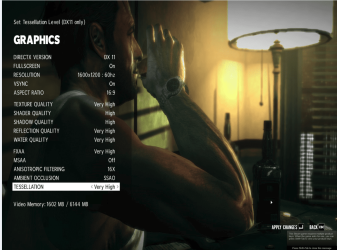
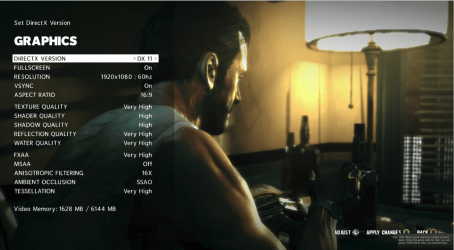
Well I hate to prove you wrong but the proof is right here and it clearly shows what I have available through 2 cards of video ram im using 1600mb but it shows total Vram 6 Gbs so yes I am correct it does combine when 2 cards are in play
 

Attachments

  • Mindblower.PNG
    Mindblower.PNG
    313.6 KB · Views: 9
  • correct res.PNG
    correct res.PNG
    411.5 KB · Views: 7

My Computer My Computer

At a glance

Windows 10 Home Premium 64bit sp1Intel I7-6700K @ 4.6 Ghz 1.344 volts everyday OC32GB G-Skill TridentZ 3200mhz 16-18-18-38 DDR4Sli Gigabyte Windforce GTX 980 G1
Computer type
PC/Desktop
Computer Manufacturer/Model Number
CoreI7-6700K MrFingerIII Special Builds
OS
Windows 10 Home Premium 64bit sp1
CPU
Intel I7-6700K @ 4.6 Ghz 1.344 volts everyday OC
Motherboard
Asrock Fatality K6 Z170 Socket 1151
Memory
32GB G-Skill TridentZ 3200mhz 16-18-18-38 DDR4
Graphics Card(s)
Sli Gigabyte Windforce GTX 980 G1
Sound Card
AC97 Creative Rage Tactic 3D Headphones Bluetooth
Monitor(s) Displays
27" Asus ROG Swift PG278Q G-Sync 48" Vizio Smart HD TV
Screen Resolution
2560x1440p 27"- 48" Currently Gaming at 2560x1440p Res 2K
Hard Drives
250GB Samsung Evo840SSD Seagate baracuda 500 GB WD Mybook 500Gb 1TB Seagate Barracuda
PSU
HX1050w Corsair Silver 80plus certified crosfire/sli
Case
Enthod Pro Full Tower
Cooling
Corsair H110i GT 280 mm High Performance WaterBlock
Keyboard
Logitech wireless keyboard
Mouse
Logitech wireless mouse
Internet Speed
Cox Cable 100+ mb
Antivirus
WebRoot Spysweeper with Antivirus
Browser
IE-10, Chrome, Opera
Other Info
My Other Rig is a AMD FX8320E @4.6Ghz 16GB Ballistic Sport Ram
Mobo Asrock Fatality 990FX 120GB OCZ SSD 1TB Seagate Barracuda Corsair H75 Cooling PSU Corsair CX750
GPU GTX Gigabyte 970G1
It shows the vram, but it only uses the vram from one card. They share the workload as it is mirrored on the cards.
 

My Computer My Computer

At a glance

Windows 10 Pro X64Intel(R) Core(TM) i5-3570K CPU OC@ 4.5GHZ Turbo8.00 GB DDR3 1600MhzMSI Gaming X GTX 1070
Computer type
PC/Desktop
Computer Manufacturer/Model Number
Dude Build
OS
Windows 10 Pro X64
CPU
Intel(R) Core(TM) i5-3570K CPU OC@ 4.5GHZ Turbo
Motherboard
MSI Z77A-G45 Gaming
Memory
8.00 GB DDR3 1600Mhz
Graphics Card(s)
MSI Gaming X GTX 1070
Sound Card
Realtek High Definition
Monitor(s) Displays
Dell S23O9W, HP L1710
Screen Resolution
DELL-1920 x 1080 HP-1280 x1024
Hard Drives
Crucial m4 256 SSD, WD 7200RPM 500GB WD 1TB
PSU
Seasonic X650 GOLD
Case
Zalman Z12
Cooling
Antec Kuhler 920
Keyboard
Logitech
Mouse
MSI DS100 Interceptor
Internet Speed
50 down and 5 up
Antivirus
MSE
Browser
Chrome, IE 11
Other Info
Logitech X-620 Speakers
It shows the vram, but it only uses the vram from one card. They share the workload.
I posted 2 pics one with the correct res and one with out yes it will use only Vram from one card the bigger the RES the more V ram just a simple res adjustment brought more Vram into play

as you see it has what I am using and total available why would it say that if it doesn't recognize it as being together if that was the case it would only show 3 Gb no matter what the game shows all 6 gb are ready for play if I used bigger resolution that is what it comes down too
 

My Computer My Computer

At a glance

Windows 10 Home Premium 64bit sp1Intel I7-6700K @ 4.6 Ghz 1.344 volts everyday OC32GB G-Skill TridentZ 3200mhz 16-18-18-38 DDR4Sli Gigabyte Windforce GTX 980 G1
Computer type
PC/Desktop
Computer Manufacturer/Model Number
CoreI7-6700K MrFingerIII Special Builds
OS
Windows 10 Home Premium 64bit sp1
CPU
Intel I7-6700K @ 4.6 Ghz 1.344 volts everyday OC
Motherboard
Asrock Fatality K6 Z170 Socket 1151
Memory
32GB G-Skill TridentZ 3200mhz 16-18-18-38 DDR4
Graphics Card(s)
Sli Gigabyte Windforce GTX 980 G1
Sound Card
AC97 Creative Rage Tactic 3D Headphones Bluetooth
Monitor(s) Displays
27" Asus ROG Swift PG278Q G-Sync 48" Vizio Smart HD TV
Screen Resolution
2560x1440p 27"- 48" Currently Gaming at 2560x1440p Res 2K
Hard Drives
250GB Samsung Evo840SSD Seagate baracuda 500 GB WD Mybook 500Gb 1TB Seagate Barracuda
PSU
HX1050w Corsair Silver 80plus certified crosfire/sli
Case
Enthod Pro Full Tower
Cooling
Corsair H110i GT 280 mm High Performance WaterBlock
Keyboard
Logitech wireless keyboard
Mouse
Logitech wireless mouse
Internet Speed
Cox Cable 100+ mb
Antivirus
WebRoot Spysweeper with Antivirus
Browser
IE-10, Chrome, Opera
Other Info
My Other Rig is a AMD FX8320E @4.6Ghz 16GB Ballistic Sport Ram
Mobo Asrock Fatality 990FX 120GB OCZ SSD 1TB Seagate Barracuda Corsair H75 Cooling PSU Corsair CX750
GPU GTX Gigabyte 970G1
I'm looking for more information to support my claim

See this is the thing I know both card have there own processing unit yes that is true and yes this is mirrored off each other to show 6gb but when higher resolution comes into play that other card has to give up some in order to help out if you get what im saying
 

Attachments

  • Vram.PNG
    Vram.PNG
    27.9 KB · Views: 5

My Computer My Computer

At a glance

Windows 10 Home Premium 64bit sp1Intel I7-6700K @ 4.6 Ghz 1.344 volts everyday OC32GB G-Skill TridentZ 3200mhz 16-18-18-38 DDR4Sli Gigabyte Windforce GTX 980 G1
Computer type
PC/Desktop
Computer Manufacturer/Model Number
CoreI7-6700K MrFingerIII Special Builds
OS
Windows 10 Home Premium 64bit sp1
CPU
Intel I7-6700K @ 4.6 Ghz 1.344 volts everyday OC
Motherboard
Asrock Fatality K6 Z170 Socket 1151
Memory
32GB G-Skill TridentZ 3200mhz 16-18-18-38 DDR4
Graphics Card(s)
Sli Gigabyte Windforce GTX 980 G1
Sound Card
AC97 Creative Rage Tactic 3D Headphones Bluetooth
Monitor(s) Displays
27" Asus ROG Swift PG278Q G-Sync 48" Vizio Smart HD TV
Screen Resolution
2560x1440p 27"- 48" Currently Gaming at 2560x1440p Res 2K
Hard Drives
250GB Samsung Evo840SSD Seagate baracuda 500 GB WD Mybook 500Gb 1TB Seagate Barracuda
PSU
HX1050w Corsair Silver 80plus certified crosfire/sli
Case
Enthod Pro Full Tower
Cooling
Corsair H110i GT 280 mm High Performance WaterBlock
Keyboard
Logitech wireless keyboard
Mouse
Logitech wireless mouse
Internet Speed
Cox Cable 100+ mb
Antivirus
WebRoot Spysweeper with Antivirus
Browser
IE-10, Chrome, Opera
Other Info
My Other Rig is a AMD FX8320E @4.6Ghz 16GB Ballistic Sport Ram
Mobo Asrock Fatality 990FX 120GB OCZ SSD 1TB Seagate Barracuda Corsair H75 Cooling PSU Corsair CX750
GPU GTX Gigabyte 970G1
Hi Solar,

It was from personal experience that I gained this knowledge.

I had GTA4 when I has a single gtx560ti 1gb, I could not run the game on max settings so I decided to add another card thinking it would double my memory.
I bought the 2nd card, installed it and ran GTA4 again. To my dismay it had exactly the same problem and ran out of Vram as it still only had 1gb available to use.
I spent the next few hours trawling through countless forums and articles on Vram use in sli and xfire and they all came back with the exact same information. That a PC will only ever use the Vram from 1 card.

Have a look round yourself by all means. In the last screenshot you posted it looks like it is maxing out the ram on the 680sli and on the 1.5gb 580, but it does not show what version for the 7970, they might both be 6gb versions?

I would love for you to correct me on this, but from personal experience I don't think it's possible.

Paul.
 

My Computer My Computer

At a glance

Windows 7 Professional 64 bit
OS
Windows 7 Professional 64 bit
Hi Solar,

It was from personal experience that I gained this knowledge.

I had GTA4 when I has a single gtx560ti 1gb, I could not run the game on max settings so I decided to add another card thinking it would double my memory.
I bought the 2nd card, installed it and ran GTA4 again. To my dismay it had exactly the same problem and ran out of Vram as it still only had 1gb available to use.
I spent the next few hours trawling through countless forums and articles on Vram use in sli and xfire and they all came back with the exact same information. That a PC will only ever use the Vram from 1 card.

Have a look round yourself by all means. In the last screenshot you posted it looks like it is maxing out the ram on the 680sli and on the 1.5gb 580, but it does not show what version for the 7970, they might both be 6gb versions?

I would love for you to correct me on this, but from personal experience I don't think it's possible.

Paul.
I agree with you on it using one card that is true but I know im not using 6gb cards and for the record AMD is a little different then Nvidia all together from the information I gather and screen shot is only shows AMD cards doing this as when I was using 2x 6870's my Vram appeared at 2040gbs but used 1.5 Gb in Game play if I had a screen shot of my old set up I would show you but I don't and I truly believe AMD just made it work that way underlined everyone will say the same thing but I never ran out of Vram on that game and I have it cranked to the max with 6870's so my experience and what I seen im not limited Nvidia's Gpu are
 
Last edited:

My Computer My Computer

At a glance

Windows 10 Home Premium 64bit sp1Intel I7-6700K @ 4.6 Ghz 1.344 volts everyday OC32GB G-Skill TridentZ 3200mhz 16-18-18-38 DDR4Sli Gigabyte Windforce GTX 980 G1
Computer type
PC/Desktop
Computer Manufacturer/Model Number
CoreI7-6700K MrFingerIII Special Builds
OS
Windows 10 Home Premium 64bit sp1
CPU
Intel I7-6700K @ 4.6 Ghz 1.344 volts everyday OC
Motherboard
Asrock Fatality K6 Z170 Socket 1151
Memory
32GB G-Skill TridentZ 3200mhz 16-18-18-38 DDR4
Graphics Card(s)
Sli Gigabyte Windforce GTX 980 G1
Sound Card
AC97 Creative Rage Tactic 3D Headphones Bluetooth
Monitor(s) Displays
27" Asus ROG Swift PG278Q G-Sync 48" Vizio Smart HD TV
Screen Resolution
2560x1440p 27"- 48" Currently Gaming at 2560x1440p Res 2K
Hard Drives
250GB Samsung Evo840SSD Seagate baracuda 500 GB WD Mybook 500Gb 1TB Seagate Barracuda
PSU
HX1050w Corsair Silver 80plus certified crosfire/sli
Case
Enthod Pro Full Tower
Cooling
Corsair H110i GT 280 mm High Performance WaterBlock
Keyboard
Logitech wireless keyboard
Mouse
Logitech wireless mouse
Internet Speed
Cox Cable 100+ mb
Antivirus
WebRoot Spysweeper with Antivirus
Browser
IE-10, Chrome, Opera
Other Info
My Other Rig is a AMD FX8320E @4.6Ghz 16GB Ballistic Sport Ram
Mobo Asrock Fatality 990FX 120GB OCZ SSD 1TB Seagate Barracuda Corsair H75 Cooling PSU Corsair CX750
GPU GTX Gigabyte 970G1
Last edited:

My Computer My Computer

At a glance

Windows 10 ProIntel Core i7-4770K (3.5Ghz)32 gig Corsair Dominator Platinum (4x8Gig)Sapphire Tri-X R9 Fury
Computer type
PC/Desktop
Computer Manufacturer/Model Number
Custom built by me.
OS
Windows 10 Pro
CPU
Intel Core i7-4770K (3.5Ghz)
Motherboard
Gigabyte G1 Sniper 5 (F10 Bios)
Memory
32 gig Corsair Dominator Platinum (4x8Gig)
Graphics Card(s)
Sapphire Tri-X R9 Fury
Sound Card
Soundblaster ZXR
Monitor(s) Displays
NEC PA242W 24" LCD Monitor
Screen Resolution
1920 x 1200
Hard Drives
Primary - Samsung 850 Pro (512gig), Samsung 840 Pro (256gig), 2TB WD Caviar Black.
PSU
EVGA Supernova 1000 G2
Case
Cooler Master HAF X
Cooling
Corsair H100i with Corsair Air Series SP120 Quiet Fans
Keyboard
Logitech Wireless Wave
Mouse
Logitech Performance MX
Internet Speed
High Speed Cable
Antivirus
Norton Security
Browser
IE11
Other Info
Memory Timings - 1866MHz @ 9-9-9-27-1T @ 1.5 volts
Sygnus, looks like a great system. As for motherboards, I'm partial to Asus over Asrock. I own both but prefer the Asus. I've looked several times in the past and just have trouble picking an X79 board. It seems that none of them have stellar ratings. But, for that CPU, I would definately go with one of the better boards. Perhaps the RampageIV or a sabertooth. You've chosen some nice ram too. I really can't offer an opinion on the Graphics card other than I would find a 7950 or 7970 for that set up, especially if you are going with 1 card.

Another option since you are waiting until September is see what Haswell is like and see if AMD comes out with a new generation of card and see what it's like. personally, I'm not expecting much from Haswell that would match the CPU you have chosen, but I've been surprised before. Just my 2 cents.

BTW, the system in your specs is nothing to be ashamed of. That's a very good system. You did well on it.
 
Last edited:

My Computers My Computers

  • At a glance

    Windows 11 ProRyzen 9 5900X32GB G Skill DDR4-3600EVGA RTX 3080 FTW 3 Ultra
    Computer type
    PC/Desktop
    Computer Manufacturer/Model Number
    ALWAYS UNDER CONSTRUCTION
    OS
    Windows 11 Pro
    CPU
    Ryzen 9 5900X
    Motherboard
    Asus X570 Crosshair Viii Hero
    Memory
    32GB G Skill DDR4-3600
    Graphics Card(s)
    EVGA RTX 3080 FTW 3 Ultra
    Sound Card
    On Board/Sennheiser PC37X Headset
    Monitor(s) Displays
    3 X Asus 27"
    Screen Resolution
    2560x1440
    Hard Drives
    2 X 1 TB NVME drives
    PSU
    EVGA 850
    Case
    Phanteks Eclipse P400A
    Cooling
    EVGA 280 AIO
    Keyboard
    Logitech G510s/ Logitech G13
    Mouse
    Logitech G502
    Internet Speed
    24/1
    Antivirus
    ESET/MBAM Pro/SAS Pro
    Browser
    Chrome/ Firefox/ Edge
  • At a glance

    Windows 11 ProIntel Ultra 9 288V32 GB LPDDR5X 8533
    Computer type
    Laptop
    System Manufacturer/Model Number
    Dell 16 Plus
    OS
    Windows 11 Pro
    CPU
    Intel Ultra 9 288V
    Memory
    32 GB LPDDR5X 8533
    Monitor(s) Displays
    16" Mini-LED HDR600 Touch 90 Hz
    Screen Resolution
    2560X1600
    Hard Drives
    1 TB NVME
As for motherboards, I'm partial to Asus over Asrock. I own both but prefer the Asus.

I see my influence has payed off well :)


I prefer to pay a little extra for Asus boards. They've been largely good to me.
 

My Computer My Computer

At a glance

8 Pro x64i7 3770K 4.6GHz16GB G.Skill Trident X 2666mhzx2 EVGA 780 Ti Superclocked SLI
Computer type
PC/Desktop
Computer Manufacturer/Model Number
Systems by SmartEyeball
OS
8 Pro x64
CPU
i7 3770K 4.6GHz
Motherboard
ASUS P8Z77 WS
Memory
16GB G.Skill Trident X 2666mhz
Graphics Card(s)
x2 EVGA 780 Ti Superclocked SLI
Sound Card
SB X-FI Surround 5.1 PRO USB / ATH-AD900 Headphones
Monitor(s) Displays
x3 Dell U2410 / 58" Samsung
Screen Resolution
5760*1200/ 1920*1200
Hard Drives
2x Intel 520 240GB (RAID 0) * 2x WD Caviar Blacks 2TB (RAID 0) * 2TB WD Caviar Black * Sony Optirac DVD
PSU
Silverstone Strider Evolution 1200W
Case
Thermaltake Level 10 GT Snow Edition
Cooling
Noctua NH-D14
Keyboard
Topre Realforce // Ducky Shine MX Black // Filco Ninja TKL
Mouse
Thermaltake Theron (Highly Recommended) + Razer Imperator
Antivirus
MSE
Browser
IE, FF, WaterFox
Other Info
GT Extreme V2 Sim Racing Cockpit + 40" LCD and K/B Mouse stand ▼
Fanatec CSR Elite Wheel + Clubsport V1 Pedals + CSR shifter/7G-H ▼Saitek X52 Pro ▼ TrackIR 5 Pro
Buttkicker v2 Seat Rumbler with Dedicated 5.1 and Sub Woofer attached to frame ▼
=
Bloody Big Grin
As for motherboards, I'm partial to Asus over Asrock. I own both but prefer the Asus.

I see my influence has payed off well :)


I prefer to pay a little extra for Asus boards. They've been largely good to me.

Patrick, your influence has paid off on more than just boards. I've learned an awful lot from you and hope to learn more in the future. I can't say anything bad about my Asrock board. It is very stable, cheaper for the features you get and has done most anything I've asked of it. But, the Asus board is better quality, has many more bios options and will absolutely do more than I can ever imagine doing. I've owned a few Asus boards, but it seems the ROG boards are the best, for my money. I can't lie, having Extreme behind the Maximus name just makes me feel like it's running faster, but the truth is, it will run as fast as you want.
 

My Computers My Computers

  • At a glance

    Windows 11 ProRyzen 9 5900X32GB G Skill DDR4-3600EVGA RTX 3080 FTW 3 Ultra
    Computer type
    PC/Desktop
    Computer Manufacturer/Model Number
    ALWAYS UNDER CONSTRUCTION
    OS
    Windows 11 Pro
    CPU
    Ryzen 9 5900X
    Motherboard
    Asus X570 Crosshair Viii Hero
    Memory
    32GB G Skill DDR4-3600
    Graphics Card(s)
    EVGA RTX 3080 FTW 3 Ultra
    Sound Card
    On Board/Sennheiser PC37X Headset
    Monitor(s) Displays
    3 X Asus 27"
    Screen Resolution
    2560x1440
    Hard Drives
    2 X 1 TB NVME drives
    PSU
    EVGA 850
    Case
    Phanteks Eclipse P400A
    Cooling
    EVGA 280 AIO
    Keyboard
    Logitech G510s/ Logitech G13
    Mouse
    Logitech G502
    Internet Speed
    24/1
    Antivirus
    ESET/MBAM Pro/SAS Pro
    Browser
    Chrome/ Firefox/ Edge
  • At a glance

    Windows 11 ProIntel Ultra 9 288V32 GB LPDDR5X 8533
    Computer type
    Laptop
    System Manufacturer/Model Number
    Dell 16 Plus
    OS
    Windows 11 Pro
    CPU
    Intel Ultra 9 288V
    Memory
    32 GB LPDDR5X 8533
    Monitor(s) Displays
    16" Mini-LED HDR600 Touch 90 Hz
    Screen Resolution
    2560X1600
    Hard Drives
    1 TB NVME
Back
Top