I have 2 no. of 1GB DDR2 533FSB RAM installed on my Gigabyte GA-945GM-S2 motherboard. Now when I am going to install one 2GB DDR2 667FSB RAM it is showing only 3GB inside BIOS and also on my Windows 7 64bit OS. here is no RAM remap setting in BIOS. I have tried load optimized default setting.
Please suggest if anyone have resolve this problem.
Let me see if I understand. You had two 1GB DDR2 533fsb Ram sticks, and then installed one 2GB 667 ram sticks. You also have a 64-bit os so you can use 4Gb or more. is all of the correct?
Okay I did a little research into your motherboard. It looks like it can only handle 1GB per slot. This means that there is no way yo fix this issue without buying more ram. I recommend two of this ram from newegg. It has the exact same specs as your previous ram. I wouldn't recommend using 667fsb ram unless you were going to replace the older sticks in addition to getting new ones. I also would look into if you could return the 2GB stick to where ever you got it from if I were you. If not, sell/give it to someone you know. It would suck for you to be out $40-50 on the ram you already bought.
Thanks for your reply. My motherboard support 2GB per slot, because when I installed only that 2GB module my BIOS show me 2GB. I have checked all port & all RAM one by one. My motherboard is Gigabyte GA-945GM-S2.
All I can recommend from here is that you have your RAM organizes as one 1gig in the first red slot, the second one gid in the adjacent yellow slot, and the 2gig in the second red slot (maybe switch to the yellow one if problem persist). Something is causing your bios to only see your 2gig stick as a one gig. Also try a 1gig in the first red slot and the 2gig in the second red slot with nothing in the yellow slots and tell me what happens.
*Colors are based on the images of the motherboard that I found online. Colors may not be the same but instructions should still make sense.
I have checked as you mentioned, but nothing is working.
Now I have got 1 more RAM(2GB DDR2 667). Now when I am installing these two 2GB RAM my bios showing 3GB RAM. So my RAM slot supports 2BG RAM, and motherboard also supports max 4GB RAM.
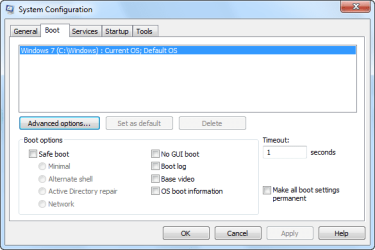
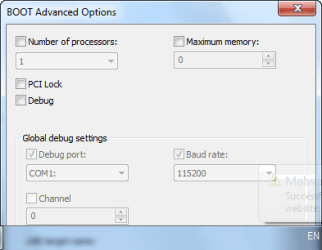
Go to start and then type in the search box CONFIG then go to the top of the list and click on System Configuration click on BOOT then advanced options and make sure that the maximum memory is unchecked. Reboot and see if that helps.
I just re-read your post are you using memory of different speed types?
Patriot Viper 6GB 3x2GB DDR3 PC3-1200C9 1600Mhz Tri Channel
Graphics Card(s)
Asus ATI Radeon HD 5770 CuCore 1024MB GDDR5 PCI Express
Sound Card
Realtek ALC889 @ Intel 82801JB ICH10 - High Definition Audio
Monitor(s) Displays
Samsung SyncMaster 920N 19"
Screen Resolution
1280*1024
Hard Drives
1 x OCZ Vertex2 Series 120GB 2.5" SATA-II SSD
1 x Seagate Barracuda 7200.12 1TB SATA-II 32MB Cache
1 x Western Digital Caviar Green 2TB SATA-II 64 MB Cache
PSU
Corsair TX 650W ATX SLi
Case
Antec 902 Ultimate Gaming Case Black
Cooling
Prolimatech Megahalems Rev B CPU Cooler Socket 775/1156/1366
Keyboard
Microsoft Comfort Curve Keyboard
Mouse
Microsoft Optical USB
Internet Speed
ADSL24 FTTC 34.2 Mbps Down 7.1Mbps Up
Other Info
OcUK 22x DVDSATA ReWriter Black
Akasa AK-FN058 Apache Black Super Silent 120mm Fan
Printer Epson Stylus Photo R300
Scanner Canon Canoscan 8000F
type MSCONFIG in the search bar after start up to get to boot options
would a flash bios update do any justice ? and are you useing ram to fast for your current bus speed?
first things to consider when upgrading get the same exact ram all together to assure you dont have to go swappin out sticks and you may have a bad memory slot on your mainboard that is shorting now days alot of this stuff that is built is mass produced
wouldnt be surprised if there are a few faulty sections on your board unoticable untill you need to use those features
My Computer
Computer type
PC/Desktop
Computer Manufacturer/Model Number
CoreI7-6700K MrFingerIII Special Builds
OS
Windows 10 Home Premium 64bit sp1
CPU
Intel I7-6700K @ 4.6 Ghz 1.344 volts everyday OC
Motherboard
Asrock Fatality K6 Z170 Socket 1151
Memory
32GB G-Skill TridentZ 3200mhz 16-18-18-38 DDR4
Graphics Card(s)
Sli Gigabyte Windforce GTX 980 G1
Sound Card
AC97 Creative Rage Tactic 3D Headphones Bluetooth
Monitor(s) Displays
27" Asus ROG Swift PG278Q G-Sync 48" Vizio Smart HD TV
Screen Resolution
2560x1440p 27"- 48" Currently Gaming at 2560x1440p Res 2K
Patriot Viper 6GB 3x2GB DDR3 PC3-1200C9 1600Mhz Tri Channel
Graphics Card(s)
Asus ATI Radeon HD 5770 CuCore 1024MB GDDR5 PCI Express
Sound Card
Realtek ALC889 @ Intel 82801JB ICH10 - High Definition Audio
Monitor(s) Displays
Samsung SyncMaster 920N 19"
Screen Resolution
1280*1024
Hard Drives
1 x OCZ Vertex2 Series 120GB 2.5" SATA-II SSD
1 x Seagate Barracuda 7200.12 1TB SATA-II 32MB Cache
1 x Western Digital Caviar Green 2TB SATA-II 64 MB Cache
PSU
Corsair TX 650W ATX SLi
Case
Antec 902 Ultimate Gaming Case Black
Cooling
Prolimatech Megahalems Rev B CPU Cooler Socket 775/1156/1366
Keyboard
Microsoft Comfort Curve Keyboard
Mouse
Microsoft Optical USB
Internet Speed
ADSL24 FTTC 34.2 Mbps Down 7.1Mbps Up
Other Info
OcUK 22x DVDSATA ReWriter Black
Akasa AK-FN058 Apache Black Super Silent 120mm Fan
Printer Epson Stylus Photo R300
Scanner Canon Canoscan 8000F
actually i was thinking about the ram types i talked about before getting the same ram and the correct speed is the difference maker if your speed is only 333 then 667 wouldn't do to much justice but those are just a random numbers i threw out there
anyway one of the ram sticks is mostlikly not compatible with your board or you have to find out what ram is best suited for that pc sometimes even though it says supported certain makes and kinds of ram just dont match no matter how you try
so one more ram tip find out what is the best ram for the board grab 4 gigs of that style ram and most likly that will kill the issue remember some boards are iffy about what you throw into them
when building a rig you have to consider all those options ram capatabilty vid card capatability processor would better suit the combination a whole lot of factors
so number one suggestion make sure you have the correct ram that is recommended by the board company that will just kill all doubt
My Computer
Computer type
PC/Desktop
Computer Manufacturer/Model Number
CoreI7-6700K MrFingerIII Special Builds
OS
Windows 10 Home Premium 64bit sp1
CPU
Intel I7-6700K @ 4.6 Ghz 1.344 volts everyday OC
Motherboard
Asrock Fatality K6 Z170 Socket 1151
Memory
32GB G-Skill TridentZ 3200mhz 16-18-18-38 DDR4
Graphics Card(s)
Sli Gigabyte Windforce GTX 980 G1
Sound Card
AC97 Creative Rage Tactic 3D Headphones Bluetooth
Monitor(s) Displays
27" Asus ROG Swift PG278Q G-Sync 48" Vizio Smart HD TV
Screen Resolution
2560x1440p 27"- 48" Currently Gaming at 2560x1440p Res 2K