
Shredded Data Recovery

farhaj

New member
Member
VIP
Local time
5:49 PM
Messages
127
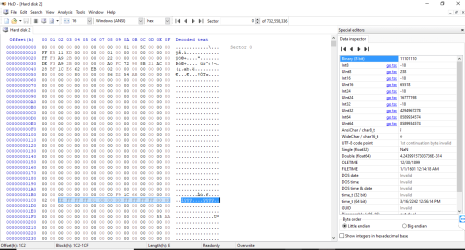
I have an external Hard Drive. I got it checked with HXD ...
And, it shows that most of the Binary Data written in it has converted to 0...:cry::cry:

It seems more like that the data has been shredded.. Attaching the Image along as well..
Hard Drive Image.png


Is their any way at all to retreive back the shredded data from the Drive..
 

My Computer

Computer type
Laptop
Computer Manufacturer/Model Number
Toshiba
OS
Windows 7 Home Premium 64bit
Hard Drives
Hitachi
Assuming the whole disk is the same recovery is slim to none did you run something to do that?
 

My Computer

Computer type
PC/Desktop
OS
win 8 32 bit
Assuming the whole disk is the same recovery is slim to none did you run something to do that?

1) Why do you say the chances are slim..?
2) I did not get your point of running what..?
 

My Computer

Computer type
Laptop
Computer Manufacturer/Model Number
Toshiba
OS
Windows 7 Home Premium 64bit
Hard Drives
Hitachi
1) Why do you say the chances are slim..?
2) I did not get your point of running what..?

Unless you work for the NSA the probability of recovering your data from that drive is exactly ZERO.

You do have a backup copy, don't you?

If not it is a good lesson to learn that you NEVER have just one instance of your important data. NEVER.
 

My Computer

Computer type
Laptop
Computer Manufacturer/Model Number
Lenovo T530
OS
Windows 7 Ultimate x64 SP1
Memory
16GB
Hard Drives
1TB SSD
If data has been overwritten, for whatever reason, there is no recovery. At least none that is remotely practical.

It was about 1996 that Peter Gutmann proposed a method of recovering overwritten data from a disk drive. This was verified as a proof of concept. This was academic research, much of which never becomes practical. How much real world data, if any, has been recovered by this method is unknown. The only organizations that might have this capability aren't talking. Modern hard drives use a different recording method and Gutmann himself has expressed doubt whether it is now possible.

In any event this method is far beyond the capabilities of a home user. It certainly is not using some special software. Never rely on data recovery. Even professional data recovery can fail.

This is just one of the reasons why you need to maintain backups. Data of any importance at all should have at least one backup copy. Data of particular importance should have 2 or more backup copies, preferably stored in different locations. Hard drives, new or old, do fail, often without warning or apparent reason. There are many other causes of data loss as well.

If you don't have backups you have learned a valuable lesson. It is unfortunate that many people only learn it the hard way.

I have heard many horror stories of lost data. One of the worst was in some organization several people were storing their data on one flash drive. This went on for several months. The drive failed. It seems that in all that time no one had ever bothered to make a backup.
 

My Computer

Computer type
PC/Desktop
Computer Manufacturer/Model Number
HP
OS
Windows 7 Pro 64 bit
CPU
Xeon W3520
Memory
8 GB
Graphics Card(s)
Nvidia Geforce 210
I have an external Hard Drive. I got it checked with HXD ...
And, it shows that most of the Binary Data written in it has converted to 0...:cry::cry:

It seems more like that the data has been shredded.. Attaching the Image along as well..

View attachment 411973


Is their any way at all to retreive back the shredded data from the Drive..

Seeing that Pictures in the HxD Image, does it really show that
1) The data has been overwritten as 0..
2) The Data has been Shredded rather than formatted..?
 

My Computer

Computer type
Laptop
Computer Manufacturer/Model Number
Toshiba
OS
Windows 7 Home Premium 64bit
Hard Drives
Hitachi
I have an external Hard Drive. I got it checked with HXD ...
And, it shows that most of the Binary Data written in it has converted to 0...:cry::cry:

It seems more like that the data has been shredded.. Attaching the Image along as well..

View attachment 411973


Is their any way at all to retreive back the shredded data from the Drive..

Totally irrelevant and misleading post.

1. If a single sector has all zeros or umpteen zeros it does not mean that the disk has been wiped. I can show you a thousand sectors on my System drive which have all zeros or umpteen zeros. My system has not lost any data.

2. You have posted a Sector map of sector 0 which is an MBR sector ( appears to be a Protective MBR of a GPT drive). I can see that the disk has a Windows Unique ID and a single partition table.

Please stop asking/posting such misleading questions.

If someone has deliberately wiped the data on that HDD by formatting/overwriting, none here can help you to recover the data. Stop.

Are you repeating these same threads putting it into different basket? It looks like.

Retrieve Data after A full Format

WD External Hard Drive Not Showing on My PC
 
Last edited:

My Computer

OS
Windows 7 Home Premium 32 bit
Totally irrelevant and misleading post.

1. If a single sector has all zeros or umpteen zeros it does not mean that the disk has been wiped. I can show you a thousand sectors on my System drive which have all zeros or umpteen zeros. My system has not lost any data.

2. You have posted a Sector map of sector 0 which is an MBR sector ( appears to be a Protective MBR of a GPT drive). I can see that the disk has a Windows Unique ID and a single partition table.

Please stop asking/posting such misleading questions.

If someone has deliberately wiped the data on that HDD by formatting/overwriting, none here can help you to recover the data. Stop.

Are you repeating these same threads putting it into different basket? It looks like.

Retrieve Data after A full Format

WD External Hard Drive Not Showing on My PC

I am not asking misleading questions..
It is just that exactly, I did not knew what happened with it..

is it a format and what type of format has been done..?
that is why I asked here...
someone told me about Hxd, and I shared the Image here... It showed 0 in most of the parts.. so, with that I think It got formated but is it retrieveable.. And what type of 0 format is it called..?
 

My Computer

Computer type
Laptop
Computer Manufacturer/Model Number
Toshiba
OS
Windows 7 Home Premium 64bit
Hard Drives
Hitachi
If the whole disk has 0 written to it then something has been run to stop any recovery normally any security disk wipe would write 0 several times to the drive and would take some time. That's why I asked what you had run on the disk.

If only one sector has 0 written that's a different story a normal format just clears partition tables. Etc and data is still there you need to look at other sectors to see if they are 0
 

My Computer

Computer type
PC/Desktop
OS
win 8 32 bit
If the whole disk has 0 written to it then something has been run to stop any recovery normally any security disk wipe would write 0 several times to the drive and would take some time. That's why I asked what you had run on the disk.

If only one sector has 0 written that's a different story a normal format just clears partition tables. Etc and data is still there you need to look at other sectors to see if they are 0

1) Actually, it was not run by me.. someone did it... And what exactly was done on it.. I don't know..
2) I checked it with the hxd program and it showed in the starting some data (as seen in the image); after that it all shows 0... And also in the other sector the same is done ( in the starting their is some data) and after that everything shows up 0...
3) And if a securtiy wipe is done it, then what are the chances to get it back...? nothing can be done..?
 

My Computer

Computer type
Laptop
Computer Manufacturer/Model Number
Toshiba
OS
Windows 7 Home Premium 64bit
Hard Drives
Hitachi
As per most post the security wipe is desgned to wipe the drive to military standerds so they chances as I said are slim to none
 

My Computer

Computer type
PC/Desktop
OS
win 8 32 bit
As per most post the security wipe is desgned to wipe the drive to military standerds so they chances as I said are slim to none

What are those standards..?
and the security wipe is specially deisgned only for them..?
 

My Computer

Computer type
Laptop
Computer Manufacturer/Model Number
Toshiba
OS
Windows 7 Home Premium 64bit
Hard Drives
Hitachi
Military Standards or Military Grade Data Wiping or Encryption are confidential and the details are only available to security officers of the various military Labs - the ability to use them is granted to non military personnel as they are basically beyond reversal, once it's gone it isn't coming back.

Before wiping any hard drive or storage medium it is the user's responsibility to ensure they have a suitable backup copy of the data if this is likely to be needed again
 

My Computers

System One System Two

  • Computer type
    PC/Desktop
    Computer Manufacturer/Model Number
    ChillBlast - Custom to my design
    OS
    Windows 11 Pro x64 [Latest Release and Release Preview]
    CPU
    Ryzen 9 5950X, 3.8 - 5.2 MHz
    Motherboard
    Asus Prime X570-Pro
    Memory
    64GB [2 x 32GB] DDR4 3200MHz
    Graphics Card(s)
    4GB NVIDIA GEFORCE GTX 1650 Ti
    Sound Card
    On-board SPDIF to 5.1 System + HDMI [5.1 system]
    Monitor(s) Displays
    32" UHD 32 Bit HDR Monitor + 43" UHD 4K 32Bit HDR TV
    Screen Resolution
    2 x 3840 x 2160 @60Hz
    Hard Drives
    1TB M2 SSD OS, 500GB Fast Access SSD, 2 x 8TB Data + Various Externals from 1TB to 4TB, 10TB NAS
    PSU
    NZXT C750 80 PLUS Gold 750W Modular PSU
    Case
    Workstation Case [Matt Black]
    Cooling
    NZXT Kraken X63 280mm CPU Cooler +2x Quiet Case fans
    Keyboard
    Logitech Wireless MX Keys & K400 + others
    Mouse
    Logitech Wireless MX Master 3S
    Internet Speed
    920 MB Down 50 MB Up
    Antivirus
    BitDefender Total Security Pro
    Browser
    Chrome (always run latest Non-Beta)
    Other Info
    Also run ...
    Laptop - Quad 8GB - Windows 10 Pro x64
    Nexus 7 Android tablet x2
    Samsung 10.2" tablet
    Blackview TAB 8 4G Android Tablet c/w Keyboard
    Wacom Intuos Pro Medium Pen Pad
    Wacom Intuos Pro Small Pen Pad
    Wacom Expresskeys Remote
    Loopdeck+ Graphics Controller
    Shuttle Pro v2 Control
  • Computer type
    Laptop
    System Manufacturer/Model Number
    Dell XPS 17 10750H
    OS
    Windows 11 Pro x64 Latest RP
    CPU
    Intel I7 10750H 5.0GHz
    Motherboard
    Dell XPS
    Memory
    32GB [2x16GB] DDR4 2933 MHz
    Graphics Card(s)
    nVidia GTX1650Ti 4 GB GDDR6
    Sound Card
    Stock [Realtek] 4 Speaker
    Monitor(s) Displays
    17" IPS UHD+ Infinity Edge Touchscreen
    Screen Resolution
    3840 x 2400
    Hard Drives
    2TB M2 NVMe, 4TB External + various 500GB & 1TB External NVMe (also have access to spinner HDD from
    PSU
    Stock
    Case
    Stock XPS Aluminium & Carbon Fibre
    Cooling
    Stock - Active Fan Control
    Keyboard
    Backlit + Various Logitech
    Mouse
    Stock Track Pad + Logitech MX Trackball
    Internet Speed
    72 MB Down 18MB Up
    Browser
    Chrome
    Other Info
    Also run ...
    Laptop - Quad 8GB - Windows 10 Pro x64
    Nexus 7 Android tablet x2
    10.2" tablet
    Sony Z3 Android Smartphone
    Wacom Intuos Pro Medium Pen Pad
    Wacom Intuos Pro Small Pen Pad
    Wacom Expresskeys Remote
    Loopdeck+ Graphics Controller
    Shuttle Pro v2 Control Pad
    10TB NAS
File recovery foe files deleted using just the recycle bin is never guaranteed and potentially expensive. I think that's already been stated. Factoring in a file shredding utility and it's likely that you won't be able to get it back. That's by design. With file shredding part to all of the file is completely overwritten with either random data or zeros, depending on how the software is setup, and potentially multiple times. If it was easy to recover the file afterwards then there wouldn't be any point to anyone doing it. Supposedly computer forensics can do limited file recovery but it is a long and drawn out process that is very specialized. If it's really that important you can try to hire a firm to attempt to recover it but be prepared to shell out big bucks. Are you missing data or are you just wanting to know what someone else used your hard drive for?
 

My Computers

System One System Two

Totally irrelevant and misleading post.

1. If a single sector has all zeros or umpteen zeros it does not mean that the disk has been wiped. I can show you a thousand sectors on my System drive which have all zeros or umpteen zeros. My system has not lost any data.

2. You have posted a Sector map of sector 0 which is an MBR sector ( appears to be a Protective MBR of a GPT drive). I can see that the disk has a Windows Unique ID and a single partition table.

Please stop asking/posting such misleading questions.

If someone has deliberately wiped the data on that HDD by formatting/overwriting, none here can help you to recover the data. Stop.

Are you repeating these same threads putting it into different basket? It looks like.

Retrieve Data after A full Format

WD External Hard Drive Not Showing on My PC

I share jumanji's instinct's about these threads. Can't tell if OP is trying to recover data, or instead trying to make certain his files are unrecoverable.
 

My Computer

Computer type
Laptop
Computer Manufacturer/Model Number
Dell Latitude E6540 Laptop
OS
Windows 7 Professional 64bit
CPU
Intel Core i7 4600M @ 2.90GHz
Motherboard
Dell Inc. 0CYT5F (SOCKET 0)
Memory
16.0GB Dual-Channel DDR3 @ 797MHz (11-11-11-28)
Graphics Card(s)
Intel HD Graphics 4600 (Dell) 2048MB ATI AMD Radeon HD 8790M
Sound Card
Realtek High Definition Audio
Monitor(s) Displays
HP ZR30w (2560x1600@60Hz)
Hard Drives
256GB LITEONIT LMT-256M6M-41 mm SATA (SSD)
1TB Samsung SSD 860 EVO mSATA SATA (SSD)
2TB USB 3.0 USB Device
115GB SanDisk Ultra Fit USB
Other Info
Multiple Dell E-Port Plus II Port Replicator/Docking Stations 0Y72NH USB 3.0 + 130W AC Adapters
Back
Top