
All right so I was doing the tutorial thing for dual-boot Windows 7 and Windows XP.
http://www.sevenforums.com/tutorials/2672-partition-volume-shrink.html
I was shrinking the volume (500gigs or so in use, 400 available, shrinking that 400), and had a program running. Well the program had an error and froze my computer so I had to restart. When I went back to shrink it said I have 0 free space to shrink (I was 3/4 done with shrinking). I ran defragmentor and recovered 8 gigs of it, still not what I had before. I then ran chkdsk c: /r ; so I could see if that fixed it. Nope, I now have 6 gigs of space for shrinking...
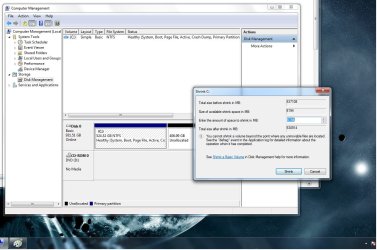
I attached a screen shot of the problem, I sincerely hope that you can help me with this. I don't want to believe I managed to screw up Windows 7 by having a program running... the tutorial (not to place blame) didn't tell me other things should not be running.
Odd thing is I have 524 gigs of space allocated to C: and 406 gigs unallocated... doesn't seem to believe me when I want to shrink... Attached is also my DxDiag.
THIS ISSUE HAS BEEN SOLVED.
http://www.sevenforums.com/tutorials/2672-partition-volume-shrink.html
I was shrinking the volume (500gigs or so in use, 400 available, shrinking that 400), and had a program running. Well the program had an error and froze my computer so I had to restart. When I went back to shrink it said I have 0 free space to shrink (I was 3/4 done with shrinking). I ran defragmentor and recovered 8 gigs of it, still not what I had before. I then ran chkdsk c: /r ; so I could see if that fixed it. Nope, I now have 6 gigs of space for shrinking...
I attached a screen shot of the problem, I sincerely hope that you can help me with this. I don't want to believe I managed to screw up Windows 7 by having a program running... the tutorial (not to place blame) didn't tell me other things should not be running.
Odd thing is I have 524 gigs of space allocated to C: and 406 gigs unallocated... doesn't seem to believe me when I want to shrink... Attached is also my DxDiag.
THIS ISSUE HAS BEEN SOLVED.
Attachments
Last edited:
My Computer
- OS
- Windows 7

