Solved Shrinking Volume

Hewjr100

New member
Member
Local time
9:08 AM
Messages
44
Location
Poughkeepsie NY
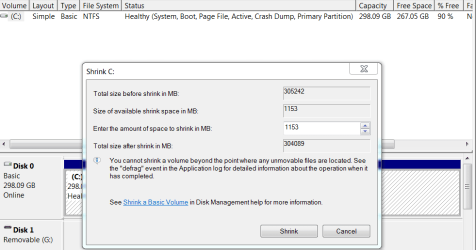
Today I defragmented hdd have 298 gb drive with 262 gb free. Reebooted and went to disk management to shrink drive and free up about 50 gb. When I try to shrink it is allowing a maximum of 662 mb. What must I do to increase this amount.

Henry
 

My Computer

Computer Manufacturer/Model Number
Compaq cq56-115dx
OS
Windows 7 Home Premium 64 Bit
CPU
Amd V140
Memory
2 Gig
Graphics Card(s)
Amd Ati Radeon 4250 Hd
Hard Drives
250 Gig
Internet Speed
Broadband
Hello Henry,

Could you post some screenshots of Disk Management showing this? It may help determine what is happening.

Does the drive that you are trying to shrink have any VHD files from a virtual machine on it, page file, or system protection turned on for it? If so, then they would allocate space on the drive not allowing it to be free space available to shrink from.
 

My Computer

Computer type
PC/Desktop
Computer Manufacturer/Model Number
Self built custom
OS
64-bit Windows 11 Pro for Workstations
CPU
Intel i7-8700K OC'd to 5 GHz
Motherboard
ASUS ROG Maximus XI Formula Z390
Memory
64 GB (4x16GB) G.SKILL TridentZ RGB DDR4 3600 MHz
Graphics Card(s)
ASUS ROG-STRIX-GTX1080TI-O11G-GAMING
Sound Card
Integrated
Monitor(s) Displays
2 x Samsung Odyssey G7 27"
Screen Resolution
2560x1440
Hard Drives
1TB Samsung 990 PRO M.2,
4TB Samsung 990 PRO PRO M.2,
TerraMaster F8 SSD Plus NAS
PSU
Seasonic Prime Titanium 850W
Case
Thermaltake Core P3
Cooling
Corsair Hydro H115i
Keyboard
Logitech wireless K800
Mouse
Logitech MX Master 4
Internet Speed
2 Gb/s Download and 100 Mb/s Upload
Antivirus
Malwarebyte Anti-Malware Premium
Browser
Google Chrome
Other Info
Logitech Z625 speaker system,
Logitech BRIO 4K Pro webcam,
HP Color LaserJet Pro MFP M477fdn,
APC SMART-UPS RT 1000 XL - SURT1000XLI,
Galaxy S23 Plus phone
I looks like disk management wont allow any more than that you will have to use a partitioning program that allows you to resize a partition during boot mode to whatever size you what. I would first though make sure you have a good image backup of your system. To go about doing this I would use a program like Macrium:
http://www.sevenforums.com/tutorials/73828-imaging-free-macrium.html
and to shrink your volume follow this guide:
http://www.sevenforums.com/tutorials/2672-partition-volume-shrink.html?ltr=P
 

My Computer

Computer Manufacturer/Model Number
Alienware
OS
Windows 7 Ultimate x64
CPU
I7
Motherboard
GA-X58-USB3
Memory
6 x 1.5V DDR3 DIMM sockets supporting up to 24 GB of system
Graphics Card(s)
GeForce GTX 580
Sound Card
Realtek ALC892 codec 2/4/5.1/7.1-channel
Monitor(s) Displays
NEC Display Solutions E321 Black 32"
Screen Resolution
1366 x 768
Hard Drives
OCZ Colossus LT Series OCZSSD2-1CLSLT1T 3.5" 1TB SATA II MLC Internal Solid State Drive
PSU
XFX Black Edition XPS-850W-BES 850W ATX12V
Case
Antec
Cooling
Zalman
Keyboard
Microsoft
Mouse
Microsoft
Will try to send screenshot. As for resizing, I do have parted magic on cd. Problem is I don't have backup media, just a couple of 4 gb flash drives.

Henry
 

My Computer

Computer Manufacturer/Model Number
Compaq cq56-115dx
OS
Windows 7 Home Premium 64 Bit
CPU
Amd V140
Memory
2 Gig
Graphics Card(s)
Amd Ati Radeon 4250 Hd
Hard Drives
250 Gig
Internet Speed
Broadband
See if this shot got thru.

Henry
 

Attachments

  • Capture 1.PNG
    Capture 1.PNG
    18.5 KB · Views: 50

My Computer

Computer Manufacturer/Model Number
Compaq cq56-115dx
OS
Windows 7 Home Premium 64 Bit
CPU
Amd V140
Memory
2 Gig
Graphics Card(s)
Amd Ati Radeon 4250 Hd
Hard Drives
250 Gig
Internet Speed
Broadband
Turned off system protection, and other services. Everthing back to normal. Thanks for all your replies.

Henry
 

My Computer

Computer Manufacturer/Model Number
Compaq cq56-115dx
OS
Windows 7 Home Premium 64 Bit
CPU
Amd V140
Memory
2 Gig
Graphics Card(s)
Amd Ati Radeon 4250 Hd
Hard Drives
250 Gig
Internet Speed
Broadband
Glad you got it worked out..:)
 

My Computer

Computer Manufacturer/Model Number
Alienware
OS
Windows 7 Ultimate x64
CPU
I7
Motherboard
GA-X58-USB3
Memory
6 x 1.5V DDR3 DIMM sockets supporting up to 24 GB of system
Graphics Card(s)
GeForce GTX 580
Sound Card
Realtek ALC892 codec 2/4/5.1/7.1-channel
Monitor(s) Displays
NEC Display Solutions E321 Black 32"
Screen Resolution
1366 x 768
Hard Drives
OCZ Colossus LT Series OCZSSD2-1CLSLT1T 3.5" 1TB SATA II MLC Internal Solid State Drive
PSU
XFX Black Edition XPS-850W-BES 850W ATX12V
Case
Antec
Cooling
Zalman
Keyboard
Microsoft
Mouse
Microsoft
That's great news Henry. Thank you for posting back with your results. :)
 

My Computer

Computer type
PC/Desktop
Computer Manufacturer/Model Number
Self built custom
OS
64-bit Windows 11 Pro for Workstations
CPU
Intel i7-8700K OC'd to 5 GHz
Motherboard
ASUS ROG Maximus XI Formula Z390
Memory
64 GB (4x16GB) G.SKILL TridentZ RGB DDR4 3600 MHz
Graphics Card(s)
ASUS ROG-STRIX-GTX1080TI-O11G-GAMING
Sound Card
Integrated
Monitor(s) Displays
2 x Samsung Odyssey G7 27"
Screen Resolution
2560x1440
Hard Drives
1TB Samsung 990 PRO M.2,
4TB Samsung 990 PRO PRO M.2,
TerraMaster F8 SSD Plus NAS
PSU
Seasonic Prime Titanium 850W
Case
Thermaltake Core P3
Cooling
Corsair Hydro H115i
Keyboard
Logitech wireless K800
Mouse
Logitech MX Master 4
Internet Speed
2 Gb/s Download and 100 Mb/s Upload
Antivirus
Malwarebyte Anti-Malware Premium
Browser
Google Chrome
Other Info
Logitech Z625 speaker system,
Logitech BRIO 4K Pro webcam,
HP Color LaserJet Pro MFP M477fdn,
APC SMART-UPS RT 1000 XL - SURT1000XLI,
Galaxy S23 Plus phone
Back
Top