shutdown and restart of network PCs

namich2007

New member
Local time
6:45 PM
Messages
4
Hi there,

I oversee a small test facility of about 200 systems running a mix of XP, Vista and Win 7. They are all on the same Lan / subnet and all configure with a static ip address.

What i want to achieve is a batch shut down and restart of these systems from a central workstation which is also on the same lan.

Can someone point me in the right direction.

Thanks
 

My Computer My Computer

At a glance

win 7 home premium 32bit
Computer Manufacturer/Model Number
Dell vostro 320
OS
win 7 home premium 32bit
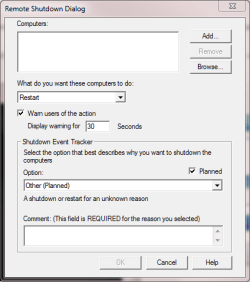
Only built-in command which can be found on all those three OS's I can think of is shutdown -i, which opens the remote shutdown dialog:

Shutdown.PNG

Have you tried this?

Kari
 

My Computer My Computer

At a glance

Windows 10 Pro x64 EN-GB1.6 GHz Intel Core i7-720QM Processor6 GBATI Mobility Radeon HD 5850 Graphics
Computer type
Laptop
Computer Manufacturer/Model Number
HP ENVY 17-1150eg
OS
Windows 10 Pro x64 EN-GB
CPU
1.6 GHz Intel Core i7-720QM Processor
Memory
6 GB
Graphics Card(s)
ATI Mobility Radeon HD 5850 Graphics
Sound Card
Beats sound system with integrated subwoofer
Monitor(s) Displays
17" laptop display, 22" LED and 32" Full HD TV through HDMI
Screen Resolution
1600*900 (1), 1920*1080 (2&3)
Hard Drives
Internal: 2 x 500 GB SATA Hard Disk Drive 7200 rpm
External: 2TB for backups, 3TB USB3 network drive for media
Cooling
As Envy runs a bit warm, I have it on a Cooler Master pad
Keyboard
Logitech diNovo Media Desktop Laser (bluetooth)
Mouse
Logitech Performance Mouse MX
Internet Speed
50/10 Mbps VDSL
Antivirus
Windows Defender 4.3.9431.0
Browser
Maxthon 3.5.2., IE11
Hey Kari,

I tried your suggestion and was able to get it working for my XP pro Sp3 systems. However I have had no luck with the Vista Home Basic and Win 7 home premium systems. Do you think that because my Vista and Win 7 systems are not the professional versions may be why the shutdown command is not working?
 

My Computer My Computer

At a glance

win 7 home premium 32bit
Computer Manufacturer/Model Number
Dell vostro 320
OS
win 7 home premium 32bit
I have to check this. I have both Vistas and Sevens running at home, but all Ultimates and a Seven enterprise, so I can not test it myself.

I ask some fellow geeks, posting back when I know.

Kari
 

My Computer My Computer

At a glance

Windows 10 Pro x64 EN-GB1.6 GHz Intel Core i7-720QM Processor6 GBATI Mobility Radeon HD 5850 Graphics
Computer type
Laptop
Computer Manufacturer/Model Number
HP ENVY 17-1150eg
OS
Windows 10 Pro x64 EN-GB
CPU
1.6 GHz Intel Core i7-720QM Processor
Memory
6 GB
Graphics Card(s)
ATI Mobility Radeon HD 5850 Graphics
Sound Card
Beats sound system with integrated subwoofer
Monitor(s) Displays
17" laptop display, 22" LED and 32" Full HD TV through HDMI
Screen Resolution
1600*900 (1), 1920*1080 (2&3)
Hard Drives
Internal: 2 x 500 GB SATA Hard Disk Drive 7200 rpm
External: 2TB for backups, 3TB USB3 network drive for media
Cooling
As Envy runs a bit warm, I have it on a Cooler Master pad
Keyboard
Logitech diNovo Media Desktop Laser (bluetooth)
Mouse
Logitech Performance Mouse MX
Internet Speed
50/10 Mbps VDSL
Antivirus
Windows Defender 4.3.9431.0
Browser
Maxthon 3.5.2., IE11
I can confirm from experience that the command does work on Vista home Premium.

One thing you may need to ensure is that the user is an admin and has an account on all systems, assuming a non domain environment when I believe that a domain admin account may be required.

Additional Information

You may also need to enable WMI remote management, this can be achived with the following ...

netsh advfirewall firewall set rule group="windows management instrumentation (WMI)" new enable=Yes

Also open any ports in the firewall relating to remote management using the advanced firewall options
 

My Computers My Computers

  • At a glance

    Windows 11 Pro x64 [Latest Release and Releas...Ryzen 9 5950X, 3.8 - 5.2 MHz64GB [2 x 32GB] DDR4 3200MHz4GB NVIDIA GEFORCE GTX 1650 Ti
    Computer type
    PC/Desktop
    Computer Manufacturer/Model Number
    ChillBlast - Custom to my design
    OS
    Windows 11 Pro x64 [Latest Release and Release Preview]
    CPU
    Ryzen 9 5950X, 3.8 - 5.2 MHz
    Motherboard
    Asus Prime X570-Pro
    Memory
    64GB [2 x 32GB] DDR4 3200MHz
    Graphics Card(s)
    4GB NVIDIA GEFORCE GTX 1650 Ti
    Sound Card
    On-board SPDIF to 5.1 System + HDMI [5.1 system]
    Monitor(s) Displays
    32" UHD 32 Bit HDR Monitor + 43" UHD 4K 32Bit HDR TV
    Screen Resolution
    2 x 3840 x 2160 @60Hz
    Hard Drives
    1TB M2 SSD OS, 500GB Fast Access SSD, 2 x 8TB Data + Various Externals from 1TB to 4TB, 10TB NAS
    PSU
    NZXT C750 80 PLUS Gold 750W Modular PSU
    Case
    Workstation Case [Matt Black]
    Cooling
    NZXT Kraken X63 280mm CPU Cooler +2x Quiet Case fans
    Keyboard
    Logitech Wireless MX Keys & K400 + others
    Mouse
    Logitech Wireless MX Master 3S
    Internet Speed
    920 MB Down 50 MB Up
    Antivirus
    BitDefender Total Security Pro
    Browser
    Chrome (always run latest Non-Beta)
    Other Info
    Also run ...
    Laptop - Quad 8GB - Windows 10 Pro x64
    Nexus 7 Android tablet x2
    Samsung 10.2" tablet
    Blackview TAB 8 4G Android Tablet c/w Keyboard
    Wacom Intuos Pro Medium Pen Pad
    Wacom Intuos Pro Small Pen Pad
    Wacom Expresskeys Remote
    Loopdeck+ Graphics Controller
    Shuttle Pro v2 Control
  • At a glance

    Windows 11 Pro x64 Latest RPIntel I7 10750H 5.0GHz32GB [2x16GB] DDR4 2933 MHznVidia GTX1650Ti 4 GB GDDR6
    Computer type
    Laptop
    System Manufacturer/Model Number
    Dell XPS 17 10750H
    OS
    Windows 11 Pro x64 Latest RP
    CPU
    Intel I7 10750H 5.0GHz
    Motherboard
    Dell XPS
    Memory
    32GB [2x16GB] DDR4 2933 MHz
    Graphics Card(s)
    nVidia GTX1650Ti 4 GB GDDR6
    Sound Card
    Stock [Realtek] 4 Speaker
    Monitor(s) Displays
    17" IPS UHD+ Infinity Edge Touchscreen
    Screen Resolution
    3840 x 2400
    Hard Drives
    2TB M2 NVMe, 4TB External + various 500GB & 1TB External NVMe (also have access to spinner HDD from
    PSU
    Stock
    Case
    Stock XPS Aluminium & Carbon Fibre
    Cooling
    Stock - Active Fan Control
    Keyboard
    Backlit + Various Logitech
    Mouse
    Stock Track Pad + Logitech MX Trackball
    Internet Speed
    72 MB Down 18MB Up
    Browser
    Chrome
    Other Info
    Also run ...
    Laptop - Quad 8GB - Windows 10 Pro x64
    Nexus 7 Android tablet x2
    10.2" tablet
    Sony Z3 Android Smartphone
    Wacom Intuos Pro Medium Pen Pad
    Wacom Intuos Pro Small Pen Pad
    Wacom Expresskeys Remote
    Loopdeck+ Graphics Controller
    Shuttle Pro v2 Control Pad
    10TB NAS
I thought it should work on all editions. Thanks for confirming that, Nigel.
 

My Computer My Computer

At a glance

Windows 10 Pro x64 EN-GB1.6 GHz Intel Core i7-720QM Processor6 GBATI Mobility Radeon HD 5850 Graphics
Computer type
Laptop
Computer Manufacturer/Model Number
HP ENVY 17-1150eg
OS
Windows 10 Pro x64 EN-GB
CPU
1.6 GHz Intel Core i7-720QM Processor
Memory
6 GB
Graphics Card(s)
ATI Mobility Radeon HD 5850 Graphics
Sound Card
Beats sound system with integrated subwoofer
Monitor(s) Displays
17" laptop display, 22" LED and 32" Full HD TV through HDMI
Screen Resolution
1600*900 (1), 1920*1080 (2&3)
Hard Drives
Internal: 2 x 500 GB SATA Hard Disk Drive 7200 rpm
External: 2TB for backups, 3TB USB3 network drive for media
Cooling
As Envy runs a bit warm, I have it on a Cooler Master pad
Keyboard
Logitech diNovo Media Desktop Laser (bluetooth)
Mouse
Logitech Performance Mouse MX
Internet Speed
50/10 Mbps VDSL
Antivirus
Windows Defender 4.3.9431.0
Browser
Maxthon 3.5.2., IE11
Additional info added - it's been a while since I set one up :o
 

My Computers My Computers

  • At a glance

    Windows 11 Pro x64 [Latest Release and Releas...Ryzen 9 5950X, 3.8 - 5.2 MHz64GB [2 x 32GB] DDR4 3200MHz4GB NVIDIA GEFORCE GTX 1650 Ti
    Computer type
    PC/Desktop
    Computer Manufacturer/Model Number
    ChillBlast - Custom to my design
    OS
    Windows 11 Pro x64 [Latest Release and Release Preview]
    CPU
    Ryzen 9 5950X, 3.8 - 5.2 MHz
    Motherboard
    Asus Prime X570-Pro
    Memory
    64GB [2 x 32GB] DDR4 3200MHz
    Graphics Card(s)
    4GB NVIDIA GEFORCE GTX 1650 Ti
    Sound Card
    On-board SPDIF to 5.1 System + HDMI [5.1 system]
    Monitor(s) Displays
    32" UHD 32 Bit HDR Monitor + 43" UHD 4K 32Bit HDR TV
    Screen Resolution
    2 x 3840 x 2160 @60Hz
    Hard Drives
    1TB M2 SSD OS, 500GB Fast Access SSD, 2 x 8TB Data + Various Externals from 1TB to 4TB, 10TB NAS
    PSU
    NZXT C750 80 PLUS Gold 750W Modular PSU
    Case
    Workstation Case [Matt Black]
    Cooling
    NZXT Kraken X63 280mm CPU Cooler +2x Quiet Case fans
    Keyboard
    Logitech Wireless MX Keys & K400 + others
    Mouse
    Logitech Wireless MX Master 3S
    Internet Speed
    920 MB Down 50 MB Up
    Antivirus
    BitDefender Total Security Pro
    Browser
    Chrome (always run latest Non-Beta)
    Other Info
    Also run ...
    Laptop - Quad 8GB - Windows 10 Pro x64
    Nexus 7 Android tablet x2
    Samsung 10.2" tablet
    Blackview TAB 8 4G Android Tablet c/w Keyboard
    Wacom Intuos Pro Medium Pen Pad
    Wacom Intuos Pro Small Pen Pad
    Wacom Expresskeys Remote
    Loopdeck+ Graphics Controller
    Shuttle Pro v2 Control
  • At a glance

    Windows 11 Pro x64 Latest RPIntel I7 10750H 5.0GHz32GB [2x16GB] DDR4 2933 MHznVidia GTX1650Ti 4 GB GDDR6
    Computer type
    Laptop
    System Manufacturer/Model Number
    Dell XPS 17 10750H
    OS
    Windows 11 Pro x64 Latest RP
    CPU
    Intel I7 10750H 5.0GHz
    Motherboard
    Dell XPS
    Memory
    32GB [2x16GB] DDR4 2933 MHz
    Graphics Card(s)
    nVidia GTX1650Ti 4 GB GDDR6
    Sound Card
    Stock [Realtek] 4 Speaker
    Monitor(s) Displays
    17" IPS UHD+ Infinity Edge Touchscreen
    Screen Resolution
    3840 x 2400
    Hard Drives
    2TB M2 NVMe, 4TB External + various 500GB & 1TB External NVMe (also have access to spinner HDD from
    PSU
    Stock
    Case
    Stock XPS Aluminium & Carbon Fibre
    Cooling
    Stock - Active Fan Control
    Keyboard
    Backlit + Various Logitech
    Mouse
    Stock Track Pad + Logitech MX Trackball
    Internet Speed
    72 MB Down 18MB Up
    Browser
    Chrome
    Other Info
    Also run ...
    Laptop - Quad 8GB - Windows 10 Pro x64
    Nexus 7 Android tablet x2
    10.2" tablet
    Sony Z3 Android Smartphone
    Wacom Intuos Pro Medium Pen Pad
    Wacom Intuos Pro Small Pen Pad
    Wacom Expresskeys Remote
    Loopdeck+ Graphics Controller
    Shuttle Pro v2 Control Pad
    10TB NAS
I have disable windows firewall all together and set up an admin account on all remote workstations with the same credentials as that used on the control workstation. When I run :

shutdown.exe -r -f -t 00 -m \\192.168.12.xxx

response : the network path was not found
 

My Computer My Computer

At a glance

win 7 home premium 32bit
Computer Manufacturer/Model Number
Dell vostro 320
OS
win 7 home premium 32bit
The spec for the command gives the parameter as \\computername rather than IP address - I always used the \\computername so it maybe that the IP is not supported although this would be unusual.
 

My Computers My Computers

  • At a glance

    Windows 11 Pro x64 [Latest Release and Releas...Ryzen 9 5950X, 3.8 - 5.2 MHz64GB [2 x 32GB] DDR4 3200MHz4GB NVIDIA GEFORCE GTX 1650 Ti
    Computer type
    PC/Desktop
    Computer Manufacturer/Model Number
    ChillBlast - Custom to my design
    OS
    Windows 11 Pro x64 [Latest Release and Release Preview]
    CPU
    Ryzen 9 5950X, 3.8 - 5.2 MHz
    Motherboard
    Asus Prime X570-Pro
    Memory
    64GB [2 x 32GB] DDR4 3200MHz
    Graphics Card(s)
    4GB NVIDIA GEFORCE GTX 1650 Ti
    Sound Card
    On-board SPDIF to 5.1 System + HDMI [5.1 system]
    Monitor(s) Displays
    32" UHD 32 Bit HDR Monitor + 43" UHD 4K 32Bit HDR TV
    Screen Resolution
    2 x 3840 x 2160 @60Hz
    Hard Drives
    1TB M2 SSD OS, 500GB Fast Access SSD, 2 x 8TB Data + Various Externals from 1TB to 4TB, 10TB NAS
    PSU
    NZXT C750 80 PLUS Gold 750W Modular PSU
    Case
    Workstation Case [Matt Black]
    Cooling
    NZXT Kraken X63 280mm CPU Cooler +2x Quiet Case fans
    Keyboard
    Logitech Wireless MX Keys & K400 + others
    Mouse
    Logitech Wireless MX Master 3S
    Internet Speed
    920 MB Down 50 MB Up
    Antivirus
    BitDefender Total Security Pro
    Browser
    Chrome (always run latest Non-Beta)
    Other Info
    Also run ...
    Laptop - Quad 8GB - Windows 10 Pro x64
    Nexus 7 Android tablet x2
    Samsung 10.2" tablet
    Blackview TAB 8 4G Android Tablet c/w Keyboard
    Wacom Intuos Pro Medium Pen Pad
    Wacom Intuos Pro Small Pen Pad
    Wacom Expresskeys Remote
    Loopdeck+ Graphics Controller
    Shuttle Pro v2 Control
  • At a glance

    Windows 11 Pro x64 Latest RPIntel I7 10750H 5.0GHz32GB [2x16GB] DDR4 2933 MHznVidia GTX1650Ti 4 GB GDDR6
    Computer type
    Laptop
    System Manufacturer/Model Number
    Dell XPS 17 10750H
    OS
    Windows 11 Pro x64 Latest RP
    CPU
    Intel I7 10750H 5.0GHz
    Motherboard
    Dell XPS
    Memory
    32GB [2x16GB] DDR4 2933 MHz
    Graphics Card(s)
    nVidia GTX1650Ti 4 GB GDDR6
    Sound Card
    Stock [Realtek] 4 Speaker
    Monitor(s) Displays
    17" IPS UHD+ Infinity Edge Touchscreen
    Screen Resolution
    3840 x 2400
    Hard Drives
    2TB M2 NVMe, 4TB External + various 500GB & 1TB External NVMe (also have access to spinner HDD from
    PSU
    Stock
    Case
    Stock XPS Aluminium & Carbon Fibre
    Cooling
    Stock - Active Fan Control
    Keyboard
    Backlit + Various Logitech
    Mouse
    Stock Track Pad + Logitech MX Trackball
    Internet Speed
    72 MB Down 18MB Up
    Browser
    Chrome
    Other Info
    Also run ...
    Laptop - Quad 8GB - Windows 10 Pro x64
    Nexus 7 Android tablet x2
    10.2" tablet
    Sony Z3 Android Smartphone
    Wacom Intuos Pro Medium Pen Pad
    Wacom Intuos Pro Small Pen Pad
    Wacom Expresskeys Remote
    Loopdeck+ Graphics Controller
    Shuttle Pro v2 Control Pad
    10TB NAS
The spec for the command gives the parameter as \\computername rather than IP address - I always used the \\computername so it maybe that the IP is not supported although this would be unusual.

I can confirm IP is supported I use it all the time.

I have a script for this...let me dig it up.
 

My Computer My Computer

At a glance

Windows 7 Enterprise (x64); Windows Server 20...16GB
Computer type
PC/Desktop
Computer Manufacturer/Model Number
Dell OP7010
OS
Windows 7 Enterprise (x64); Windows Server 2008 R2 (x64)
Memory
16GB
Monitor(s) Displays
4 Dell 24" LCD
Screen Resolution
1280x1024
Keyboard
Dell
Mouse
Dell Optical
Internet Speed
40meg
OP are you on a domain or not??
 

My Computer My Computer

At a glance

Windows 7 Enterprise (x64); Windows Server 20...16GB
Computer type
PC/Desktop
Computer Manufacturer/Model Number
Dell OP7010
OS
Windows 7 Enterprise (x64); Windows Server 2008 R2 (x64)
Memory
16GB
Monitor(s) Displays
4 Dell 24" LCD
Screen Resolution
1280x1024
Keyboard
Dell
Mouse
Dell Optical
Internet Speed
40meg
You will need to prep the machines for this to work:

Windows XP or Windows Server 2003 or Windows Server 2003 R2:

Logon as Administrator and run from a Command Prompt:
netsh firewall set service RemoteAdmin enable

Windows Vista or Windows 7 or Windows Server 2008 or Windows Server 2008 R2

Run as Administrator and run from a Command Prompt
netsh advfirewall firewall set rule group="windows management instrumentation (WMI)" new enable=Yes

and

netsh advfirewall firewall set rule group=”File and Printer Sharing” new enable=Yes

Now let me find the script to for rebooting.

Until then you can use shutdown -m \\<computername> or <IP> -r -f -t 0
 
Last edited:

My Computer My Computer

At a glance

Windows 7 Enterprise (x64); Windows Server 20...16GB
Computer type
PC/Desktop
Computer Manufacturer/Model Number
Dell OP7010
OS
Windows 7 Enterprise (x64); Windows Server 2008 R2 (x64)
Memory
16GB
Monitor(s) Displays
4 Dell 24" LCD
Screen Resolution
1280x1024
Keyboard
Dell
Mouse
Dell Optical
Internet Speed
40meg
unfortunately I am not running the workstations in a domain environment. There all in a workgroup.
 

My Computer My Computer

At a glance

win 7 home premium 32bit
Computer Manufacturer/Model Number
Dell vostro 320
OS
win 7 home premium 32bit
Ok here is the script. I had to modify it for non-domain. It seems to work but it has not been toughly tested.

The nice thing about scheduling the reboot is that you can set it up for a reboot in 2 minutes or late at night when you are asleep or to reboot 10 hours later when you might forget. I spent a lot of time getting this to work and it has worked very well for me over the years.

Please give it a good test and let me know.

Code:
' Schedule Computer Reboot v3.9
' Programmed by WindowsStar - Copyright (c) 2008-2010
'
'"netsh firewall set service RemoteAdmin enable" (Must be run at the command prompt on Window XP or Server 2003 before this will work)
' Must enable "Windows Management Instrumentation (WMI)" and "File and Printer Sharing" on Vista or Server 2008 Firewall before this will work)
' --------------------------------------------------------
Set Login = Wscript.CreateObject("WSHLogin.clsLogin")
Set WSHShell = WScript.CreateObject("WScript.Shell")
Set WShNetwork = CreateObject("WScript.Network")
Set fso = CreateObject("Scripting.FileSystemObject")
Set objEnv = WshShell.Environment("Process")
DSTOffset = "420"
Title = "Computer Name"
Message = "Name of computer to reboot." & vbLF & vbLF & "Leave blank or press cancel to quit."
strComputer = UCase(InputBox(Message, Title, WShNetwork.ComputerName))
If strComputer = "" Then Wscript.quit
Title = "Reboot Time"
Message = "Enter reboot time in military format." & vbLF & vbLF & "Sample: 05:45" & vbLF & "Sample: 14:45" & vbLF & vbLF & "Leave blank or press cancel to quit."
strTime = InputBox(Message, Title, "")
If strTime = "" Then Wscript.quit
strNormalTime = strTime
strTime = Left(Replace(strTime,":","") & "0000",6)
If Left(strTime,2) > 23 Then WScript.Echo "Incorrect time entered! Script Terminated!" : WScript.Quit
If Mid(strTime,3,2) > 59 Then WScript.Echo "Incorrect time entered! Script Terminated!" : WScript.Quit
'On Error Resume Next
Set objWMIService = GetObject("winmgmts:{impersonationLevel=impersonate}!\\" & strComputer & "\root\cimv2")
Set colItems = objWMIService.ExecQuery("SELECT * FROM Win32_ComputerSystem")
For Each objItem In colItems
  If objItem.DaylightInEffect = True Then DSTOffset = "360"
Next
Set colItems = objWMIService.ExecQuery("Select * from Win32_OperatingSystem",,48)
For Each objItem in colItems
  If LCase(InStr(objItem.Caption,"Windows XP")) or LCase(InStr(objItem.Caption,"Vista")) Then
    Set objNewJob = objWMIService.Get("Win32_ScheduledJob")
    errJobCreated = objNewJob.Create ("shutdown.exe -r -f -t 05", "********" & strTime & ".000000-" & DSTOffset, False , , , False, JobId)
  End If
Next
Set colItems = objWMIService.ExecQuery("Select * from Win32_OperatingSystem",,48)
For Each objItem in colItems
  If LCase(InStr(objItem.Caption,"Windows 2000")) or LCase(InStr(objItem.Caption,"Server 2003")) Then
    Set objNewJob = objWMIService.Get("Win32_ScheduledJob")
    errJobCreated = objNewJob.Create ("shutdown.exe /r /f /t 05", "********" & strTime & ".000000-" & DSTOffset, False , , , False, JobId)
  End If
Next
Set colItems = objWMIService.ExecQuery("Select * from Win32_OperatingSystem",,48)
For Each objItem in colItems
  If LCase(InStr(objItem.Caption,"Windows 7")) or LCase(InStr(objItem.Caption,"Server 2008 R2")) Then
     Set objProcess = objWMIService.Get("Win32_Process")
     strCommand = "SCHTASKS /Create /SC ONCE /TN Scheduled-Reboot /F /NP /RL HIGHEST /TR " & Chr(34) & "shutdown.exe -r -f -t 05" & Chr(34) & " /ST " & strNormalTime
     errReturn = objProcess.Create(strCommand, null, null, intProcessID)
  End If
Next
If errReturn <> 0 Then WScript.Echo "Reboot NOT Scheduled!  " & Err.Number : WScript.Quit
If Err.Number <> 0 Then WScript.Echo "Reboot NOT Scheduled!  " & Err.Number : WScript.Quit
WShNetwork.MapNetworkDrive "", "\\" & strComputer & "\IPC$"
If fso.FileExists ("\\" & strComputer & "\C$\Windows\Tasks\At1.job") Then fso.MoveFile "\\" & strComputer & "\C$\Windows\Tasks\At1.job", "\\" & strComputer & "\C$\Windows\Tasks\Scheduled Reboot.job"
If fso.FileExists ("\\" & strComputer & "\C$\Winnt\Tasks\At1.job") Then fso.MoveFile "\\" & strComputer & "\C$\Winnt\Tasks\At1.job", "\\" & strComputer & "\C$\Winnt\Tasks\Scheduled Reboot.job"
WShNetwork.RemoveNetworkDrive "\\" & strComputer & "\IPC$"
On Error Resume Next
fso.DeleteFile(objEnv("UserProfile") & "\Recent\*.lnk"), True
fso.DeleteFile(objEnv("UserProfile") & "\AppData\Roaming\Microsoft\Windows\Recent\*.lnk"), True
WshShell.Popup "           Done!",5,"Script Message"

 

Attachments

Last edited:

My Computer My Computer

At a glance

Windows 7 Enterprise (x64); Windows Server 20...16GB
Computer type
PC/Desktop
Computer Manufacturer/Model Number
Dell OP7010
OS
Windows 7 Enterprise (x64); Windows Server 2008 R2 (x64)
Memory
16GB
Monitor(s) Displays
4 Dell 24" LCD
Screen Resolution
1280x1024
Keyboard
Dell
Mouse
Dell Optical
Internet Speed
40meg
Back
Top