Shutdown style options?

dazco

Banned
Local time
3:18 PM
Messages
126
In XP when i clicked a mouse button on my desktop that is set to "close" windows, the resulting shutdown dialog was a window with 3 square buttons for shutdown/restart/log off. In 7 when i do this i get that other style that has a drop down field to choose which option i want. Is there a way to get the XP style i mentioned? (doesn't have to look the same, just offer a one click alternative to the drop down method)
 

My Computer

OS
windows 7 pro 64 bit
CPU
i5 760
Motherboard
GIGABYTE GA-P55A-UD3
Memory
4GB G skill DDR3 1600
Graphics Card(s)
XFX 5850
Sound Card
audigy 2 ZS
Monitor(s) Displays
samsung 22" 1650x1080
Hard Drives
Patriot SSD 120GB Inferno
maxtor 300GB IDE storage drive
PSU
Corsair TX650w
In XP when i clicked a mouse button on my desktop that is set to "close" windows, the resulting shutdown dialog was a window with 3 square buttons for shutdown/restart/log off. In 7 when i do this i get that other style that has a drop down field to choose which option i want. Is there a way to get the XP style i mentioned? (doesn't have to look the same, just offer a one click alternative to the drop down method)
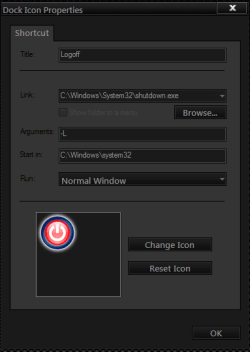
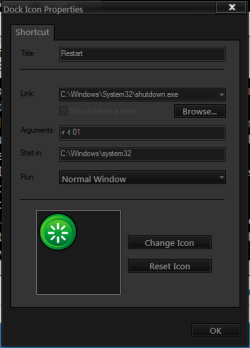
I have a alternative way of doing that I installed ObjectDock & made a shortcut for shutdown, restart, log off put them on the dock & they are one click
Jerry
 

Attachments

  • logoff.PNG
    logoff.PNG
    9.5 KB · Views: 14
  • restart.PNG
    restart.PNG
    8.7 KB · Views: 14
  • shutdown.PNG
    shutdown.PNG
    8.4 KB · Views: 13

My Computer

Computer type
Laptop
Computer Manufacturer/Model Number
Sager NP9170
OS
Win 7 Pro x64 / Win 10 Pro
CPU
Intel(R) Core(TM) i7-3630QM CPU @ 2.40GHz
Motherboard
CLEVO P170EM
Memory
12 GB
Graphics Card(s)
(1) Intel(R) HD Graphics 4000 (2) NVIDIA GeForce GTX 675M
Sound Card
(1) Realtek High Definition Audio (2) Intel(R) Display Aud
Monitor(s) Displays
17.3
Screen Resolution
1920x1080
Hard Drives
(1) Samsung 860 EVO 500GB(OS) (1) Samsung 860 EVO 500GB(Data)
Keyboard
Backlite
Antivirus
MSE, Malwarebytes Pro
Browser
Firefox
Other Info
DESKTOP: Custom-built.
OS: Win 10 Pro x64.
CASE: Rosewill R5.
CPU: Intel I5 4670K CPU @ 3.40GHz.
CPU COOLER: Cool Master Hyper 212 EVO.
MOTHERBOARD: Asus Z87-A.
MEMORY: Kingston HyperX 2x4 GB.
GPU: Nvidia Geforce 650 TI.
PSU: Corsair TX750.
DRIVES: (1) Samsung 840 120 GB SSD (2) Western Digital blue 500 GB 7200 RPM.
So this object dock is a app which you use to make the shortcuts, then you can use them as regular desktop shortcuts or are you saying you have to open the objectdock app to get to them?
 

My Computer

OS
windows 7 pro 64 bit
CPU
i5 760
Motherboard
GIGABYTE GA-P55A-UD3
Memory
4GB G skill DDR3 1600
Graphics Card(s)
XFX 5850
Sound Card
audigy 2 ZS
Monitor(s) Displays
samsung 22" 1650x1080
Hard Drives
Patriot SSD 120GB Inferno
maxtor 300GB IDE storage drive
PSU
Corsair TX650w
So this object dock is a app which you use to make the shortcuts, then you can use them as regular desktop shortcuts or are you saying you have to open the objectdock app to get to them?
It's a app or program that's on your desktop & the free version works great Stardock.com - Your Edge In Software then you can make shortcuts to just about anything. If you need help setting it up I will help you. Here is a screenshot of it & it's very customizable with backgrounds, transparency, size ect
Jerry
 

Attachments

  • zx.PNG
    zx.PNG
    11.9 KB · Views: 9

My Computer

Computer type
Laptop
Computer Manufacturer/Model Number
Sager NP9170
OS
Win 7 Pro x64 / Win 10 Pro
CPU
Intel(R) Core(TM) i7-3630QM CPU @ 2.40GHz
Motherboard
CLEVO P170EM
Memory
12 GB
Graphics Card(s)
(1) Intel(R) HD Graphics 4000 (2) NVIDIA GeForce GTX 675M
Sound Card
(1) Realtek High Definition Audio (2) Intel(R) Display Aud
Monitor(s) Displays
17.3
Screen Resolution
1920x1080
Hard Drives
(1) Samsung 860 EVO 500GB(OS) (1) Samsung 860 EVO 500GB(Data)
Keyboard
Backlite
Antivirus
MSE, Malwarebytes Pro
Browser
Firefox
Other Info
DESKTOP: Custom-built.
OS: Win 10 Pro x64.
CASE: Rosewill R5.
CPU: Intel I5 4670K CPU @ 3.40GHz.
CPU COOLER: Cool Master Hyper 212 EVO.
MOTHERBOARD: Asus Z87-A.
MEMORY: Kingston HyperX 2x4 GB.
GPU: Nvidia Geforce 650 TI.
PSU: Corsair TX750.
DRIVES: (1) Samsung 840 120 GB SSD (2) Western Digital blue 500 GB 7200 RPM.

My Computer

Computer type
Laptop
Computer Manufacturer/Model Number
Sager NP9170
OS
Win 7 Pro x64 / Win 10 Pro
CPU
Intel(R) Core(TM) i7-3630QM CPU @ 2.40GHz
Motherboard
CLEVO P170EM
Memory
12 GB
Graphics Card(s)
(1) Intel(R) HD Graphics 4000 (2) NVIDIA GeForce GTX 675M
Sound Card
(1) Realtek High Definition Audio (2) Intel(R) Display Aud
Monitor(s) Displays
17.3
Screen Resolution
1920x1080
Hard Drives
(1) Samsung 860 EVO 500GB(OS) (1) Samsung 860 EVO 500GB(Data)
Keyboard
Backlite
Antivirus
MSE, Malwarebytes Pro
Browser
Firefox
Other Info
DESKTOP: Custom-built.
OS: Win 10 Pro x64.
CASE: Rosewill R5.
CPU: Intel I5 4670K CPU @ 3.40GHz.
CPU COOLER: Cool Master Hyper 212 EVO.
MOTHERBOARD: Asus Z87-A.
MEMORY: Kingston HyperX 2x4 GB.
GPU: Nvidia Geforce 650 TI.
PSU: Corsair TX750.
DRIVES: (1) Samsung 840 120 GB SSD (2) Western Digital blue 500 GB 7200 RPM.
Thats what i'm trying to get away from tho....more things to open drop down, etc to get to it. Plus i'm really against installing apps just to do simple things like this. Your PC gets loaded up with junk with little benefit. So on things like this i always either find a way withing the OS or i live with it.

On my last PC i had the windows 3 button dialog box and i always have a mouse button set to the function "close". So if i click that button on the desktop it brought up the shutdown dialog and i'd just click whichever i wanted, shutdown, logoff, or restart. I'd like the same thing now, or better yet like i had on the PC even before that, shutdown and restart shortcuts on the desktop. But i tried those with this pC and apparenty the pathway is wrong in W7, and i couldn't google it and find a way in W7.
 

My Computer

OS
windows 7 pro 64 bit
CPU
i5 760
Motherboard
GIGABYTE GA-P55A-UD3
Memory
4GB G skill DDR3 1600
Graphics Card(s)
XFX 5850
Sound Card
audigy 2 ZS
Monitor(s) Displays
samsung 22" 1650x1080
Hard Drives
Patriot SSD 120GB Inferno
maxtor 300GB IDE storage drive
PSU
Corsair TX650w

My Computer

OS
windows 7 pro 64 bit
CPU
i5 760
Motherboard
GIGABYTE GA-P55A-UD3
Memory
4GB G skill DDR3 1600
Graphics Card(s)
XFX 5850
Sound Card
audigy 2 ZS
Monitor(s) Displays
samsung 22" 1650x1080
Hard Drives
Patriot SSD 120GB Inferno
maxtor 300GB IDE storage drive
PSU
Corsair TX650w

My Computer

Computer type
Laptop
Computer Manufacturer/Model Number
Sager NP9170
OS
Win 7 Pro x64 / Win 10 Pro
CPU
Intel(R) Core(TM) i7-3630QM CPU @ 2.40GHz
Motherboard
CLEVO P170EM
Memory
12 GB
Graphics Card(s)
(1) Intel(R) HD Graphics 4000 (2) NVIDIA GeForce GTX 675M
Sound Card
(1) Realtek High Definition Audio (2) Intel(R) Display Aud
Monitor(s) Displays
17.3
Screen Resolution
1920x1080
Hard Drives
(1) Samsung 860 EVO 500GB(OS) (1) Samsung 860 EVO 500GB(Data)
Keyboard
Backlite
Antivirus
MSE, Malwarebytes Pro
Browser
Firefox
Other Info
DESKTOP: Custom-built.
OS: Win 10 Pro x64.
CASE: Rosewill R5.
CPU: Intel I5 4670K CPU @ 3.40GHz.
CPU COOLER: Cool Master Hyper 212 EVO.
MOTHERBOARD: Asus Z87-A.
MEMORY: Kingston HyperX 2x4 GB.
GPU: Nvidia Geforce 650 TI.
PSU: Corsair TX750.
DRIVES: (1) Samsung 840 120 GB SSD (2) Western Digital blue 500 GB 7200 RPM.

My Computer

Computer type
Laptop
Computer Manufacturer/Model Number
Sager NP9170
OS
Win 7 Pro x64 / Win 10 Pro
CPU
Intel(R) Core(TM) i7-3630QM CPU @ 2.40GHz
Motherboard
CLEVO P170EM
Memory
12 GB
Graphics Card(s)
(1) Intel(R) HD Graphics 4000 (2) NVIDIA GeForce GTX 675M
Sound Card
(1) Realtek High Definition Audio (2) Intel(R) Display Aud
Monitor(s) Displays
17.3
Screen Resolution
1920x1080
Hard Drives
(1) Samsung 860 EVO 500GB(OS) (1) Samsung 860 EVO 500GB(Data)
Keyboard
Backlite
Antivirus
MSE, Malwarebytes Pro
Browser
Firefox
Other Info
DESKTOP: Custom-built.
OS: Win 10 Pro x64.
CASE: Rosewill R5.
CPU: Intel I5 4670K CPU @ 3.40GHz.
CPU COOLER: Cool Master Hyper 212 EVO.
MOTHERBOARD: Asus Z87-A.
MEMORY: Kingston HyperX 2x4 GB.
GPU: Nvidia Geforce 650 TI.
PSU: Corsair TX750.
DRIVES: (1) Samsung 840 120 GB SSD (2) Western Digital blue 500 GB 7200 RPM.

My Computer

Computer Manufacturer/Model Number
HCL
OS
Winbdows 7 ultimate x64 | Ubuntu 12.04 x64 LTS
CPU
Core 2 Duo e7400 @ 2.90GHz
Motherboard
Gigabyte G31M-ES2L
Memory
3GB DDR2
Graphics Card(s)
Asus Nvidia GTX 560Ti 1GB
Sound Card
On-board
Monitor(s) Displays
HCL eZeeBee 18.5" LCD
Screen Resolution
1366x768 @ 60Hz
Hard Drives
Western Digital 320GB
PSU
Corsair CX500 V2 500W
Cooling
Stock
Keyboard
Stock
Mouse
Stock
Internet Speed
15-25kBps D/L | 10kBps U/L | Hey Don't laugh
Thanks, but the shortcuts i mentioned are the ultimate solution for me. Exactly what i wanted even more than the XP shutdown dialog i described.
 

My Computer

OS
windows 7 pro 64 bit
CPU
i5 760
Motherboard
GIGABYTE GA-P55A-UD3
Memory
4GB G skill DDR3 1600
Graphics Card(s)
XFX 5850
Sound Card
audigy 2 ZS
Monitor(s) Displays
samsung 22" 1650x1080
Hard Drives
Patriot SSD 120GB Inferno
maxtor 300GB IDE storage drive
PSU
Corsair TX650w
Back
Top