
How to Change the "Shutting down..." Text Message at Shut Down in Windows 7 and Vista
Information
This will show you how to change the Shutting down... text message you get after clicking on Shut Down in Windows 7 and Vista to any text message that you want it to say instead.
You can only do this tutorial while logged on as an administrator.
You can only do this tutorial while logged on as an administrator.
Note
If you run a sfc /scannow command, then you will lose all changes made to the system file in the tutorial below since it and all other system files will be restored back to default by the command.
For Windows 7 Only:
For Windows 7 Only:
- This tutorial works with UAC turned on or off.
- This tutorial works in all 32-bit and 64-bit Windows 7 SP1 editions.
- For Windows 7 without SP1, you will need to turn off a Windows Feature (ex: Windows Gadget Platform), and restart the computer before this tutorial will work. Afterwards, you can turn back on the Windows Feature again.
Warning
Making a mistake while modifying system files can render your Windows 7 installation unusable. To be safe, you should create a restore point before doing this tutorial in case you need to do a system restore at boot using the restore point to undo any mistakes that may be made.
EXAMPLE: Default and Changed "Shutting down..." Text Message at Shut Down
NOTE: By default you get a Shutting Down... message right after the Logging off... message when you shut down the computer.


OPTION ONE
Change "Shutting down..." Text Message at Shut Down
Note
The en-US folder is in English Windows 7 copies. If you have a non-English Windows 7 copy, then this folder will have a different name reflecting your language instead. The table below are a few of the most common ones.
| Folder Name | Language |
|---|---|
| da-DK | Danish |
| en-GB | English-Great Britian |
| en-US | English-U.S. |
| fi-FI | Finnish |
| fr-FR | French |
| de-DE | German |
| el-GR | Greek |
| it-IT | Italian |
| no-NO | Norwegian |
| es-ES | Spanish |
| sv-SE | Swedish |

2. Take ownership of the wininit.exe.mui file with your user account, and set it's permissions to Allow your user account Full Control. Close Windows Explorer when finished.
3. Copy the wininit.exe.mui file to your desktop.
4. If you have not already, then download and install the latest version of Resource Hacker.
5. Right click on the Resource Hacker shortcut in Start Menu - All Programs, then click on Run as administrator. (see screenshot below)

6. If prompted by UAC, then click on Yes.
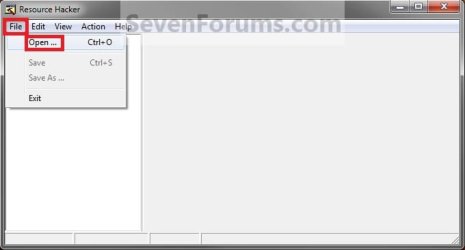
7. In Resource Hacker, click on File and Open. (see screenshot below)
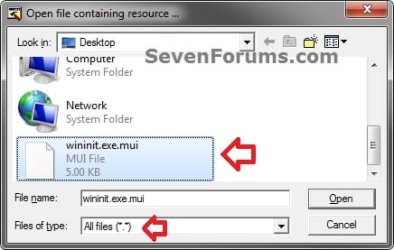
8. Navigate to C:\Windows\System32\en-US, select All Files (*.*) in the Files of type drop down box, select the wininit.exe.mui file, then click on the Open button. (see screenshot below)
9. In the left pane of Resource Hacker, expand String Table, and 63, to 1033. (see screenshot below)
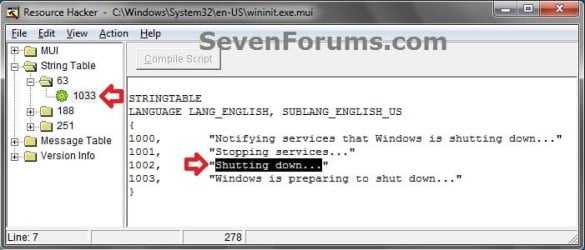
10. In the right pane of 1033, replace the Shutting down... text in quotes at the 1002 location with the text you want instead (ex: Turning off computer...) within quotes, then click on the Compile Script button. (see screenshot above and below)
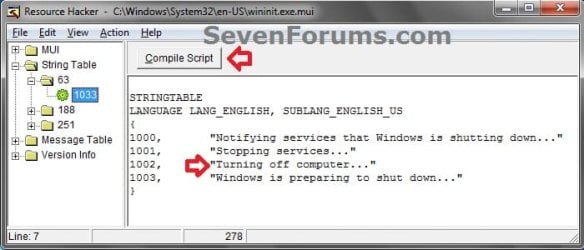
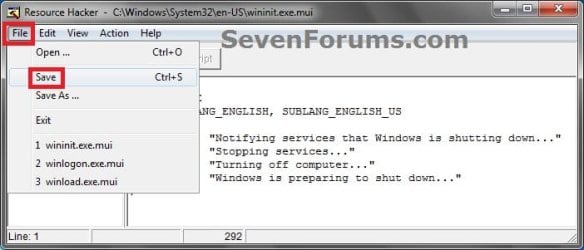
11. Click on File and Save, then close Resource Hacker. (see screenshot below)
12. Copy the modified wininit.exe.mui file on your Desktop, and Paste it into the C:\Windows\System32\en-US folder from step 1. (see screenshot below step 1)
NOTE: The en-US folder is in English Windows 7 copies. If you have a non-English Windows 7 copy, then this folder will have a different name reflecting your language instead.
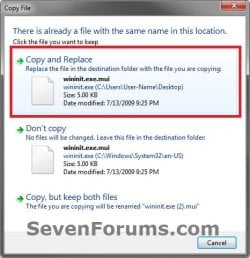
13. Click on Copy and Replace. (see screenshot below)
14. If prompted, click on Continue (UAC) and Yes to approve.
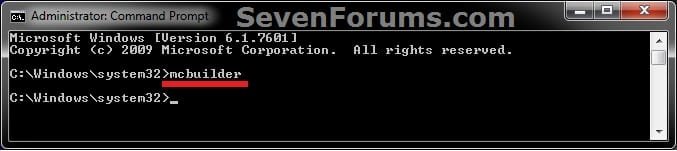
15. Open a elevated command prompt, type mcbuilder, press Enter, then close the command prompt. (see screenshot below)
NOTE: Thanks to Fimble for pointing this out.
16. Restart the computer.
17. Open the Start Menu and click on Shut Down in the arrow menu to see the changes made.
:warn:WARNING: Be sure to save anything that you have open first.
18. You can delete the wininit.exe_original.mui that ResHacker created if you like since you can easily do OPTION TWO below to restore the default settings, or keep it as a backup.
OPTION TWO
Restore Default "Shutting down..." Text Message at Shut Down
That's it,
Shawn Brink
Related Tutorials
- How to Change the "Welcome" Text Message at Log On in Windows 7 and Vista
- How to Change the "Logging off..." Text Message at Shut Down in Windows 7 and Vista
- How to Change the Default Action of the Windows 7 Alt+F4 Shut Down Window
- How to Speed Up the Shut Down Time in Windows 7
- How to Create a "Shut Down Windows" Shortcut in Windows 7
- How to Create a "Shut Down" Computer Shortcut in Windows
- How to Enable or Disable Shut Down without Having to Log On
- How to Change the Windows 7 Log On Screen Background
- How to Allow or Prevent Users and Groups to Shut Down the Computer
- How to See the Last Shutdown Time of Your Windows PC
Last edited:


