Solved Sick and tired of "cannot overwrite you do not have permission to"

Blackmagic12345

New member
Local time
7:31 PM
Messages
4
Sick and tired of "cannot overwrite you do not have permission to"

Alright, ive been trying to edit files in notepad all day and im sick of having to open everything through notepad (or whatever other software im using) run as administrator. Its aggravating to have to open the start menu every time i want to do something and right click notepad > run as admin > search for file all over again. I just want to be able to click the file, open it, edit it, save then quit without having to deal with the "windoze think ur 2 dum 2 do dis, so it maek stop u." message that pops up (its the one where "You cannot save this file because editing the directory requires administrator privileges" or something like that.)
Ive been using this OS since about a year after its release, i know what im doing when i mess with the Program Files folders and files within those folders. How the heck do i make this thing understand that i am smarter than it?
 

My Computer My Computer

At a glance

Windows 7 Enterprise x64Intel Core i7-3770k @ 4.8ghzKingston HyperX Beast 1866mhz (2x4gb)Asus GTX770 DirectCU II
Computer type
PC/Desktop
Computer Manufacturer/Model Number
Custom
OS
Windows 7 Enterprise x64
CPU
Intel Core i7-3770k @ 4.8ghz
Motherboard
MSI Z77-GD65 Gaming
Memory
Kingston HyperX Beast 1866mhz (2x4gb)
Graphics Card(s)
Asus GTX770 DirectCU II
Hard Drives
Kingston HyperX 3k 120gb
Western Digital EZEX - 1tb
Seagate Barracuda - 500gb
Western Digital FZEX - 2tb
Seagate Barracuda - 3tb x3 in RAID0
PSU
Corsair RM850
Case
Cooler Master Storm Trooper Black
Cooling
Noctua NH-D14
Keyboard
Cooler Master Storm QuickFire Pro, Rapoo Blade minikb
Mouse
Logitech G600 Black
Internet Speed
30/15 Cable
Antivirus
Avast, MalwareBytes, SuperAntiSpyware (depends on the day)
Browser
Mozilla Firefox
Other Info
Gaming Rig/Media Server.
Have you tried just logging in as Admin?
 

My Computer My Computer

At a glance

Microsoft Windows 7 Ultimate 64-bit 7601 Mult...AMD FX(tm)-6100 Six-Core Processor4.00 GBAMD Radeon HD 6450
Computer type
PC/Desktop
Computer Manufacturer/Model Number
custom build
OS
Microsoft Windows 7 Ultimate 64-bit 7601 Multiprocessor Free Service Pack 1
CPU
AMD FX(tm)-6100 Six-Core Processor
Motherboard
ASUSTeK Computer INC. M5A78L-M LX PLUS
Memory
4.00 GB
Graphics Card(s)
AMD Radeon HD 6450
Sound Card
(1) AMD High Definition Audio Device (2) Realtek High Defi
Monitor(s) Displays
Toshiba 47ZV650U 47" LCD 240Hz
Screen Resolution
1920 x 1080 x 32 bits (4294967296 colors) @ 60 Hz
Hard Drives
(1) HDT722516DLA380 ATA Device (2) Hitachi HDS721025CLA382 ATA Device (3) ST4000VN000-1H4168 ATA Device (4) Generic STORAGE DEVICE USB Device (5) Generic STORAGE DEVICE USB Device (6) Generic STORAGE DEVICE USB Device (7) Generic STORAGE
PSU
Corsair CX430M
Case
WMI (Waste Management Incorporated)
Cooling
Yes, it's very cool.
Keyboard
Bluetooth KB & Mousepad
Internet Speed
Fios 15/5 and it sucks when Verizon is throttling it down
Antivirus
Avast, MSE and Malwarebytes
Browser
Firefox v.41.0.2 and IE 11
Other Info
2 years old and so far this rig still kicks butt
How the heck do i make this thing understand that i am smarter than it?
​The irony.

Being apart of the 'Administrators' local group, you are free to make NTFS permission changes at any time, but knowing how to do so is usually the hard part, apparently.

Rather than us batting posts back and forth trying to figure out the correct procedure you should perform to rid your issue, Blackmagic, I've attached a slightly modified version of Brink's Take Ownership Shortcut registry tweak that will do things for you. Use it.
 

Attachments

My Computer My Computer

At a glance

Windows 10, Windows 8.1 Pro, Windows 7 Profes...
Computer type
PC/Desktop
OS
Windows 10, Windows 8.1 Pro, Windows 7 Professional, OS X El Capitan
Pyprohly,
I'm not smarter than the Operating System :-)

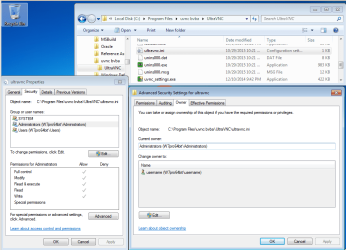
Using an INI file as an example, the owner is the builtin:administrators group and that group has full control of the file via NTFS. If the user is a member of the builtin:administrators group, then why must the ownership and NTFS permissions be changed to allow editors running at the Medium Integrity level to make changes to the file?

vnc.PNG

I see no need to change the file's ownership. Adding/Giving my user account NTFS write permissions is enough.
 

My Computer My Computer

At a glance

W7 Pro SP1 64biti78GBIntel HD Graphics
Computer type
Laptop
Computer Manufacturer/Model Number
Employer provided Dell Latitude
OS
W7 Pro SP1 64bit
CPU
i7
Memory
8GB
Graphics Card(s)
Intel HD Graphics
Hard Drives
crappy SSD
Antivirus
Employer mandated Symantec Endpoint Protection
Browser
Pale Moon 64bit, IE11 64bit & Chrome 64bit
@cyclops, im the only user on the system so its pretty hard not to lol
@pyprohly, thanks a mil. You just saved me a million headaches :D
 

My Computer My Computer

At a glance

Windows 7 Enterprise x64Intel Core i7-3770k @ 4.8ghzKingston HyperX Beast 1866mhz (2x4gb)Asus GTX770 DirectCU II
Computer type
PC/Desktop
Computer Manufacturer/Model Number
Custom
OS
Windows 7 Enterprise x64
CPU
Intel Core i7-3770k @ 4.8ghz
Motherboard
MSI Z77-GD65 Gaming
Memory
Kingston HyperX Beast 1866mhz (2x4gb)
Graphics Card(s)
Asus GTX770 DirectCU II
Hard Drives
Kingston HyperX 3k 120gb
Western Digital EZEX - 1tb
Seagate Barracuda - 500gb
Western Digital FZEX - 2tb
Seagate Barracuda - 3tb x3 in RAID0
PSU
Corsair RM850
Case
Cooler Master Storm Trooper Black
Cooling
Noctua NH-D14
Keyboard
Cooler Master Storm QuickFire Pro, Rapoo Blade minikb
Mouse
Logitech G600 Black
Internet Speed
30/15 Cable
Antivirus
Avast, MalwareBytes, SuperAntiSpyware (depends on the day)
Browser
Mozilla Firefox
Other Info
Gaming Rig/Media Server.
I'm wondering how the permission got changed in the first place.

Permission was correct.
Permission was not correct.
Now permission is back to being correct.
 

My Computer My Computer

At a glance

Windows 10 Pro. 64/ version 1709 Windows 7 Pr...Intel i7-6800K @ 4.3Corsair Platinum 16 gig @2400EVGA GTX 1070 OC
Computer type
PC/Desktop
Computer Manufacturer/Model Number
Home made Desktop
OS
Windows 10 Pro. 64/ version 1709 Windows 7 Pro/64
CPU
Intel i7-6800K @ 4.3
Motherboard
ASUS X-99 Deluxe II
Memory
Corsair Platinum 16 gig @2400
Graphics Card(s)
EVGA GTX 1070 OC
Monitor(s) Displays
Asus 27" LED LCD/VE278Q
Screen Resolution
1920-1080 or 1280-720 HDMI
Hard Drives
INTEL SSD 730-240 Gb Sata 3.0/
PSU
EVGA Platium 1200W
Case
Phanteks Luxe Tempered Glass 8 fans/ one radiator
Cooling
XSPC/ Water Cooled CPU
Keyboard
Das 4 Professional
Mouse
Logitech M705/MX Anywhere 2-S
Internet Speed
100 mbits
Antivirus
Microsoft Security Essentials/ Malwarebytes Premium 3.0/ SAS
Browser
I.E. 11 default/Firefox/ ISP Time Warner Cable/Spectrum
Other Info
LG BluRay Burner/
Sound system-KLipsch-THX/
Icy Dock ssd Hot Swap bays.
Have you tried just logging in as Admin?
How to do that please?

When I start my computer I just press the big blue button on the case which lights up and the machine starts. I am (I think) the Administrator (the shop who built it said so) but have never seen a pasword being needed. So perhaps I am not the Administratoe after all, which I would like to be (no-one else uses my machine).

Also, I'm not clear about the concept of Logging In. I see no opportunity to do that, just the blue button which causes a startup (as above).

EDIT: I have come across this image, showing I am the Administrator.

My main question however is how to understand logging on.
 

Attachments

  • Untitled-1.jpg
    Untitled-1.jpg
    17 KB · Views: 21
Last edited:

My Computer My Computer

At a glance

Windows 7 Home Premium 64bitIntel Pentium Edition G3220 3.0 GHz8 GB DDR3 1600 MHz DIMMNot Known
Computer type
PC/Desktop
Computer Manufacturer/Model Number
Gigabyte ATX case with 500 W power supply GZ-M1
OS
Windows 7 Home Premium 64bit
CPU
Intel Pentium Edition G3220 3.0 GHz
Motherboard
Gigabyte Socket 1150 MicroATX Mot Ultra Durable, GA-H81M-S2H
Memory
8 GB DDR3 1600 MHz DIMM
Graphics Card(s)
Not Known
Sound Card
Not known
Monitor(s) Displays
Samsung LS24D590 23.6"
Screen Resolution
1920 x 1080
Hard Drives
256 GB Solid State Drive (C: on which Windows 7 is installed)-
1 TB internal conventional HD (X:)-
Two WD "Elements" " 2TB USB drives as backups
PSU
500 W
Case
Gigabyte ATX case
Cooling
Several fans!
Keyboard
Accuratus 301 USB Compact, white.
Mouse
Microsoft Basic Optical Mouse v2.0, two-button, tethered
Internet Speed
10 to 12 Mb per second
Antivirus
Kaspersky Internet Security 2016, Malwarebytes (paid)
Browser
Firefox (ocassionally Safari)
Other Info
The 256 GB SSD (C:) also has Adobe Photoshop CS6 and InDesign CS6, MS Office, Adobe Lightroom, and other small programs.
I'm wondering how the permission got changed in the first place.

Permission was correct.
Permission was not correct.
Now permission is back to being correct.
The permissions (and ownership) on the files are correct. The permissions were correctly set by the operating system during the installation of the various apps. Nothing has changed the permissions (yet).

The problem is, some apps still cling to using INI files (or other configuration files) that they place in the Program Files folder. Putting those type of files in that protected folder structure is not a good idea for Windows 7. It was not a good idea for XP or Vista either. My screenshot in post #4 shows an INI file for UltraVNC. If I want to edit that file, I can either use the tool that UltraVNC provides or open the INI in a text editor that is running as admin. It gets rather annoying to navigate to these types of files via Notepad's File > Open dialog box. The OP would rather use Windows (file) Explorer and just double click to open/edit files like this.

One solution is to make a shortcut file with a target like this...
Code:
%windir%\system32\notepad.exe "C:\Program Files\uvnc bvba\UltraVNC\UltraVNC.ini"
...then change the properties of that shortcut to run as admin. A user would need to make a shortcut like that for each configuration file of interest. The user would still need to deal with the UAC, but the native Windows file protection scheme would remain intact. And that is a good thing :-)

This might work too:
http://www.sevenforums.com/tutorials/11949-elevated-program-shortcut-without-uac-prompt-create.html
I have not tired it.


Edit: in the info above and the info below, I intentionally left out the discussion about access tokens. However, this makes it sound like the the primary reason for the editor cannot write to a protected file is the editor's integrity level. The normal process for assigning the needed access token to the editor will raise the editor's integrity level to high. You can watch this via Process Explorer.


Have you tried just logging in as Admin?
How to do that please?
~~~
Logging in as admin is of little value in this situation. Apps (like notepad) that you start while logged on as admin (administrator) should still run at the normal Medium Integrity level. That integrity level is not enough to edit the protected files that we are discussing. The text editor needs to be running at the High Integrity level (run as admin) to be able to edit these files - or - you have to lower the protection level of these files (bad idea).

By default, Windows (file) Explorer runs at the Medium Integrity level. If you use the Windows (file) Explorer to navigate to a text file and then double on that text file, notepad should start at the Medium Integrity level. Some noteworthy exceptions to that norm are web browsers like IE and Chrome. Both of those start at the Medium Integrity level, but then they start other copies of themselves at lower Integrity levels. Those lower copies show you the websites. The lower the Integrity level, the fewer things that the browser can infect.

Your Desktop and Taskbar are presented to you by the Windows (file) Explorer running at the Medium Integrity level. Double clicking on a normal shortcut (icon) on the Desktop or Taskbar is just like the info presented in the paragraph above.

The bad guys are always finding ways to make browsers and/or PDF readers escape those lower Integrity levels. That is called privilege escalation.


If anyone is still awake at this point, the shortcut methods mentioned above are the safest solution to the OP's issue. The next safest thing is to add your user account to the NTFS permissions. You only need Write permissions. You do not need Full Control. And you should only change the file(s) of interest. Don't change the permissions on the entire app folder... and certainly don't change the permissions on the entire Program Files folder.

Or - you could throw all caution to the wind and turn off the UAC. Doing that lets most everything run at the High Integrity level - including infections. [There are security apps that can be used instead of the UAC.]


While I'm putting people to sleep with this topic, I'll go ahead and mention the VirtualStore folder. If an app that is running at the Medium Integrity level needs to write to an INI file in the a protected folder structure. Windows 7 might try to help you out by placing a copy of that INI file into the VirtualStore folder. I wasted a lot of labor before I figured that out. In my case, the INI file was in the Windows folder and the VirtualStore folder. The two copies contained different info. I could not tell the old app to look for the INI file in another place. [Yes, I know about hard and symbolic links. That was not the best solution in this case.]

One final point: If computer #1 is connected to computer #2 via the admin share (C$), then changes to the protected files on computer #2 can be made from computer #1 without any UAC prompts. Infections on computer #1 can do a lot of damage to computer #2.
 
Last edited:

My Computer My Computer

At a glance

W7 Pro SP1 64biti78GBIntel HD Graphics
Computer type
Laptop
Computer Manufacturer/Model Number
Employer provided Dell Latitude
OS
W7 Pro SP1 64bit
CPU
i7
Memory
8GB
Graphics Card(s)
Intel HD Graphics
Hard Drives
crappy SSD
Antivirus
Employer mandated Symantec Endpoint Protection
Browser
Pale Moon 64bit, IE11 64bit & Chrome 64bit
@pyprohly, thanks a mil. You just saved me a million headaches :D
Enjoy.

I'm wondering how the permission got changed in the first place.

Permission was correct.
Permission was not correct.
Now permission is back to being correct.
No permissions were changed. Blackmagic states that his problem file resides under the 'Program Files' folder, and it would make sense that editing anything in there must require UAC's approval.


@Stevekir Please start a new thread for your unrelated question.


I'm not smarter than the Operating System :-)
Yes you are. It'll be some time before computers become more intelligent than a brain.

If the user is a member of the builtin:administrators group, then why must the ownership and NTFS permissions be changed [...] to make changes to the file?

[/COLOR]

I see no need to change the file's ownership. Adding/Giving my user account NTFS write permissions is enough.[/QUOTE]
I think you know why the NTFS permissions had to be changed—that was the cause of OP’s problem—but the taking ownership part, on the other hand, I’m glad you questioned that because taking ownership is indeed hardly necessary in Blackmagic's case.

As per the intention, the registry tweak I've attached is only a parody of Brink’s, so I kept most bytes the same. By keeping the file as similar to the original as possible, its functionality will be familiar to those who are familiar with Brink’s file. I didn't bother pulling out the Takeown command in concern that the resulting file will differ too much from the original. [SIZE="1"]And modifying the file as less as possible saves me the effort too.[/SIZE]

Also, if I were to keep posting back and forth to Blackmagic and eventually establish some set of instructions he should perform to fix his issue, it may only be relevant to that file/folder of his, and he probably wants the process done to multiple items. Providing the registry tweak with Takeown not only saves time on my behalf, but also the OP’s, all while maintain a high success rate.
 
Last edited:

My Computer My Computer

At a glance

Windows 10, Windows 8.1 Pro, Windows 7 Profes...
Computer type
PC/Desktop
OS
Windows 10, Windows 8.1 Pro, Windows 7 Professional, OS X El Capitan
Back
Top