
side by side error

wingman1800

New member
Local time
6:25 PM
Messages
14
I am tring to install a downloaded exe program for my ups..... Power Supply... but I get the followinf info from event viewer ....."Activation context generation failed for "C:\Program Files (x86)\APC\PowerChute Personal Edition\PowerChute.exe.Manifest".Error in manifest or policy file "C:\Program Files (x86)\APC\PowerChute Personal Edition\PowerChute.exe.Config" on line 0. Invalid Xml syntax."
and then I get the blue screen and a auto restart..... Program is ok because I used the same file on a windows 8 machine and it installed perfectly??? Also I get a notification that progrem can install because of "side by side error" help
tom
 
Last edited:

My Computer

OS
windows 7 pro 64 bit, dual boot with windows 8 pro 64
Hey wingman, Welcome to Seven forums.

Please try the following troubleshooting steps:

1. Install the latest the version of Microsoft Visual C++ 2010 Redistributable Package for x64 based system.

2. Temporary disable Microsoft Security Essentials and rename MSESysprep.dll to MSESysprep.dll.old, run Microsoft Security Essentials again and see how it works
 

My Computer

Computer type
PC/Desktop
Computer Manufacturer/Model Number
Custom Bulid/Self made
OS
Windows 11 x64
CPU
i5 2500K @ 3.3 GHz
Motherboard
ASUS P8 Z77 V pro
Memory
16 GB DDR 3 @ 1600Mhz
Graphics Card(s)
MSI 1050TI 4GB OC version
Sound Card
On Board (Realtek HD audio)
Monitor(s) Displays
Samsung 22" LCD
Screen Resolution
1920*1080
Hard Drives
Seagate 1 TB, WD 1TB, Seagate 2 TB ( I use a lot of space)
PSU
coolermaster 750 W
Case
Coolermaster HAF912
Cooling
Coolermaster hyper 212 EVO
Keyboard
Samsung
Mouse
Dell Wireless
Internet Speed
Wireless 50 Mbps
Antivirus
AVG 2016 Internet Security
Browser
Google Chrome
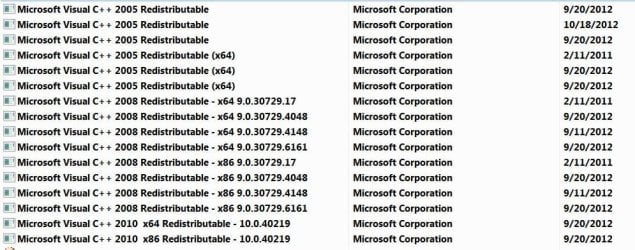
I did as you suggested but even tho it says the 2008 versions have installed I can not find them in updates but I can see the ones for 2010 versions..... where are the 2008 versions??
thanx
tom
 

Attachments

  • Capture.JPG
    Capture.JPG
    86.8 KB · Views: 1

My Computer

OS
windows 7 pro 64 bit, dual boot with windows 8 pro 64
Bump, because I added new info
thanks
tom
 

My Computer

OS
windows 7 pro 64 bit, dual boot with windows 8 pro 64
Back
Top