Side by side problem?

flycaster

New member
Member
VIP
Local time
10:42 AM
Messages
472
Location
Boynton Beach, FL
I've searched the forums on this issue and quite frankly didn't really undersand or see a solution that I could do; so, some help is needed.

Running an upgraded Vista x64 to Windows7 x64. Not having any problems with Windows 7 except when I downloaded QuickGamma and tried running it. I got the "side by side" error and was directed to run command sxstrace.exe. or the event log. Sxstrace.exe lead to a DOS screen that didn't have anything useful on it, just a line like C\users\username - and that was it. When I run sxstrace now, the DOS screen fashes on and off and disappears. As for the event log, I have no idea what that is. Also, in my search I the suggestion that I do RegEdit didn't work. I dl'd it, ran it, it detected and corrected only 14 items and it appears that you have to buy RegEdit to get the whole job done (about 300+ items were detected.) Anyway, I don't know how to handle these "solutions" and need some helpful help for soemone who doesn't know too much about these things. Thanks.

EDIT: Got to the event log. Botom line appears to be that Microsoft.VC90.MFC, processorArchitecture=x86,publickeyToken="1fc8b3b9a1e3b",type="win32",version="9.0.21022.8" could not be found. I have no idea what this means, nor how to fix???
 

My Computer

Computer Manufacturer/Model Number
Gateway DX4720-03/HP Pavilion dv6
OS
Windows 7 HP 64-bit
Memory
4GB/4GB
Antivirus
Avast Pro
Browser
Firefox, the latest

My Computer

Computer type
PC/Desktop
Computer Manufacturer/Model Number
Alienware Aurora ALX R4
OS
Windows 10 Pro (x64)
CPU
Intel Core i7-3930K (3.2GHz - 4.5GHz)
Motherboard
Alienware Aurora-R4 x79
Memory
4x Samsung 4GB PC3-12800 DDR3 (16GB 1600MHz)
Graphics Card(s)
Nvidia Geforce GTX 690
Sound Card
SteelSeries Siberia Elite
Monitor(s) Displays
Dell UltraSharp U3011
Screen Resolution
2560x1600
Hard Drives
Samsung 850 Pro 256 GB, Seagate 1TB Desktop Hybrid HDD, 2x Western Digital 4TB Green HDD
PSU
875W Some Dell PSU <.<
Case
Alienware Aurora ALX
Cooling
Custom Liquid Cooling (EK CPU & GPU blocks) dual EK 480RAD
Keyboard
Logitech G710+ Mechanical
Mouse
Logitech G700s
Internet Speed
Verizon Fios (50 mbps average)
Other Info
Server: Intel NUC D54250WYK: i5-4250U, 16GB, 256 GB mSATA, Windows Server 2012 R2
As I am not sure what I am doing, let me ask a few more questions.

First, searching my Windows Explorer for sxstrace.exe failed to bring up the app. Also, before I try to load in your suggestions, note that I do have:

Microsoft Visual C ++ 2005 ATL update kb973923-x86 8.0.50727.4053
Microsoft Visual C ++ 2005 ATL update kb973923-x64 8.0.50727.4053
Microsoft Visual C++ 2005 Redistributable
Microsoft Visual C++ 2005 Redistributable (x64)
Microsoft Visual C++ 2008 Redistributable-x64 9.0.30729.17
Microsoft Visual C++ 2008 Redistributable ATL Update-x64 kb9.0.30729.17

From the above it seems that I may have what you are suggesting I dl. However, maybe I don't as your suggestions are labeled as "packages" and there is no mention of "package" in the above?

Nonetheless, with this info, do I need to dl and install both of your suggestions or is one more appropriate than the other, or maybe this isn't the solution? And do I delete these first before downloading what you suggest?
 

My Computer

Computer Manufacturer/Model Number
Gateway DX4720-03/HP Pavilion dv6
OS
Windows 7 HP 64-bit
Memory
4GB/4GB
Antivirus
Avast Pro
Browser
Firefox, the latest
First, searching my Windows Explorer for sxstrace.exe failed to bring up the app.

It would be here: "C:\Windows\System32\sxstrace.exe"
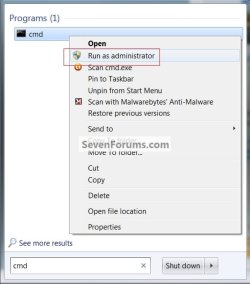
However you must first run a Command Prompt, Windows key then type "cmd" right-click on "cmd.exe" that appears, select Run as administrator. Follow the instructions in the previous post on sxstrace.exe in the Command Prompt you just opened.
 

My Computer

Computer type
PC/Desktop
Computer Manufacturer/Model Number
Alienware Aurora ALX R4
OS
Windows 10 Pro (x64)
CPU
Intel Core i7-3930K (3.2GHz - 4.5GHz)
Motherboard
Alienware Aurora-R4 x79
Memory
4x Samsung 4GB PC3-12800 DDR3 (16GB 1600MHz)
Graphics Card(s)
Nvidia Geforce GTX 690
Sound Card
SteelSeries Siberia Elite
Monitor(s) Displays
Dell UltraSharp U3011
Screen Resolution
2560x1600
Hard Drives
Samsung 850 Pro 256 GB, Seagate 1TB Desktop Hybrid HDD, 2x Western Digital 4TB Green HDD
PSU
875W Some Dell PSU <.<
Case
Alienware Aurora ALX
Cooling
Custom Liquid Cooling (EK CPU & GPU blocks) dual EK 480RAD
Keyboard
Logitech G710+ Mechanical
Mouse
Logitech G700s
Internet Speed
Verizon Fios (50 mbps average)
Other Info
Server: Intel NUC D54250WYK: i5-4250U, 16GB, 256 GB mSATA, Windows Server 2012 R2
It would be here: "C:\Windows\System32\sxstrace.exe"
However you must first run a Command Prompt, Windows key then type "cmd" right-click on "cmd.exe" that appears, select Run as administrator. Follow the instructions in the previous post on sxstrace.exe in the Command Prompt you just opened.

Thanks for hanging in there with me, but I am confused by the above. Don't recognize what "Windows key" means. I would assume that I type cmd.exe in Start???, but not sure.
 
Last edited by a moderator:

My Computer

Computer Manufacturer/Model Number
Gateway DX4720-03/HP Pavilion dv6
OS
Windows 7 HP 64-bit
Memory
4GB/4GB
Antivirus
Avast Pro
Browser
Firefox, the latest
The Windows key is normally between CTRL and ALT on the keyboard, the one with the Windows logo. Tapping it brings up the Start Menu. By default in Windows 7 when you bring up the Start Menu the search box is given focus, typing "cmd" (without the quotes) in that box with do a search.
 

My Computer

Computer type
PC/Desktop
Computer Manufacturer/Model Number
Alienware Aurora ALX R4
OS
Windows 10 Pro (x64)
CPU
Intel Core i7-3930K (3.2GHz - 4.5GHz)
Motherboard
Alienware Aurora-R4 x79
Memory
4x Samsung 4GB PC3-12800 DDR3 (16GB 1600MHz)
Graphics Card(s)
Nvidia Geforce GTX 690
Sound Card
SteelSeries Siberia Elite
Monitor(s) Displays
Dell UltraSharp U3011
Screen Resolution
2560x1600
Hard Drives
Samsung 850 Pro 256 GB, Seagate 1TB Desktop Hybrid HDD, 2x Western Digital 4TB Green HDD
PSU
875W Some Dell PSU <.<
Case
Alienware Aurora ALX
Cooling
Custom Liquid Cooling (EK CPU & GPU blocks) dual EK 480RAD
Keyboard
Logitech G710+ Mechanical
Mouse
Logitech G700s
Internet Speed
Verizon Fios (50 mbps average)
Other Info
Server: Intel NUC D54250WYK: i5-4250U, 16GB, 256 GB mSATA, Windows Server 2012 R2
Like this, click the snip to enlarge.


cmd.jpg
 

My Computer

Computer Manufacturer/Model Number
* BFK Customs *
OS
W 7 64-bit Ultimate
CPU
Intel Q9550 Yorkfield
Motherboard
ASUS P5Q Pro
Memory
8GB Dominator 8500C5D
Graphics Card(s)
ATI : XFX 5870
Sound Card
Realtek HD Audio 7-1
Monitor(s) Displays
1x 47" LCD HDMI & 3x 26" LCD HDMI
Screen Resolution
1920x1080P & 1920x1200
Hard Drives
1x 80GB Intel X25-M G2 SSD : 1x 500GB & 1x 640GB WD Caviar Black(s)
PSU
Corsair 620HX
Case
Cooler Master RC-690
Cooling
Tuniq Tower 120, 2x 140mm and 3x 120mm case fans
Keyboard
Microsoft 500
Mouse
Razer Diamondback 3G
Internet Speed
14 Mb/s
Other Info
1x Koutech 3Gb/s SATA HDD Hot Swap Rack
How dumb of me not to recognize that "windows key" mens just that...duh. But, then again, at least I was on the right track.

So I got to the DOS screen, but was not sure what I should type in after reading the instructions.

Before running the program that failed to start, in a CMD window, run sxstrace in trace mode
  • sxstrace.exe Trace -logfile:C:\tmp\MySxSTrace.log
In the CMD screen I typed in sxstrace.exe, but I suspect that I should have typed in more. I would have typed in "sxstrace.exe Trace -logfile:C:\tmp\MySxSTrace.log" but I didn't because I felt that the way it was written, it looked strange and just not right with all those spaces. Please point out how it should be typed.

In another CMD window, run the program that failed to start. Wait until it errors out.
Here I assume that I simply type in "quickgamma.exe" and let it run. I guess errors out occurs when things come to a halt?

Back on the first CMD window, stop the trace and convert the log
  • sxstrace.exe Parse -logfile:C:\tmp\MySxSTrace.log -outfile:C:\tmp\MySxSTrace.txt
Don't know what "convert the log" means (nor how to stop), unless it means that I type in the above. But this poses a problem to me as again it looks strange with too many spaces. How should it be typed?
 

My Computer

Computer Manufacturer/Model Number
Gateway DX4720-03/HP Pavilion dv6
OS
Windows 7 HP 64-bit
Memory
4GB/4GB
Antivirus
Avast Pro
Browser
Firefox, the latest

My Computer

Computer type
PC/Desktop
Computer Manufacturer/Model Number
Alienware Aurora ALX R4
OS
Windows 10 Pro (x64)
CPU
Intel Core i7-3930K (3.2GHz - 4.5GHz)
Motherboard
Alienware Aurora-R4 x79
Memory
4x Samsung 4GB PC3-12800 DDR3 (16GB 1600MHz)
Graphics Card(s)
Nvidia Geforce GTX 690
Sound Card
SteelSeries Siberia Elite
Monitor(s) Displays
Dell UltraSharp U3011
Screen Resolution
2560x1600
Hard Drives
Samsung 850 Pro 256 GB, Seagate 1TB Desktop Hybrid HDD, 2x Western Digital 4TB Green HDD
PSU
875W Some Dell PSU <.<
Case
Alienware Aurora ALX
Cooling
Custom Liquid Cooling (EK CPU & GPU blocks) dual EK 480RAD
Keyboard
Logitech G710+ Mechanical
Mouse
Logitech G700s
Internet Speed
Verizon Fios (50 mbps average)
Other Info
Server: Intel NUC D54250WYK: i5-4250U, 16GB, 256 GB mSATA, Windows Server 2012 R2

My Computer

Computer Manufacturer/Model Number
* BFK Customs *
OS
W 7 64-bit Ultimate
CPU
Intel Q9550 Yorkfield
Motherboard
ASUS P5Q Pro
Memory
8GB Dominator 8500C5D
Graphics Card(s)
ATI : XFX 5870
Sound Card
Realtek HD Audio 7-1
Monitor(s) Displays
1x 47" LCD HDMI & 3x 26" LCD HDMI
Screen Resolution
1920x1080P & 1920x1200
Hard Drives
1x 80GB Intel X25-M G2 SSD : 1x 500GB & 1x 640GB WD Caviar Black(s)
PSU
Corsair 620HX
Case
Cooler Master RC-690
Cooling
Tuniq Tower 120, 2x 140mm and 3x 120mm case fans
Keyboard
Microsoft 500
Mouse
Razer Diamondback 3G
Internet Speed
14 Mb/s
Other Info
1x Koutech 3Gb/s SATA HDD Hot Swap Rack

My Computer

Computer type
PC/Desktop
Computer Manufacturer/Model Number
Alienware Aurora ALX R4
OS
Windows 10 Pro (x64)
CPU
Intel Core i7-3930K (3.2GHz - 4.5GHz)
Motherboard
Alienware Aurora-R4 x79
Memory
4x Samsung 4GB PC3-12800 DDR3 (16GB 1600MHz)
Graphics Card(s)
Nvidia Geforce GTX 690
Sound Card
SteelSeries Siberia Elite
Monitor(s) Displays
Dell UltraSharp U3011
Screen Resolution
2560x1600
Hard Drives
Samsung 850 Pro 256 GB, Seagate 1TB Desktop Hybrid HDD, 2x Western Digital 4TB Green HDD
PSU
875W Some Dell PSU <.<
Case
Alienware Aurora ALX
Cooling
Custom Liquid Cooling (EK CPU & GPU blocks) dual EK 480RAD
Keyboard
Logitech G710+ Mechanical
Mouse
Logitech G700s
Internet Speed
Verizon Fios (50 mbps average)
Other Info
Server: Intel NUC D54250WYK: i5-4250U, 16GB, 256 GB mSATA, Windows Server 2012 R2
I know you guys know your stuff, but excuse me for being a little bit cautious, as obviously all this is quite out of my realm, and before I go about installing new MS program(s), psychologically I have to feel comfortable. So,

1. You see what I have, before doing any installing, do I have to delete anything?
2. Let's say I install the 32-bit version and QuickGamma still doesn't load, do I then uninstall this version before installing the 64-bit version? I assume that I should.
3. Is there any downside to installing/uninstalling these MS programs?
 

My Computer

Computer Manufacturer/Model Number
Gateway DX4720-03/HP Pavilion dv6
OS
Windows 7 HP 64-bit
Memory
4GB/4GB
Antivirus
Avast Pro
Browser
Firefox, the latest
I know you guys know your stuff, but excuse me for being a little bit cautious, as obviously all this is quite out of my realm, and before I go about installing new MS program(s), psychologically I have to feel comfortable. So,

1. You see what I have, before doing any installing, do I have to delete anything?
Nothing needs to be uninstalled.

2. Let's say I install the 32-bit version and QuickGamma still doesn't load, do I then uninstall this version before installing the 64-bit version? I assume that I should.
You don't have to, they should be independent of another.

3. Is there any downside to installing/uninstalling these MS programs?
No downside to installing them, quite a bit of programs use them.
 

My Computer

Computer type
PC/Desktop
Computer Manufacturer/Model Number
Alienware Aurora ALX R4
OS
Windows 10 Pro (x64)
CPU
Intel Core i7-3930K (3.2GHz - 4.5GHz)
Motherboard
Alienware Aurora-R4 x79
Memory
4x Samsung 4GB PC3-12800 DDR3 (16GB 1600MHz)
Graphics Card(s)
Nvidia Geforce GTX 690
Sound Card
SteelSeries Siberia Elite
Monitor(s) Displays
Dell UltraSharp U3011
Screen Resolution
2560x1600
Hard Drives
Samsung 850 Pro 256 GB, Seagate 1TB Desktop Hybrid HDD, 2x Western Digital 4TB Green HDD
PSU
875W Some Dell PSU <.<
Case
Alienware Aurora ALX
Cooling
Custom Liquid Cooling (EK CPU & GPU blocks) dual EK 480RAD
Keyboard
Logitech G710+ Mechanical
Mouse
Logitech G700s
Internet Speed
Verizon Fios (50 mbps average)
Other Info
Server: Intel NUC D54250WYK: i5-4250U, 16GB, 256 GB mSATA, Windows Server 2012 R2
Here is a little background. When vendors write programs using Microsoft Visual C++ in order to run them you would need Visual C++ installed on your computer, but that would be too costly. The Redistribution Packages supply the files necessary to run these programs. Over the years with different versions of Visual C++ there are now different versions of the Redistribution Packages. They have 2005 x86, 2005 x64, 2008 x86, 2008 x64 and I think there is now a 2010 version. In your case the Event Error is saying it is missing the Microsoft.VC90.MSC file ver x86. That file is part of the x86 version of the 2008 Redistribution Package. Other vendors use different versions of Visual C++ so you end up with multiple Reistribution Packages to run their programs.

Jim :geek:
 

My Computer

Computer type
PC/Desktop
Computer Manufacturer/Model Number
Home Built
OS
Windows 8.1 Pro w/Media Center 64bit, Windows 7 HP 64bit
CPU
Phenom II X6 1100T
Motherboard
ASUS M5A99X EVO
Memory
Crucial Balistic 8gb DDR3-1866 CL9
Graphics Card(s)
MSI R6850 Cyclone IGD5 PE
Sound Card
On Board
Monitor(s) Displays
ASUS VE258Q 25" LED with DVI-HDMI-DisplayPort
Screen Resolution
1920 x 1080
Hard Drives
Two WD Cavier Black 2TB Sata III, WD My Book Essential 2TB USB 3.0
PSU
Seasonic X650 80 Plus GOLD Modular
Case
Corsair 400R
Cooling
Antec Kuhler H2O 620, Two 120mm and four 140mm
Keyboard
Logitech K120
Mouse
Logitech Marble Mouse USB, Logitech Precision Game Pad
Internet Speed
15MB
Antivirus
Norton IS 2013, Malwarebytes Pro Beta 2
Browser
IE-11, FF-27
Other Info
APC UPS ES 750, Netgear WNR3500L Gigabit & Wireless N Router with SamKnows Test Program, Motorola SB6120 Gigabit Cable Modem. Brother HL-2170W Laser Printer, Epson V300 Scanner
Nice overview, Jim - thanks. And thanks to Logicearth for soothing my mind as I muddled through this exercise. I'll do the suggested dl'ing/installation and happily go on to calibrating my monitor.

Interestingly, the version (3) of QuickGamma that was giving me all this trouble (but I did learn a lot) had an earlier version (2) that I was able to install successfully. I guess for that version the computer did have the necessary Visual C++ files. This earlier version didn't quite have all that the latter one did (missing good individual RGB gamma correction), but I was able to adjust gamma, nonetheless.

Thanks all.
 

My Computer

Computer Manufacturer/Model Number
Gateway DX4720-03/HP Pavilion dv6
OS
Windows 7 HP 64-bit
Memory
4GB/4GB
Antivirus
Avast Pro
Browser
Firefox, the latest
Sorry guys, but the computer gremlins are at work, again.

With the knowledge that I could do no harm by dl'ing your suggestions, I first deleted Qickgamma2 with Revouninstaller. At some point during the uninstall, a notice that something couldn't be located (didn't note what that something was), but the uninstall continued...apparently successfully. I then dl'd both suggestions and dl'd/installed Quickgamma3. When opening QG3, I got the following Application error: "Ordinal 7138 couldn't be located in the DLL mfc90u.dll" I think this is the same message I got during the uninstall as I do remember seeing reference to "ordinal."

EDIT: Because of the noted above problem with QG3, I dl'd/installed QG2 again...and it worked. But, of course, I'd still like to get QG3 on board. So what's with this missing dll problem?

EDIT EDIT: Found this post that had the same problem I did and the suggested solution was to add x86 Redistribution Pack that I have already installed In fact, it appers to have been installed twice...
 
Last edited:

My Computer

Computer Manufacturer/Model Number
Gateway DX4720-03/HP Pavilion dv6
OS
Windows 7 HP 64-bit
Memory
4GB/4GB
Antivirus
Avast Pro
Browser
Firefox, the latest
Well, finally got QuickGamma3 on board, and I am quite ashamed to say that the anwers were stating me in the face...if I had scrolled down the website page, fully (QuickGamma). There is was, instructions telling you that both "Visual Studio C++ 2008" and the "Visual Studio C++ 2008 SP1" runtime libraries are required, and the page gives you the dl links. Man, MY Bad!

However, live and learn. Although i spent, and you folks spent a bit of time hashing this out, I do feel that it was a good learning experience as I will now completely read everything, and I learned a little bit about Visual C.

Thanks again for all your help.
 

My Computer

Computer Manufacturer/Model Number
Gateway DX4720-03/HP Pavilion dv6
OS
Windows 7 HP 64-bit
Memory
4GB/4GB
Antivirus
Avast Pro
Browser
Firefox, the latest
Back
Top