Sidebar gadget spikes CPU up high. Need help.

MadMatt

New member
Local time
8:40 AM
Messages
51
I did some search in this forum, but I cant find the solution for this problem.

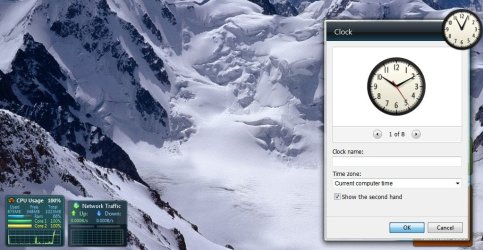
My sidebar gadgets are doing okay until I decided to turn on the "show the second hand" in Clock gadget, suddenly my CPU spiked up to 100% (see picture). The same thing happens when I activate the CPU Meter gadget and Slide Show gadget.

Could anybody please help me to fix this? Thanks in advance.
 

Attachments
  • Capture.JPG
    Capture.JPG
    98 KB · Views: 173

My Computer My Computer

Computer Manufacturer/Model Number
custom built
OS
7600.16385 x86
CPU
Intel Pentium E8400
Motherboard
Gigabyte GA-X48T-DQ6
Graphics Card(s)
HIS 4890
Internet Speed
broadband 384kbps bandwidth
I did some search in this forum, but I cant find the solution for this problem.

My sidebar gadgets are doing okay until I decided to turn on the "show the second hand" in Clock gadget, suddenly my CPU spiked up to 100% (see picture). The same thing happens when I activate the CPU Meter gadget and Slide Show gadget.

Could anybody please help me to fix this? Thanks in advance.
,

Hi MM

Gadgets can do that. I use a gadget here at sevenforums and is it uses abt 30% cpu and a couple of hundred Megs of ram.

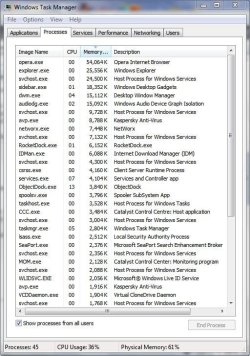
can you open task manager (right click task bar) Go to the process tab, check show all users. then click the memory column so that the highest memory users are on top.

Ust the snipping tool (type snipping tool in search) to take a screenshot of it and upload it to us using the attachment icon on the reply form

See pics for both

Thanks

kenn
 
Last edited:

My Computer My Computer

Computer Manufacturer/Model Number
HP Pavillion dv-7 1005 Tx
OS
Win 8 Release candidate 8400
CPU
[email protected]
Memory
4 gigs
Graphics Card(s)
Nvidia 9600M
Sound Card
HD built-in
Monitor(s) Displays
17" Wxga
Screen Resolution
1440x900
Cooling
none
Internet Speed
45Mb down 5Mb up
Here it is, with all 3 troublesome gadgets inactive. It has been a long time since I last use the CPU Meter gadget and Slide Show gadget, they were okay then, but now, I don't know what causes this malfunctioning.
 

Attachments

  • Capture.JPG
    Capture.JPG
    87.9 KB · Views: 242

My Computer My Computer

Computer Manufacturer/Model Number
custom built
OS
7600.16385 x86
CPU
Intel Pentium E8400
Motherboard
Gigabyte GA-X48T-DQ6
Graphics Card(s)
HIS 4890
Internet Speed
broadband 384kbps bandwidth
So, should I repair install my Windows 7?
 

My Computer My Computer

Computer Manufacturer/Model Number
custom built
OS
7600.16385 x86
CPU
Intel Pentium E8400
Motherboard
Gigabyte GA-X48T-DQ6
Graphics Card(s)
HIS 4890
Internet Speed
broadband 384kbps bandwidth
This is off topic but don't use Daemon tools. It contains malware. Use Virtual Clonedrive instead.
Kaspersky has been trouble for lots of people. Use Avast if you need an anti-virus.

I notice you have networx, rocket dock, object dock and maybe other apps.

Uninstall all unnecessary apps. Don't overclock. Set the speed of ram to what it's suppose to be. Maybe load defualt settings for the bios. Now see what happens with your gadgets. You will see an increase of speed without all those apps running in the background all the time.
 

My Computer My Computer

Computer Manufacturer/Model Number
Built by Mark
OS
Windows 7 x64
CPU
Intel Core i7 930
Motherboard
Gigabyte GA-X58A-UD3R Bios F5
Memory
OCZ 6GBkit OCZ3G1600LV6GK 8-8-8-24-2T 1.65V
Graphics Card(s)
(2) HIS ATI Radeon HD 5770 CROSSFIRE (H577QT1GD)
Sound Card
On board Realtek HD
Monitor(s) Displays
Samsung SyncMaster 2343 22" Wide Screen
Screen Resolution
2048x1152
Hard Drives
Two Western Digital 320 Gig Blue series WDC WD3200AAKS-00L9A0
PSU
Corsiar 750 watts TX750W
Case
Antec NINE Hundred Two (air filters & adjustable fan speed)
Cooling
Cooler Master Hyper 212 Plus CPU cooler
Keyboard
Logitech
Mouse
Logitech MX310
Internet Speed
20 meg down/ 5 meg up
Other Info
Hewlett Packard Deskjet 932C printer
Epson 4990 Photo scanner
I never use Daemon, I've always been using VirtualCloneDrive, it's just its name like that. And actually I use networx, rocketdock and objectdock, it all kinda necessary to me. And I never overclock, I'm currently using bios default settings.

However, I tried your advice but those gadget still hogs my CPU up high.
 

My Computer My Computer

Computer Manufacturer/Model Number
custom built
OS
7600.16385 x86
CPU
Intel Pentium E8400
Motherboard
Gigabyte GA-X48T-DQ6
Graphics Card(s)
HIS 4890
Internet Speed
broadband 384kbps bandwidth
It happened to me exactly the same. But as we have other 3 PC's at home, running Windows 7 and IE8 and none of them showed the same problem, I dedicated a couple of days to find a solution on my desktop. After several trials, experimenting all the sugestions found in Internet, I remembered I had installed the last driver and its Catalyst program for my ATI Radeon graphic card, downloaded from the AMD site. Today, I uninstalled completely all the stuff, using the Driver Sweeper found at Guru 3D, and forced Windows 7 to reinstall its original driver and...the problem is gone. The gadget clock works perfectly, the second hand does not freeze and the 'sidebar.exe' file does not take 25% of my processor anymore. Even after its update, proposed by the Windows Update, everything works as it should. It is important to say that none of the other PC's, which had never developed those problems, have the Catalyst and the ATI driver installed.


My Computer My Computer

OS
Windows 7 Home Premium 64 bit
Back
Top