
Hello all,
I have a frustrating problem with my Dell M1530 laptop. Switched it on this morning and the audio had completely gone. The speaker icon has a red cross next to it and when hovering the mouse over, it says "No Audio Output Device is installed".
Went to device manager to see what's going on, and was confronted with this
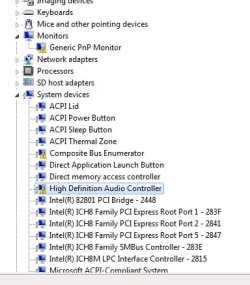
So as you can see, I have no actual sound category in the device manager. But a warning for the HD Audio, and the Composite bus enumerator (I have no idea what this is, could it be related?)
I thought the obvious solution would be to re-install the latest drivers from Dell. However this didn't want to work:

I then tried re-installing different types of the drivers in different ways (safe mode, run as admin etc). I also tried uninstalling the "High Definition Audio Controller" with the device manager, but same error message kept on popping up.
I then tried to update the drivers from within the device manager. When I try an automatic driver upgrade it tells me that I already have the latest drivers installed, and if I try a manual ("have disk") install then it says that the drivers are incompatible.
My last resort was to try a legacy driver install pointing it to the WDM folder where the Sigmatel drivers are, but that also told that the drivers could not be installed due to a hardware error.
I'll point out here that I have performed a boot diagnostic (provided by Dell) and the speakers definately work. I have also checked that it is not the headphone jack sensor problem that seems pretty common for Dell laptops.
The cause? Well the only thing that would have affected the system is the latest Windows updates that I have installed. I have looked through the updates but nothing relates to anything to do with the audio chips/bus. I have also tried a system restore previous to the windows updates but this had no effect.
After checking over the Dell support forums, and searching through google for the whole day I am completely stumped with this one. I'm really trying to avoid to re-install Windows as it will be a hell of a backup job for me.
Thanks for sticking with it, I will gladly accept any help I can!!
Regards,
Sam.
I have a frustrating problem with my Dell M1530 laptop. Switched it on this morning and the audio had completely gone. The speaker icon has a red cross next to it and when hovering the mouse over, it says "No Audio Output Device is installed".
Went to device manager to see what's going on, and was confronted with this
So as you can see, I have no actual sound category in the device manager. But a warning for the HD Audio, and the Composite bus enumerator (I have no idea what this is, could it be related?)
I thought the obvious solution would be to re-install the latest drivers from Dell. However this didn't want to work:
I then tried re-installing different types of the drivers in different ways (safe mode, run as admin etc). I also tried uninstalling the "High Definition Audio Controller" with the device manager, but same error message kept on popping up.
I then tried to update the drivers from within the device manager. When I try an automatic driver upgrade it tells me that I already have the latest drivers installed, and if I try a manual ("have disk") install then it says that the drivers are incompatible.
My last resort was to try a legacy driver install pointing it to the WDM folder where the Sigmatel drivers are, but that also told that the drivers could not be installed due to a hardware error.
I'll point out here that I have performed a boot diagnostic (provided by Dell) and the speakers definately work. I have also checked that it is not the headphone jack sensor problem that seems pretty common for Dell laptops.
The cause? Well the only thing that would have affected the system is the latest Windows updates that I have installed. I have looked through the updates but nothing relates to anything to do with the audio chips/bus. I have also tried a system restore previous to the windows updates but this had no effect.
After checking over the Dell support forums, and searching through google for the whole day I am completely stumped with this one. I'm really trying to avoid to re-install Windows as it will be a hell of a backup job for me.
Thanks for sticking with it, I will gladly accept any help I can!!
Regards,
Sam.
My Computer
- OS
- Windows 7 Home Premium 64bit

