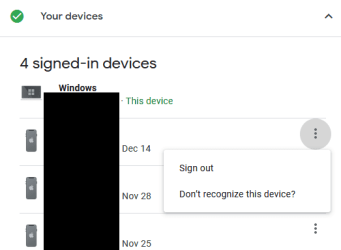
Let me answer your question as best as I can as it relates to cookies and how a server (the software) sees them.
From my memory you have two main types of cookies. Persistent and temporary (for perhaps lack of the correct term). Most of the time you're issued a temp cookie unless you check the 'remember me' box. All this does is tell the server you're logged in. If you log into the same website in another browser and then log out, the other browser's cookies will be invalidated since the last season in the other browser was a log out that the server received.
If the cookie is persistent, that will keep you logged in whether you're in another browser or not. There is no signal to the server of a log out so if some black hoodie wearing "hacker" got a hold of that persistent cookie they could use it to gain entry to your account. But, that's ONLY if you did not log out or if the time of the season hasn't expired for the persistent cookie at the server level. Depending on the website, persistent cookies can last for a few hours or forever which would be very bad in terms of security. For my website, and I'd have to check this again, I think I have persistent cookies either last some four hours or twenty four hours. I need to check again.
So in a nutshell:
If the cookie is persistent your login is persistent until actual log out. A capture of that cookie would allow someone into your account, but there are other things involved which goes beyond the scope of this post.
Temp cookies only exist per browser. If you log out in another browser the other browser's cookies are now invalid. They won't work anymore even though in that browser you were logged in. The other browser invalidated the season in this browser.
You can try this yourself. Make sure you're completely logged out of Gmail in both browsers. Now log in with one browser and keep that browser opened. Now open another browser and log in then log out. Go back to the first browser and you should be logged out even though in that browser you didn't. If not, Google is crap in every single security manner known. That tells me you have a persistent cookie season. Knowing them that's probably what it is. I'd have to check.
Four basic security points:
1) Refrain from the remember me option. If it's on by default untick it.
2) Stay away from the lazy method of using Facebook or what ever for single sign on across many sites. This is called OAuth and is in fact a single point of failure.
3) Use unique long complex passwords per website with a password manager. For the computer minded, use Keepass and periodically backup its database all over the place. Use Argon2, ChaCha20 and a keyfile. DON'T LOSE THE KEY FILE! For the not so computer savvy check out LastPass or Dashlane. I think Norton has theirs and there may be others. Not what I would use, but better than nothing. Keepass2Android works with Keepass, and there is an iOS keepass database understanding App, but I can't remember its name.
4) If a website offers 2FA (Two Factor Authentication) in the security options use it. I use Authy for this. DON'T FORGET YOUR AUTHY BACKUPS PASSWORD! Don't use Google Authenticator or the others. Don't use SMS for 2FA. If SMS or email is all they got then it's better than nothing but very hackable with something called a sim card swap.
*BONUS* Use a good, reputable VPN for open WIFI. Better yet, stay the hell off of open WIFI and just use your cell Internet. Tether if necessary.