
Signal Strength Meter

dogloop

New member
Local time
3:54 PM
Messages
8
Location
MN
This is from Microsoft's web site.(see below) I do not have the option "Digital TV antenna signal strength. I really need to check my signal strength. Anybody else have this problem?
I have 2 Hauppage 950Q tuners that I receive clear QAM through the cable company on.


  • On the Windows Media Center start screen, scroll to Tasks, click Settings, click TV, click TV Signal, and then do one of the following:
    • Click Scan for More Channels, and then follow the instructions. Media Center will look for additional channels that might be available for your TV tuner.
    • Click Digital TV Antenna Signal Strength, and then follow the instructions. Media Center will scan each channel individually and display its signal strength. On the Adjust Digital TV Antenna and Choose Channels screen, you can clear the check box next to channels with little or no signal so they won't show up in the Guide.
 

My Computer

Computer Manufacturer/Model Number
Dell Optiplex GX620
OS
7
CPU
Pentium D 2.0
Memory
4GB
Graphics Card(s)
ATI Radeon 4650 HD
Monitor(s) Displays
Samsung LN52A550
Hard Drives
Seagate 1TB
Other Info
PS3, Onkyo SR600, Cambridge Soundworks 5.1
So you dont see this option? TV Signal...

WMC tv1.PNG
 

My Computer

Computer Manufacturer/Model Number
Homebrew PC - "Alpha_Dawg"
OS
Windows 7 Ultimate 64 bit Steve Ballmer Signature Edition
CPU
Intel Core 2 Quad - Q9550 - 2.83GHz stock - OC'd to 3.6GHz
Motherboard
Gigabyte EP45-UD3P
Memory
4GB DDR2 800MHz (PC6400) OCZ Reaper
Graphics Card(s)
Nvidia GE Force 8800 GTS
Sound Card
Asus Xonar DX
Monitor(s) Displays
Samsung SyncMaster 2333HD
Screen Resolution
1920 x 1080
Hard Drives
WD Caviar Black 750GB - 7200RPM - 32MB cache
WD Caviar Green 1.5TB - 5400RPM - 64MB cache
WD Caviar Green 2.0TB - 5400RPM - 64MB cache
PSU
PC Power & Cooling Silencer 750
Case
Gigabyte 3D Aurora
Cooling
Case is Air - 5ea. 120mm fans (mix of Arctic and Xigmatec)
Keyboard
MS Natural Wireless KB
Mouse
MS Wireless Mouse
Internet Speed
50 mbps down/5 mbps up
Other Info
AVerMedia - AVerTVHD G2 Dual Tuner Card
Actually, underneath TV Signal I have 2 options:
"Scan for more channels"
"Set up TV Signal"

I think I may hav figured out why.
I hooked up an old Pinnacle 800 to my laptop which has an OTA antenna.
And went through the setup process and using the pinnacle tuner and OTA antenna I see the 3rd option "Digital TV Signal Antenna Strength"
I think this option must only be for OTA antennas and not for cable connected tuners.
Can anyone verify this?
 

My Computer

Computer Manufacturer/Model Number
Dell Optiplex GX620
OS
7
CPU
Pentium D 2.0
Memory
4GB
Graphics Card(s)
ATI Radeon 4650 HD
Monitor(s) Displays
Samsung LN52A550
Hard Drives
Seagate 1TB
Other Info
PS3, Onkyo SR600, Cambridge Soundworks 5.1
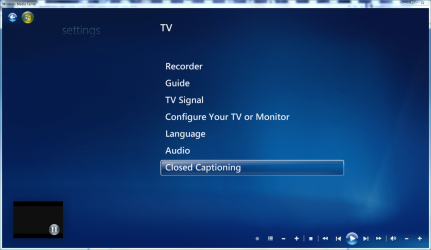
Yep... I dont have an over the air, but that option is in my WMC setup also.
 

My Computer

Computer Manufacturer/Model Number
Homebrew PC - "Alpha_Dawg"
OS
Windows 7 Ultimate 64 bit Steve Ballmer Signature Edition
CPU
Intel Core 2 Quad - Q9550 - 2.83GHz stock - OC'd to 3.6GHz
Motherboard
Gigabyte EP45-UD3P
Memory
4GB DDR2 800MHz (PC6400) OCZ Reaper
Graphics Card(s)
Nvidia GE Force 8800 GTS
Sound Card
Asus Xonar DX
Monitor(s) Displays
Samsung SyncMaster 2333HD
Screen Resolution
1920 x 1080
Hard Drives
WD Caviar Black 750GB - 7200RPM - 32MB cache
WD Caviar Green 1.5TB - 5400RPM - 64MB cache
WD Caviar Green 2.0TB - 5400RPM - 64MB cache
PSU
PC Power & Cooling Silencer 750
Case
Gigabyte 3D Aurora
Cooling
Case is Air - 5ea. 120mm fans (mix of Arctic and Xigmatec)
Keyboard
MS Natural Wireless KB
Mouse
MS Wireless Mouse
Internet Speed
50 mbps down/5 mbps up
Other Info
AVerMedia - AVerTVHD G2 Dual Tuner Card
Really? Okay, then it must be how Windows is seeing my 950Q tuners.
Maybe I will try to reset them up and see if I get it.

Thanks!
 

My Computer

Computer Manufacturer/Model Number
Dell Optiplex GX620
OS
7
CPU
Pentium D 2.0
Memory
4GB
Graphics Card(s)
ATI Radeon 4650 HD
Monitor(s) Displays
Samsung LN52A550
Hard Drives
Seagate 1TB
Other Info
PS3, Onkyo SR600, Cambridge Soundworks 5.1
Any success?
 

My Computer

Computer Manufacturer/Model Number
Homebrew PC - "Alpha_Dawg"
OS
Windows 7 Ultimate 64 bit Steve Ballmer Signature Edition
CPU
Intel Core 2 Quad - Q9550 - 2.83GHz stock - OC'd to 3.6GHz
Motherboard
Gigabyte EP45-UD3P
Memory
4GB DDR2 800MHz (PC6400) OCZ Reaper
Graphics Card(s)
Nvidia GE Force 8800 GTS
Sound Card
Asus Xonar DX
Monitor(s) Displays
Samsung SyncMaster 2333HD
Screen Resolution
1920 x 1080
Hard Drives
WD Caviar Black 750GB - 7200RPM - 32MB cache
WD Caviar Green 1.5TB - 5400RPM - 64MB cache
WD Caviar Green 2.0TB - 5400RPM - 64MB cache
PSU
PC Power & Cooling Silencer 750
Case
Gigabyte 3D Aurora
Cooling
Case is Air - 5ea. 120mm fans (mix of Arctic and Xigmatec)
Keyboard
MS Natural Wireless KB
Mouse
MS Wireless Mouse
Internet Speed
50 mbps down/5 mbps up
Other Info
AVerMedia - AVerTVHD G2 Dual Tuner Card
No success. Redid my tv tuner setup. Still don't have the option.
I think it must be how media center see's the tuners.
My 950Q tuners are dual tuners, both digital and analog.
That might make a difference, not really sure.
Guess I will just check my signal using my TV's feature instead of through media center.
 

My Computer

Computer Manufacturer/Model Number
Dell Optiplex GX620
OS
7
CPU
Pentium D 2.0
Memory
4GB
Graphics Card(s)
ATI Radeon 4650 HD
Monitor(s) Displays
Samsung LN52A550
Hard Drives
Seagate 1TB
Other Info
PS3, Onkyo SR600, Cambridge Soundworks 5.1
I don't understand your issue.

If you are getting good enough signals for your TV and your tuner, then why do you need to know the signal strength/quality?

Or is there a symptom you are trying to address?
 

My Computer

Computer Manufacturer/Model Number
Gateway GM5472
OS
Windows 7 Home Premium (64 bit)
CPU
AMD Athlon 56 X2 5000+
Motherboard
ECS MCP61P-AM
Memory
4.0 GB
Graphics Card(s)
Sapphire HD 4350 fanless w/512MB
Monitor(s) Displays
VeiwSonic VX2035WM
Screen Resolution
1680x1050
Other Info
Stock system except for the addition of 2GB memory, a Swann PCDVR 4 Card and a Hauppage dual HD tuner and a Sapphire HD 4550 video card
I never said I was getting a good signal. I want to put a booster on my cable line and would like the signal strength meter to judge a before/after reading.
My signal is okay (not great), but it's clear qam and I have fluxuations which kills my recordings at times.
I think a signal booster would help. Am probably going to order the motorola bda100 and see if it helps.
 

My Computer

Computer Manufacturer/Model Number
Dell Optiplex GX620
OS
7
CPU
Pentium D 2.0
Memory
4GB
Graphics Card(s)
ATI Radeon 4650 HD
Monitor(s) Displays
Samsung LN52A550
Hard Drives
Seagate 1TB
Other Info
PS3, Onkyo SR600, Cambridge Soundworks 5.1
I never said I was getting a good signal. I want to put a booster on my cable line and would like the signal strength meter to judge a before/after reading.
My signal is okay (not great), but it's clear qam and I have fluxuations which kills my recordings at times.
I think a signal booster would help. Am probably going to order the motorola bda100 and see if it helps.

Please report back with your results... and I think that signal strength meter is only for over the air... not cable!
 

My Computer

Computer Manufacturer/Model Number
Homebrew PC - "Alpha_Dawg"
OS
Windows 7 Ultimate 64 bit Steve Ballmer Signature Edition
CPU
Intel Core 2 Quad - Q9550 - 2.83GHz stock - OC'd to 3.6GHz
Motherboard
Gigabyte EP45-UD3P
Memory
4GB DDR2 800MHz (PC6400) OCZ Reaper
Graphics Card(s)
Nvidia GE Force 8800 GTS
Sound Card
Asus Xonar DX
Monitor(s) Displays
Samsung SyncMaster 2333HD
Screen Resolution
1920 x 1080
Hard Drives
WD Caviar Black 750GB - 7200RPM - 32MB cache
WD Caviar Green 1.5TB - 5400RPM - 64MB cache
WD Caviar Green 2.0TB - 5400RPM - 64MB cache
PSU
PC Power & Cooling Silencer 750
Case
Gigabyte 3D Aurora
Cooling
Case is Air - 5ea. 120mm fans (mix of Arctic and Xigmatec)
Keyboard
MS Natural Wireless KB
Mouse
MS Wireless Mouse
Internet Speed
50 mbps down/5 mbps up
Other Info
AVerMedia - AVerTVHD G2 Dual Tuner Card
I thought that as well but in your earlier post you said you didn't have an ota antenna but you still had that option.
Was that not correct?
 

My Computer

Computer Manufacturer/Model Number
Dell Optiplex GX620
OS
7
CPU
Pentium D 2.0
Memory
4GB
Graphics Card(s)
ATI Radeon 4650 HD
Monitor(s) Displays
Samsung LN52A550
Hard Drives
Seagate 1TB
Other Info
PS3, Onkyo SR600, Cambridge Soundworks 5.1
Yes I have cable... no over the air. But I did see the signal strength area in WMC and no it didnt show any strength meter or gauge. I was just saying that I know it's there I've seen it. Sorry for the confusion!
 

My Computer

Computer Manufacturer/Model Number
Homebrew PC - "Alpha_Dawg"
OS
Windows 7 Ultimate 64 bit Steve Ballmer Signature Edition
CPU
Intel Core 2 Quad - Q9550 - 2.83GHz stock - OC'd to 3.6GHz
Motherboard
Gigabyte EP45-UD3P
Memory
4GB DDR2 800MHz (PC6400) OCZ Reaper
Graphics Card(s)
Nvidia GE Force 8800 GTS
Sound Card
Asus Xonar DX
Monitor(s) Displays
Samsung SyncMaster 2333HD
Screen Resolution
1920 x 1080
Hard Drives
WD Caviar Black 750GB - 7200RPM - 32MB cache
WD Caviar Green 1.5TB - 5400RPM - 64MB cache
WD Caviar Green 2.0TB - 5400RPM - 64MB cache
PSU
PC Power & Cooling Silencer 750
Case
Gigabyte 3D Aurora
Cooling
Case is Air - 5ea. 120mm fans (mix of Arctic and Xigmatec)
Keyboard
MS Natural Wireless KB
Mouse
MS Wireless Mouse
Internet Speed
50 mbps down/5 mbps up
Other Info
AVerMedia - AVerTVHD G2 Dual Tuner Card
I see, I have cable as well but don't even have that option.
Very confusing.
 

My Computer

Computer Manufacturer/Model Number
Dell Optiplex GX620
OS
7
CPU
Pentium D 2.0
Memory
4GB
Graphics Card(s)
ATI Radeon 4650 HD
Monitor(s) Displays
Samsung LN52A550
Hard Drives
Seagate 1TB
Other Info
PS3, Onkyo SR600, Cambridge Soundworks 5.1
I see, I have cable as well but don't even have that option.
Very confusing.

Only before you configure a tuner I believe.
 

My Computer

Computer Manufacturer/Model Number
Homebrew PC - "Alpha_Dawg"
OS
Windows 7 Ultimate 64 bit Steve Ballmer Signature Edition
CPU
Intel Core 2 Quad - Q9550 - 2.83GHz stock - OC'd to 3.6GHz
Motherboard
Gigabyte EP45-UD3P
Memory
4GB DDR2 800MHz (PC6400) OCZ Reaper
Graphics Card(s)
Nvidia GE Force 8800 GTS
Sound Card
Asus Xonar DX
Monitor(s) Displays
Samsung SyncMaster 2333HD
Screen Resolution
1920 x 1080
Hard Drives
WD Caviar Black 750GB - 7200RPM - 32MB cache
WD Caviar Green 1.5TB - 5400RPM - 64MB cache
WD Caviar Green 2.0TB - 5400RPM - 64MB cache
PSU
PC Power & Cooling Silencer 750
Case
Gigabyte 3D Aurora
Cooling
Case is Air - 5ea. 120mm fans (mix of Arctic and Xigmatec)
Keyboard
MS Natural Wireless KB
Mouse
MS Wireless Mouse
Internet Speed
50 mbps down/5 mbps up
Other Info
AVerMedia - AVerTVHD G2 Dual Tuner Card
Old post I know, but I have the same problem. I have two digital tuners. I have a Avermedia 800 (quite old) with really good signal and a Picostick with less good signal, and sometimes no signal. I do not have the signal strength option on my windows 7 home premium 32bit (Asus Eeebox 1501). I have followed the steps in microsofts homepage, but it's simply not there.
 

My Computer

Computer Manufacturer/Model Number
Asus Eeebox 1501
OS
Windows 7 Home Premium 32bit
Graphics Card(s)
Nvidia Ion
Monitor(s) Displays
15" TFT and LCD 32" full HD

My Computer

Computer Manufacturer/Model Number
Dell Optiplex GX620
OS
7
CPU
Pentium D 2.0
Memory
4GB
Graphics Card(s)
ATI Radeon 4650 HD
Monitor(s) Displays
Samsung LN52A550
Hard Drives
Seagate 1TB
Other Info
PS3, Onkyo SR600, Cambridge Soundworks 5.1
It's DVB-T, but some users with DVB-T have no problem. I have two tuners and their respective software have signal strength and/or quality that's working. Why can't microsoft come up with a soultion? One should think they had the engineering skills to do such a simple task.
 
Last edited:

My Computer

Computer Manufacturer/Model Number
Asus Eeebox 1501
OS
Windows 7 Home Premium 32bit
Graphics Card(s)
Nvidia Ion
Monitor(s) Displays
15" TFT and LCD 32" full HD
Actually, underneath TV Signal I have 2 options:
"Scan for more channels"
"Set up TV Signal"

I think I may hav figured out why.
I hooked up an old Pinnacle 800 to my laptop which has an OTA antenna.
And went through the setup process and using the pinnacle tuner and OTA antenna I see the 3rd option "Digital TV Signal Antenna Strength"
I think this option must only be for OTA antennas and not for cable connected tuners.
Can anyone verify this?

You'll only see the signal strength meter for OTA signals.
You won't see it if you're scanning for cable.
 
Last edited:

My Computer

Computer type
PC/Desktop
Computer Manufacturer/Model Number
Custom Build
OS
Windows 7 Home Premium 64 bit
CPU
Intel Core i7-4790
Motherboard
GA-Z87X-D3H
Memory
G.SKILL 8GB (2 x 4GB) DDR3 F3-10666CL9D-8GBNT
Graphics Card(s)
AMD Radeon R7 250
Sound Card
Realtek ALC892
Monitor(s) Displays
Samsung UN32EH5000, Dell 1703FPT
Screen Resolution
1920 x 1080, 1280 x 1024
Hard Drives
WD5003AZEX
WD10EZEX
Samsung HD103SJ
Samsung 128 GB 840 PRO
PSU
SeaSonic M12II SS-500GM
Case
Fractal Design Define R4
Cooling
Zalman CNPS9900ALED
Keyboard
Logitech K800
Mouse
Logitech M705
Internet Speed
16 Mbps
Antivirus
Avast
Browser
Firefox
Other Info
Bose Companion 2 Multimedia Speakers
I don't have the option and only use OTA antennas. I have tried two different tuners (Aver Media and PicoStick).
 

My Computer

Computer Manufacturer/Model Number
Asus Eeebox 1501
OS
Windows 7 Home Premium 32bit
Graphics Card(s)
Nvidia Ion
Monitor(s) Displays
15" TFT and LCD 32" full HD
I don't have the option and only use OTA antennas. I have tried two different tuners (Aver Media and PicoStick).

In the article, Microsoft said for ATSC, yes, DVB-T, no.
That article came out in 2006. My quess is that it's still an issue.
Maybe they'll have it fixed in Windows 8, who knows.
 

My Computer

Computer type
PC/Desktop
Computer Manufacturer/Model Number
Custom Build
OS
Windows 7 Home Premium 64 bit
CPU
Intel Core i7-4790
Motherboard
GA-Z87X-D3H
Memory
G.SKILL 8GB (2 x 4GB) DDR3 F3-10666CL9D-8GBNT
Graphics Card(s)
AMD Radeon R7 250
Sound Card
Realtek ALC892
Monitor(s) Displays
Samsung UN32EH5000, Dell 1703FPT
Screen Resolution
1920 x 1080, 1280 x 1024
Hard Drives
WD5003AZEX
WD10EZEX
Samsung HD103SJ
Samsung 128 GB 840 PRO
PSU
SeaSonic M12II SS-500GM
Case
Fractal Design Define R4
Cooling
Zalman CNPS9900ALED
Keyboard
Logitech K800
Mouse
Logitech M705
Internet Speed
16 Mbps
Antivirus
Avast
Browser
Firefox
Other Info
Bose Companion 2 Multimedia Speakers
Back
Top