JavaScript is disabled. For a better experience, please enable JavaScript in your browser before proceeding.
You are using an out of date browser. It may not display this or other websites correctly.
You should upgrade or use an
alternative browser .
Signed driver error for the freeware program Hwinfo benchmark program
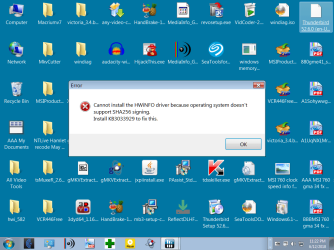
The Hwinfo benchmark program shows the error repeatedly given in the attachment of my
screen shot.
What is the best method to turn off drive signing or fix the error in Win7?
I can see a fix the program note on there but I don't understand any of it.
it's for Hwinfo Benchmark program. That error message stays on until I
force a reboot which is another pain.
link to Hwinfo here for reference:
HWiNFO - Hardware Information, Analysis and Monitoring Tools
Signed driver error from HWinfo.png
69.9 KB
· Views: 0
Windows 7 x64 Ultimate AMD Athlon II x3 450 2 GB PC/Desktop custom Windows 7 x64 Ultimate AMD Athlon II x3 450 MSI 880GM 2 GB various Firefox, Opera
New member
Guru
Gold Member
VIP
Have you installed the KB it says will fix it?
PC/Desktop win 8 32 bit
I WANT TO BELIEVE!
Guru
Gold Member
VIP
Last edited: Jun 13, 2018
Win 7 HP SP1 64-bit Vista HB SP2 32-bit Linux... Intel(R) Pentium(R) CPU P6200 @ 2.13GHz 4.00 GB Intel(R) Graphics Media Accelerator HD Laptop Fujitsu LIFEBOOK Win 7 HP SP1 64-bit Vista HB SP2 32-bit Linux Mint 18.3 Intel(R) Pentium(R) CPU P6200 @ 2.13GHz FUJITSU FJNBB06 4.00 GB Intel(R) Graphics Media Accelerator HD [1] Realtek High Definition Audio [2] Intel(R) Display Audio 1366 x 768 x 32 bits (4294967296 colors) @ 59 Hz TOSHIBA MK5076GSX AVG FREE
New member
Member
VIP
Thread Starter
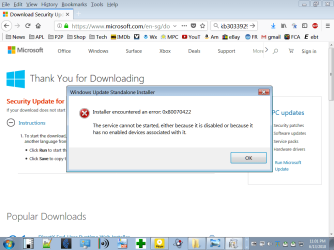
Yes, at one point even before I wrote here I had done that. When I retried I was reminded of the error on install after download.
I'm still not getting anything from KB3033929. Attached is the new error message.
There are other fixes apparently-- most notably from a site called windowsreport.com:
A digitally signed driver is required: 3 ways to fix it
I haven't done the procedures they show yet.
A friend just downloaded the HWinfo prog. and ran it straightaway in XP with none of these hoops to jump through.
errormessageonsigned drivers.png
42.9 KB
· Views: 1
Windows 7 x64 Ultimate AMD Athlon II x3 450 2 GB PC/Desktop custom Windows 7 x64 Ultimate AMD Athlon II x3 450 MSI 880GM 2 GB various Firefox, Opera
I WANT TO BELIEVE!
Guru
Gold Member
VIP
Hi
loninappleton ,
I see that
HWiNFO has a dedicated forum here:
HWiNFO Forum
Have you tried posting your problem there?
The authors of the software should be able to help you!
I hope this helps!
Win 7 HP SP1 64-bit Vista HB SP2 32-bit Linux... Intel(R) Pentium(R) CPU P6200 @ 2.13GHz 4.00 GB Intel(R) Graphics Media Accelerator HD Laptop Fujitsu LIFEBOOK Win 7 HP SP1 64-bit Vista HB SP2 32-bit Linux Mint 18.3 Intel(R) Pentium(R) CPU P6200 @ 2.13GHz FUJITSU FJNBB06 4.00 GB Intel(R) Graphics Media Accelerator HD [1] Realtek High Definition Audio [2] Intel(R) Display Audio 1366 x 768 x 32 bits (4294967296 colors) @ 59 Hz TOSHIBA MK5076GSX AVG FREE