Simple Outlook 2010 Questions

IaskQuestions

New member
Member
Local time
9:50 AM
Messages
58
What i want to know is....

Can i get outlook to start automatically when i run windows and prompt me to login? I'm sure i can, but before i actually log in will people be able to see the emails I've previously sent/received?

I'm guessing that when u hit send/receive it downloads it to the computer, which is fine. But i share this computer and I want to make the information where it is stored password protected.

I tried to set Outlook 2010 to not remember my password and it didn't work. I configured the account to remember, than went back and unchecked the "Remember my password option". Now when you hit "Next" in the process, both of the tests fail, the log on, then the test message.

When I send/receive i WANT to enter my password every time, but can people still see the messages I've already received and sent before??

Can i password protect outlook before it completely opens on startup?

Thanks for all responses and valid, on topic information!!
 

My Computer

Computer Manufacturer/Model Number
Dell Inspiron Q6600
OS
Windows 7 64 Bit
CPU
Intel Core2 Quad 2.4
Motherboard
Intel G33 Express
Memory
2GB
Graphics Card(s)
Will Update
Sound Card
Onboard
Monitor(s) Displays
Samsung SyncMaster181T
PSU
300w
Keyboard
Logitech G15
Mouse
Logitech G7
Internet Speed
Crappy (changing that soon)
Other Info
What other info could i possibly put? The other stuff i left out? Who cares. =)
Also, i setup rules for my emails that come in for a certain word in the "subject' or "Body" to go in to a certain folder....

Do i really have to hit Run Rules every time to do this or can i get it to do it automatically?
 

My Computer

Computer Manufacturer/Model Number
Dell Inspiron Q6600
OS
Windows 7 64 Bit
CPU
Intel Core2 Quad 2.4
Motherboard
Intel G33 Express
Memory
2GB
Graphics Card(s)
Will Update
Sound Card
Onboard
Monitor(s) Displays
Samsung SyncMaster181T
PSU
300w
Keyboard
Logitech G15
Mouse
Logitech G7
Internet Speed
Crappy (changing that soon)
Other Info
What other info could i possibly put? The other stuff i left out? Who cares. =)
What i want to know is....

Can i get outlook to start automatically when i run windows and prompt me to login? I'm sure i can, but before i actually log in will people be able to see the emails I've previously sent/received?

Thanks for all responses and valid, on topic information!!

If you let other people use your userid and password on your computer, then they can do anything that you can do. ...

Have you drilled down thru the email options for the email address your using to make sure that the remember password is unchecked?

Also, you can password protect your pst file by going to the data file and check add a password so that each time you open outlook, you must put in the password or it won't open.
 

My Computer

Computer type
Laptop
Computer Manufacturer/Model Number
Toshiba Laptop Qosimo X870
OS
Windows 7 Pro x64 SP1
CPU
Intel Core I7
Motherboard
Toshiba Qosmio
Memory
16 Gigs
Graphics Card(s)
NVIDIA GeForce GTX 670M
Monitor(s) Displays
17.7" laptop
Screen Resolution
1600 x 900
Hard Drives
256 Gig SanDisk SSD for C
256 Gig Intel SSD for D
Internet Speed
50/25 FIOS
Antivirus
Vipre (all you can eat for 10 machines)
Browser
IE and FF
Other Info
I have dos 6.22, wfwg 3.11, win98, 2000 and xp VHD's available for testing. MS's Virtual PC works great.
richnrockville is correct, IaskQuestions. Here's a bit more info:

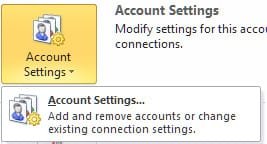
Click on the "File" tab then go to "Account Settings" and select "Account Settings...":

ScreenShot00319.jpg

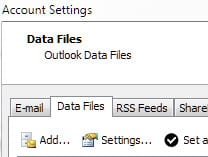
In the next dialog, select the "Data Files" tab, select your active pst file (it will have a checkmark beside it), then click "Settings...":

ScreenShot00320.jpg

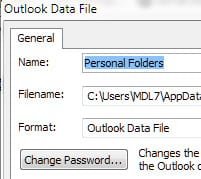
In the next dialog, click the "Change Password..." button:

ScreenShot00321.jpg

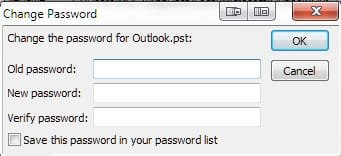
You will then be prompted to enter your old password (if you've never set one before, leave it blank) and enter your new password with a confirmation:

ScreenShot00322.jpg

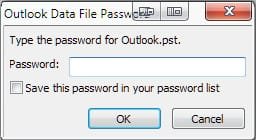
Next time you start Outlook, before it gets to any reading pane or calendar (anything but the password prompt) you will be asked to enter your password:

ScreenShot00318.jpg

If you want to reset it so the password prompt doesn't appear, just repeat the steps above, enter the old password and leave the new password blank.
 
Last edited:

My Computer

Computer Manufacturer/Model Number
Toshiba L355D
OS
Windows 7 Ultimate x64 SP1
CPU
Core2 Duo
Motherboard
Intel
Memory
4 GB
Graphics Card(s)
GM965 on-board
Sound Card
RealTek on-board
Monitor(s) Displays
19"+17"(laptop)
Screen Resolution
1440x900 (x 2)
Hard Drives
500GB Ext. 200GB Internal
PSU
N/A
Case
N/A
Cooling
N/A
I've used rules in Outlook 2003 and 2007 and they all start with "Apply this rule after the message arrives" and run automatically when new mail arrives.
 

My Computer

Computer type
PC/Desktop
Computer Manufacturer/Model Number
Home Built
OS
Windows 10 Education 64 bit
CPU
AMD Phenom II X4 980 Black Edition Deneb 3.7GHz
Motherboard
Asus M4N68T-M V2 µATX Motherboard
Memory
8GB 4GBx2 Kingston PC10600 DDR3 1333 Memory
Graphics Card(s)
Zotac NVIDIA Geforce GT640 2 Gig DDR3 PCIe
Sound Card
VIA VT1708s High Definition Audio 8-channel Onboard
Monitor(s) Displays
22" LG E2242 1080p and 2 19" I-INC AG191D
Screen Resolution
1280x1024 - 1920x1080 - 1280x1024
Hard Drives
Crucial M100 256 GB SSD and 500 GB WD Blue SATA
PSU
Thermaltake TR 620
Case
Power Up Black ATX Mid-Tower Case
Cooling
Stock heatsink and fan
Keyboard
Logitech Wireless K350 Wave
Mouse
Logitech Wireless M570 Trackman Wheel
Internet Speed
80 Mbps Down 30 Mbps Up
Antivirus
Windows Defender
Browser
Internet Explorer 11
Other Info
HP DVD1040e Lightscribe - External USB2
richnrockville is correct, IaskQuestions. Here's a bit more info:

Click on the "File" tab then go to "Account Settings" and select "Account Settings...":

View attachment 127096

In the next dialog, select the "Data Files" tab, select your active pst file (it will have a checkmark beside it), then click "Settings...":

View attachment 127097

In the next dialog, click the "Change Password..." button:

View attachment 127098

You will then be prompted to enter your old password (if you've never set one before, leave it blank) and enter your new password with a confirmation:

View attachment 127099

Next time you start Outlook, before it gets to any reading pane or calendar (anything but the password prompt) you will be asked to enter your password:

View attachment 127100

If you want to reset it so the password prompt doesn't appear, just repeat the steps above, enter the old password and leave the new password blank.

Awesome answers from all.

I am curious though... I've setup my gmail account through OL 2010 and it i have a lot (around 10-15) of folders and rules setup.

Lately its been running VERY slow. For instance, i click on a folder on the left that has attachments and emails, it might take it 3-5 seconds to load sometimes longer. This type of thing even happens when i click on something simple like the "Home" tab.

My keyboard is a logitech G15 that allows me to view ram and CPU usage. Nothing changes when the program starts to slow down. I stay at around 60% RAM usage and 10% CPU usage of my quad core.

In the background i run eset nod and comodo.

Any ideas on whats going on? I've excluded all files for OL2010 in comodo, i guess i'll do the same in NOD. Any other suggestions??

Thanks.
 
Last edited:

My Computer

Computer Manufacturer/Model Number
Dell Inspiron Q6600
OS
Windows 7 64 Bit
CPU
Intel Core2 Quad 2.4
Motherboard
Intel G33 Express
Memory
2GB
Graphics Card(s)
Will Update
Sound Card
Onboard
Monitor(s) Displays
Samsung SyncMaster181T
PSU
300w
Keyboard
Logitech G15
Mouse
Logitech G7
Internet Speed
Crappy (changing that soon)
Other Info
What other info could i possibly put? The other stuff i left out? Who cares. =)
Back
Top