Solved Simpliest Way to Partition For New Install?

nyjohn1

New member
Local time
5:04 AM
Messages
6
Hi,

I have 1TB HD. Currently have Windows 7 but I want to install fresh copy of Windows 10 Preview (know of the risks). On this HD I have ~100GB of data I wish to backup (no other HD available).

In the past, I would just wipeout/format the HD, and install new OS. I'm assuming if I want to save the 100GB, I need to create a new partition (~100GB), and than when installing Windows 10, delete and format the partition that has Windows 7 (~900GB) for the Windows 10 install?

What is the simplest way of doing this? Is it as simple as I make it out?

Thanks!
 

My Computer My Computer

At a glance

64
Computer type
PC/Desktop
Computer Manufacturer/Model Number
Acer
OS
64
I'm assuming you want to get rid of Windows 7, rather than have both 7 and 10.

Correct?

You could do either of the following:

1: Shrink your current C (Win 7 partition) and then install Win 10 to that freed up space, making a new partition. Then move your data from the current C to the new partition containing 10. Then delete the current C, wiping out Windows 7.

2: Shrink your current C and make a new partition from that freed up space. Move your data to this new partition. Then install 10 to the current C, wiping out 7.

I'd probably take choice 2 as I like to keep data and operating system on separate partitions or preferably on separate drives.

You might be able to do it with Windows Disk Management or you might need Partition Wizard.

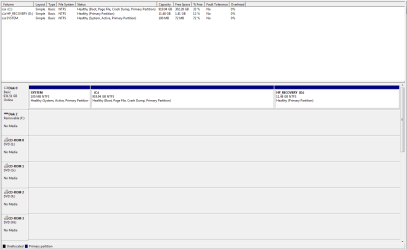
Post a screen shot of Windows Disk Management so we can see what you've got right now.
 

My Computer My Computer

At a glance

Windows 7 Home Premium SP1, 64-bitIntel Skylake i5-6600K, not overclocked8 GB HyperX DDR4-2666 (2 x 4 GB)none; graphics are integrated on CPU
Computer type
PC/Desktop
Computer Manufacturer/Model Number
Ignatz Special; 4 speed manual gearbox; factory air conditioning; one of one
OS
Windows 7 Home Premium SP1, 64-bit
CPU
Intel Skylake i5-6600K, not overclocked
Motherboard
AsRock Z170M Extreme 4, micro ATX
Memory
8 GB HyperX DDR4-2666 (2 x 4 GB)
Graphics Card(s)
none; graphics are integrated on CPU
Sound Card
onboard: Realtek ALC1150; external: USB Behringer UF0-202
Monitor(s) Displays
Dell S2340M 23 inch IPS
Screen Resolution
1600 x 900
Hard Drives
System: Crucial MX100 series SSD, 128 GB;
Data: Samsung Spinpoint 103SJ, 1 TB;
Backup: WD Caviar Green WD30EZRX-00D8PB0, 3 TB
PSU
Rosewill SilentNight 500 watt fanless, semi-modular
Case
Antec Solo II
Cooling
Noctua NH-U12S; Noctua F12 intake, Noctua S12A exhaust
Keyboard
Microsoft 200 6JH-00001 USB
Mouse
Dell or Microsoft optical wired; USB
Antivirus
Microsoft Security Essentials and Malwarebytes Premium
Browser
Pale Moon
Other Info
All fans PWM; speeds at idle: CPU circa 500 rpm; intake circa 600 rpm; exhaust circa 600 rpm; CPU temps 27 idle and 47 C load in a warm room (27 C/81 F) when running Intel Extreme Tuning Utility stress test.
ignatzasonic - thank you for your response. your suggestions are much better than what i was thinking.

2) makes most sense. lets say i shrink, and leave 100gb for my data on new partition. the windows 7 partition i overwrite/format with 10. can i later, increase / decrease the partition of both, or does that require new partitioning? also by shrinking through disk management, does that create automatically new partition with the new space, or do i need to use 3rd party app to create the partition?
 

My Computer My Computer

At a glance

64
Computer type
PC/Desktop
Computer Manufacturer/Model Number
Acer
OS
64
Why abandon so quickly the best OS ever created?

With all that space, might as well keep the Win7 partition, shrink as suggested to create the space to partition during Clean Install Windows 10 Technical Preview.

This is what I have done and even though I haven't gone back to Windows 7 there are some risks which make keeping WIn7 worthwhile. Some hardware may not adjust yet to the Technical Preview.

You can even shrink another partition to move your User folders into, then link them from both OS's so they share the same data: http://www.sevenforums.com/tutorials/18629-user-folders-change-default-location.html.

Or from Windows 10 you can rightclick each User folder in Windows 7 to add it to the related Library so it is readily accessible while in Win10.
 
ignatzasonic - thank you for your response. your suggestions are much better than what i was thinking.

2) makes most sense. lets say i shrink, and leave 100gb for my data on new partition. the windows 7 partition i overwrite/format with 10. can i later, increase / decrease the partition of both, or does that require new partitioning? also by shrinking through disk management, does that create automatically new partition with the new space, or do i need to use 3rd party app to create the partition?

Yes, you can later enlarge or shrink any partitions as necessary.

Shrinking generates "unallocated space", not a new partition. After you've got the unallocated space, you then create new partitions or enlarge existing partitions.

The correct tool depends on your particular partition layout. Windows Disc Management will work within its limitations. Partition Wizard, a free download, is much more flexible. WDM's main limitation is that it cannot expand a partition UNLESS there is unallocated space IMMEDIATELY ADJACENT to the right of the partition to be enlarged, as shown in WDM.

BUT--as Greg says---you've got much more nerve than I would in abandoning 7 for what is currently a technical preview, not even a Beta.

I haven't messed with 10 at all yet as I don't want to go through application installation and configuration hell on a Tech Preview. It's too time-consuming--several days at least and I'd have to do it yet again when the finished Win 10 is made available next year.
 

My Computer My Computer

At a glance

Windows 7 Home Premium SP1, 64-bitIntel Skylake i5-6600K, not overclocked8 GB HyperX DDR4-2666 (2 x 4 GB)none; graphics are integrated on CPU
Computer type
PC/Desktop
Computer Manufacturer/Model Number
Ignatz Special; 4 speed manual gearbox; factory air conditioning; one of one
OS
Windows 7 Home Premium SP1, 64-bit
CPU
Intel Skylake i5-6600K, not overclocked
Motherboard
AsRock Z170M Extreme 4, micro ATX
Memory
8 GB HyperX DDR4-2666 (2 x 4 GB)
Graphics Card(s)
none; graphics are integrated on CPU
Sound Card
onboard: Realtek ALC1150; external: USB Behringer UF0-202
Monitor(s) Displays
Dell S2340M 23 inch IPS
Screen Resolution
1600 x 900
Hard Drives
System: Crucial MX100 series SSD, 128 GB;
Data: Samsung Spinpoint 103SJ, 1 TB;
Backup: WD Caviar Green WD30EZRX-00D8PB0, 3 TB
PSU
Rosewill SilentNight 500 watt fanless, semi-modular
Case
Antec Solo II
Cooling
Noctua NH-U12S; Noctua F12 intake, Noctua S12A exhaust
Keyboard
Microsoft 200 6JH-00001 USB
Mouse
Dell or Microsoft optical wired; USB
Antivirus
Microsoft Security Essentials and Malwarebytes Premium
Browser
Pale Moon
Other Info
All fans PWM; speeds at idle: CPU circa 500 rpm; intake circa 600 rpm; exhaust circa 600 rpm; CPU temps 27 idle and 47 C load in a warm room (27 C/81 F) when running Intel Extreme Tuning Utility stress test.
thank you both for the guidance. saved me lots of researching and reading :)

i agree about windows 7 being the greatest. i bought this computer in 2009 with windows 7, and i haven't had to re-install even once. despite 5 years of heavy use everything was running like brand new until few months ago. caught a spyware/adware bug , but i cleaned up it. last few weeks system is a bit sluggish and noticing hd/cpu activity when doing the simplest things (fear remnants of virus/spyware). need to do fresh re install anyway, so might as well try out 10. i have laptop for work, so this is my secondary computer, and if things don't work out i'll just go back to 7.
 

My Computer My Computer

At a glance

64
Computer type
PC/Desktop
Computer Manufacturer/Model Number
Acer
OS
64

My Computer My Computer

At a glance

Windows 10 Pro x64Intel Core i7 6700KGSkill TridentZ RGB 16GB 3600 16-16-16-36EVGA GTX 980 Ti SC x2
Computer type
PC/Desktop
Computer Manufacturer/Model Number
Skylake Special #666
OS
Windows 10 Pro x64
CPU
Intel Core i7 6700K
Motherboard
Asus Sabertooth Z170 Mark 1
Memory
GSkill TridentZ RGB 16GB 3600 16-16-16-36
Graphics Card(s)
EVGA GTX 980 Ti SC x2
Sound Card
Realtek High Definition
Monitor(s) Displays
AOC G2460PG
Screen Resolution
1920 x 1080 144Hz
Hard Drives
Samsung 860 Pro 256GB, Seagate Barracuda 4TB x2
PSU
EVGA 1000 P2, EVGA White Custom Braided Cables
Case
Corsair Vengeance C70 Gunmetal Black
Cooling
Corsair H100i v2, Corsair ML120 x2, Thermal Grizzly Kryonaut
Keyboard
Logitech G910 Orion Spectrum
Mouse
Logitech G700s
Internet Speed
Verizon Fios Quantum Gateway 75/75
Antivirus
Windows Defender, Malwarebytes Free 3.8.3
Browser
Chrome
Other Info
Corsair SP120 x4, LG Blu-ray Drive, Durabrand HT-395 100 Watt Dolby Digital Amp, Corsair H2100 Wireless 7.1 Headset
AddRam - Disk Management
 

Attachments

  • Capture.PNG
    Capture.PNG
    17.2 KB · Views: 4

My Computer My Computer

At a glance

64
Computer type
PC/Desktop
Computer Manufacturer/Model Number
Acer
OS
64
Shrink C by the amount you want for your TP partition, then create and format that from the booted installer during install of TP.

This keeps 7 intact, HP Diagnostics and Recovery still bootable from the ESC and F11 keys.
 
After you have successfully shrunk C, post another shot of disk management :)

Do not try to make another Primary partition using Disk Management, it will change the entire disk to Dynamic (You don`t want that) you will get a warning message before this happens, pay attention to it.

Use the Windows TP installer as Greg has suggested or.......

Use Partition Wizard if you want to create another Primary partition.

http://www.partitionwizard.com/free-partition-manager.html
 

My Computer My Computer

At a glance

Windows 10 Pro x64Intel Core i7 6700KGSkill TridentZ RGB 16GB 3600 16-16-16-36EVGA GTX 980 Ti SC x2
Computer type
PC/Desktop
Computer Manufacturer/Model Number
Skylake Special #666
OS
Windows 10 Pro x64
CPU
Intel Core i7 6700K
Motherboard
Asus Sabertooth Z170 Mark 1
Memory
GSkill TridentZ RGB 16GB 3600 16-16-16-36
Graphics Card(s)
EVGA GTX 980 Ti SC x2
Sound Card
Realtek High Definition
Monitor(s) Displays
AOC G2460PG
Screen Resolution
1920 x 1080 144Hz
Hard Drives
Samsung 860 Pro 256GB, Seagate Barracuda 4TB x2
PSU
EVGA 1000 P2, EVGA White Custom Braided Cables
Case
Corsair Vengeance C70 Gunmetal Black
Cooling
Corsair H100i v2, Corsair ML120 x2, Thermal Grizzly Kryonaut
Keyboard
Logitech G910 Orion Spectrum
Mouse
Logitech G700s
Internet Speed
Verizon Fios Quantum Gateway 75/75
Antivirus
Windows Defender, Malwarebytes Free 3.8.3
Browser
Chrome
Other Info
Corsair SP120 x4, LG Blu-ray Drive, Durabrand HT-395 100 Watt Dolby Digital Amp, Corsair H2100 Wireless 7.1 Headset
Back
Top