
nascarstevie
New member
- Local time
- 9:09 PM
- Messages
- 1
Looks like some of this territory has been covered before, but I'm somewhat of a pc novice who usually requires step-by-step guidance.
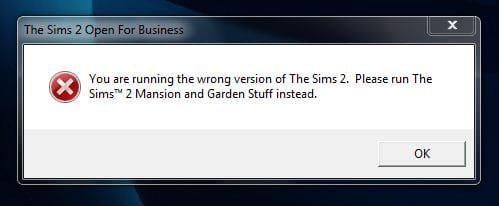
My family's old pc ran Windows XP and my teenage daughter had several Sims 2 games loaded onto it -- many were the Expansion Packs. I've loaded them all onto our new pc which runs Windows 7 HP 32-bit. Sims 3 games run fine, as do the Sims "Stories" games. But whenever I try to open ANY of the Sims 2 Expansion Pack games (REGARDLESS of the title) I get some variation of the attached message below.
Any ideas? I'm guessing it's a compatibility issue as most of the Sims 2 games were originally running on Windows Vista and/or XP? But I don't know how to bridge the gap over to Windows 7.
Thanks in advance for any assistance!
My family's old pc ran Windows XP and my teenage daughter had several Sims 2 games loaded onto it -- many were the Expansion Packs. I've loaded them all onto our new pc which runs Windows 7 HP 32-bit. Sims 3 games run fine, as do the Sims "Stories" games. But whenever I try to open ANY of the Sims 2 Expansion Pack games (REGARDLESS of the title) I get some variation of the attached message below.
Any ideas? I'm guessing it's a compatibility issue as most of the Sims 2 games were originally running on Windows Vista and/or XP? But I don't know how to bridge the gap over to Windows 7.
Thanks in advance for any assistance!
Attachments
My Computer
At a glance
Windows 7 Home Premium 32-bit
- OS
- Windows 7 Home Premium 32-bit

