
Sims 2 - Shadows appearing as black squares, Catalyst 13.12

HoneycombAG

Overclocking the Web
Power User
Local time
6:22 PM
Messages
297
I had Catalyst 13.4 (which by then was being used by my onboard HD-7480D, on-die with the APU itself), and in the Sims 2, installing 13.9 or 13.12 drivers causes this glitch to happen:
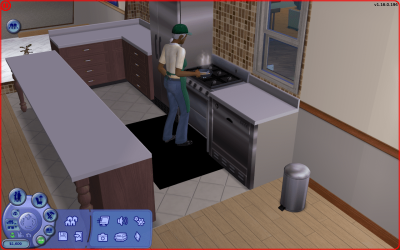
Sims2EP8 2014-04-19 23-27-58-83.png

Well, just recently I put in an ASUS Radeon R7-250 graphics card and I find that the Catalyst 13.4 drivers didn't support that card, so I had to install it from a CD.

My game's Shadows setting is stuck on "Medium" as a result.

And there's the problem, because it only glitches when Sims are indoors. Medium setting makes it where only stationary objects have shadows, but now it makes the game "less" realistic anyway.

And, on Steam, buying The Sims 3 and all of its DLC costs around $460. There's no way anyone can get that kind of money, so getting Sims 3 is basically out of the question!

I already tried filing a complaint about it using the AMD Catalyst issues reporting form but I ain't heard nothing back about it. They're a bit too focused on the "new" games.

(For some reason, it still goes back to 800x600 even with the memory override taken out of Graphics Rules.sgr.)

How do I fix the black squares problem?
 

My Computer My Computer

At a glance

Microsoft Windows 7 Home Premium 64-bit Servi...AMD A10-6800K APU with Radeon(tm)™ HD Graphic...(2) G.Skill F3-12800CL10-8GBXLASUS R7 250 Series (0x6610)
Computer type
PC/Desktop
Computer Manufacturer/Model Number
Custom
OS
Microsoft Windows 7 Home Premium 64-bit Service Pack 1
CPU
AMD A10-6800K APU with Radeon(tm)™ HD Graphics 4100
Motherboard
ASRock FM2A85X Extreme4-M
Memory
(2) G.Skill F3-12800CL10-8GBXL
Graphics Card(s)
ASUS R7 250 Series (0x6610)
Sound Card
Realtek High Definition Audio
Monitor(s) Displays
Acer X213H LCD monitor, 21"
Screen Resolution
1920 x 1080 x 32 bits @ 60 Hz
Hard Drives
WD Black, 1.0TB, WDC WD1002FAEX-00Z3A0
PSU
Rosewill Quark-650
Case
Raidmax Comet SECC Steel ATX Mid Tower Computer Case
Cooling
1 x 80mm + 2 x 120mm + Stock cooler
Mouse
Gear Head Wireless Optical 5-button mouse
Internet Speed
FTTx 6000 / 1000
Antivirus
Avast! Free Antivirus 2015.10.0.2208
Browser
Google Chrome Version 40.0.2214.115
Other Info
*AMD Dual-Graphics
*Uses OpenDNS
*Uses Folding@Home
*HP 16x Super-Multi DVD Writer
*Superspeed 74-in-1 Card Reader
*Maximum overclock has not been determined.


My Computer My Computer

At a glance

Win 7 Pro x64/Win 10 Pro x64 dual bootAMD FX 8350 Vishera @ 420016 GB Mushkin Blackline DDR3-2400 @ 1866 (9-1...XFX Radeon R9 280 Double D Black Edition
Computer type
PC/Desktop
Computer Manufacturer/Model Number
Mellon Labs (custom build)
OS
Win 7 Pro x64/Win 10 Pro x64 dual boot
CPU
AMD FX 8350 Vishera @ 4200
Motherboard
ASUS M5A97 R2.0
Memory
16 GB Mushkin Blackline DDR3-2400 @ 1866 (9-10-10-10-31)
Graphics Card(s)
XFX Radeon R9 280 Double D Black Edition
Sound Card
Realtek HD Audio on MB. Sounds great.
Monitor(s) Displays
Acer 24", Acer 22"
Screen Resolution
3840 x 1080
Hard Drives
1 x Mushkin Chronos 120 GB SSD (Win 10)
1 x Samsung 850 EVO 250 GB SSD (Win 7)
1 x WD 1TB SATA Blue
1 x WD 1TB SATA Green
PSU
Corsair TX-750
Case
CoolerMaster HAF 912+
Cooling
Coolermaster Seidon 240M Liquid AIO. 6 case fans
Keyboard
Logitech G710+
Mouse
Logitech G500s
Internet Speed
Much better since I got fiber, but still way overpriced.
Antivirus
MSE, Malware Bytes for scanning
Browser
Firefox
Other Info
Corsair VOID USB headphones.

A Mellon Labs X-1 - LCD Smartie driven system status display.

Brought to you by the letter E
Beware of Raptr drive-by download

Catalyst 13.12
...was out of beta ages ago! It's the latest release. The newer release candidate that is available is Catalyst 14.4 RC Version 1.0

I do want to point out a little drive-by download behavior when using the AMD Driver Auto-Detect Program. If you see a screen that looks like this:
raptr1.png
Close it out using the system tray or task manager, then uninstall it using either CCleaner, Revo, or by running the uninstaller directly as administrator. The uninstaller can be found in C:\Program Files (86)\Raptr.
 

My Computer My Computer

At a glance

Microsoft Windows 7 Home Premium 64-bit Servi...AMD A10-6800K APU with Radeon(tm)™ HD Graphic...(2) G.Skill F3-12800CL10-8GBXLASUS R7 250 Series (0x6610)
Computer type
PC/Desktop
Computer Manufacturer/Model Number
Custom
OS
Microsoft Windows 7 Home Premium 64-bit Service Pack 1
CPU
AMD A10-6800K APU with Radeon(tm)™ HD Graphics 4100
Motherboard
ASRock FM2A85X Extreme4-M
Memory
(2) G.Skill F3-12800CL10-8GBXL
Graphics Card(s)
ASUS R7 250 Series (0x6610)
Sound Card
Realtek High Definition Audio
Monitor(s) Displays
Acer X213H LCD monitor, 21"
Screen Resolution
1920 x 1080 x 32 bits @ 60 Hz
Hard Drives
WD Black, 1.0TB, WDC WD1002FAEX-00Z3A0
PSU
Rosewill Quark-650
Case
Raidmax Comet SECC Steel ATX Mid Tower Computer Case
Cooling
1 x 80mm + 2 x 120mm + Stock cooler
Mouse
Gear Head Wireless Optical 5-button mouse
Internet Speed
FTTx 6000 / 1000
Antivirus
Avast! Free Antivirus 2015.10.0.2208
Browser
Google Chrome Version 40.0.2214.115
Other Info
*AMD Dual-Graphics
*Uses OpenDNS
*Uses Folding@Home
*HP 16x Super-Multi DVD Writer
*Superspeed 74-in-1 Card Reader
*Maximum overclock has not been determined.
No sir, I don't like it.
Sims2EP8 2014-04-21 23-55-04-48.png
It still makes black squares in place of shadows. Look at the Sim on the right, his shadows work because he's outside.

And I thought I had stuck the game to use "Medium" shadow and lighting quality when I last left it, I think these are settings that "Graphics Rules.sgr" overrides, so I'll have to hack those parameters too.
 

My Computer My Computer

At a glance

Microsoft Windows 7 Home Premium 64-bit Servi...AMD A10-6800K APU with Radeon(tm)™ HD Graphic...(2) G.Skill F3-12800CL10-8GBXLASUS R7 250 Series (0x6610)
Computer type
PC/Desktop
Computer Manufacturer/Model Number
Custom
OS
Microsoft Windows 7 Home Premium 64-bit Service Pack 1
CPU
AMD A10-6800K APU with Radeon(tm)™ HD Graphics 4100
Motherboard
ASRock FM2A85X Extreme4-M
Memory
(2) G.Skill F3-12800CL10-8GBXL
Graphics Card(s)
ASUS R7 250 Series (0x6610)
Sound Card
Realtek High Definition Audio
Monitor(s) Displays
Acer X213H LCD monitor, 21"
Screen Resolution
1920 x 1080 x 32 bits @ 60 Hz
Hard Drives
WD Black, 1.0TB, WDC WD1002FAEX-00Z3A0
PSU
Rosewill Quark-650
Case
Raidmax Comet SECC Steel ATX Mid Tower Computer Case
Cooling
1 x 80mm + 2 x 120mm + Stock cooler
Mouse
Gear Head Wireless Optical 5-button mouse
Internet Speed
FTTx 6000 / 1000
Antivirus
Avast! Free Antivirus 2015.10.0.2208
Browser
Google Chrome Version 40.0.2214.115
Other Info
*AMD Dual-Graphics
*Uses OpenDNS
*Uses Folding@Home
*HP 16x Super-Multi DVD Writer
*Superspeed 74-in-1 Card Reader
*Maximum overclock has not been determined.
Catalyst 13.12
...was out of beta ages ago! It's the latest release. The newer release candidate that is available is Catalyst 14.4 RC Version 1.0
I meant to try the new beta drivers to see if they work. Version 14.4. It seems that they don't work for you.
 

My Computer My Computer

At a glance

Win 7 Pro x64/Win 10 Pro x64 dual bootAMD FX 8350 Vishera @ 420016 GB Mushkin Blackline DDR3-2400 @ 1866 (9-1...XFX Radeon R9 280 Double D Black Edition
Computer type
PC/Desktop
Computer Manufacturer/Model Number
Mellon Labs (custom build)
OS
Win 7 Pro x64/Win 10 Pro x64 dual boot
CPU
AMD FX 8350 Vishera @ 4200
Motherboard
ASUS M5A97 R2.0
Memory
16 GB Mushkin Blackline DDR3-2400 @ 1866 (9-10-10-10-31)
Graphics Card(s)
XFX Radeon R9 280 Double D Black Edition
Sound Card
Realtek HD Audio on MB. Sounds great.
Monitor(s) Displays
Acer 24", Acer 22"
Screen Resolution
3840 x 1080
Hard Drives
1 x Mushkin Chronos 120 GB SSD (Win 10)
1 x Samsung 850 EVO 250 GB SSD (Win 7)
1 x WD 1TB SATA Blue
1 x WD 1TB SATA Green
PSU
Corsair TX-750
Case
CoolerMaster HAF 912+
Cooling
Coolermaster Seidon 240M Liquid AIO. 6 case fans
Keyboard
Logitech G710+
Mouse
Logitech G500s
Internet Speed
Much better since I got fiber, but still way overpriced.
Antivirus
MSE, Malware Bytes for scanning
Browser
Firefox
Other Info
Corsair VOID USB headphones.

A Mellon Labs X-1 - LCD Smartie driven system status display.

Brought to you by the letter E
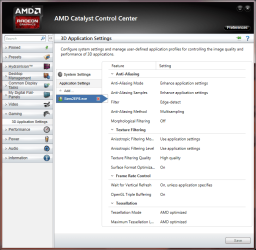
Well, I went as far as to tune the shadows in with the Catalyst Control Center, by making a profile and adjusting the settings from there, but that didn't work. I guess all my Sims are now stuck casting no shadows for the time being.

But wait, if they aren't going to cast shadows, then they would have to be ... ghosts?!

Last Settings I Tried
ccc_sims2ep8_settings.png
 

My Computer My Computer

At a glance

Microsoft Windows 7 Home Premium 64-bit Servi...AMD A10-6800K APU with Radeon(tm)™ HD Graphic...(2) G.Skill F3-12800CL10-8GBXLASUS R7 250 Series (0x6610)
Computer type
PC/Desktop
Computer Manufacturer/Model Number
Custom
OS
Microsoft Windows 7 Home Premium 64-bit Service Pack 1
CPU
AMD A10-6800K APU with Radeon(tm)™ HD Graphics 4100
Motherboard
ASRock FM2A85X Extreme4-M
Memory
(2) G.Skill F3-12800CL10-8GBXL
Graphics Card(s)
ASUS R7 250 Series (0x6610)
Sound Card
Realtek High Definition Audio
Monitor(s) Displays
Acer X213H LCD monitor, 21"
Screen Resolution
1920 x 1080 x 32 bits @ 60 Hz
Hard Drives
WD Black, 1.0TB, WDC WD1002FAEX-00Z3A0
PSU
Rosewill Quark-650
Case
Raidmax Comet SECC Steel ATX Mid Tower Computer Case
Cooling
1 x 80mm + 2 x 120mm + Stock cooler
Mouse
Gear Head Wireless Optical 5-button mouse
Internet Speed
FTTx 6000 / 1000
Antivirus
Avast! Free Antivirus 2015.10.0.2208
Browser
Google Chrome Version 40.0.2214.115
Other Info
*AMD Dual-Graphics
*Uses OpenDNS
*Uses Folding@Home
*HP 16x Super-Multi DVD Writer
*Superspeed 74-in-1 Card Reader
*Maximum overclock has not been determined.
Sorry for my English, it is not my native language.
I have the same problem as you have, same graphic card and I am running Sims 2 on Windows 7. I installed the game today and I immediately noticed that, when Sims are inside the house, the shadow is a black square. Could you find any solution?
 

My Computer My Computer

At a glance

Win7
Computer type
PC/Desktop
OS
Win7
Back
Top