

No registry editing required. 
If you have Windows 7 and don't have Aero enabled, you either aren't worried that it is off, tried to fix it using numerous different methods (like the "registry hacks"), or accepted the fact that you can't get it to work. But, there is a way!
(Yes, I know that a bit of this has been posted before, creds to them, but it was 6 months ago, and I do have other stuff here too. )
)
TrueTransparency
Before:

After:
Site
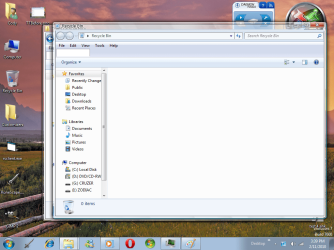
What it does is replace the Win7 basic borders (or Vista, or XP) with PNGs (some already included, like a "Seven" theme) that make it look 95% like Aero. There are some artifacts at times, but that's to be expected by a third party program. It also has Aero Snap and Shake for Vista and XP OS's.
I personally keep it disabled for high intensity programs, but it works really well for eye candy, and if you're good at graphics, you can even make your own window borders! How bout that for a good program?
Visual Tooltip
Site
This just simulates the preview you get when you hover over a window with Aero enabled. Pretty helpful.
NOTE: Just noticed this did not work for 7, but it does work for XP/Vista, and I think it still deserves a spot since it DOES simulate it.
LiveWindows New!
By - Holomind
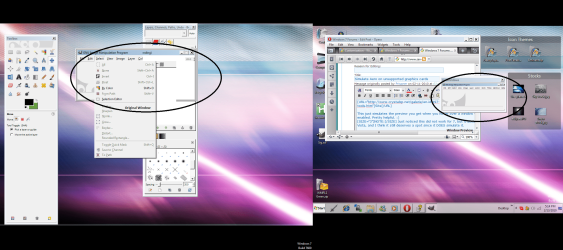
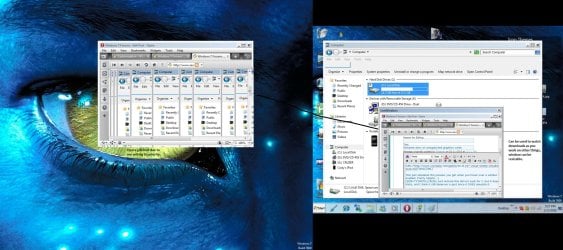
This program is a useful replacement to the previews on the taskbar, but it's hard to compare. I can't explain it very well myself, so i'll give the link.
LiveWindows
Your best bet is to download the .exe file, the .ahk file is the source code, and you need to download the program to compile it.
TransBar
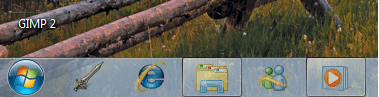
Before:
After (75% Transparency):
Site
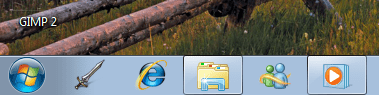
One thing that really annoyed me the most when I first installed 7 was that the taskbar was solid, and it looked ugly! So, I ran around and traversed many internet sites in search of a working replacement, and found this. All it does is simply add any percentage of transparency to your taskbar, and it can run at startup too, so it makes it look better.
WinFlip
Sorry, can't get screenshots of this one, PrntScrn won't take it, but the download site below has some screenshots.
Site
This is a really tight program. It replicates the pretty awesome effect you get by holding the Alt key and hitting the tab key on an Aero-enabled system, and also works on XP and Vista. It has a load of features to customize with.
WARNING: This program has had a history of being unstable under certain situations. Do not alter any graphics settings while running this! It could crash and possibly take the Explorer process with it!
Note: if that happens to you, hit "Ctrl + Shift + Esc", go to the "Applications" tab, click "New Task", and type in "explorer".
AeroPeek
Site
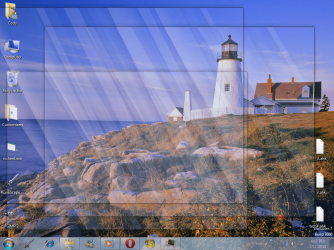
This has recently become one of my faves in terms of eye candy. It almost perfectly replicates the actual Aero Peek effect. The only downside is that it's activated by a tray icon and not by the Show Desktop button, but that isn't much of a problem.
Note: this app may have averse effects on your gadgets, but that may have just been my system. Before I took the screenshot above, it caused the transparency placeholders around the gadgets to turn solid. Mind that this may be an isolated event. Will test into the future.
--------------------------------------------------------------------
Depending on if anyone takes interest, I might add more programs to this list as I find replacement programs, but a Google search ought to satisfy anything I don't have here.
Credits to the smart guys who made these programs
Aaand, on a last note, if I broke any rules here, please tell me so I can fix it.
If you have Windows 7 and don't have Aero enabled, you either aren't worried that it is off, tried to fix it using numerous different methods (like the "registry hacks"), or accepted the fact that you can't get it to work. But, there is a way!
(Yes, I know that a bit of this has been posted before, creds to them, but it was 6 months ago, and I do have other stuff here too.
)TrueTransparency
Before:
After:
Site
What it does is replace the Win7 basic borders (or Vista, or XP) with PNGs (some already included, like a "Seven" theme) that make it look 95% like Aero. There are some artifacts at times, but that's to be expected by a third party program. It also has Aero Snap and Shake for Vista and XP OS's.
I personally keep it disabled for high intensity programs, but it works really well for eye candy, and if you're good at graphics, you can even make your own window borders! How bout that for a good program?
Visual Tooltip
Site
This just simulates the preview you get when you hover over a window with Aero enabled. Pretty helpful.
NOTE: Just noticed this did not work for 7, but it does work for XP/Vista, and I think it still deserves a spot since it DOES simulate it.
LiveWindows New!
By - Holomind
This program is a useful replacement to the previews on the taskbar, but it's hard to compare. I can't explain it very well myself, so i'll give the link.
LiveWindows
Your best bet is to download the .exe file, the .ahk file is the source code, and you need to download the program to compile it.
TransBar
Before:
After (75% Transparency):
Site
One thing that really annoyed me the most when I first installed 7 was that the taskbar was solid, and it looked ugly! So, I ran around and traversed many internet sites in search of a working replacement, and found this. All it does is simply add any percentage of transparency to your taskbar, and it can run at startup too, so it makes it look better.
WinFlip
Sorry, can't get screenshots of this one, PrntScrn won't take it, but the download site below has some screenshots.
Site
This is a really tight program. It replicates the pretty awesome effect you get by holding the Alt key and hitting the tab key on an Aero-enabled system, and also works on XP and Vista. It has a load of features to customize with.
WARNING: This program has had a history of being unstable under certain situations. Do not alter any graphics settings while running this! It could crash and possibly take the Explorer process with it!
Note: if that happens to you, hit "Ctrl + Shift + Esc", go to the "Applications" tab, click "New Task", and type in "explorer".
AeroPeek
Site
This has recently become one of my faves in terms of eye candy. It almost perfectly replicates the actual Aero Peek effect. The only downside is that it's activated by a tray icon and not by the Show Desktop button, but that isn't much of a problem.
Note: this app may have averse effects on your gadgets, but that may have just been my system. Before I took the screenshot above, it caused the transparency placeholders around the gadgets to turn solid. Mind that this may be an isolated event. Will test into the future.
--------------------------------------------------------------------
Depending on if anyone takes interest, I might add more programs to this list as I find replacement programs, but a Google search ought to satisfy anything I don't have here.
Credits to the smart guys who made these programs
Aaand, on a last note, if I broke any rules here, please tell me so I can fix it.
Last edited:
My Computer
- Computer type
- PC/Desktop
- Computer Manufacturer/Model Number
- Custom built
- OS
- Windows 8 Pro 64-bit
- CPU
- Intel Core i7 950 @4.4GHz
- Motherboard
- EVGA 131-GT-E767
- Memory
- 12GB DDR3 1333MHz @1400 (9-9-9-24)
- Graphics Card(s)
- 2x AMD Radeon HD 6770
- Sound Card
- Sound Blaster Audigy
- Monitor(s) Displays
- Acer S231HL + Acer E19T5W
- Screen Resolution
- 1920x1080 + 1440x900
- Hard Drives
- 128GB Samsung 840 Pro
1TB Seagate Barracuda 7200RPM 64mb
500GB Seagate Barracuda 7200RPM 16mb
- PSU
- Corsair GS800
- Case
- Custom-made
- Cooling
- CM Hyper212+, lots of fans
- Keyboard
- NMB RT8255C+
- Mouse
- Func MS-3
- Internet Speed
- 30/1.5
- Antivirus
- Microsoft Security Essentials/Spybot SD/Malwarebytes
- Browser
- Google Chrome
- Other Info
- Onkyo TX-27 receiver & two Realistic Optimus T100s.

