Solved Single partition boot disk - EFI systems

Ritjesman

New member
Member
Local time
12:31 PM
Messages
54
Location
Belgium (Transplanted Alaskan)
[SIZE=+2] [SIZE=+2]PLEASE NOTE: Based on what I learned from the folks who contributed to this problem's solution, a more accurate title for this thread is Single partition boot disk - with a UEFI Motherboard [/SIZE] [/SIZE]


Hello - I've previously created a single partition boot drive using the "diskpart, format NTFS etc" approach.


Since that time I've upgraded my computer with (among other things) a motherboard which the Win 7 install identifies as EFI and therefore will not install to an NTFS partition.


I formatted disk 0 (old C) at windows default and completed the install. I now have 3 partitions on disk 0:
System - 100mg, Unallocated - 100mg (I presume EFI/GPT stuff) and C: (remainder of 500gig SSD).


Since the "pre-formatting" approach is not possible with the board I followed this tutorial:
Bootmgr - Move to C:\ with EasyBCD
in an attempt to convert to a single partition post-install.


Unfortunately upon running EasyBCD I got a message that because of EFI "some functions, including multi-boot" would not be available". When doing the "change boot drive" I got the message "unsuccessful, set C: to active and try again". Which is puzzling since C: was showing as active in Disk Manager.

Is there:
  1. a way to circumvent the EFI constraint during install, or
  2. a way to convert the EFI setup to a single MBR/NTFS partition boot drive post-install?
Thanks in advance for your time & expertise.
 
Last edited:

My Computer

Computer type
PC/Desktop
Computer Manufacturer/Model Number
Custom Build
OS
Win7 Pro x64 SP1
CPU
Intel i7-6700
Motherboard
Gigabyte Z270 HD3
Memory
16 gig (2x8)
Graphics Card(s)
MSI GTX 1660 Super
Monitor(s) Displays
AOC CQ27G2
Screen Resolution
1440p
Hard Drives
Internal:
Crucial MX500 500GB SATA SSD (OS/Apps)
WD10EZEX-00WN4A0 1TB (Data/Games)
WD10EZEX-00WN4A0 1TB (On-line backup/Testing)
External
WD 4TB USB3.1 EasyStore (off-line backup archive/"sandbox")
PSU
Cooler Master 650W Bronze
Case
Sharkoon BW9000-V tower housing
Cooling
Deep Cool Ice Blade
Internet Speed
fiber optic 2 res broadband
Antivirus
Kaspersky Free
Browser
Firefox
Hello Ritjesman

I don't quite understand what you have done up to this point. I gather that your old computer had a single partition NTFS with Windows 7. Then :confused: you say that you tried to use that disk on
i) a new computer, or
ii) an upgrade of the old computer -??
I am unclear as to what you are saying here. Can you perhaps elaborate?

EFI can mean legacy EFI, or it can mean UEFI. Which do you use?

If you use GPT, it will create Hidden Partitions, like the ones you describe.

Not sure what "pre-formatting" approach is. DO you mean GPT partitioning?
 

My Computer

Computer type
PC/Desktop
OS
Windows 7 x64, Vista x64, 8.1 smartphone
CPU
Intel E8400 65W 64-bit
Motherboard
Gigabyte EP45-UD3LR
Memory
DDR2 2 x 2GB, 1GB x 2
Graphics Card(s)
XFX Radeon HD5750
Sound Card
AMD High Definition Audio; Realtek High Definition Audio
Monitor(s) Displays
iiyama prolite X2377HDS
Screen Resolution
1920 x 1080
Hard Drives
500GB 7200 rpm Seagate ST3500413AS 16MB, 500GB 5400 rpm Toshiba MQ02ABF050H 32MB, 200GB 7200 rpm Seagate ST3200820AS 8MB, 2TB 7200 rpm Western Digital WD20EZRX 64MB
PSU
Enermax Liberty Modular
Case
Antec P193 Midi Tower
Keyboard
Mionix ZIBAL 60
Mouse
Razer USB 2.0 Diamondback Mouse or Huion Graphics Tablet
Browser
Internet Explorer, Lunascape, Firefox, Opera, Avast Safezone
Hello Ritjesman

I don't quite understand what you have done up to this point.


iko - thanx for the prompt response. To clarify:


Quick background: Having made the unpleasant decision to upgrade to Win 10 I wanted a "clean" system to do the upgrade from. Basically that means a fresh Win 7 install plus my core apps (on SSD) with Win 7 customized to my preference (user docs/pics/vids/psts/etc on data drive, modified start menu, customized folder permissions, etc.).


Two years ago I set up a single C: partition boot drive. By "Pre-formatted" I'm referring to the process I found here at Seven Forum (I used Reflect's rescue media (USB) to access a DOS cmd window outside of Windows):

  1. diskpart
  2. list disk
  3. select disk 0
  4. clean all
  5. create partition primary
  6. list partition
  7. select partition 1
  8. format fs=NTFS quick
  9. exit
Post-install I had everything in a single C: drive on the SSD, which is what I wanted. This install was performed on an circa 2010 HP ATX tower, in other words a MBR system.


Last year I did a custom build in terms of case, cooling, motherboard, PSU, CPU and GPU; e.g SSD and 2 HDDs unplugged from old and plugged into new and a Retail Pro license purchased. In retrospect, I had inadvertently created sort of a hybrid system: OS structured for MBR/BIOS running on a UEFI board.


My initial intent in preparing to upgrade to 10 was to restore a backup taken immediately after the Windows install and prior to installing anything else (as pristine as possible). Unfortunately, (or perhaps negligently) when I made my Macrium Reflect backup Windows had not yet been activated. For some reason neither I nor some quite knowledgeable folks at the Reflect forums understand when I booted into the restored OS drive it displayed a blank background with the OS type and "windows not genuine" message in lower right but it would progress to displaying the taskbar. Absolutely no action other than shutting down via the computer's power button was possible. My strong suspicion is that -- since the Backup was taken when the OEM license was in effect an restored when none of the OEM hardware was present -- it is a result of MS anti-piracy.


Bottom line, I was not able to get a pristine Win 7 OS via restore which necessitated a fresh install.


Since I'd previously used SWI2's utility -- Update your Win 7 installation media -- that was my starting point. At which juncture some of my motherboard's peculiarities began to emerge. No matter what I tried (w/SWI2's kind assistance) I could not get the install to progress from the "Starting Windows" screen to displaying the Language etc screen. Both Rufus and Easy USB Creator were used to create a bootable install USB and trying all combinations of MBR or GPT and FAT32 or NTFS.


This was where the motherboard's peculiarities became inhibiting. The GA-z270-HD3's "UEFI BIOS" does not have a normal CSM-Legacy option. Instead it has a "Windows 8/10 options" where either "Other OS" or "Windows 8/10" can be selected. If 8/10 is selected it activates the CSM capability but when Other OS is re-selected the CSM option disappears. With 8/10 selected and CSM set to Legacy the machine wouldn't recognize the bootable USB (created in Win 7).


It was possible to create a bootable Win 7 install USB using an official MS ISO that would work (almost) but it needed USB3 drivers (because I have a Skylake CPU) to make it to the Accept License screen of the install. For whatever reason, Gigabyte's utility for inserting the USB3 drivers into the boot/install WIMs on the bootable USB didn't find the flash drive except when the partition scheme was MBR and Format type was NTFS. A combination that wouldn't boot on this machine. I did find a helpful tutorial over at Intel How to Install USB 3.0 Drivers into Windows* 7 and Windows 2008 R2 on... and using DISM GUI created a working install USB.


During install is when I discovered that the motherboard is considered by the install process to be "EFI" (with no further clarification provided) and therefore installation could/would not proceed using an NTFS formatted disk. That restriction is MS's terminology and no further clarification is provided.


I tried the install with both Other OS and Win 8/10 - CSM Legacy and the only way to proceed appeared to be to let the install process format the SSD (disk 0 on this system). Which resulted in the 3 partition boot drive referenced above. (Like you I believe that indicates a GPT partitioning scheme.) And which led to my trying to "consolidate" the 3 partitions post-installation (rather preparing for the single boot drive pre-installation) by first using EasyBCD to change the boot drive (more accurately, partition). Which failed with the EasyBCD's messages about functional constraints due Microsoft's EFI without clarifying MBR EFI or UEFI.


I hope that clarifies things a bit (apologies if it rambled) but all of that led to my questions above.


And long way round to say I don't know if it's MBR EFI or UEFI.
 

My Computer

Computer type
PC/Desktop
Computer Manufacturer/Model Number
Custom Build
OS
Win7 Pro x64 SP1
CPU
Intel i7-6700
Motherboard
Gigabyte Z270 HD3
Memory
16 gig (2x8)
Graphics Card(s)
MSI GTX 1660 Super
Monitor(s) Displays
AOC CQ27G2
Screen Resolution
1440p
Hard Drives
Internal:
Crucial MX500 500GB SATA SSD (OS/Apps)
WD10EZEX-00WN4A0 1TB (Data/Games)
WD10EZEX-00WN4A0 1TB (On-line backup/Testing)
External
WD 4TB USB3.1 EasyStore (off-line backup archive/"sandbox")
PSU
Cooler Master 650W Bronze
Case
Sharkoon BW9000-V tower housing
Cooling
Deep Cool Ice Blade
Internet Speed
fiber optic 2 res broadband
Antivirus
Kaspersky Free
Browser
Firefox
I have a skylake computer with Win 7 and win 10.

Do you want to install win 7 or win 10 (or both) in UEFI mode?
Windows can be installed in two ways: Legacy-MBR or UEFI-GPT
To install as Legacy-MBR you must boot the installation drive as Legacy
To install as UEFI-GPT you must boot the installation drive as UEFI.

The USB installation drive must be FAT32 so it be able to boot as UEFI.

Can you explain in a single line what you want to do / install?
 

My Computers

System One System Two

  • Computer type
    PC/Desktop
    Computer Manufacturer/Model Number
    custom build
    OS
    Windows 7 HP 64
    CPU
    i5 6600K - 800MHz to 4200MHz
    Motherboard
    GA-Z170-HD3P
    Memory
    4+4G GSkill DDR4 3000
    Graphics Card(s)
    IG - Intel 530
    Monitor(s) Displays
    Samsung 226BW
    Screen Resolution
    1680x1050
    Hard Drives
    (1) -1 SM951 – 128GB M.2 AHCI PCIe SSD drive for Windows 7 and Lubuntu
    (2) -1 WD SATA 3 - 1T for Data
    (3) -1 WD SATA 3 - 1T for backup
    PSU
    Thermaltake 450W TR2 gold
    Keyboard
    Old and good Chicony mechanical keyboard
    Mouse
    Logitech mX performance - 9 buttons (had to disable some)
    Internet Speed
    500Mb/s
    Browser
    Firefox 64
    Other Info
    TinyWall firewall
  • Computer type
    Laptop
    System Manufacturer/Model Number
    Asus Q550LF
    OS
    Windows 7 Pro
    CPU
    i7-4500U 800MHz to 3.0GHz
    Motherboard
    Asus Q550LF
    Memory
    (4+4)G DDR3 1600
    Graphics Card(s)
    IG intel 4400 + NVIDIA GeForce GT 745M
    Sound Card
    Realtek
    Monitor(s) Displays
    LG Display LP156WF4-SPH1
    Screen Resolution
    1920 x 1080
    Hard Drives
    BX500 120G SSD for Windows and programs +
    1T HDD for data
    Internet Speed
    500 Mb/s
    Browser
    Firefox
    Other Info
    TinyWall firewall
Get a fresh Win 7 install with a single partition boot drive constrained by a motherboard that is EFI (as identified by the install process) and Windows install refusal to install to NTFS for EFI systems.
 

My Computer

Computer type
PC/Desktop
Computer Manufacturer/Model Number
Custom Build
OS
Win7 Pro x64 SP1
CPU
Intel i7-6700
Motherboard
Gigabyte Z270 HD3
Memory
16 gig (2x8)
Graphics Card(s)
MSI GTX 1660 Super
Monitor(s) Displays
AOC CQ27G2
Screen Resolution
1440p
Hard Drives
Internal:
Crucial MX500 500GB SATA SSD (OS/Apps)
WD10EZEX-00WN4A0 1TB (Data/Games)
WD10EZEX-00WN4A0 1TB (On-line backup/Testing)
External
WD 4TB USB3.1 EasyStore (off-line backup archive/"sandbox")
PSU
Cooler Master 650W Bronze
Case
Sharkoon BW9000-V tower housing
Cooling
Deep Cool Ice Blade
Internet Speed
fiber optic 2 res broadband
Antivirus
Kaspersky Free
Browser
Firefox
Thanks for the long explanation.
And long way round to say I don't know if it's MBR EFI or UEFI.

I checked your Motherboard manual, and it states that both UEFI and Legacy ROMs are supported, so long as CSM support is Enabled.

All UEFI/Legacy and CSM options are in the BIOS submenu of the Gigabyte BIOS.
 

My Computer

Computer type
PC/Desktop
OS
Windows 7 x64, Vista x64, 8.1 smartphone
CPU
Intel E8400 65W 64-bit
Motherboard
Gigabyte EP45-UD3LR
Memory
DDR2 2 x 2GB, 1GB x 2
Graphics Card(s)
XFX Radeon HD5750
Sound Card
AMD High Definition Audio; Realtek High Definition Audio
Monitor(s) Displays
iiyama prolite X2377HDS
Screen Resolution
1920 x 1080
Hard Drives
500GB 7200 rpm Seagate ST3500413AS 16MB, 500GB 5400 rpm Toshiba MQ02ABF050H 32MB, 200GB 7200 rpm Seagate ST3200820AS 8MB, 2TB 7200 rpm Western Digital WD20EZRX 64MB
PSU
Enermax Liberty Modular
Case
Antec P193 Midi Tower
Keyboard
Mionix ZIBAL 60
Mouse
Razer USB 2.0 Diamondback Mouse or Huion Graphics Tablet
Browser
Internet Explorer, Lunascape, Firefox, Opera, Avast Safezone
iko22, I have a MB almost the same as OP and you don't set to CSM.

Enter BIOS and set:
- Fast boot: Disabled
- Windows 8/10 Features - Allows you to select the operating system to be installed. (Default: Other OS)
- CSM Support Enables or disables UEFI CSM (Compatibility Support Module) This item is configurable only when Windows 8/10 Features is set to Windows 8/10 or Windows 8/10 WHQL. - If you select Other it won't even show

- LAN PXE Boot Option ROM Allows you to select whether to enable the legacy option ROM for the LAN controller. (Default: Disabled)
- Other PCI devices - UEFI
- Secure Boot: Disabled

Prepare USB

Open CMD window as administrator and type:
diskpart
list disk (it will list all drives. Identify the USB drive number)
select disk n (replace n by the USB drive number obtained with list disk)
clean
convert mbr
create part primary
select part 1
format fs=fat32 quick
assign
active
exit (to exit diskpart)

I will give you two options to make a USB installation drive after preparing the USB drive like described above.

Option 1 - Win 7 boot able Installation drive.
It will only have and use win 7 installation files.
- Copy all files and folders from the Win 7 installation you have added the USB3.x and SATA drivers to the USB drive you prepared above.
- Make sure you have \efi\Boot\Bootx64.efi. If you don't you have to add it.
391487d1473287656-windows-7-installer-stuck-setup-starting-efi.jpg

- Boot the USB as UEFI, go to install, delete all partitions on the target disk and proceed.

Option 2 (recommended)
- Download Windows 10 Recovery Tools iso
- Use 7zip to extract all files and folders from the Windows 10 Recovery Tools iso to the USB drive you prepared above.
- Make a Win 7 folder on the USB drive and copy all files and folders from the Win 7 installation you have added the USB3.x and SATA drivers to it.
- Boot the USB as UEFI, go to the Win 7 folder and run setup.exe. Delete all partitions on the target disk and proceed.
- The advantage of using Windows 10 Recovery Tools is that you are booting a Win 10 PE that naturally has USB3.x, new SATA and MVMe drivers support so during installation you can point to other drivers if needed. And you will have a wonderful tool for backup, repair etc.
 
Last edited:

My Computers

System One System Two

  • Computer type
    PC/Desktop
    Computer Manufacturer/Model Number
    custom build
    OS
    Windows 7 HP 64
    CPU
    i5 6600K - 800MHz to 4200MHz
    Motherboard
    GA-Z170-HD3P
    Memory
    4+4G GSkill DDR4 3000
    Graphics Card(s)
    IG - Intel 530
    Monitor(s) Displays
    Samsung 226BW
    Screen Resolution
    1680x1050
    Hard Drives
    (1) -1 SM951 – 128GB M.2 AHCI PCIe SSD drive for Windows 7 and Lubuntu
    (2) -1 WD SATA 3 - 1T for Data
    (3) -1 WD SATA 3 - 1T for backup
    PSU
    Thermaltake 450W TR2 gold
    Keyboard
    Old and good Chicony mechanical keyboard
    Mouse
    Logitech mX performance - 9 buttons (had to disable some)
    Internet Speed
    500Mb/s
    Browser
    Firefox 64
    Other Info
    TinyWall firewall
  • Computer type
    Laptop
    System Manufacturer/Model Number
    Asus Q550LF
    OS
    Windows 7 Pro
    CPU
    i7-4500U 800MHz to 3.0GHz
    Motherboard
    Asus Q550LF
    Memory
    (4+4)G DDR3 1600
    Graphics Card(s)
    IG intel 4400 + NVIDIA GeForce GT 745M
    Sound Card
    Realtek
    Monitor(s) Displays
    LG Display LP156WF4-SPH1
    Screen Resolution
    1920 x 1080
    Hard Drives
    BX500 120G SSD for Windows and programs +
    1T HDD for data
    Internet Speed
    500 Mb/s
    Browser
    Firefox
    Other Info
    TinyWall firewall
Hello - thank you! I will attempt by getting the Win 10 Recovery approach. Will check back with results ...
 

My Computer

Computer type
PC/Desktop
Computer Manufacturer/Model Number
Custom Build
OS
Win7 Pro x64 SP1
CPU
Intel i7-6700
Motherboard
Gigabyte Z270 HD3
Memory
16 gig (2x8)
Graphics Card(s)
MSI GTX 1660 Super
Monitor(s) Displays
AOC CQ27G2
Screen Resolution
1440p
Hard Drives
Internal:
Crucial MX500 500GB SATA SSD (OS/Apps)
WD10EZEX-00WN4A0 1TB (Data/Games)
WD10EZEX-00WN4A0 1TB (On-line backup/Testing)
External
WD 4TB USB3.1 EasyStore (off-line backup archive/"sandbox")
PSU
Cooler Master 650W Bronze
Case
Sharkoon BW9000-V tower housing
Cooling
Deep Cool Ice Blade
Internet Speed
fiber optic 2 res broadband
Antivirus
Kaspersky Free
Browser
Firefox
[FONT=&quot]Status[/FONT]

[FONT=&quot]Thank you very much for introducing me to the Win10 Recovery (& so much more) Toolkit. It'll be my boot USB from now on (Reflect is my backup tool and for some reason this boots much faster than Macrium's Win10 PE recovery USB).[/FONT]
[FONT=&quot]
[/FONT]
[FONT=&quot]I was unable to complete the install. Between the “Install Now” and accept license screens I received this message: [/FONT]
[FONT=&quot]procedure entry point IsLocalConnecton could not be found in the dynamic link library X:\windows\system32\wbem\wbemprox.dll.[/FONT]
[FONT=&quot]I could proceed but got stuck at the select disk/format disk screen. Despite clicking on Format/Refresh a few times nothing happened. [/FONT]
[FONT=&quot]I googled “wbemprax.dll” and found one at exefilesDOTcom/en/dll/wbemprox-dll/ that was the same size (but newer) as the dll in the Toolkit\Sources\boot.wim. Using DISM GUI I replaced the wbemprax.dll in the boot.wim with the one DL’d from exefiles.com. Although the web site appeared to addressing an MS Access 2010/14 problem I assumed that wbemprax.dll is a standardized MS file. Unfortunately when I booted the Win10 Recovery USB I got this message as soon as the Recovery desktop was displayed:[/FONT]
[FONT=&quot]
procedure entry point ?SetMemLogObject@@YAPEAVC Memory Log@@XZ? could not be found in the dynamic link library X:\windows\system32\wbem\wbemprox.dll.
[/FONT]
[FONT=&quot]The normal connecting to the network (I think that’s what’s happening) errored out and closed.[/FONT]
[FONT=&quot]
[/FONT]
[FONT=&quot]When testing the Win7 install I got the following between the “Install Now” and accept license screens:[/FONT]
[FONT=&quot]
procedure entry point _ThrowMemoryException_ could not be found in the dynamic link library X:\windows\system32\wbem\fastprox.dll.
[/FONT]
[FONT=&quot]I thought I followed your instructions but I’ve obviously missed something. This is the file structure on the flash drive:[/FONT]
Win10-PE-Folders.jpg
To initiate the install I just execute the setup file. Where did I make the mistake(s)?


Thanx for the help.
 

My Computer

Computer type
PC/Desktop
Computer Manufacturer/Model Number
Custom Build
OS
Win7 Pro x64 SP1
CPU
Intel i7-6700
Motherboard
Gigabyte Z270 HD3
Memory
16 gig (2x8)
Graphics Card(s)
MSI GTX 1660 Super
Monitor(s) Displays
AOC CQ27G2
Screen Resolution
1440p
Hard Drives
Internal:
Crucial MX500 500GB SATA SSD (OS/Apps)
WD10EZEX-00WN4A0 1TB (Data/Games)
WD10EZEX-00WN4A0 1TB (On-line backup/Testing)
External
WD 4TB USB3.1 EasyStore (off-line backup archive/"sandbox")
PSU
Cooler Master 650W Bronze
Case
Sharkoon BW9000-V tower housing
Cooling
Deep Cool Ice Blade
Internet Speed
fiber optic 2 res broadband
Antivirus
Kaspersky Free
Browser
Firefox
[FONT=&quot]Status[/FONT]

[FONT=&quot]I could proceed but got stuck at the select disk/format disk screen. Despite clicking on Format/Refresh a few times nothing happened. [/FONT]

You were almost there.
I think some driver is missing.
I'm assuming you did the BIOS config as I described and booted the Win 10 PE as UEFI, not legacy (press F12 during POST and select UEFI USB (Name).
In BIOS, did you set the SATA mode to AHCI?
Did you detach (Power or SATA cable) ALL other drives living on only the target drive?
Are you trying to install to a M.2 MVMe drive?
Did you added the Intel SATA Preinstall driver to Win 7 installation?
SATA Preinstall driver

- Extract the SATA Preinstall drivers to a folder on the USB drive.
- Boot from the Win10 tools and run Setup.exe
- Load the SATA Preinstall drivers when you get to the select disk screen.
 

My Computers

System One System Two

  • Computer type
    PC/Desktop
    Computer Manufacturer/Model Number
    custom build
    OS
    Windows 7 HP 64
    CPU
    i5 6600K - 800MHz to 4200MHz
    Motherboard
    GA-Z170-HD3P
    Memory
    4+4G GSkill DDR4 3000
    Graphics Card(s)
    IG - Intel 530
    Monitor(s) Displays
    Samsung 226BW
    Screen Resolution
    1680x1050
    Hard Drives
    (1) -1 SM951 – 128GB M.2 AHCI PCIe SSD drive for Windows 7 and Lubuntu
    (2) -1 WD SATA 3 - 1T for Data
    (3) -1 WD SATA 3 - 1T for backup
    PSU
    Thermaltake 450W TR2 gold
    Keyboard
    Old and good Chicony mechanical keyboard
    Mouse
    Logitech mX performance - 9 buttons (had to disable some)
    Internet Speed
    500Mb/s
    Browser
    Firefox 64
    Other Info
    TinyWall firewall
  • Computer type
    Laptop
    System Manufacturer/Model Number
    Asus Q550LF
    OS
    Windows 7 Pro
    CPU
    i7-4500U 800MHz to 3.0GHz
    Motherboard
    Asus Q550LF
    Memory
    (4+4)G DDR3 1600
    Graphics Card(s)
    IG intel 4400 + NVIDIA GeForce GT 745M
    Sound Card
    Realtek
    Monitor(s) Displays
    LG Display LP156WF4-SPH1
    Screen Resolution
    1920 x 1080
    Hard Drives
    BX500 120G SSD for Windows and programs +
    1T HDD for data
    Internet Speed
    500 Mb/s
    Browser
    Firefox
    Other Info
    TinyWall firewall
When you finish installation, don't run Windows Update.
Make sure all drivers have been installed, than run Simplix
MS releases SP2 for Windows 7
 

My Computers

System One System Two

  • Computer type
    PC/Desktop
    Computer Manufacturer/Model Number
    custom build
    OS
    Windows 7 HP 64
    CPU
    i5 6600K - 800MHz to 4200MHz
    Motherboard
    GA-Z170-HD3P
    Memory
    4+4G GSkill DDR4 3000
    Graphics Card(s)
    IG - Intel 530
    Monitor(s) Displays
    Samsung 226BW
    Screen Resolution
    1680x1050
    Hard Drives
    (1) -1 SM951 – 128GB M.2 AHCI PCIe SSD drive for Windows 7 and Lubuntu
    (2) -1 WD SATA 3 - 1T for Data
    (3) -1 WD SATA 3 - 1T for backup
    PSU
    Thermaltake 450W TR2 gold
    Keyboard
    Old and good Chicony mechanical keyboard
    Mouse
    Logitech mX performance - 9 buttons (had to disable some)
    Internet Speed
    500Mb/s
    Browser
    Firefox 64
    Other Info
    TinyWall firewall
  • Computer type
    Laptop
    System Manufacturer/Model Number
    Asus Q550LF
    OS
    Windows 7 Pro
    CPU
    i7-4500U 800MHz to 3.0GHz
    Motherboard
    Asus Q550LF
    Memory
    (4+4)G DDR3 1600
    Graphics Card(s)
    IG intel 4400 + NVIDIA GeForce GT 745M
    Sound Card
    Realtek
    Monitor(s) Displays
    LG Display LP156WF4-SPH1
    Screen Resolution
    1920 x 1080
    Hard Drives
    BX500 120G SSD for Windows and programs +
    1T HDD for data
    Internet Speed
    500 Mb/s
    Browser
    Firefox
    Other Info
    TinyWall firewall
I'm assuming you did the BIOS config as I described and booted the Win 10 PE as UEFI, not legacy (press F12 during POST and select UEFI USB (Name).
Yes.


In BIOS, did you set the SATA mode to AHCI?
Yes

Did you detach (Power or SATA cable) ALL other drives living on only the target drive?
No. I'm physically disabled and making those kind of changes entails involving volunteer assistance which can take weeks. I did disable the SATA ports for all drives except the install target and disconnected external USB HDDs. I presume this would accomplish the objective since "list disk" in diskpart only shows the one disk.

Are you trying to install to a M.2 MVMe drive?
No, SATA SSD

Did you added the Intel SATA Preinstall driver to Win 7 installation?
This doesn't appear to be needed as the disk are found


The work around in order to progress beyond the Select Install Disk was to Clean the disk with diskpart leaving the entire disk in an unallocated state. The disk could then be Selected for install.


The install result, however, is still a GPT scheme 3 partition boot drive. My objective in posing the question was an MBR:NTFS scheme single partition boot drive. Based on this experience I suspect it is not possible to get a fresh install single partition boot drive with UEFI based motherboard, or at least not with a Gigabyte z270 HD3.


I'm not sure how to close this off when folks have given their best shot at helping solve a problem and a solution is not found. Obviously, marking it as Solved would misrepresent status but the folks who did try to help should be recognized for that somehow...
 

My Computer

Computer type
PC/Desktop
Computer Manufacturer/Model Number
Custom Build
OS
Win7 Pro x64 SP1
CPU
Intel i7-6700
Motherboard
Gigabyte Z270 HD3
Memory
16 gig (2x8)
Graphics Card(s)
MSI GTX 1660 Super
Monitor(s) Displays
AOC CQ27G2
Screen Resolution
1440p
Hard Drives
Internal:
Crucial MX500 500GB SATA SSD (OS/Apps)
WD10EZEX-00WN4A0 1TB (Data/Games)
WD10EZEX-00WN4A0 1TB (On-line backup/Testing)
External
WD 4TB USB3.1 EasyStore (off-line backup archive/"sandbox")
PSU
Cooler Master 650W Bronze
Case
Sharkoon BW9000-V tower housing
Cooling
Deep Cool Ice Blade
Internet Speed
fiber optic 2 res broadband
Antivirus
Kaspersky Free
Browser
Firefox
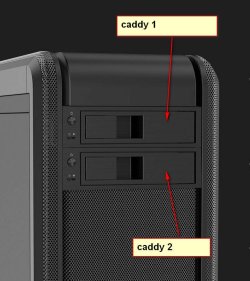
I am a big fan of disk caddies. They usually go in the 5.25 bays in the front of the pc case. After they have been added to the case, disks can be popped in and out just by opening the little handle at the front. No technical knowedge required to swap/add/remove disks, no need to go inside the machine.

I don't know if it is feasible for you to get somebody to install a couple of caddies in the front of your machine. Just requires a small screwdriver to install the caddy.


s-l1600.jpg

There are plenty available for 3.5 and 2.5 inch disks.

This one is for 3.5 inch disk
ORICO Trayless Mobile Rack for 3.5" SATA III HDD into 5.25 Inch PC Bay - Hot Swap for SATA 6 Gbps: Amazon.co.uk: Computers & Accessories

This one is for 2.5 inch ssd ( it takes either one or two ssd's )
Dual Bay 2.5" SATA Hard Disk HDD/SSD Trayless Caddy Internal Mobile Rack | eBay
 
Last edited:

My Computers

System One System Two

  • Computer type
    PC/Desktop
    OS
    7 X64
    CPU
    i5 8400
    Motherboard
    gigabyte b365m ds3h
    Memory
    2x8gb 3200mhz
    Hard Drives
    various
    PSU
    pure power 11 400w cm
    Case
    Coolermaster
    Cooling
    cryorig m9i
  • Computer type
    PC/Desktop
    OS
    7x64
    CPU
    g5400
    Motherboard
    ga b365m ds3h
    Memory
    8gb ddr4 2400
    PSU
    xfx pro 450w
To answer the question in your first post:

win7 needs a system partition and an os partition. Usually referred by MS as "system" and "boot".

With mbr partitioning, it is possible for "system" and "boot" to be on the same partition.

With gpt partitioning, as far as I know, they need to be separate partitions. Windows setup routine will usually also create another small partition called MSR - the precise purpose of which is somewhat opaque, and it is not required to boot the os successfully.
 

My Computers

System One System Two

  • Computer type
    PC/Desktop
    OS
    7 X64
    CPU
    i5 8400
    Motherboard
    gigabyte b365m ds3h
    Memory
    2x8gb 3200mhz
    Hard Drives
    various
    PSU
    pure power 11 400w cm
    Case
    Coolermaster
    Cooling
    cryorig m9i
  • Computer type
    PC/Desktop
    OS
    7x64
    CPU
    g5400
    Motherboard
    ga b365m ds3h
    Memory
    8gb ddr4 2400
    PSU
    xfx pro 450w
- On Post #4 I said you can install as Legacy-MBR or UEFI-GPT and I've asked if you wanted to install Win 7 on UEFI mode. I understood you wanted to install as UEFI-GPT, not Legacy-MBR. I gave you instructions to the UEFI-GPT mode.
You can install Win 7 as Legacy - MBR. You have to change BIOS and boot the Win10 tools as Legacy.
- You didn't need to use diskpart if you had followed my instructions: - Boot the USB as UEFI, go to the Win 7 folder and run setup.exe. Delete all partitions on the target disk and proceed.

On a modern MB, you only have advantages on having UEFI-GPT (drives bigger than 2.2T and independent multi boot OS)
 

My Computers

System One System Two

  • Computer type
    PC/Desktop
    Computer Manufacturer/Model Number
    custom build
    OS
    Windows 7 HP 64
    CPU
    i5 6600K - 800MHz to 4200MHz
    Motherboard
    GA-Z170-HD3P
    Memory
    4+4G GSkill DDR4 3000
    Graphics Card(s)
    IG - Intel 530
    Monitor(s) Displays
    Samsung 226BW
    Screen Resolution
    1680x1050
    Hard Drives
    (1) -1 SM951 – 128GB M.2 AHCI PCIe SSD drive for Windows 7 and Lubuntu
    (2) -1 WD SATA 3 - 1T for Data
    (3) -1 WD SATA 3 - 1T for backup
    PSU
    Thermaltake 450W TR2 gold
    Keyboard
    Old and good Chicony mechanical keyboard
    Mouse
    Logitech mX performance - 9 buttons (had to disable some)
    Internet Speed
    500Mb/s
    Browser
    Firefox 64
    Other Info
    TinyWall firewall
  • Computer type
    Laptop
    System Manufacturer/Model Number
    Asus Q550LF
    OS
    Windows 7 Pro
    CPU
    i7-4500U 800MHz to 3.0GHz
    Motherboard
    Asus Q550LF
    Memory
    (4+4)G DDR3 1600
    Graphics Card(s)
    IG intel 4400 + NVIDIA GeForce GT 745M
    Sound Card
    Realtek
    Monitor(s) Displays
    LG Display LP156WF4-SPH1
    Screen Resolution
    1920 x 1080
    Hard Drives
    BX500 120G SSD for Windows and programs +
    1T HDD for data
    Internet Speed
    500 Mb/s
    Browser
    Firefox
    Other Info
    TinyWall firewall
Simple process actually, just set the Bios to Legacy & UEFI, you should never have to change it. Then create your install partition (I use the entire drive) mark it active, align it, and there you go. Now install windows. Your installer may show 2 options, a UEFI install or a normal looking installer (can`t explain it any simpler than that) just choose the non UEFI installer.

Sorry this is a W7 install but it`s exactly the same for 7 or 10, all my installs are MBR on a single drive/partition. There is no reason you can`t have a MBR W10 install on a Z270 Motherboard.

I wanted to hook up my W7 850 EVO for a bit, (very few pictures on this drive) It`s for historical purposes :D

Sorry if I stepped on anyone`s toes.

But the process to create a single install partition is the same, you can use Diskpart or I prefer creating my install partition with Partition Wizard.
 

Attachments

  • DM.JPG
    DM.JPG
    30.5 KB · Views: 0
  • DM2.JPG
    DM2.JPG
    15.3 KB · Views: 0

My Computer

Computer type
PC/Desktop
Computer Manufacturer/Model Number
Skylake Special #666
OS
Windows 10 Pro x64
CPU
Intel Core i7 6700K
Motherboard
Asus Sabertooth Z170 Mark 1
Memory
GSkill TridentZ RGB 16GB 3600 16-16-16-36
Graphics Card(s)
EVGA GTX 980 Ti SC x2
Sound Card
Realtek High Definition
Monitor(s) Displays
AOC G2460PG
Screen Resolution
1920 x 1080 144Hz
Hard Drives
Samsung 860 Pro 256GB, Seagate Barracuda 4TB x2
PSU
EVGA 1000 P2, EVGA White Custom Braided Cables
Case
Corsair Vengeance C70 Gunmetal Black
Cooling
Corsair H100i v2, Corsair ML120 x2, Thermal Grizzly Kryonaut
Keyboard
Logitech G910 Orion Spectrum
Mouse
Logitech G700s
Internet Speed
Verizon Fios Quantum Gateway 75/75
Antivirus
Windows Defender, Malwarebytes Free 3.8.3
Browser
Chrome
Other Info
Corsair SP120 x4, LG Blu-ray Drive, Durabrand HT-395 100 Watt Dolby Digital Amp, Corsair H2100 Wireless 7.1 Headset
I am a big fan of disk caddies.
@SIW2 - Thank you sir! That's a great idea; I've spent an enjoyable day shopping (will also need a case with sufficient externally facing bays).


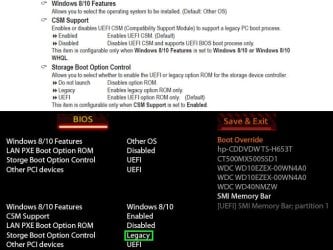
On to the biz at hand: good news, I've achieved the objective & now a fresh single partition Win 7 install on a UEFI MoBo system. The advice I received here got me 95% of the way there; your help is much appreciated. In reviewing my mobo manual the penny finally dropped (as my Brit friends would say). What needed to be added to the mix was setting storage to legacy and booting the install USB also legacy:
Create-1P-boot-BIOS.jpg


After that it was possible to proceed with the install on an MBR NTFS formatted disk.


Thanks again, I'll now mark this Solved.
 

My Computer

Computer type
PC/Desktop
Computer Manufacturer/Model Number
Custom Build
OS
Win7 Pro x64 SP1
CPU
Intel i7-6700
Motherboard
Gigabyte Z270 HD3
Memory
16 gig (2x8)
Graphics Card(s)
MSI GTX 1660 Super
Monitor(s) Displays
AOC CQ27G2
Screen Resolution
1440p
Hard Drives
Internal:
Crucial MX500 500GB SATA SSD (OS/Apps)
WD10EZEX-00WN4A0 1TB (Data/Games)
WD10EZEX-00WN4A0 1TB (On-line backup/Testing)
External
WD 4TB USB3.1 EasyStore (off-line backup archive/"sandbox")
PSU
Cooler Master 650W Bronze
Case
Sharkoon BW9000-V tower housing
Cooling
Deep Cool Ice Blade
Internet Speed
fiber optic 2 res broadband
Antivirus
Kaspersky Free
Browser
Firefox
Back
Top