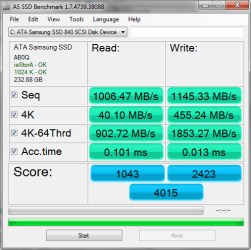
Hi, I just changed my system from 2 SSD's in RAID0 (Samsung 830 Series 256MB each) to a single SSD (Samsung 840 Pro 512MB). The reason I changed it is mainly because I need to encrypt the whole volume with Truecrypt which does not support RAID.
I measured the performance in both configurations, here are the results:
So what do these results say? I can't seem to tell the difference, I tried different applications and they open almost instantly in both cases. Boot time seems a bit faster with the single SSD (I guess that's because of the software RAID initializing at startup?).
Last edited by a moderator:
My Computer
At a glance
Windows XP Professional SP3/Windows 7 Ultimat...Intel Pentium 4 3.06GHz Northwood/Intel Core ...2 Gb RDRAM Dual Channel/GSkill 32GB DDR3 1866ATI ALL-IN-WONDER X800 XT AGP/MSI GTX 660 Ti PE
Computer type
PC/Desktop
Computer Manufacturer/Model Number
Dell Dimension 8200/Personal Build
OS
Windows XP Professional SP3/Windows 7 Ultimate x64
North Bridge:Intel Tehama i850(E)/Asus P8Z77-V Deluxe
Memory
2 Gb RDRAM Dual Channel/GSkill 32GB DDR3 1866
Graphics Card(s)
ATI ALL-IN-WONDER X800 XT AGP/MSI GTX 660 Ti PE
Sound Card
Voyetra Turtle Beach Santa Cruz PCI/Onboard Realtek HD
Monitor(s) Displays
Viewsonic VP230mb ViewPanel
Screen Resolution
1600x1200 32bit
Hard Drives
Western Digital 500Gb IDE drive (main drive) (XP PC)/Samsung 512GB 840 Pro Series SSD main+Western Digital Caviar Black 2 TB SATA III 7200 RPM 64 MB Cache as 2nd internal (Win 7 PC)
PSU
Dell OEM/Thermaltake Toughpower Grand 850W TPG-850M
Most likely. Many people don't realize that, despite impressive bench results, in real life, there is little to be gained when putting newer SSDs into RAID 0. Add to that reduced reliability; if one SSD dies, the whole array is lost and, since there is more than one SDD, the chance of failure increases with each added SSD. Still, I see people wanting to put several SSDs into RAID 0.
RAID 0 made sense with slower spinners; the delay caused by the RAID initializing was negligible compared to the overall gain. SSDs, however, are so fast, any gain in speed will be smaller since the overhead delay stays the same and will offset a larger percentage of any gain from the RAID.
Keep in mind a faster boot drive will decrease only boot time and program loading. If you have a program that takes one or two seconds to load with one SSD, cutting that down to 1/2 to one second just isn't going to be particularly noticeable.
Samsung 128GB 840 Pro SSD (1),
Samsung 4TB 850 EVO SSDs (4)
Samsung 4TB 850 EVO SSDs (16) external backup drives used in 2.5" hot swap bays in the computer.
PSU
Corsair HX750w
Case
Antec Two Hundred v2 (modified)
Cooling
Cooler Master GeminII S524 120mm (fan replaced with a 140mm)
In any computer system there will always be a bottleneck, something that is limiting some aspect of performance than any other. Upgrading that something will not eliminate the bottleneck but simply move it elsewhere. Typically the component limiting boot and application load times will be a slow conventional drive. Upgrading to an SSD either eliminated or greatly reduced the influence of disk performance nfor this aspect of performance. But you can't expect that further improvements in SSD speed will noticeably improve performance. It has ceased being the bottleneck.
RAID 0 can produce some impressive benchmarks, one of the most noticeable being the sequential read times. That is the time for reading large blocks from large files. But that doesn't happen very often in the real world where small reads are more typical. Here the performance of RAID 0 is more modest.
System performance is a complex thing with multiple factors involved. Upgrading one component often doesn't provide the performance that the benchmarks might imply.
My Computer
At a glance
Windows 7 Pro 64 bitXeon W35208 GBNvidia Geforce 210
Amazing benchmarks Britton! Congrats!!. I downloaded Samsung Magician software and set it to "Performance" before posting my benchmark. The Rapid Mode is not yet supported for the Pro version, only for the EVO, however it seems it's coming later this year for the Pro too.
Last edited:
My Computer
At a glance
Windows XP Professional SP3/Windows 7 Ultimat...Intel Pentium 4 3.06GHz Northwood/Intel Core ...2 Gb RDRAM Dual Channel/GSkill 32GB DDR3 1866ATI ALL-IN-WONDER X800 XT AGP/MSI GTX 660 Ti PE
Computer type
PC/Desktop
Computer Manufacturer/Model Number
Dell Dimension 8200/Personal Build
OS
Windows XP Professional SP3/Windows 7 Ultimate x64
North Bridge:Intel Tehama i850(E)/Asus P8Z77-V Deluxe
Memory
2 Gb RDRAM Dual Channel/GSkill 32GB DDR3 1866
Graphics Card(s)
ATI ALL-IN-WONDER X800 XT AGP/MSI GTX 660 Ti PE
Sound Card
Voyetra Turtle Beach Santa Cruz PCI/Onboard Realtek HD
Monitor(s) Displays
Viewsonic VP230mb ViewPanel
Screen Resolution
1600x1200 32bit
Hard Drives
Western Digital 500Gb IDE drive (main drive) (XP PC)/Samsung 512GB 840 Pro Series SSD main+Western Digital Caviar Black 2 TB SATA III 7200 RPM 64 MB Cache as 2nd internal (Win 7 PC)
PSU
Dell OEM/Thermaltake Toughpower Grand 850W TPG-850M
North Bridge:Intel Tehama i850(E)/Asus P8Z77-V Deluxe
Memory
2 Gb RDRAM Dual Channel/GSkill 32GB DDR3 1866
Graphics Card(s)
ATI ALL-IN-WONDER X800 XT AGP/MSI GTX 660 Ti PE
Sound Card
Voyetra Turtle Beach Santa Cruz PCI/Onboard Realtek HD
Monitor(s) Displays
Viewsonic VP230mb ViewPanel
Screen Resolution
1600x1200 32bit
Hard Drives
Western Digital 500Gb IDE drive (main drive) (XP PC)/Samsung 512GB 840 Pro Series SSD main+Western Digital Caviar Black 2 TB SATA III 7200 RPM 64 MB Cache as 2nd internal (Win 7 PC)
PSU
Dell OEM/Thermaltake Toughpower Grand 850W TPG-850M
No I don't notice any speed gain. It is in the testing phase though so I don't yet have resource heavy software, like Photoshop and Corel Draw installed. I think it's like overclocking, there's no performance gain but gives good benchmark numbers to brag about.
My Computer
At a glance
Windows 7 Ultimate X64 SP1Intel i5-2550K, Differing ~4.4-4.8GHz No buil...16GB G.Skill Sniper 1866MHz @ 2133MHz 2x8GBASUS GTX650TIB-DC2OC-2GD5, (650TI Boost)
Computer type
PC/Desktop
Computer Manufacturer/Model Number
Home Built Desktop By DataTech
OS
Windows 7 Ultimate X64 SP1
CPU
Intel i5-2550K, Differing ~4.4-4.8GHz No built in GPU
Motherboard
ASUS P8Z68-V PRO/GEN3
Memory
16GB G.Skill Sniper 1866MHz @ 2133MHz 2x8GB
Graphics Card(s)
ASUS GTX650TIB-DC2OC-2GD5, (650TI Boost)
Sound Card
Onboard Realtek 5-1
Monitor(s) Displays
Samsung P2570HD
Screen Resolution
1920x1080
Hard Drives
Samsung 840 Pro 256GB SSD for OS, 500GB Seagate Constellation (Enterprise drive) for Data
PSU
Corsair HX650W
Case
Inwin Dragon Rider
Cooling
Hyper 212 EVO w/two Noctua fans, push-pull, @1300 RPM
Keyboard
E-Z Eyes, bright yellow keys with large characters
Mouse
steelseries SENSEI Laser Pro Gaming
Internet Speed
48-51Mbs Mbs down, 11 Mbs up Xfinity Cable
Antivirus
Norton Internet Security 2013
Browser
IE 10, Opera, Pale Moon if needed
Other Info
4 case fans, LG BluRay-RE, ASUS DVD-RW, Mr. Fusion power supply, 1.21 gigawatts.
Samsung 128GB 840 Pro SSD (1),
Samsung 4TB 850 EVO SSDs (4)
Samsung 4TB 850 EVO SSDs (16) external backup drives used in 2.5" hot swap bays in the computer.
PSU
Corsair HX750w
Case
Antec Two Hundred v2 (modified)
Cooling
Cooler Master GeminII S524 120mm (fan replaced with a 140mm)
Samsung 128GB 840 Pro SSD (1),
Samsung 4TB 850 EVO SSDs (4)
Samsung 4TB 850 EVO SSDs (16) external backup drives used in 2.5" hot swap bays in the computer.
PSU
Corsair HX750w
Case
Antec Two Hundred v2 (modified)
Cooling
Cooler Master GeminII S524 120mm (fan replaced with a 140mm)
Samsung 128GB 840 Pro SSD (1),
Samsung 4TB 850 EVO SSDs (4)
Samsung 4TB 850 EVO SSDs (16) external backup drives used in 2.5" hot swap bays in the computer.
PSU
Corsair HX750w
Case
Antec Two Hundred v2 (modified)
Cooling
Cooler Master GeminII S524 120mm (fan replaced with a 140mm)