Single Style Image File Icon For Windows 7 Desktop Like XP

Firemonkey

New member
Local time
9:41 PM
Messages
4
Windows 7 Desktop is showing tiny thumbnails on image file icons instead of the *real* image file icon like it shows in all the folders in "Details" view. How do I get it to stop that behavior and revert to showing plain image file icons on the desktop like Windows XP does? :confused:

I tried [right-click on desktop > Personalize > Change desktop icons] but nothing there to affect image file icons on the desktop.

I tried [Explorer > Tools > Folder options... > View tab > Always show icons, never thumbnails] and that does fix the Desktop image file icons so they *all* show the same *real* image file icon, but that setting also affects Explorer "Large Icons" view (thumbs) -- Explorer stops showing thumbs when I select "Large icons" view.

I did a thorough search here and found several posts regarding customizing icon behavior but none address this exact problem, so please re-examine the description of the problem before telling me this issue has been answered many times before. Thanks!!!
 

My Computer My Computer

At a glance

Windows 7 Pro x64Q955012GBATI Radeon HD 4300/4500 Series (ASUStek Compu...
Computer type
PC/Desktop
Computer Manufacturer/Model Number
Asus
OS
Windows 7 Pro x64
CPU
Q9550
Motherboard
P5Q3
Memory
12GB
Graphics Card(s)
ATI Radeon HD 4300/4500 Series (ASUStek Computer Inc)
Hard Drives
yes
Antivirus
Antivirus *IS A VIRUS!!!!*
Browser
yes
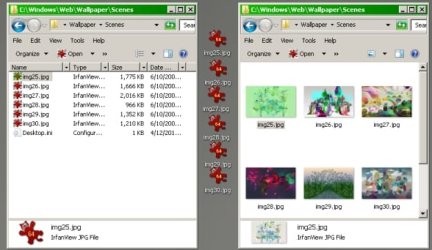
To clarify, this shows 2 Explorers listing the same files in "Detail" view and "Large icons" view -- one Explorer on either side of a column of Desktop image file icons. The files on the Desktop were copied from the Explorer window so we are looking at the same set of files on the Desktop and both Explorers. This is default display behavior for Windows 7 Classic theme. Notice how each of the individual Desktop icons look different? They are very hard to identify as "image" files because Windows 7 made them in to thumbnails, unlike normal behavior in Windows XP.
 

Attachments

  • Desk-Default.jpg
    Desk-Default.jpg
    35.6 KB · Views: 14

My Computer My Computer

At a glance

Windows 7 Pro x64Q955012GBATI Radeon HD 4300/4500 Series (ASUStek Compu...
Computer type
PC/Desktop
Computer Manufacturer/Model Number
Asus
OS
Windows 7 Pro x64
CPU
Q9550
Motherboard
P5Q3
Memory
12GB
Graphics Card(s)
ATI Radeon HD 4300/4500 Series (ASUStek Computer Inc)
Hard Drives
yes
Antivirus
Antivirus *IS A VIRUS!!!!*
Browser
yes
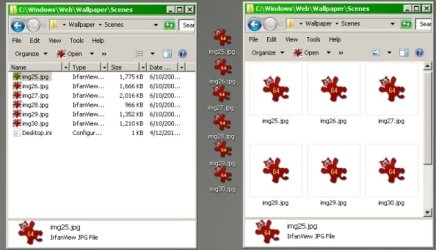
Display behavior you see below occurs when you check "Always show icons, never thumbnails". This is great for the Desktop. Now the image files on the Desktop stand out very clearly as image files -- they all look the same! Yay! Oh, but wait. Now the thumbnail view that I had in the Explorer on the right turned in to big icons so I cannot scan across the page to find the image I want. How annoying!
 

Attachments

  • Desk-ALL-Icons.jpg
    Desk-ALL-Icons.jpg
    35.8 KB · Views: 14

My Computer My Computer

At a glance

Windows 7 Pro x64Q955012GBATI Radeon HD 4300/4500 Series (ASUStek Compu...
Computer type
PC/Desktop
Computer Manufacturer/Model Number
Asus
OS
Windows 7 Pro x64
CPU
Q9550
Motherboard
P5Q3
Memory
12GB
Graphics Card(s)
ATI Radeon HD 4300/4500 Series (ASUStek Computer Inc)
Hard Drives
yes
Antivirus
Antivirus *IS A VIRUS!!!!*
Browser
yes
Now a simulated illustration of the display behavior I want in Windows 7. This equates to the native display behavior seen in Windows XP. Desktop image file icons all have the same appearance so they are easy to identify. The (formerly "Thumbnail") "Large Icon" view actually shows thumbnails as it would if I did not check the "Always show icons, never thumbnails" setting. All very user friendly, like Windows XP always was. I just can't figure out how to make Windows 7 do this.
 

Attachments

  • Desk-PROPER-Icons.jpg
    Desk-PROPER-Icons.jpg
    37.7 KB · Views: 14

My Computer My Computer

At a glance

Windows 7 Pro x64Q955012GBATI Radeon HD 4300/4500 Series (ASUStek Compu...
Computer type
PC/Desktop
Computer Manufacturer/Model Number
Asus
OS
Windows 7 Pro x64
CPU
Q9550
Motherboard
P5Q3
Memory
12GB
Graphics Card(s)
ATI Radeon HD 4300/4500 Series (ASUStek Computer Inc)
Hard Drives
yes
Antivirus
Antivirus *IS A VIRUS!!!!*
Browser
yes
Back
Top