sisoft sandra 2010 processor arithmetic benchmark

totalguy

New member
Local time
3:37 PM
Messages
100
because of crashing problems and no real information to explain why i decided to get sisoft sandra.

when i do a benchmark on processor arithmetic it always freezes up my computer as in the mouse wont move and cant do nothing. this is the same thing that happens with other programs but it is more intermittent there.

i ran the test several times with the same freezing happening all the time. i run other tests and none of them do this but some tests just seem to go on forever as if they are stuck in a loop. maybe its the program i dont know.

before the freeze my 1st core goes to 100% then seconds later freeze and i have to reset the computer.

i ran prime95 before i got ssisoft sandra and it ran no problems which seemed to me it wasnt doing a thorough enough test. the computer isnt overheating, i have auto fan control and when it gets to ovet 50c the fan goes on max and i can tell by the sound and it only did that on prime95
 

My Computer

OS
windows ultimate 7 64 bit
CPU
phenom 2 X4 965 3.4ghz
Motherboard
asus m4a77td pro
Memory
4gb corsair 1333 CT2KIT25664BA1339
Graphics Card(s)
xfx 220gt
Sound Card
onboard
Monitor(s) Displays
Digimate 23"
Screen Resolution
1920 x 1080 native
Normally, Sandra's benchmarks DO freeze the mouse and keyboard for a while. The progress meter will eventually update to a higher percentage, and then it will freeze again. It does this until it's finished the test.

The reason for this is that the results are more accurate if the CPU isn't wasting cycles on extra stuff like the mouse, etc. Sandra minimizes the CPU time of everything it can, so that it can concentrate on the test.

My quad core can take up to 5 minutes to run some of the tests, esp. the memory ones. How long is your machine locking up on you?
 

My Computer

Computer type
PC/Desktop
Computer Manufacturer/Model Number
Mellon Labs (custom build)
OS
Win 7 Pro x64/Win 10 Pro x64 dual boot
CPU
AMD FX 8350 Vishera @ 4200
Motherboard
ASUS M5A97 R2.0
Memory
16 GB Mushkin Blackline DDR3-2400 @ 1866 (9-10-10-10-31)
Graphics Card(s)
XFX Radeon R9 280 Double D Black Edition
Sound Card
Realtek HD Audio on MB. Sounds great.
Monitor(s) Displays
Acer 24", Acer 22"
Screen Resolution
3840 x 1080
Hard Drives
1 x Mushkin Chronos 120 GB SSD (Win 10)
1 x Samsung 850 EVO 250 GB SSD (Win 7)
1 x WD 1TB SATA Blue
1 x WD 1TB SATA Green
PSU
Corsair TX-750
Case
CoolerMaster HAF 912+
Cooling
Coolermaster Seidon 240M Liquid AIO. 6 case fans
Keyboard
Logitech G710+
Mouse
Logitech G500s
Internet Speed
Much better since I got fiber, but still way overpriced.
Antivirus
MSE, Malware Bytes for scanning
Browser
Firefox
Other Info
Corsair VOID USB headphones.

A Mellon Labs X-1 - LCD Smartie driven system status display.

Brought to you by the letter E
it locks up pretty much straight away and because only the first core was upto 100% surely the other cores would allow it to work on mouse movement. when i used prime95 the cpu load was 100% for all cores and i could still move the mouse without problems i will retry the test now for 10 minutes and see what happens
 

My Computer

OS
windows ultimate 7 64 bit
CPU
phenom 2 X4 965 3.4ghz
Motherboard
asus m4a77td pro
Memory
4gb corsair 1333 CT2KIT25664BA1339
Graphics Card(s)
xfx 220gt
Sound Card
onboard
Monitor(s) Displays
Digimate 23"
Screen Resolution
1920 x 1080 native
you were right i let the program create a full report then i looked at it took some time as it was very long the only problem i can see is this:

Cannot use Large Memory Pages due to lack of privileges.

this appears on memory and processor elements that were tested
 

My Computer

OS
windows ultimate 7 64 bit
CPU
phenom 2 X4 965 3.4ghz
Motherboard
asus m4a77td pro
Memory
4gb corsair 1333 CT2KIT25664BA1339
Graphics Card(s)
xfx 220gt
Sound Card
onboard
Monitor(s) Displays
Digimate 23"
Screen Resolution
1920 x 1080 native
you were right i let the program create a full report then i looked at it took some time as it was very long the only problem i can see is this:

Cannot use Large Memory Pages due to lack of privileges.

this appears on memory and processor elements that were tested
Glad it worked. The memory page thing is pretty normal. I'm not sure it's an error. It's mostly just a flag telling you that it couldn't use large pages. I've never figured out whether there's a big difference or not so I've never bothered to enable it.
 

My Computer

Computer type
PC/Desktop
Computer Manufacturer/Model Number
Mellon Labs (custom build)
OS
Win 7 Pro x64/Win 10 Pro x64 dual boot
CPU
AMD FX 8350 Vishera @ 4200
Motherboard
ASUS M5A97 R2.0
Memory
16 GB Mushkin Blackline DDR3-2400 @ 1866 (9-10-10-10-31)
Graphics Card(s)
XFX Radeon R9 280 Double D Black Edition
Sound Card
Realtek HD Audio on MB. Sounds great.
Monitor(s) Displays
Acer 24", Acer 22"
Screen Resolution
3840 x 1080
Hard Drives
1 x Mushkin Chronos 120 GB SSD (Win 10)
1 x Samsung 850 EVO 250 GB SSD (Win 7)
1 x WD 1TB SATA Blue
1 x WD 1TB SATA Green
PSU
Corsair TX-750
Case
CoolerMaster HAF 912+
Cooling
Coolermaster Seidon 240M Liquid AIO. 6 case fans
Keyboard
Logitech G710+
Mouse
Logitech G500s
Internet Speed
Much better since I got fiber, but still way overpriced.
Antivirus
MSE, Malware Bytes for scanning
Browser
Firefox
Other Info
Corsair VOID USB headphones.

A Mellon Labs X-1 - LCD Smartie driven system status display.

Brought to you by the letter E
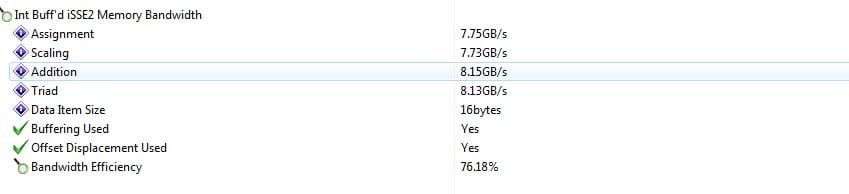
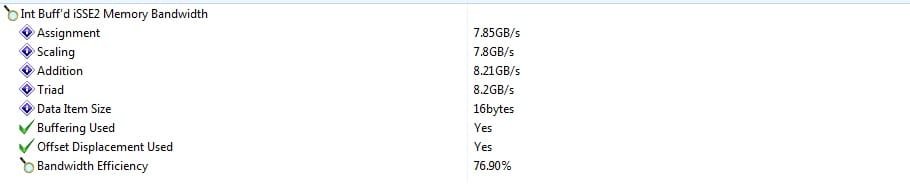
i found this page http://www.sevenforums.com/general-discussion/3706-lock-pages-memory.html so i followed what it said to do and i did see a difference in the results however im still getting the warning.

there is a warning on the properties of this policy but i think that would only apply if you had a little amount of ram where as i have 4gb installed.

ive attached pictures of before and after to show the difference its not a hige difference but it is an improvement im just wondering if there is something else i can do as this error still appears.
 

Attachments

  • before.jpg
    before.jpg
    30 KB · Views: 88
  • after.jpg
    after.jpg
    27.5 KB · Views: 63

My Computer

OS
windows ultimate 7 64 bit
CPU
phenom 2 X4 965 3.4ghz
Motherboard
asus m4a77td pro
Memory
4gb corsair 1333 CT2KIT25664BA1339
Graphics Card(s)
xfx 220gt
Sound Card
onboard
Monitor(s) Displays
Digimate 23"
Screen Resolution
1920 x 1080 native
The differences are actually pretty minor. I remember looking this up a while ago, and there was a reason that I didn't enable it. Might have been a compatibility issue with something, I can't remember now. It might be worth doing a little research about enabled vs disabled. Maybe some of the other guys here know more about that one.

Edit: I guess it would have helped if I had noticed the link in your post. IIRC, lock memory pages benefits a server more than a desktop.
 

My Computer

Computer type
PC/Desktop
Computer Manufacturer/Model Number
Mellon Labs (custom build)
OS
Win 7 Pro x64/Win 10 Pro x64 dual boot
CPU
AMD FX 8350 Vishera @ 4200
Motherboard
ASUS M5A97 R2.0
Memory
16 GB Mushkin Blackline DDR3-2400 @ 1866 (9-10-10-10-31)
Graphics Card(s)
XFX Radeon R9 280 Double D Black Edition
Sound Card
Realtek HD Audio on MB. Sounds great.
Monitor(s) Displays
Acer 24", Acer 22"
Screen Resolution
3840 x 1080
Hard Drives
1 x Mushkin Chronos 120 GB SSD (Win 10)
1 x Samsung 850 EVO 250 GB SSD (Win 7)
1 x WD 1TB SATA Blue
1 x WD 1TB SATA Green
PSU
Corsair TX-750
Case
CoolerMaster HAF 912+
Cooling
Coolermaster Seidon 240M Liquid AIO. 6 case fans
Keyboard
Logitech G710+
Mouse
Logitech G500s
Internet Speed
Much better since I got fiber, but still way overpriced.
Antivirus
MSE, Malware Bytes for scanning
Browser
Firefox
Other Info
Corsair VOID USB headphones.

A Mellon Labs X-1 - LCD Smartie driven system status display.

Brought to you by the letter E
i did a bit of googling and this warning came up a lot and from what ive found my memory efficiency is a lot higher than most peoples systems so im happy that its not a problem. trouble is now i still have my crashing system i still have to resolve.
 

My Computer

OS
windows ultimate 7 64 bit
CPU
phenom 2 X4 965 3.4ghz
Motherboard
asus m4a77td pro
Memory
4gb corsair 1333 CT2KIT25664BA1339
Graphics Card(s)
xfx 220gt
Sound Card
onboard
Monitor(s) Displays
Digimate 23"
Screen Resolution
1920 x 1080 native
Is your RAM voltage at spec? Corsair's spec, not the auto setting on the motherboard. That might do it.
 

My Computer

Computer type
PC/Desktop
Computer Manufacturer/Model Number
Mellon Labs (custom build)
OS
Win 7 Pro x64/Win 10 Pro x64 dual boot
CPU
AMD FX 8350 Vishera @ 4200
Motherboard
ASUS M5A97 R2.0
Memory
16 GB Mushkin Blackline DDR3-2400 @ 1866 (9-10-10-10-31)
Graphics Card(s)
XFX Radeon R9 280 Double D Black Edition
Sound Card
Realtek HD Audio on MB. Sounds great.
Monitor(s) Displays
Acer 24", Acer 22"
Screen Resolution
3840 x 1080
Hard Drives
1 x Mushkin Chronos 120 GB SSD (Win 10)
1 x Samsung 850 EVO 250 GB SSD (Win 7)
1 x WD 1TB SATA Blue
1 x WD 1TB SATA Green
PSU
Corsair TX-750
Case
CoolerMaster HAF 912+
Cooling
Coolermaster Seidon 240M Liquid AIO. 6 case fans
Keyboard
Logitech G710+
Mouse
Logitech G500s
Internet Speed
Much better since I got fiber, but still way overpriced.
Antivirus
MSE, Malware Bytes for scanning
Browser
Firefox
Other Info
Corsair VOID USB headphones.

A Mellon Labs X-1 - LCD Smartie driven system status display.

Brought to you by the letter E

My Computer

OS
windows ultimate 7 64 bit
CPU
phenom 2 X4 965 3.4ghz
Motherboard
asus m4a77td pro
Memory
4gb corsair 1333 CT2KIT25664BA1339
Graphics Card(s)
xfx 220gt
Sound Card
onboard
Monitor(s) Displays
Digimate 23"
Screen Resolution
1920 x 1080 native
found my ram on a page and a guy was reviewing it playing with the timings so i adjusted them. OverClocked inside - Redaktion ocinside.de PC hardware page

timings set to auto (on cpuz) 9,9,9,24,33,2T
timings adjusted to what they should be 9,9,9,30,33,2T
overclocked 8,8,8,24,33,2T (as per what a guy tested them with on website)
overclocked 7,7,7,20,27,2T (as per timings table on cpuz)

ive already put up the before and after pics for changing the local policy now im attaching the original and the 2 overclocked results.

i couldnt find anything for the voltages in the bios unless its "memory over voltage" ? i didnt want to mess with that though incase it was putting voltage over and above what it already was. any thoughts on this?

is there anything else i could do ? i dont want to go mental overclocking but from what i originally had ive gained over 1% in efficiency.

is there any tests i should do to make sure its stable? i have sisoft sandra and cpuz and prime 95.
 

Attachments

  • original.jpg
    original.jpg
    27.9 KB · Views: 20
  • oc_8_8_8_24_33_2T.jpg
    oc_8_8_8_24_33_2T.jpg
    25.6 KB · Views: 12
  • oc_7_7_7_20_27_2T.jpg
    oc_7_7_7_20_27_2T.jpg
    23 KB · Views: 11

My Computer

OS
windows ultimate 7 64 bit
CPU
phenom 2 X4 965 3.4ghz
Motherboard
asus m4a77td pro
Memory
4gb corsair 1333 CT2KIT25664BA1339
Graphics Card(s)
xfx 220gt
Sound Card
onboard
Monitor(s) Displays
Digimate 23"
Screen Resolution
1920 x 1080 native
Well, it's supposed to be set at 1.5 Volts, according to Crucial's website. There's a Crucial support forum here:

Standard DRAM Memory - Crucial Community

You can usually bump up the voltage a little on your RAM. At least that's true of performance RAM. My sticks are auto set by the motherboard at 1.75 Volts, and that's just enough to get into BIOS and bring it up to spec so Windows will run properly. Most motherboards are conservative in their automatic settings.

I'd check in that forum to see if anyone else has the same problem. You can probably get away with upping the voltage slightly, but you never want to go over the maximum. Just take it up in small increments to the minimum level you need for stability. Less is more, as they say, and do your research before trying it out.

Memtest86+ is a good way of testing your RAM for faults. There's a link in the software section, in Brink's Free Software sticky.

EDIT. Just saw your post as I was writing this one. It's probably Memory Over Voltage in the BIOS. Keep in mind that if you tighten your timings (7-7-7 etc.), you often will need a slight voltage increase. Memory tuning is a bit of a science. Usually, the tighter the timings, or the higher the memory clock speed, the more voltage you need, and it is motherboard dependent. For example, my motherboard will not run my Mushkin 1066 sticks at 1066, no way, no how, no matter what. I'll burn them up over volting them before they'll get stable. It's not the RAM, it's the board.
 
Last edited:

My Computer

Computer type
PC/Desktop
Computer Manufacturer/Model Number
Mellon Labs (custom build)
OS
Win 7 Pro x64/Win 10 Pro x64 dual boot
CPU
AMD FX 8350 Vishera @ 4200
Motherboard
ASUS M5A97 R2.0
Memory
16 GB Mushkin Blackline DDR3-2400 @ 1866 (9-10-10-10-31)
Graphics Card(s)
XFX Radeon R9 280 Double D Black Edition
Sound Card
Realtek HD Audio on MB. Sounds great.
Monitor(s) Displays
Acer 24", Acer 22"
Screen Resolution
3840 x 1080
Hard Drives
1 x Mushkin Chronos 120 GB SSD (Win 10)
1 x Samsung 850 EVO 250 GB SSD (Win 7)
1 x WD 1TB SATA Blue
1 x WD 1TB SATA Green
PSU
Corsair TX-750
Case
CoolerMaster HAF 912+
Cooling
Coolermaster Seidon 240M Liquid AIO. 6 case fans
Keyboard
Logitech G710+
Mouse
Logitech G500s
Internet Speed
Much better since I got fiber, but still way overpriced.
Antivirus
MSE, Malware Bytes for scanning
Browser
Firefox
Other Info
Corsair VOID USB headphones.

A Mellon Labs X-1 - LCD Smartie driven system status display.

Brought to you by the letter E
thanks for the info your help is appreciated :) i tried the voltage at 1.5 and it didnt like it it froze my system in windows so i thought ok and i tried 2 lower settings first 1.350 and 1.425v both failed to boot to post, luckily on my system if it does not boot to post i press reset then it will boot with defaults and tell you the problems.
in the end i got 1.515v with the timings as i left them before 7,7,7,20,27,2T i think im at a limit now i could try more voltage but i dont want to go to mad with it. i read somewhere this ram wont run above 1.5v so im assuming it wont go much higher and im guessing the setting im on now is probably what it was doing at auto as the lower ones failed and 1.5v failed. also i havent seen any ram of the sizes i have under cas latency 7 so i guess it probably wont go any lower now.

considering your problems with your ram maybe this is the same issue ive been having. i dont know just need to wait and see now.
 

My Computer

OS
windows ultimate 7 64 bit
CPU
phenom 2 X4 965 3.4ghz
Motherboard
asus m4a77td pro
Memory
4gb corsair 1333 CT2KIT25664BA1339
Graphics Card(s)
xfx 220gt
Sound Card
onboard
Monitor(s) Displays
Digimate 23"
Screen Resolution
1920 x 1080 native
If you relax your timings a little, like 8-8-8... or 9-9-9... it might be a little more stable. Instability can be caused by having the timings too tight. Benchmarks don't always show the whole picture, they only show specific performance. Sometimes, you have to tune for middle of the road to get the best overall performance. I wound up with very good performance by using aggressive timings and running the sticks slower than stock. Mine run at 972, not 1066, but the performance is much better.

Cheers.
 

My Computer

Computer type
PC/Desktop
Computer Manufacturer/Model Number
Mellon Labs (custom build)
OS
Win 7 Pro x64/Win 10 Pro x64 dual boot
CPU
AMD FX 8350 Vishera @ 4200
Motherboard
ASUS M5A97 R2.0
Memory
16 GB Mushkin Blackline DDR3-2400 @ 1866 (9-10-10-10-31)
Graphics Card(s)
XFX Radeon R9 280 Double D Black Edition
Sound Card
Realtek HD Audio on MB. Sounds great.
Monitor(s) Displays
Acer 24", Acer 22"
Screen Resolution
3840 x 1080
Hard Drives
1 x Mushkin Chronos 120 GB SSD (Win 10)
1 x Samsung 850 EVO 250 GB SSD (Win 7)
1 x WD 1TB SATA Blue
1 x WD 1TB SATA Green
PSU
Corsair TX-750
Case
CoolerMaster HAF 912+
Cooling
Coolermaster Seidon 240M Liquid AIO. 6 case fans
Keyboard
Logitech G710+
Mouse
Logitech G500s
Internet Speed
Much better since I got fiber, but still way overpriced.
Antivirus
MSE, Malware Bytes for scanning
Browser
Firefox
Other Info
Corsair VOID USB headphones.

A Mellon Labs X-1 - LCD Smartie driven system status display.

Brought to you by the letter E
good point that i will look into that
 

My Computer

OS
windows ultimate 7 64 bit
CPU
phenom 2 X4 965 3.4ghz
Motherboard
asus m4a77td pro
Memory
4gb corsair 1333 CT2KIT25664BA1339
Graphics Card(s)
xfx 220gt
Sound Card
onboard
Monitor(s) Displays
Digimate 23"
Screen Resolution
1920 x 1080 native
Let us know how it works out for you, ok?
 

My Computer

Computer type
PC/Desktop
Computer Manufacturer/Model Number
Mellon Labs (custom build)
OS
Win 7 Pro x64/Win 10 Pro x64 dual boot
CPU
AMD FX 8350 Vishera @ 4200
Motherboard
ASUS M5A97 R2.0
Memory
16 GB Mushkin Blackline DDR3-2400 @ 1866 (9-10-10-10-31)
Graphics Card(s)
XFX Radeon R9 280 Double D Black Edition
Sound Card
Realtek HD Audio on MB. Sounds great.
Monitor(s) Displays
Acer 24", Acer 22"
Screen Resolution
3840 x 1080
Hard Drives
1 x Mushkin Chronos 120 GB SSD (Win 10)
1 x Samsung 850 EVO 250 GB SSD (Win 7)
1 x WD 1TB SATA Blue
1 x WD 1TB SATA Green
PSU
Corsair TX-750
Case
CoolerMaster HAF 912+
Cooling
Coolermaster Seidon 240M Liquid AIO. 6 case fans
Keyboard
Logitech G710+
Mouse
Logitech G500s
Internet Speed
Much better since I got fiber, but still way overpriced.
Antivirus
MSE, Malware Bytes for scanning
Browser
Firefox
Other Info
Corsair VOID USB headphones.

A Mellon Labs X-1 - LCD Smartie driven system status display.

Brought to you by the letter E
considering its not any worse with tighter timings i feel its probably best keeping them as they are. i feel my problems lie with my processor now as i found a guy i know with exactly the same processor but the rest of his hardware is different to mine as an example his graphics are totally opposite, mine nvidia his ati. he is having the exact same problems as i am. im pretty sure its the processor driver either that or a bios setting. the processor driver is 2006 and windows 7 wasnt even out then so its not a windows 7 specific driver.

i think it also has a lot to do with us both using our computers several hours daily where as other people with the same processor may not use their computers as much and not see the problem.

as far as sisoft sandra testing goes though i feel the problem is now solved.
 

My Computer

OS
windows ultimate 7 64 bit
CPU
phenom 2 X4 965 3.4ghz
Motherboard
asus m4a77td pro
Memory
4gb corsair 1333 CT2KIT25664BA1339
Graphics Card(s)
xfx 220gt
Sound Card
onboard
Monitor(s) Displays
Digimate 23"
Screen Resolution
1920 x 1080 native
My PC at work has the exact same CPU and a slightly different ASUS board, with Nvidia graphics. Mine runs 24/7 with no issues at all.

Some thoughts on the crashing:

1. How long did you let Prime95 run?
2. Is there a specific thing you are running when the machine crashes?
3. Have you ever tested the memory with Memtest86+?

When I didn't have my RAM tuned up just right, my home machine would always crash after about 4 or 5 minutes of using Firefox. Guaranteed. It would also fail the Memtest. Tweaking the voltage and timings a little made it fine.

I'll look around about your RAM sticks and I'll see if I can find anything that might help.
 

My Computer

Computer type
PC/Desktop
Computer Manufacturer/Model Number
Mellon Labs (custom build)
OS
Win 7 Pro x64/Win 10 Pro x64 dual boot
CPU
AMD FX 8350 Vishera @ 4200
Motherboard
ASUS M5A97 R2.0
Memory
16 GB Mushkin Blackline DDR3-2400 @ 1866 (9-10-10-10-31)
Graphics Card(s)
XFX Radeon R9 280 Double D Black Edition
Sound Card
Realtek HD Audio on MB. Sounds great.
Monitor(s) Displays
Acer 24", Acer 22"
Screen Resolution
3840 x 1080
Hard Drives
1 x Mushkin Chronos 120 GB SSD (Win 10)
1 x Samsung 850 EVO 250 GB SSD (Win 7)
1 x WD 1TB SATA Blue
1 x WD 1TB SATA Green
PSU
Corsair TX-750
Case
CoolerMaster HAF 912+
Cooling
Coolermaster Seidon 240M Liquid AIO. 6 case fans
Keyboard
Logitech G710+
Mouse
Logitech G500s
Internet Speed
Much better since I got fiber, but still way overpriced.
Antivirus
MSE, Malware Bytes for scanning
Browser
Firefox
Other Info
Corsair VOID USB headphones.

A Mellon Labs X-1 - LCD Smartie driven system status display.

Brought to you by the letter E
run prime for about 6 hrs in total
no theres not a specific time it crashes it crashes using several programs including office programs and adobe cs4 programs and browsing on IE and opera.

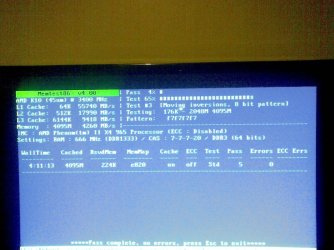
ive run memtest86 on 5 passes see attached pic

read my post here on my thoughts.... http://www.sevenforums.com/crashes-debugging/68586-please-help-multiple-bsods-4.html#post676108

oh and apparently my ram is compatiable with this board according to crucial when i looked for ram for my board the stuff i got was second on the list. see most of the time you get a list of ram (like in the mobo manual) but people tend to just buy the ram they want and hope it works, most of the time it does.
 

Attachments

  • 09042010(005).jpg
    09042010(005).jpg
    289.7 KB · Views: 17

My Computer

OS
windows ultimate 7 64 bit
CPU
phenom 2 X4 965 3.4ghz
Motherboard
asus m4a77td pro
Memory
4gb corsair 1333 CT2KIT25664BA1339
Graphics Card(s)
xfx 220gt
Sound Card
onboard
Monitor(s) Displays
Digimate 23"
Screen Resolution
1920 x 1080 native
Back
Top