Size matters

urbanspaceman1

New member
Power User
VIP
Local time
6:51 PM
Messages
332
Why do a lot of my folders not display size in the appropriate column? I seem to remember it being constant back on XP.
 

My Computer

Computer type
PC/Desktop
Computer Manufacturer/Model Number
Cyberpower PC
OS
windows 7 premium home 64bit
CPU
intel core i5 2500 3.3Ghz 6mb cache OEM
Motherboard
Asus P8Z68-V LX Intel Z68 Chipset DDR3 ATX USB 3
Memory
8GB (2x4GB) PC10666 DDR3/1333mhz Dual
Graphics Card(s)
AMD ATI Radeon Powercolor HD5670 1GB passive cooled
Sound Card
Creative/Soundblaster Digital Music Premium HD/X-Fi-HD
Monitor(s) Displays
Samsung 22; Hanns.G 19
Screen Resolution
1680 x 1050
Hard Drives
SSD: 120 GB Intel 520 Series SATA III
HDD2:West Dig 1TB SATA III 32mb 6gb/s
Hot swap HDD3: 1tb Barracuda Sata 3 32mb 6gb/s
PSU
Coolermaster Elitepower 500wt
Case
NZXT Hush 2
Cooling
Coolermaster Hyper TX3
Mouse
Logitech M570 Trackball
Internet Speed
50mbs
Antivirus
Malwarebytes3. cont' below:
Browser
IE11
Other Info
Windows Firewall.
Hitman-Pro.alert3.
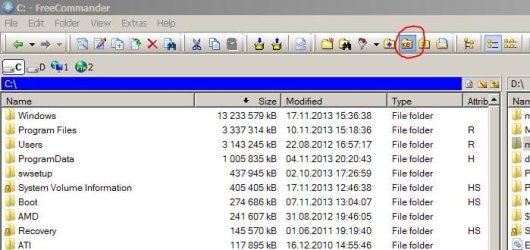
Hello Mr Robot. I do not know where to begin to post a screen shot I'm afraid. Perhaps I can clarify the issue somewhat:
in the size column of Windows Explorer (assuming you have it selected) are file sizes, but folders do not display size. I felt certain that folder sizes used to be displayed and I suspect I either haven't turned it on or somehow, inadvertently turned it off.
 

My Computer

Computer type
PC/Desktop
Computer Manufacturer/Model Number
Cyberpower PC
OS
windows 7 premium home 64bit
CPU
intel core i5 2500 3.3Ghz 6mb cache OEM
Motherboard
Asus P8Z68-V LX Intel Z68 Chipset DDR3 ATX USB 3
Memory
8GB (2x4GB) PC10666 DDR3/1333mhz Dual
Graphics Card(s)
AMD ATI Radeon Powercolor HD5670 1GB passive cooled
Sound Card
Creative/Soundblaster Digital Music Premium HD/X-Fi-HD
Monitor(s) Displays
Samsung 22; Hanns.G 19
Screen Resolution
1680 x 1050
Hard Drives
SSD: 120 GB Intel 520 Series SATA III
HDD2:West Dig 1TB SATA III 32mb 6gb/s
Hot swap HDD3: 1tb Barracuda Sata 3 32mb 6gb/s
PSU
Coolermaster Elitepower 500wt
Case
NZXT Hush 2
Cooling
Coolermaster Hyper TX3
Mouse
Logitech M570 Trackball
Internet Speed
50mbs
Antivirus
Malwarebytes3. cont' below:
Browser
IE11
Other Info
Windows Firewall.
Hitman-Pro.alert3.

Attachments

  • free.JPG
    free.JPG
    51.7 KB · Views: 74

My Computer

Computer type
Laptop
Computer Manufacturer/Model Number
Dell \ Lenovo\ HP \ Toshiba
OS
W7, W8.1
Antivirus
MSE, Malwarebytes
Browser
FF
Did MS turn off this folder size facility? I'm sure it was there in XP.
This Freecommander looks very good. Will clashes occur with my Classic Shell and Shell Folder Fix software?
 

My Computer

Computer type
PC/Desktop
Computer Manufacturer/Model Number
Cyberpower PC
OS
windows 7 premium home 64bit
CPU
intel core i5 2500 3.3Ghz 6mb cache OEM
Motherboard
Asus P8Z68-V LX Intel Z68 Chipset DDR3 ATX USB 3
Memory
8GB (2x4GB) PC10666 DDR3/1333mhz Dual
Graphics Card(s)
AMD ATI Radeon Powercolor HD5670 1GB passive cooled
Sound Card
Creative/Soundblaster Digital Music Premium HD/X-Fi-HD
Monitor(s) Displays
Samsung 22; Hanns.G 19
Screen Resolution
1680 x 1050
Hard Drives
SSD: 120 GB Intel 520 Series SATA III
HDD2:West Dig 1TB SATA III 32mb 6gb/s
Hot swap HDD3: 1tb Barracuda Sata 3 32mb 6gb/s
PSU
Coolermaster Elitepower 500wt
Case
NZXT Hush 2
Cooling
Coolermaster Hyper TX3
Mouse
Logitech M570 Trackball
Internet Speed
50mbs
Antivirus
Malwarebytes3. cont' below:
Browser
IE11
Other Info
Windows Firewall.
Hitman-Pro.alert3.
Hello, Freecommander works like any file manager, just 'reads' whatever is on the pc. Got tons of good features and can be customized. Start it up when needed, does not interfere with anything.
 

My Computer

Computer type
Laptop
Computer Manufacturer/Model Number
Dell \ Lenovo\ HP \ Toshiba
OS
W7, W8.1
Antivirus
MSE, Malwarebytes
Browser
FF
2013-11-18 16_48_20-Clipboard.jpg

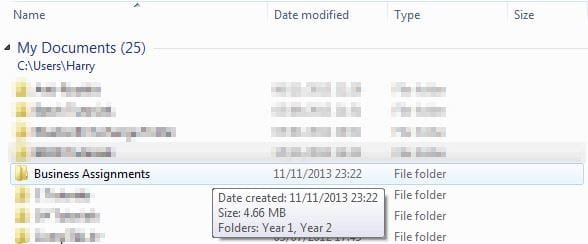
You just hover over the folder, or you can just open the Properties for the folder.
 

My Computer

Computer type
Laptop
Did MS turn off this folder size facility? I'm sure it was there in XP.
~~~
Nope - the info is not there in XP either. :-(
At least not when using the stock Explorer.exe.
 

My Computer

Computer type
Laptop
Computer Manufacturer/Model Number
Employer provided Dell Latitude
OS
W7 Pro SP1 64bit
CPU
i7
Memory
8GB
Graphics Card(s)
Intel HD Graphics
Hard Drives
crappy SSD
Antivirus
Employer mandated Symantec Endpoint Protection
Browser
Pale Moon 64bit, IE11 64bit & Chrome 64bit
View attachment 294106

You just hover over the folder, or you can just open the Properties for the folder.

That's a hurt in the donkey when trying to compare umpteen folders. In the illustration you provided for us, there is a column that says Size, but it's never populated. How can one get that turned on?
 

My Computer

Computer type
PC/Desktop
Computer Manufacturer/Model Number
Custom Build
OS
Win 7 Ultimate 64 bit
CPU
Intel i7-3930K
Motherboard
ASUS P9X79 WS
Memory
Kingston HyperX Genesis 32GB Kit (8x4GB Modules) 1600MHz DDR
Graphics Card(s)
MSI R7850 Twin Frozr 2GD5/OC Radeon HD 7850 2GB 256-bit GDDR
Sound Card
Asus Xonar Essence STX
Monitor(s) Displays
3x Asus VG248QE 24", Vizio 32" TV
Screen Resolution
1920 x 1080, ?
Hard Drives
Samsung 128GB 840 Pro SSD (1),
Samsung 4TB 850 EVO SSDs (4)
Samsung 4TB 850 EVO SSDs (16) external backup drives used in 2.5" hot swap bays in the computer.
PSU
Corsair HX750w
Case
Antec Two Hundred v2 (modified)
Cooling
Cooler Master GeminII S524 120mm (fan replaced with a 140mm)
Keyboard
Logitech G510s
Mouse
Logitech M525 (two in use)
Internet Speed
=< 32Mbps down, 8Mbps up
Antivirus
AVAST!, MBAM, SAS, Spybot S&D (all but MBAM free) Glary Util
Browser
IE11
Other Info
LSI 9211-8i HBA card (8 SATA III ports), 2.5" & 3.5" Hot Swap Bays, HooToo HT-CR001 PCI-E to USB 3.0 Internal Hub + 6 Slot Card Reader, and LG Model CH12LS28 BD-ROM Optical Drive. Also, ScanSnap S1500 ADF duplexing scanner, Canon 9000F flat bed scanner, Corsair SP2500 2.1 speakers, Samsung CLP 415nw laser color printer, Cyberpower PP2200SW UPS
View attachment 294106

You just hover over the folder, or you can just open the Properties for the folder.

That's a hurt in the donkey when trying to compare umpteen folders. In the illustration you provided for us, there is a column that says Size, but it's never populated. How can one get that turned on?
I doubt that you can turn it on in Microsoft's Explorer...
...so you might have to use another tool to view the file/folders.
 

My Computer

Computer type
Laptop
Computer Manufacturer/Model Number
Employer provided Dell Latitude
OS
W7 Pro SP1 64bit
CPU
i7
Memory
8GB
Graphics Card(s)
Intel HD Graphics
Hard Drives
crappy SSD
Antivirus
Employer mandated Symantec Endpoint Protection
Browser
Pale Moon 64bit, IE11 64bit & Chrome 64bit
View attachment 294106

You just hover over the folder, or you can just open the Properties for the folder.

That's a hurt in the donkey when trying to compare umpteen folders. In the illustration you provided for us, there is a column that says Size, but it's never populated. How can one get that turned on?
I doubt that you can turn it on in Microsoft's Explorer...
...so you might have to use another tool to view the file/folders.

Then why is that column even there?
 

My Computer

Computer type
PC/Desktop
Computer Manufacturer/Model Number
Custom Build
OS
Win 7 Ultimate 64 bit
CPU
Intel i7-3930K
Motherboard
ASUS P9X79 WS
Memory
Kingston HyperX Genesis 32GB Kit (8x4GB Modules) 1600MHz DDR
Graphics Card(s)
MSI R7850 Twin Frozr 2GD5/OC Radeon HD 7850 2GB 256-bit GDDR
Sound Card
Asus Xonar Essence STX
Monitor(s) Displays
3x Asus VG248QE 24", Vizio 32" TV
Screen Resolution
1920 x 1080, ?
Hard Drives
Samsung 128GB 840 Pro SSD (1),
Samsung 4TB 850 EVO SSDs (4)
Samsung 4TB 850 EVO SSDs (16) external backup drives used in 2.5" hot swap bays in the computer.
PSU
Corsair HX750w
Case
Antec Two Hundred v2 (modified)
Cooling
Cooler Master GeminII S524 120mm (fan replaced with a 140mm)
Keyboard
Logitech G510s
Mouse
Logitech M525 (two in use)
Internet Speed
=< 32Mbps down, 8Mbps up
Antivirus
AVAST!, MBAM, SAS, Spybot S&D (all but MBAM free) Glary Util
Browser
IE11
Other Info
LSI 9211-8i HBA card (8 SATA III ports), 2.5" & 3.5" Hot Swap Bays, HooToo HT-CR001 PCI-E to USB 3.0 Internal Hub + 6 Slot Card Reader, and LG Model CH12LS28 BD-ROM Optical Drive. Also, ScanSnap S1500 ADF duplexing scanner, Canon 9000F flat bed scanner, Corsair SP2500 2.1 speakers, Samsung CLP 415nw laser color printer, Cyberpower PP2200SW UPS
For the files that might also be in the view.
 

My Computer

Computer type
Laptop
Computer Manufacturer/Model Number
Employer provided Dell Latitude
OS
W7 Pro SP1 64bit
CPU
i7
Memory
8GB
Graphics Card(s)
Intel HD Graphics
Hard Drives
crappy SSD
Antivirus
Employer mandated Symantec Endpoint Protection
Browser
Pale Moon 64bit, IE11 64bit & Chrome 64bit
I don't believe that any version of Windows explorer has ever shown folder sizes in the listing as a native feature. There may be an explorer extension that does this but I don't know of any. I believe I used something like that years ago. The problem with this feature is that it can be very slow on some drives, such as network or slow external drives. I expect that is the reason why it was not included.
 

My Computer

Computer type
PC/Desktop
Computer Manufacturer/Model Number
HP
OS
Windows 7 Pro 64 bit
CPU
Xeon W3520
Memory
8 GB
Graphics Card(s)
Nvidia Geforce 210

My Computer

Computer type
PC/Desktop
Computer Manufacturer/Model Number
Custom Build
OS
Win 7 Ultimate 64 bit
CPU
Intel i7-3930K
Motherboard
ASUS P9X79 WS
Memory
Kingston HyperX Genesis 32GB Kit (8x4GB Modules) 1600MHz DDR
Graphics Card(s)
MSI R7850 Twin Frozr 2GD5/OC Radeon HD 7850 2GB 256-bit GDDR
Sound Card
Asus Xonar Essence STX
Monitor(s) Displays
3x Asus VG248QE 24", Vizio 32" TV
Screen Resolution
1920 x 1080, ?
Hard Drives
Samsung 128GB 840 Pro SSD (1),
Samsung 4TB 850 EVO SSDs (4)
Samsung 4TB 850 EVO SSDs (16) external backup drives used in 2.5" hot swap bays in the computer.
PSU
Corsair HX750w
Case
Antec Two Hundred v2 (modified)
Cooling
Cooler Master GeminII S524 120mm (fan replaced with a 140mm)
Keyboard
Logitech G510s
Mouse
Logitech M525 (two in use)
Internet Speed
=< 32Mbps down, 8Mbps up
Antivirus
AVAST!, MBAM, SAS, Spybot S&D (all but MBAM free) Glary Util
Browser
IE11
Other Info
LSI 9211-8i HBA card (8 SATA III ports), 2.5" & 3.5" Hot Swap Bays, HooToo HT-CR001 PCI-E to USB 3.0 Internal Hub + 6 Slot Card Reader, and LG Model CH12LS28 BD-ROM Optical Drive. Also, ScanSnap S1500 ADF duplexing scanner, Canon 9000F flat bed scanner, Corsair SP2500 2.1 speakers, Samsung CLP 415nw laser color printer, Cyberpower PP2200SW UPS
I use Details view which shows file size but not folder size. To find Folder size hover cursor as suggested. If that stalls I rightclick>Properties.

It is a bother, but a small one. Nothing like the explorer bugs I remember from XP and Vista.
 
...but you cannot folders by that column
hence 3rd party apps (which I don't use).
 

My Computer

Computer type
Laptop
Computer Manufacturer/Model Number
Employer provided Dell Latitude
OS
W7 Pro SP1 64bit
CPU
i7
Memory
8GB
Graphics Card(s)
Intel HD Graphics
Hard Drives
crappy SSD
Antivirus
Employer mandated Symantec Endpoint Protection
Browser
Pale Moon 64bit, IE11 64bit & Chrome 64bit
Thanks Folks; I'm obviously mistaken. If the info comes up on mouse hover it can't be far away, why can't they put it in the size column; but that's a whole new kettle of fish I suppose and not for this thread.
 

My Computer

Computer type
PC/Desktop
Computer Manufacturer/Model Number
Cyberpower PC
OS
windows 7 premium home 64bit
CPU
intel core i5 2500 3.3Ghz 6mb cache OEM
Motherboard
Asus P8Z68-V LX Intel Z68 Chipset DDR3 ATX USB 3
Memory
8GB (2x4GB) PC10666 DDR3/1333mhz Dual
Graphics Card(s)
AMD ATI Radeon Powercolor HD5670 1GB passive cooled
Sound Card
Creative/Soundblaster Digital Music Premium HD/X-Fi-HD
Monitor(s) Displays
Samsung 22; Hanns.G 19
Screen Resolution
1680 x 1050
Hard Drives
SSD: 120 GB Intel 520 Series SATA III
HDD2:West Dig 1TB SATA III 32mb 6gb/s
Hot swap HDD3: 1tb Barracuda Sata 3 32mb 6gb/s
PSU
Coolermaster Elitepower 500wt
Case
NZXT Hush 2
Cooling
Coolermaster Hyper TX3
Mouse
Logitech M570 Trackball
Internet Speed
50mbs
Antivirus
Malwarebytes3. cont' below:
Browser
IE11
Other Info
Windows Firewall.
Hitman-Pro.alert3.
If the info comes up on mouse hover it can't be far away, why can't they put it in the size column
I suggest you ask Microsoft. How would we know.
 

My Computer

Computer Manufacturer/Model Number
HP, Dell, Gateway, Toshiba - 4 laptops and 2 desktops
OS
Vista, Windows7, Mint Mate, Zorin, Windows 8
CPU
from 1.6GHz Duo to i7
Monitor(s) Displays
2x HP w2207
Hard Drives
5x HDD, 7x SSD, 12x Externals
Keyboard
with trackball - no mices
Mouse
Trackball mice
Internet Speed
DSL 6000
As I said in my next sentence: That's a whole new kettle of fish and not for this thread, so I did not need an answer, thank-you very much.
 

My Computer

Computer type
PC/Desktop
Computer Manufacturer/Model Number
Cyberpower PC
OS
windows 7 premium home 64bit
CPU
intel core i5 2500 3.3Ghz 6mb cache OEM
Motherboard
Asus P8Z68-V LX Intel Z68 Chipset DDR3 ATX USB 3
Memory
8GB (2x4GB) PC10666 DDR3/1333mhz Dual
Graphics Card(s)
AMD ATI Radeon Powercolor HD5670 1GB passive cooled
Sound Card
Creative/Soundblaster Digital Music Premium HD/X-Fi-HD
Monitor(s) Displays
Samsung 22; Hanns.G 19
Screen Resolution
1680 x 1050
Hard Drives
SSD: 120 GB Intel 520 Series SATA III
HDD2:West Dig 1TB SATA III 32mb 6gb/s
Hot swap HDD3: 1tb Barracuda Sata 3 32mb 6gb/s
PSU
Coolermaster Elitepower 500wt
Case
NZXT Hush 2
Cooling
Coolermaster Hyper TX3
Mouse
Logitech M570 Trackball
Internet Speed
50mbs
Antivirus
Malwarebytes3. cont' below:
Browser
IE11
Other Info
Windows Firewall.
Hitman-Pro.alert3.
If the info comes up on mouse hover it can't be far away, why can't they put it in the size column
I suggest you ask Microsoft. How would we know.

That was a completely unnecessary and distinctly unfriendly response. If my posts offend you then avoid them please and keep your vitriolic responses to yourself.
 

My Computer

Computer type
PC/Desktop
Computer Manufacturer/Model Number
Cyberpower PC
OS
windows 7 premium home 64bit
CPU
intel core i5 2500 3.3Ghz 6mb cache OEM
Motherboard
Asus P8Z68-V LX Intel Z68 Chipset DDR3 ATX USB 3
Memory
8GB (2x4GB) PC10666 DDR3/1333mhz Dual
Graphics Card(s)
AMD ATI Radeon Powercolor HD5670 1GB passive cooled
Sound Card
Creative/Soundblaster Digital Music Premium HD/X-Fi-HD
Monitor(s) Displays
Samsung 22; Hanns.G 19
Screen Resolution
1680 x 1050
Hard Drives
SSD: 120 GB Intel 520 Series SATA III
HDD2:West Dig 1TB SATA III 32mb 6gb/s
Hot swap HDD3: 1tb Barracuda Sata 3 32mb 6gb/s
PSU
Coolermaster Elitepower 500wt
Case
NZXT Hush 2
Cooling
Coolermaster Hyper TX3
Mouse
Logitech M570 Trackball
Internet Speed
50mbs
Antivirus
Malwarebytes3. cont' below:
Browser
IE11
Other Info
Windows Firewall.
Hitman-Pro.alert3.
Back
Top