Solved Skype and delete from Start up menu.

Hi,

I have installed skype as I find it useful for various contacts etc but I don`t want it to open on start up...I really don`t like programs that just open without any need and this is one of them.

I have opened the start up marker in All Programs in the start menu to disable it but it said there was nothing there...ie,no programs run on start up !...but it does !

Is there a way I can disable this program at start up ?

Thanks,
 

My Computer

OS
Windows 7 32 bit Home premium
ps...I have looked at a couiple of methods suggested in the tutorials etc but when I click on the start up or even type misconfig in the run menu it comes up that there is nothing there...however,Skype does run at start up and I cannot seem to find how to disable it...it would be a shame to just delete the whole thing from the computer but I am thinking I may need to if I cannot disable it from the start up.....hope somebody can help.
 

My Computer

OS
Windows 7 32 bit Home premium

My Computer

Computer type
PC/Desktop
Computer Manufacturer/Model Number
Home made Desktop
OS
Windows 10 Pro. 64/ version 1709 Windows 7 Pro/64
CPU
Intel i7-6800K @ 4.3
Motherboard
ASUS X-99 Deluxe II
Memory
Corsair Platinum 16 gig @2400
Graphics Card(s)
EVGA GTX 1070 OC
Monitor(s) Displays
Asus 27" LED LCD/VE278Q
Screen Resolution
1920-1080 or 1280-720 HDMI
Hard Drives
INTEL SSD 730-240 Gb Sata 3.0/
PSU
EVGA Platium 1200W
Case
Phanteks Luxe Tempered Glass 8 fans/ one radiator
Cooling
XSPC/ Water Cooled CPU
Keyboard
Das 4 Professional
Mouse
Logitech M705/MX Anywhere 2-S
Internet Speed
100 mbits
Antivirus
Microsoft Security Essentials/ Malwarebytes Premium 3.0/ SAS
Browser
I.E. 11 default/Firefox/ ISP Time Warner Cable/Spectrum
Other Info
LG BluRay Burner/
Sound system-KLipsch-THX/
Icy Dock ssd Hot Swap bays.
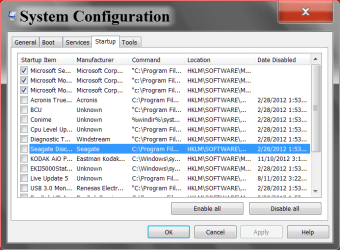
Are you getting to this page.
msconfig 11 12.PNG
 

My Computer

Computer type
PC/Desktop
Computer Manufacturer/Model Number
Home made Desktop
OS
Windows 10 Pro. 64/ version 1709 Windows 7 Pro/64
CPU
Intel i7-6800K @ 4.3
Motherboard
ASUS X-99 Deluxe II
Memory
Corsair Platinum 16 gig @2400
Graphics Card(s)
EVGA GTX 1070 OC
Monitor(s) Displays
Asus 27" LED LCD/VE278Q
Screen Resolution
1920-1080 or 1280-720 HDMI
Hard Drives
INTEL SSD 730-240 Gb Sata 3.0/
PSU
EVGA Platium 1200W
Case
Phanteks Luxe Tempered Glass 8 fans/ one radiator
Cooling
XSPC/ Water Cooled CPU
Keyboard
Das 4 Professional
Mouse
Logitech M705/MX Anywhere 2-S
Internet Speed
100 mbits
Antivirus
Microsoft Security Essentials/ Malwarebytes Premium 3.0/ SAS
Browser
I.E. 11 default/Firefox/ ISP Time Warner Cable/Spectrum
Other Info
LG BluRay Burner/
Sound system-KLipsch-THX/
Icy Dock ssd Hot Swap bays.
Hi...in keeping with "nothing ever being easy" when looking in my start-up folder...there is nothing there ! I have tried left click,right click,approach from a different angle and it just come up the same...I have read through the link before posting here but as the thing just says there isn`t anything in the folder I am a bit lost.

Is there something I am missing ?
 

My Computer

OS
Windows 7 32 bit Home premium
I can`t get to the page shown as system configuration...there are a couple of thing not quite right with my netbook it seems as I don`t get event viewer either...it says there is a problem and then closes !
 

My Computer

OS
Windows 7 32 bit Home premium
When I deselect skype from the start up menu,under the "general" tab,it moves over to "selective start up"...is this ok ?

I remember reading in the link that this leads to safe mode or something...I confess that I didn`t read thoroughly but just wannt to be sure I am doing the right thing.
 

My Computer

OS
Windows 7 32 bit Home premium
Hahaha...that must be one of the quickest "solved" threads around...thanks for the pointer to the system configuration page...the task is now completed.

Thanks...:D
 

My Computer

OS
Windows 7 32 bit Home premium
Reboot a couple times and make sure it stays like you set it. I keep System Configure pined to my Taskbar, makes it handy. If you use Skype a lot you could also pin it to the Taskbar or the Desktop. Then just tick on it when you care to use it.
Could you please mark this thread Solved if your happy.
Happy computing
 

My Computer

Computer type
PC/Desktop
Computer Manufacturer/Model Number
Home made Desktop
OS
Windows 10 Pro. 64/ version 1709 Windows 7 Pro/64
CPU
Intel i7-6800K @ 4.3
Motherboard
ASUS X-99 Deluxe II
Memory
Corsair Platinum 16 gig @2400
Graphics Card(s)
EVGA GTX 1070 OC
Monitor(s) Displays
Asus 27" LED LCD/VE278Q
Screen Resolution
1920-1080 or 1280-720 HDMI
Hard Drives
INTEL SSD 730-240 Gb Sata 3.0/
PSU
EVGA Platium 1200W
Case
Phanteks Luxe Tempered Glass 8 fans/ one radiator
Cooling
XSPC/ Water Cooled CPU
Keyboard
Das 4 Professional
Mouse
Logitech M705/MX Anywhere 2-S
Internet Speed
100 mbits
Antivirus
Microsoft Security Essentials/ Malwarebytes Premium 3.0/ SAS
Browser
I.E. 11 default/Firefox/ ISP Time Warner Cable/Spectrum
Other Info
LG BluRay Burner/
Sound system-KLipsch-THX/
Icy Dock ssd Hot Swap bays.
Yes it is on the desktop...and it has started now without the program...thread marked as solved...thanks again...:D
 

My Computer

OS
Windows 7 32 bit Home premium
Back
Top