
Solved Skype is having a party while I'm away!

RknRusty

New member
Power User
Local time
1:49 PM
Messages
118
Location
South Carolina Midlands
Earlier this morning I had opened Skype, signed in as available, and left it standing by without ever using it. Later on, I closed it on the desktop, but I forgot that it stays open and hidden in the system tray.

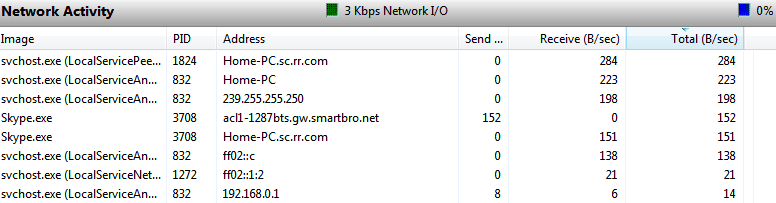
I came back to the computer a couple of hours later and noticed the Send and Receive LEDs on the cable modem were burning up the information highway. I closed the only open application, MS Word and it wasn't that. I opened perfmon.exe, the windows resource monitor, and looked at the network tab. You can see the Skype activity in the screenshot:
Capture.PNG
Anybody recognize that smartbro.net URL or have any idea what may have been going on? I will scan for malware in the meantime.

Thanks,
Rusty
 

My Computer My Computer

Computer type
PC/Desktop
Computer Manufacturer/Model Number
eMachines ET1810-03 (Acer) - single user
OS
Windows 7 Home Premium - always up to date
CPU
Intel E2210 2.2Ghz
Motherboard
(OEM) ECS MCP73VT-PM with AMI BIOS R01-A3 (4-29-2009)
Memory
3Gb DDR2
Graphics Card(s)
NVIDIA GeForce 7050/610I GPU
Sound Card
Realtek ALC888/1200 8-channel HD integrated
Monitor(s) Displays
AOC 22" LED
Screen Resolution
1920 x 1080
Hard Drives
Internal - Seagate 320Gb SATA; External - Western Digital 320Gb USB (3.5" internal drive inside a RocketFish USB enclosure)
Keyboard
Wireless
Mouse
Logitech M705 laser wireless
Internet Speed
TWC Cable Broadband ~ 15 Mbps Down/1 Mbps Up
Antivirus
NIS
Browser
Chrome
Other Info
Microsoft Office 2007, incl Outlook SP3; Netgear router; ubee modem
Try uninstalling Skype completely and installing a fresh copy.
 

My Computer My Computer

Computer Manufacturer/Model Number
Custom
OS
Windows 7 Professional x64
CPU
Intel i7 2600K OC'd @ 4620 MHz
Motherboard
Asus P8Z68-V Pro
Memory
16GB GSkill Sniper 2133 Mhz (4x4GB)
Graphics Card(s)
EVGA GeForce GTX 480 SuperClocked+
Sound Card
Realtek High Definition Audio
Monitor(s) Displays
2x Acer S273HLbmii 27"
Screen Resolution
2 x 1920x1080
Hard Drives
64GB Crucial M4 SSD

Storage: Hitachi 1TB 5400RPM, Samsung 1.5TB 5400RPM
PSU
Corsair HW Series 750w (modular)
Case
Cooler Master HAF 932 Advanced Blue Edition
Cooling
CM Hyper 212+ CPU cooler, 3x 230mm + 1x 140mm case fans
Keyboard
Logitech MK320 (wireless)
Mouse
Logitech MK320 (wireless)
Internet Speed
30 Mb/s : 2 Mb/s
Google

Connect to 203.111.229.242 on port 80 I have no clue, but maybe you can find out with the Google content.
 

My Computer My Computer

Computer type
PC/Desktop
Computer Manufacturer/Model Number
Bruce ... somewhere in his 40's
OS
Windows 7 Ultimate 32bit SP1
CPU
Intel(R) Core(TM)2 Quad CPU @ 2.40GHz, 2400 MHz
Motherboard
INTEL/D975XBX2
Memory
4 GB
Graphics Card(s)
ATI Radeon HD 2600 Pro
Monitor(s) Displays
Samsung SyncMaster 914v
Screen Resolution
1280 x 1024
Hard Drives
2/500GB each ... ST3500630AS ATA Device.
One is not connected
PSU
Rocketfish 700 W
Case
G.Skill Gigabyte Chassis
Keyboard
Standard PS/2 Keyboard
Mouse
Microsoft PS/2 Mouse
Internet Speed
DSL
Antivirus
Avira Internet Security
Browser
IE 11
Other Info
ATI HDMI Audio
Do you think it's likely that someone could have been going through my files? With as many writes as reads, there was a lot of information going upstream.

I have a backup from two days ago I can restore, but I haven't found any malware. If someone was collecting my stuff, it's too late to do anything about it now. I don't think they could get any important passwords. I never store my banking and bill paying info.

Any thoughts?

Rusty
 
Last edited:

My Computer My Computer

Computer type
PC/Desktop
Computer Manufacturer/Model Number
eMachines ET1810-03 (Acer) - single user
OS
Windows 7 Home Premium - always up to date
CPU
Intel E2210 2.2Ghz
Motherboard
(OEM) ECS MCP73VT-PM with AMI BIOS R01-A3 (4-29-2009)
Memory
3Gb DDR2
Graphics Card(s)
NVIDIA GeForce 7050/610I GPU
Sound Card
Realtek ALC888/1200 8-channel HD integrated
Monitor(s) Displays
AOC 22" LED
Screen Resolution
1920 x 1080
Hard Drives
Internal - Seagate 320Gb SATA; External - Western Digital 320Gb USB (3.5" internal drive inside a RocketFish USB enclosure)
Keyboard
Wireless
Mouse
Logitech M705 laser wireless
Internet Speed
TWC Cable Broadband ~ 15 Mbps Down/1 Mbps Up
Antivirus
NIS
Browser
Chrome
Other Info
Microsoft Office 2007, incl Outlook SP3; Netgear router; ubee modem
Okay, here's our answer: Skype is apparently part of a sort of p-p network and my open program was helping pass other's messages back and forth across the internet. I didn't know that. I will never leave it unattended again. That's also probably why it takes a few clicks to close the program.

This is strange....I marked myself as "Offline" then back "Online" and checked the Network like you did. All kinds of weird sites were showing up next to Skype including virginmedia.com, ohio-state.edu, onshore.net, among many others I don't recall.

I know my computer is not infected. Apparently Skype just does this...

http://forum.skype.com/topic/18401-weird-i...-on-connection/

I thought Skype only used bandwidth when you were using it... but apparently it connects whenever it wants. Weird...
 

My Computer My Computer

Computer type
PC/Desktop
Computer Manufacturer/Model Number
eMachines ET1810-03 (Acer) - single user
OS
Windows 7 Home Premium - always up to date
CPU
Intel E2210 2.2Ghz
Motherboard
(OEM) ECS MCP73VT-PM with AMI BIOS R01-A3 (4-29-2009)
Memory
3Gb DDR2
Graphics Card(s)
NVIDIA GeForce 7050/610I GPU
Sound Card
Realtek ALC888/1200 8-channel HD integrated
Monitor(s) Displays
AOC 22" LED
Screen Resolution
1920 x 1080
Hard Drives
Internal - Seagate 320Gb SATA; External - Western Digital 320Gb USB (3.5" internal drive inside a RocketFish USB enclosure)
Keyboard
Wireless
Mouse
Logitech M705 laser wireless
Internet Speed
TWC Cable Broadband ~ 15 Mbps Down/1 Mbps Up
Antivirus
NIS
Browser
Chrome
Other Info
Microsoft Office 2007, incl Outlook SP3; Netgear router; ubee modem
Back
Top