
KLR
New member
Hello everyone,
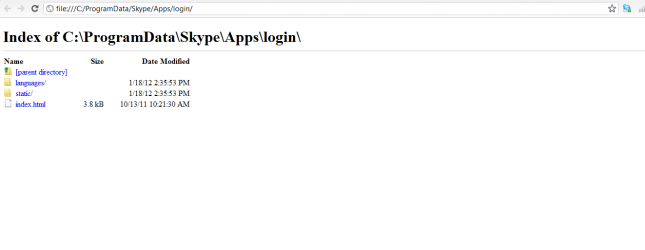
I'm not sure if my problem because of Skype program, or I have a virus, or maybe I need to reinstall windows, but anyway, when I want to sign in to skype it opens me a page with index folder! also lately the Windows media player is not working, and when I tried to restore my windows to a previous time, it didn't find any restore points!
I tried to fix my "C" drive with "Tune Up Utilities" but didn't work also.
if anyone can help me, I would be thankful!
I uploaded a print-screen after clicking the sign in button.. same window I have when I try to check the "sign me in when skype starts", "start skype when computer starts" and "create a new account".. please help :\
and thanks in advance.
I'm not sure if my problem because of Skype program, or I have a virus, or maybe I need to reinstall windows, but anyway, when I want to sign in to skype it opens me a page with index folder! also lately the Windows media player is not working, and when I tried to restore my windows to a previous time, it didn't find any restore points!
I tried to fix my "C" drive with "Tune Up Utilities" but didn't work also.
if anyone can help me, I would be thankful!
I uploaded a print-screen after clicking the sign in button.. same window I have when I try to check the "sign me in when skype starts", "start skype when computer starts" and "create a new account".. please help :\
and thanks in advance.
Attachments
My Computer
- Computer Manufacturer/Model Number
- Acer
- OS
- Windows 7 Ultimate 32-bit (6.1, Build 7600)
- CPU
- Inel Core i3 CPU
- Memory
- 4096MB RAM
- Graphics Card(s)
- Intel HD Graphics 1051MB
- Sound Card
- Speakers
- Monitor(s) Displays
- HP Laptop Monitor, Built in, Full HD
- Screen Resolution
- 1366 x 768
- Hard Drives
- 500 GB Hard Drive
- Mouse
- Touch Pad
- Internet Speed
- 28.8 Mbps
