Solved Skyrim and GPU usage

N00berG00ber

Weekend Warrior
whats up guys?

so im having a problem where when I run skyrim (have a bunch of mods, but even unmodded it does this) my GPU usage maxes out as 50% usage and I only get 20-40FPS. my core clock is at its max, mem clock is at its max too. just usage is low and im getting poor FPS. now this is the R9 280x with 13.11 beta drivers, maybe its a driver issue? if I remember, my last card GTX 660, ran at 100% usage.

any ideas?

as of now, its just skyrim that's having this issue.... my other games run fine
 

My Computer

Computer type
PC/Desktop
Computer Manufacturer/Model Number
Weekend Warrior Rig
OS
Windows 10 Pro
CPU
Intel i7-3770K 4.4GHz
Motherboard
ASUS P8Z77-V Pro
Memory
8GB G.SKILL Ripjaws 1866 MHz
Graphics Card(s)
EVGA GTX 980 Classified
Monitor(s) Displays
Asus VH238H 23" 2ms
Screen Resolution
1920x1080
Hard Drives
Intel 330 120GB SSD /
WD Blue 1TB /
WD Black 500GB
PSU
Corsair CX750M
Case
NZXT H440
Cooling
Corsair H80i- CPU / Corsair H90- GPU
Keyboard
Logitech K360 LE
Mouse
Logitech G500
Antivirus
Avast
Browser
Chrome
Other Info
1200W 2.1 Surround Sound Audio
It's a driver issue, wait for AMD to fix. :)
 

My Computer

Computer type
PC/Desktop
Computer Manufacturer/Model Number
Dell
OS
Windows 7 Home Premium x64
CPU
AMD FX 8350 - 4.8GHZ
Motherboard
Gigabyte 990FXA-UD3 rev 4
Memory
16 GB G.Skill 1866 cas 10
Graphics Card(s)
GTX 770 Windforce
Monitor(s) Displays
x2 Dell 24' 1080p
Screen Resolution
x2 1080p
Hard Drives
64GB Sandisk SSD
1TB Seagate
PSU
Corsiar RM &50w
Case
Fractal R4 window
Cooling
H100i with sp120
Keyboard
G110
Mouse
Logitech G100s
Internet Speed
12d 3u
Antivirus
Avast!
Browser
Firefox

My Computer

Computer type
PC/Desktop
Computer Manufacturer/Model Number
Weekend Warrior Rig
OS
Windows 10 Pro
CPU
Intel i7-3770K 4.4GHz
Motherboard
ASUS P8Z77-V Pro
Memory
8GB G.SKILL Ripjaws 1866 MHz
Graphics Card(s)
EVGA GTX 980 Classified
Monitor(s) Displays
Asus VH238H 23" 2ms
Screen Resolution
1920x1080
Hard Drives
Intel 330 120GB SSD /
WD Blue 1TB /
WD Black 500GB
PSU
Corsair CX750M
Case
NZXT H440
Cooling
Corsair H80i- CPU / Corsair H90- GPU
Keyboard
Logitech K360 LE
Mouse
Logitech G500
Antivirus
Avast
Browser
Chrome
Other Info
1200W 2.1 Surround Sound Audio
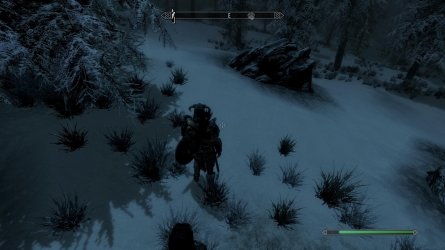
one other quick question.... why do my shadows look like this?
 

Attachments

  • TESV_2013_10_27_23_17_40_153.jpg
    TESV_2013_10_27_23_17_40_153.jpg
    212 KB · Views: 6

My Computer

Computer type
PC/Desktop
Computer Manufacturer/Model Number
Weekend Warrior Rig
OS
Windows 10 Pro
CPU
Intel i7-3770K 4.4GHz
Motherboard
ASUS P8Z77-V Pro
Memory
8GB G.SKILL Ripjaws 1866 MHz
Graphics Card(s)
EVGA GTX 980 Classified
Monitor(s) Displays
Asus VH238H 23" 2ms
Screen Resolution
1920x1080
Hard Drives
Intel 330 120GB SSD /
WD Blue 1TB /
WD Black 500GB
PSU
Corsair CX750M
Case
NZXT H440
Cooling
Corsair H80i- CPU / Corsair H90- GPU
Keyboard
Logitech K360 LE
Mouse
Logitech G500
Antivirus
Avast
Browser
Chrome
Other Info
1200W 2.1 Surround Sound Audio
They are so blocky and ugly.... They r like this both in mods and off mods. On both GPUs
 

My Computer

Computer type
PC/Desktop
Computer Manufacturer/Model Number
Weekend Warrior Rig
OS
Windows 10 Pro
CPU
Intel i7-3770K 4.4GHz
Motherboard
ASUS P8Z77-V Pro
Memory
8GB G.SKILL Ripjaws 1866 MHz
Graphics Card(s)
EVGA GTX 980 Classified
Monitor(s) Displays
Asus VH238H 23" 2ms
Screen Resolution
1920x1080
Hard Drives
Intel 330 120GB SSD /
WD Blue 1TB /
WD Black 500GB
PSU
Corsair CX750M
Case
NZXT H440
Cooling
Corsair H80i- CPU / Corsair H90- GPU
Keyboard
Logitech K360 LE
Mouse
Logitech G500
Antivirus
Avast
Browser
Chrome
Other Info
1200W 2.1 Surround Sound Audio
Go to your graphics options and see what everything is set at and adjust to your liking. You can also set things at distances beyond the max settings in the ini folder. Here is a tweak guide link to help with that. It says it's for Nvidia cards, but the settings are pretty much universal.

I'm not talking about the in game options menu or the one on the game's main menu, but the launcher settings. Just launch the game with the Skyrimlauncher.exe rather than the Skyrim.exe and choose 'options' in the small window that pops up. If you're using the script extender it will start the launcher the first time you open it, but will act like the Skyrim.exe file after the first launch. You actually need to close out the launcher and relaunch it again or the script extender doesn't start properly BTW, just in case you didn't know that.

Be sure to back up your original ini files. It is easy to make Skyrim unstable or even CTD by adjusting the ini settings a bit too much. It's worth tweaking as it improves many things in the game to do so and it can make the game run better than the vanilla settings, but you should be careful and mindful about what it is you're adjusting and how it affects the game. The guide explains what you need to know, and if you screw up you can reload your backup and start again. [It's also a good idea to make a backup of your adjusted ini once you've got it stable and set to your satisfaction.]

I'm assuming your shadows are on Ultra since you're asking, though they look to be set on medium or low.

What is the shadow distance set at?

The thing about Skyrim's shadows is that they are all one big 'blanket' that is spread out across the game. The texture is the same size no matter how far you set the distance and stretches to cover whatever distance you set it at. Put simply, the closer the shadow distance is, the better and less blocky they look. If you set the distance too far, they become blocky even at Ultra settings. You can actually set the shadow resolution to over Ultra settings by setting the value at 8192.

However, be aware that this is a huge resource hog. Shadows are probably the single most intensive effect in Skyrim. Turning them down is the best way to improve framerate in a machine that's struggling to run the game.

I'm not sure why your GPUs are telling you they are only running at 50% capacity to be honest. Especially considering it's only an issue with Skyrim and not other games. Bethesda's engine isn't exactly put together great. It's very mod friendly, but honestly not very stable even with just the base game running. They aren't the best coders and Gambryo is showing it's age. They seriously need a new engine.
 

My Computer

Computer type
PC/Desktop
Computer Manufacturer/Model Number
Home built
OS
Windows 7 Home premium
CPU
I7 3770 3.4
Motherboard
Republic of Gamers Maximus V
Memory
Corsair Vengance ddr3 8gb x2 1600 [@ 2400]
Graphics Card(s)
AMD 7970 6GB x3 [currently x2 until x3 is actually useful]
Sound Card
N/A
Monitor(s) Displays
Visio 47" 3D/Acer 27" 3D
Screen Resolution
1920x1080 120mhz Passive 3D
Hard Drives
Samsung 830 series SSD 512gb x2
Seagate 2tb x2
Segate 750 Gb
PSU
1500w
Case
Coolermaster
Cooling
Noctua D14
Keyboard
Logitech g10
Mouse
Naga Razer
Internet Speed
30mb Cable
Antivirus
Like I'd tell.
Browser
Waterfox mostly.
everything in the INI files are stock. shadows are at ultra on the launcher.
 

My Computer

Computer type
PC/Desktop
Computer Manufacturer/Model Number
Weekend Warrior Rig
OS
Windows 10 Pro
CPU
Intel i7-3770K 4.4GHz
Motherboard
ASUS P8Z77-V Pro
Memory
8GB G.SKILL Ripjaws 1866 MHz
Graphics Card(s)
EVGA GTX 980 Classified
Monitor(s) Displays
Asus VH238H 23" 2ms
Screen Resolution
1920x1080
Hard Drives
Intel 330 120GB SSD /
WD Blue 1TB /
WD Black 500GB
PSU
Corsair CX750M
Case
NZXT H440
Cooling
Corsair H80i- CPU / Corsair H90- GPU
Keyboard
Logitech K360 LE
Mouse
Logitech G500
Antivirus
Avast
Browser
Chrome
Other Info
1200W 2.1 Surround Sound Audio
ok so a driver update has helped a ton with skyrim but is still not 100%. usage is only at 80% max.

I have fixed my shadows, but how do I increase the level of detail of the terrain at a distance and also the level of details in trees at a distance?
 

My Computer

Computer type
PC/Desktop
Computer Manufacturer/Model Number
Weekend Warrior Rig
OS
Windows 10 Pro
CPU
Intel i7-3770K 4.4GHz
Motherboard
ASUS P8Z77-V Pro
Memory
8GB G.SKILL Ripjaws 1866 MHz
Graphics Card(s)
EVGA GTX 980 Classified
Monitor(s) Displays
Asus VH238H 23" 2ms
Screen Resolution
1920x1080
Hard Drives
Intel 330 120GB SSD /
WD Blue 1TB /
WD Black 500GB
PSU
Corsair CX750M
Case
NZXT H440
Cooling
Corsair H80i- CPU / Corsair H90- GPU
Keyboard
Logitech K360 LE
Mouse
Logitech G500
Antivirus
Avast
Browser
Chrome
Other Info
1200W 2.1 Surround Sound Audio
You don't want 100% usage. If you're getting 100% usage your GPU is running way too hard and you need to turn down your settings or you're going to melt your GPU. It's not good for any component in your PC to run at full capacity for any length of time. It's fine if it hits a spike to 100% briefly sometimes, but you don't want it running anywhere near that level any more than that.

Honestly, if your GPU [or CPU for that matter] is running at 90% or more, you need to dial it back. It's working too hard and will burn itself out before long if you keep stressing it that way.

75%-85% is good, that's about where you want it for running a game on average. If you're getting 80% usage, be happy. Your GPU is running as it should and isn't stressing itself under the load. That means happiness for your PC and a long life cycle for your GPU.

You increase the LOD detail for trees and distant textures by editing your ini files settings. You can also increase the number of trees the game puts into the game. That tweak guide I posted earlier will explain how to do it. I also recommend putting in LOD mods to make them look better at distance as well.

Be careful though, you can easily overdo it with setting your distances too far. Gradually increase them until you find that sweet spot between being pretty and performance, don't just set them at 1,000,000 and hope they work. It looks best if you increase all your LOD settings together at about the same rate, objects, actors, trees, grass, etc.

Some of the settings are limited by the GridsToload and exterior/interior cell variables in your ini. Do not increase these. Seriously, messing with those two settings makes the game unstable and can even break your game and ruin your saves. The game will run for a little while with those settings turned up and it makes for pretty screenshots, but it will CTD repeatedly if you try to play the game that way, and they can't be turned down without eliminating your saves and starting a new game. You can't 'clean save' your way out of it once you change those settings.

There are lots of mods that help distant textures look better. They aren't hard to find. Just go to the Skyrim Nexus or Steamworks and search for LOD and you'll get a huge list.

I know I've said it a lot, but it's important. Back up your Skyrim.ini and SkyrimPrefs.ini files before you change anything in them. It can save you a huge headache if you ini edit your game into not working.
 

My Computer

Computer type
PC/Desktop
Computer Manufacturer/Model Number
Home built
OS
Windows 7 Home premium
CPU
I7 3770 3.4
Motherboard
Republic of Gamers Maximus V
Memory
Corsair Vengance ddr3 8gb x2 1600 [@ 2400]
Graphics Card(s)
AMD 7970 6GB x3 [currently x2 until x3 is actually useful]
Sound Card
N/A
Monitor(s) Displays
Visio 47" 3D/Acer 27" 3D
Screen Resolution
1920x1080 120mhz Passive 3D
Hard Drives
Samsung 830 series SSD 512gb x2
Seagate 2tb x2
Segate 750 Gb
PSU
1500w
Case
Coolermaster
Cooling
Noctua D14
Keyboard
Logitech g10
Mouse
Naga Razer
Internet Speed
30mb Cable
Antivirus
Like I'd tell.
Browser
Waterfox mostly.
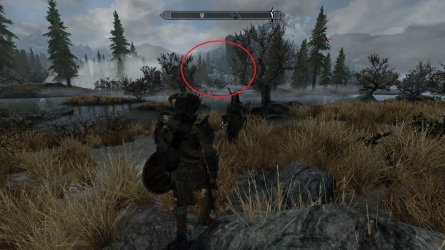
how do I increase the level of detail of the terrain at a distance and also the level of details in trees at a distance?

whats circled in red, I want better terrain details, tree details, more trees and more grass.
 

Attachments

  • TESV_2013_10_28_20_25_13_326.jpg
    TESV_2013_10_28_20_25_13_326.jpg
    829.8 KB · Views: 1

My Computer

Computer type
PC/Desktop
Computer Manufacturer/Model Number
Weekend Warrior Rig
OS
Windows 10 Pro
CPU
Intel i7-3770K 4.4GHz
Motherboard
ASUS P8Z77-V Pro
Memory
8GB G.SKILL Ripjaws 1866 MHz
Graphics Card(s)
EVGA GTX 980 Classified
Monitor(s) Displays
Asus VH238H 23" 2ms
Screen Resolution
1920x1080
Hard Drives
Intel 330 120GB SSD /
WD Blue 1TB /
WD Black 500GB
PSU
Corsair CX750M
Case
NZXT H440
Cooling
Corsair H80i- CPU / Corsair H90- GPU
Keyboard
Logitech K360 LE
Mouse
Logitech G500
Antivirus
Avast
Browser
Chrome
Other Info
1200W 2.1 Surround Sound Audio
how do I increase the level of detail of the terrain at a distance and also the level of details in trees at a distance?

whats circled in red, I want better terrain details, tree details, more trees and more grass.

As I previously explained, a combination of mods and ini editing will get you the best results for the distant LOD detail that you want.

That tweak guide link I posted earlier explains how to do it in detail.

You're still going to have limits to how much you can do because of how the engine works and the gridstoload and exterior/interior cell setting limitations. It also depends on how much your hardware can handle.
 

My Computer

Computer type
PC/Desktop
Computer Manufacturer/Model Number
Home built
OS
Windows 7 Home premium
CPU
I7 3770 3.4
Motherboard
Republic of Gamers Maximus V
Memory
Corsair Vengance ddr3 8gb x2 1600 [@ 2400]
Graphics Card(s)
AMD 7970 6GB x3 [currently x2 until x3 is actually useful]
Sound Card
N/A
Monitor(s) Displays
Visio 47" 3D/Acer 27" 3D
Screen Resolution
1920x1080 120mhz Passive 3D
Hard Drives
Samsung 830 series SSD 512gb x2
Seagate 2tb x2
Segate 750 Gb
PSU
1500w
Case
Coolermaster
Cooling
Noctua D14
Keyboard
Logitech g10
Mouse
Naga Razer
Internet Speed
30mb Cable
Antivirus
Like I'd tell.
Browser
Waterfox mostly.
iv read that tweak guide 1k times. along with others online. no matter how much I changed the values, I was limited by ugrids=7. I briefly changed it to 9 and it looked beautiful. so once my drivers are official, more modding. but as of now im happy with what I got. minimal stutter and decent FPS.
 

My Computer

Computer type
PC/Desktop
Computer Manufacturer/Model Number
Weekend Warrior Rig
OS
Windows 10 Pro
CPU
Intel i7-3770K 4.4GHz
Motherboard
ASUS P8Z77-V Pro
Memory
8GB G.SKILL Ripjaws 1866 MHz
Graphics Card(s)
EVGA GTX 980 Classified
Monitor(s) Displays
Asus VH238H 23" 2ms
Screen Resolution
1920x1080
Hard Drives
Intel 330 120GB SSD /
WD Blue 1TB /
WD Black 500GB
PSU
Corsair CX750M
Case
NZXT H440
Cooling
Corsair H80i- CPU / Corsair H90- GPU
Keyboard
Logitech K360 LE
Mouse
Logitech G500
Antivirus
Avast
Browser
Chrome
Other Info
1200W 2.1 Surround Sound Audio
iv read that tweak guide 1k times. along with others online. no matter how much I changed the values, I was limited by ugrids=7. I briefly changed it to 9 and it looked beautiful. so once my drivers are official, more modding. but as of now im happy with what I got. minimal stutter and decent FPS.

I see. Well, the only other option besides turning the ugrids value up to unstable levels is to mod the distant lod textures. There are a lot of mods that do that so you can pick one that works for you. I use distant LOD mods myself and they do improve things quite a bit.

Also, increasing the distance of trees actually does extend beyond the ugrids value into the distant textures. Set Ftreeloaddistance as high as your system will allow and the effects will extend beyond the ugrids limits. I've got my trees set at 150,000 and it affects the distant textures as well. As far as I know it's the only in game setting that can alter the distant textures.

Here's a screenshot to show what I mean:

pwx3.jpg
 
Last edited:

My Computer

Computer type
PC/Desktop
Computer Manufacturer/Model Number
Home built
OS
Windows 7 Home premium
CPU
I7 3770 3.4
Motherboard
Republic of Gamers Maximus V
Memory
Corsair Vengance ddr3 8gb x2 1600 [@ 2400]
Graphics Card(s)
AMD 7970 6GB x3 [currently x2 until x3 is actually useful]
Sound Card
N/A
Monitor(s) Displays
Visio 47" 3D/Acer 27" 3D
Screen Resolution
1920x1080 120mhz Passive 3D
Hard Drives
Samsung 830 series SSD 512gb x2
Seagate 2tb x2
Segate 750 Gb
PSU
1500w
Case
Coolermaster
Cooling
Noctua D14
Keyboard
Logitech g10
Mouse
Naga Razer
Internet Speed
30mb Cable
Antivirus
Like I'd tell.
Browser
Waterfox mostly.
I'm using a distance LOD. But it still doesn't look like that.
 

My Computer

Computer type
PC/Desktop
Computer Manufacturer/Model Number
Weekend Warrior Rig
OS
Windows 10 Pro
CPU
Intel i7-3770K 4.4GHz
Motherboard
ASUS P8Z77-V Pro
Memory
8GB G.SKILL Ripjaws 1866 MHz
Graphics Card(s)
EVGA GTX 980 Classified
Monitor(s) Displays
Asus VH238H 23" 2ms
Screen Resolution
1920x1080
Hard Drives
Intel 330 120GB SSD /
WD Blue 1TB /
WD Black 500GB
PSU
Corsair CX750M
Case
NZXT H440
Cooling
Corsair H80i- CPU / Corsair H90- GPU
Keyboard
Logitech K360 LE
Mouse
Logitech G500
Antivirus
Avast
Browser
Chrome
Other Info
1200W 2.1 Surround Sound Audio
Go into your Skyrimprefs.ini and bump up the fTreeLoadDistance setting. Mine is set at 150000.0000 in that screenshot. The max possible value is 300000.0000. The default is 75000.0000.

I've got lots of high resolution texture packs and various other GPU consuming mods, so I'm not running on the maximum value myself. Even my PC struggles with it when I set it that high. It doesn't look much different when set above 150000.0000 to be honest. I recommend setting it at around 150000 to 200000. if your system can handle it. It will accept 300000. but it's kind of a waste of resources as there's really nowhere that you can actually see the full effect of that much tree distance.

You can also gain a similar effect with grass. The vanilla value is 7000.00, but it can be bumped up to a max value of 25000.0000. Careful though, the grass itself doesn't take that many resources, but if you have the grass effects tweaked such as grass physics, shadows on grass, and grass density bumped up, it can be quite a hit on your available resources.
 

My Computer

Computer type
PC/Desktop
Computer Manufacturer/Model Number
Home built
OS
Windows 7 Home premium
CPU
I7 3770 3.4
Motherboard
Republic of Gamers Maximus V
Memory
Corsair Vengance ddr3 8gb x2 1600 [@ 2400]
Graphics Card(s)
AMD 7970 6GB x3 [currently x2 until x3 is actually useful]
Sound Card
N/A
Monitor(s) Displays
Visio 47" 3D/Acer 27" 3D
Screen Resolution
1920x1080 120mhz Passive 3D
Hard Drives
Samsung 830 series SSD 512gb x2
Seagate 2tb x2
Segate 750 Gb
PSU
1500w
Case
Coolermaster
Cooling
Noctua D14
Keyboard
Logitech g10
Mouse
Naga Razer
Internet Speed
30mb Cable
Antivirus
Like I'd tell.
Browser
Waterfox mostly.
ok thanks man
 

My Computer

Computer type
PC/Desktop
Computer Manufacturer/Model Number
Weekend Warrior Rig
OS
Windows 10 Pro
CPU
Intel i7-3770K 4.4GHz
Motherboard
ASUS P8Z77-V Pro
Memory
8GB G.SKILL Ripjaws 1866 MHz
Graphics Card(s)
EVGA GTX 980 Classified
Monitor(s) Displays
Asus VH238H 23" 2ms
Screen Resolution
1920x1080
Hard Drives
Intel 330 120GB SSD /
WD Blue 1TB /
WD Black 500GB
PSU
Corsair CX750M
Case
NZXT H440
Cooling
Corsair H80i- CPU / Corsair H90- GPU
Keyboard
Logitech K360 LE
Mouse
Logitech G500
Antivirus
Avast
Browser
Chrome
Other Info
1200W 2.1 Surround Sound Audio
Back
Top