Skyrim lighting/graphical issue (Video card problem?)

clubmimo123

New member
Local time
4:02 PM
Messages
46
Hi, so i have Skyrim for PC (with no mods installed and all the DLCs installed) and i've been playing it for 2 weeks after i upgraded my video card drivers. Then all of a sudden, strange graphical/lighting issue has started coming out of no where.

I have tried to uninstall my drivers and reinstall them: No fix
Used anti-virus software for any potential malware: No fix.
Uninstalled and reinstalled game: No fix

I do not know what to do and im hoping for someone to help me with this issue.

If you wish, i can provide a video of the issue.

(HD Raedon 5700. 4 GB RAM)
 

My Computer

Computer type
PC/Desktop
Computer Manufacturer/Model Number
custom build
OS
Windows 7 Ultimate 64-bit 7601 Multiprocessor Free Service Pack 1
CPU
Intel(R) Core(TM)2 Duo CPU E6550 @ 2.33GHz
Motherboard
ASUSTeK Computer INC. P5K
Memory
4 GB RAM
Graphics Card(s)
HD Raedon 5700
Sound Card
AMD High Definition Audio Device
Monitor(s) Displays
HP w2207 Wide LCD Monitor
Screen Resolution
1680x1050
Hard Drives
1. Hitachi HDE721064SLA360 ATA Device
2. ST3250620AS ATA Device
Antivirus
Kaspersky Anti-virus
Browser
Google Chrome
Hi, so i have Skyrim for PC (with no mods installed and all the DLCs installed) and i've been playing it for 2 weeks after i upgraded my video card drivers. Then all of a sudden, strange graphical/lighting issue has started coming out of no where.

I have tried to uninstall my drivers and reinstall them: No fix
Used anti-virus software for any potential malware: No fix.
Uninstalled and reinstalled game: No fix

I do not know what to do and im hoping for someone to help me with this issue.

If you wish, i can provide a video of the issue.

(HD Raedon 5700. 4 GB RAM)

Did you try going back to the last version of your video driver to see if it corrects the problem?
 

My Computer

Computer type
PC/Desktop
Computer Manufacturer/Model Number
Dell XPS 8700
OS
Microsoft Windows 10 Professional 64-bit
CPU
Intel(R) Core(TM) i7-4790 CPU @ 3.60GHz
Motherboard
Dell Inc.
Memory
8.00 GB
Graphics Card(s)
NVIDIA GeForce GT 720
Monitor(s) Displays
3 x LG Flatron E2350
Screen Resolution
1920 x 1080 x 32 bits (4294967296 colors) @ 60 Hz
Hard Drives
1 TB Seagate
Keyboard
Dell Wired Keyboard
Mouse
Logitech M705
Antivirus
Trend Micro
Hi, so i have Skyrim for PC (with no mods installed and all the DLCs installed) and i've been playing it for 2 weeks after i upgraded my video card drivers. Then all of a sudden, strange graphical/lighting issue has started coming out of no where.

I have tried to uninstall my drivers and reinstall them: No fix
Used anti-virus software for any potential malware: No fix.
Uninstalled and reinstalled game: No fix

I do not know what to do and im hoping for someone to help me with this issue.

If you wish, i can provide a video of the issue.

(HD Raedon 5700. 4 GB RAM)

Did you try going back to the last version of your video driver to see if it corrects the problem?

I haven't done that. Do you know how to do that?
 

My Computer

Computer type
PC/Desktop
Computer Manufacturer/Model Number
custom build
OS
Windows 7 Ultimate 64-bit 7601 Multiprocessor Free Service Pack 1
CPU
Intel(R) Core(TM)2 Duo CPU E6550 @ 2.33GHz
Motherboard
ASUSTeK Computer INC. P5K
Memory
4 GB RAM
Graphics Card(s)
HD Raedon 5700
Sound Card
AMD High Definition Audio Device
Monitor(s) Displays
HP w2207 Wide LCD Monitor
Screen Resolution
1680x1050
Hard Drives
1. Hitachi HDE721064SLA360 ATA Device
2. ST3250620AS ATA Device
Antivirus
Kaspersky Anti-virus
Browser
Google Chrome
Hi, so i have Skyrim for PC (with no mods installed and all the DLCs installed) and i've been playing it for 2 weeks after i upgraded my video card drivers. Then all of a sudden, strange graphical/lighting issue has started coming out of no where.

I have tried to uninstall my drivers and reinstall them: No fix
Used anti-virus software for any potential malware: No fix.
Uninstalled and reinstalled game: No fix

I do not know what to do and im hoping for someone to help me with this issue.

If you wish, i can provide a video of the issue.

(HD Raedon 5700. 4 GB RAM)

Did you try going back to the last version of your video driver to see if it corrects the problem?

I haven't done that. Do you know how to do that?

Assuming you have Windows 7 64 bit, here is a link to the older drivers:

Previous
 

My Computer

Computer type
PC/Desktop
Computer Manufacturer/Model Number
Dell XPS 8700
OS
Microsoft Windows 10 Professional 64-bit
CPU
Intel(R) Core(TM) i7-4790 CPU @ 3.60GHz
Motherboard
Dell Inc.
Memory
8.00 GB
Graphics Card(s)
NVIDIA GeForce GT 720
Monitor(s) Displays
3 x LG Flatron E2350
Screen Resolution
1920 x 1080 x 32 bits (4294967296 colors) @ 60 Hz
Hard Drives
1 TB Seagate
Keyboard
Dell Wired Keyboard
Mouse
Logitech M705
Antivirus
Trend Micro
I have installed the one thats older and hasn't made a difference. The problem is still present.
 

My Computer

Computer type
PC/Desktop
Computer Manufacturer/Model Number
custom build
OS
Windows 7 Ultimate 64-bit 7601 Multiprocessor Free Service Pack 1
CPU
Intel(R) Core(TM)2 Duo CPU E6550 @ 2.33GHz
Motherboard
ASUSTeK Computer INC. P5K
Memory
4 GB RAM
Graphics Card(s)
HD Raedon 5700
Sound Card
AMD High Definition Audio Device
Monitor(s) Displays
HP w2207 Wide LCD Monitor
Screen Resolution
1680x1050
Hard Drives
1. Hitachi HDE721064SLA360 ATA Device
2. ST3250620AS ATA Device
Antivirus
Kaspersky Anti-virus
Browser
Google Chrome
If you can, is it possible for you to get a screenshot to determine whether it is graphical glitch or GPU failure?
 

My Computer

Computer type
PC/Desktop
Computer Manufacturer/Model Number
Custom Build
OS
Windows 7 Ultimate x64 SP1
CPU
Intel Q6600 @ 2.6Ghz
Motherboard
Evga NF78-CK-132-A 3-Way SLI
Memory
4Gb DDR2 Corsair Dominator @ 800Mhz 5-5-5-15
Graphics Card(s)
EVGA 560 GTX SC FTW 1GB
Sound Card
Realtek HD 7.1 Audio, Plantronics GameCom780 7.1 Headset
Monitor(s) Displays
Dell S2409W
Screen Resolution
1920 x 1080
Hard Drives
SanDisk SDSSDHII-120G-G25 120GB SSD
Samsung 7200RPM 750Gb SATA
Samsung 850 EVO 120GB SSD
Western Digital Green 1TB 7200RPM
PSU
Xigmatek 750W Quad sli quad core 80% eff
Case
Antec 900 Gaming Case
Cooling
Zalman CNPS9700-NT NVIDIA Tritium
Keyboard
Logitech generic keyboard, MS wireless keyboard
Mouse
Razor Lachesis Banshee V2 Blue, 4000DPI, MS wireless mouse
Internet Speed
152Mb Virgin Media Fibre Optic
Antivirus
Microsoft Security Essentials
Browser
Google Chrome
Other Info
Wireless Gaming Receiver for Windows, Wireless Xbox 360 Pad
Just spitting a ball in the dark here but have you tried erasing your skyrim ini files and having it reset the graphics? Sometimes they glitch out in my experience. Also if you got mods try a new save without mods and see if you still get the issue. Could be a lighting mod if you have one of those.
 

My Computer

Computer type
PC/Desktop
Computer Manufacturer/Model Number
custom build
OS
Windows 10 64bit
CPU
AMD Phenom II X4 925 (Deneb)(2.8GHz) OC 3.4GHz
Motherboard
M5A78L-MLX Plus
Memory
Corsair Vengeance DDR3 4GBX2 (8192MB)
Graphics Card(s)
XFX HD 6870 1GB (OC)- 940MHz core, mem 1150MHz
Monitor(s) Displays
Vizio 26' 1920x1080 / Acer 1336x768
Screen Resolution
1920x1080 60Hz /1336x768
Hard Drives
Kingston Digital 60GB SSDNow V300/500gb HDD Western Digital 7200rpm (/WD 160GB HDD 7200rpm
PSU
CORSAIR CX600 600w
Case
AZZA Orion 202 EVO
Cooling
cooler master hyper TX3 cpu cooler
Keyboard
Razer DeathStalker
Mouse
Logitech Optical Gaming Mouse G400
Antivirus
Defualt on win 10
Browser
Firefox
Other Info
cpu is overclocked in bios
il check out M1GU31's solution first and see if it works. If that doesn't, il provide you guys with a screenshot or a video of the issue.
 

My Computer

Computer type
PC/Desktop
Computer Manufacturer/Model Number
custom build
OS
Windows 7 Ultimate 64-bit 7601 Multiprocessor Free Service Pack 1
CPU
Intel(R) Core(TM)2 Duo CPU E6550 @ 2.33GHz
Motherboard
ASUSTeK Computer INC. P5K
Memory
4 GB RAM
Graphics Card(s)
HD Raedon 5700
Sound Card
AMD High Definition Audio Device
Monitor(s) Displays
HP w2207 Wide LCD Monitor
Screen Resolution
1680x1050
Hard Drives
1. Hitachi HDE721064SLA360 ATA Device
2. ST3250620AS ATA Device
Antivirus
Kaspersky Anti-virus
Browser
Google Chrome
Alright sorry for the late response. I have tried formatting my computer and it did not resolve the problem at all. Plus, how am i able to delete the ini files and then start the game? Doesn't skyrim need the ini files in order to start the game?
 

My Computer

Computer type
PC/Desktop
Computer Manufacturer/Model Number
custom build
OS
Windows 7 Ultimate 64-bit 7601 Multiprocessor Free Service Pack 1
CPU
Intel(R) Core(TM)2 Duo CPU E6550 @ 2.33GHz
Motherboard
ASUSTeK Computer INC. P5K
Memory
4 GB RAM
Graphics Card(s)
HD Raedon 5700
Sound Card
AMD High Definition Audio Device
Monitor(s) Displays
HP w2207 Wide LCD Monitor
Screen Resolution
1680x1050
Hard Drives
1. Hitachi HDE721064SLA360 ATA Device
2. ST3250620AS ATA Device
Antivirus
Kaspersky Anti-virus
Browser
Google Chrome
Alright sorry for the late response. I have tried formatting my computer and it did not resolve the problem at all. Plus, how am i able to delete the ini files and then start the game? Doesn't skyrim need the ini files in order to start the game?

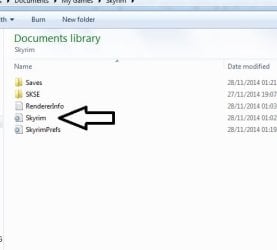
the ini files are located in documents\my games\skyrim and look for skyrim configuration files( should be just called skyrim, see image below) and delete, this will cause the game to re-detect your hardware when you start the game and set your settings accordingly.

Untitled2.jpg
 

My Computer

Computer type
PC/Desktop
Computer Manufacturer/Model Number
Custom Build
OS
Windows 7 Ultimate x64 SP1
CPU
Intel Q6600 @ 2.6Ghz
Motherboard
Evga NF78-CK-132-A 3-Way SLI
Memory
4Gb DDR2 Corsair Dominator @ 800Mhz 5-5-5-15
Graphics Card(s)
EVGA 560 GTX SC FTW 1GB
Sound Card
Realtek HD 7.1 Audio, Plantronics GameCom780 7.1 Headset
Monitor(s) Displays
Dell S2409W
Screen Resolution
1920 x 1080
Hard Drives
SanDisk SDSSDHII-120G-G25 120GB SSD
Samsung 7200RPM 750Gb SATA
Samsung 850 EVO 120GB SSD
Western Digital Green 1TB 7200RPM
PSU
Xigmatek 750W Quad sli quad core 80% eff
Case
Antec 900 Gaming Case
Cooling
Zalman CNPS9700-NT NVIDIA Tritium
Keyboard
Logitech generic keyboard, MS wireless keyboard
Mouse
Razor Lachesis Banshee V2 Blue, 4000DPI, MS wireless mouse
Internet Speed
152Mb Virgin Media Fibre Optic
Antivirus
Microsoft Security Essentials
Browser
Google Chrome
Other Info
Wireless Gaming Receiver for Windows, Wireless Xbox 360 Pad
After deleting those files and making skyrim detect my hardware, the issue is still present. What could be the problem? If skyrim worked fine for 2 weeks straight, then what could be causing this problem?
 

My Computer

Computer type
PC/Desktop
Computer Manufacturer/Model Number
custom build
OS
Windows 7 Ultimate 64-bit 7601 Multiprocessor Free Service Pack 1
CPU
Intel(R) Core(TM)2 Duo CPU E6550 @ 2.33GHz
Motherboard
ASUSTeK Computer INC. P5K
Memory
4 GB RAM
Graphics Card(s)
HD Raedon 5700
Sound Card
AMD High Definition Audio Device
Monitor(s) Displays
HP w2207 Wide LCD Monitor
Screen Resolution
1680x1050
Hard Drives
1. Hitachi HDE721064SLA360 ATA Device
2. ST3250620AS ATA Device
Antivirus
Kaspersky Anti-virus
Browser
Google Chrome
Sounds to me considering you've done a full format and re-install, it may be a GPU failure or RAM failure, can you try swapping out your RAM sticks and see if that helps? (removing one stick and trying skyrim again, then try the other stick)
 

My Computer

Computer type
PC/Desktop
Computer Manufacturer/Model Number
Custom Build
OS
Windows 7 Ultimate x64 SP1
CPU
Intel Q6600 @ 2.6Ghz
Motherboard
Evga NF78-CK-132-A 3-Way SLI
Memory
4Gb DDR2 Corsair Dominator @ 800Mhz 5-5-5-15
Graphics Card(s)
EVGA 560 GTX SC FTW 1GB
Sound Card
Realtek HD 7.1 Audio, Plantronics GameCom780 7.1 Headset
Monitor(s) Displays
Dell S2409W
Screen Resolution
1920 x 1080
Hard Drives
SanDisk SDSSDHII-120G-G25 120GB SSD
Samsung 7200RPM 750Gb SATA
Samsung 850 EVO 120GB SSD
Western Digital Green 1TB 7200RPM
PSU
Xigmatek 750W Quad sli quad core 80% eff
Case
Antec 900 Gaming Case
Cooling
Zalman CNPS9700-NT NVIDIA Tritium
Keyboard
Logitech generic keyboard, MS wireless keyboard
Mouse
Razor Lachesis Banshee V2 Blue, 4000DPI, MS wireless mouse
Internet Speed
152Mb Virgin Media Fibre Optic
Antivirus
Microsoft Security Essentials
Browser
Google Chrome
Other Info
Wireless Gaming Receiver for Windows, Wireless Xbox 360 Pad
Sounds to me considering you've done a full format and re-install, it may be a GPU failure or RAM failure, can you try swapping out your RAM sticks and see if that helps? (removing one stick and trying skyrim again, then try the other stick)

I can try it. But i've seen others saying to install the previous drivers and it works. I cannot do that because i have tried that before and resulted in creating a large issue with my computer.
 

My Computer

Computer type
PC/Desktop
Computer Manufacturer/Model Number
custom build
OS
Windows 7 Ultimate 64-bit 7601 Multiprocessor Free Service Pack 1
CPU
Intel(R) Core(TM)2 Duo CPU E6550 @ 2.33GHz
Motherboard
ASUSTeK Computer INC. P5K
Memory
4 GB RAM
Graphics Card(s)
HD Raedon 5700
Sound Card
AMD High Definition Audio Device
Monitor(s) Displays
HP w2207 Wide LCD Monitor
Screen Resolution
1680x1050
Hard Drives
1. Hitachi HDE721064SLA360 ATA Device
2. ST3250620AS ATA Device
Antivirus
Kaspersky Anti-virus
Browser
Google Chrome
Back
Top