
Slave hard drive letter

ChefOdin

New member
Local time
12:53 PM
Messages
1
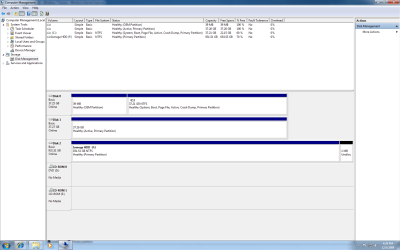
I have a second internal hard drive with data. Currently it is the slave. I have tried cable select with the same result. Disk management sees the drive but I cant assign it a letter. All options under Task -> All options are greyed out except delete volume. How do I give it a letter so I can access the data?.

I seearched but could not find a solution that worked for me. I have tried to attach two pictures.

Thanks
Chef
 

Attachments
  • Untitled.png
    Untitled.png
    43.2 KB · Views: 200
  • Untitled2.png
    Untitled2.png
    38.9 KB · Views: 95

My Computer My Computer

Computer Manufacturer/Model Number
Dell Dimension 4600
OS
Win7
CPU
Pnet 4 2.8 Ghz
Memory
2.25GB
Graphics Card(s)
Zotac
There may be a better way, but I've used a drive/partition manager, like Achronis Disk Director to do this in the past, but that was with XP, and DDS is not yet compatible with W7. There must be some software that will work.
 

My Computer My Computer

Computer Manufacturer/Model Number
DIY
OS
W7x64 Pro, SuSe 12.1/** W7 x64 Pro, XP MCE
CPU
Phenom II 1090T w/Noctua NH-D14 /**4400+ X2 w/CM Hyper TX 3
Motherboard
ASRock 890FX Deluxe 4/**A8N-SLI
Memory
2 x 2GB Patriot PGS34g1600LLKA/**4x1GB Corsair VS
Graphics Card(s)
EVGA GTX460 SC/**EVGA 8800GTS
Sound Card
Asus Xonar D2X/**Xonar D1
Monitor(s) Displays
Acer X233H, Dell E152FPc /**LG M237-WD
Screen Resolution
1920x1080 & 1024x768/**1980x1080
Hard Drives
WDC 2TB, 1.5TB, 1TB, 500GB,Seagate 500GB , Maxtor 80GB /**500GB Seagate & WDC 1TB Black
PSU
CM RS600 w/ APC BX1000G/**Antec 500 TP w/ APC BX1000
Case
HAF922/**Antec 1040IIB
Cooling
3x200mm, 1x140 and 1x120mm/**5x80mm fans
Keyboard
Logitech Media USB/**Saitek Eclipse
Mouse
Cordless Trackman Wheel/**Ditto
Internet Speed
3.3Mbps
Other Info
SB 560 5.1 w/ Sennheiser RS140/**Creative T20 speakers, Dvico FusionHDTV7 Gold RT, Cisco E3000, HP 5510V AIO, Linksys E3000, Belkin F5U237 hub and **F5D8055 adapter
(** = 2nd rig)
Try Partition Wizard.

But I would like to know why this behavior is occurring.
 

My Computer My Computer

Computer type
PC/Desktop
Computer Manufacturer/Model Number
Custom
OS
7 x64 Ultimate
CPU
AMD Ryzen 5
Motherboard
Gigabyte GA-AB350-Gaming
Memory
16GB DDR4
Graphics Card(s)
Radeon R7 360
Monitor(s) Displays
2 x Dell U2518D
Screen Resolution
2560x1440 2560x1440
Hard Drives
WD 500GB x2
Samsung SSD 128MB (OS)
XPG SX8200 Pro M.2 2280 1TB
PSU
Antec 500
Cooling
Hyper 212 EVO
Keyboard
Logitech cordless K800
Mouse
Logitech M510
Antivirus
Avira
I have a second internal hard drive with data. Currently it is the slave. I have tried cable select with the same result. Disk management sees the drive but I cant assign it a letter. All options under Task -> All options are greyed out except delete volume. How do I give it a letter so I can access the data?.

I seearched but could not find a solution that worked for me. I have tried to attach two pictures.

Thanks
Chef

Something isn't right with that second drive. Windows sees the physical drive but not how it is formated - it should indicate NTFS, FAT, FAT32 (if MS formated) - it probably wouldn't see ext, reiser, other Linux/Unix formats.

Regards,
GEWB
 

My Computer My Computer

Computer type
PC/Desktop
Computer Manufacturer/Model Number
(7 different computers booting up to 10 systems)
OS
Linux Mint / XP / Win7 Home, Pro, Ultimate / Win8.1 / Win10
Other Info
Four desktops, two laptops, one notebook and one tablet
I think it is the active flag and active (bootable) drives cannot have certain edits done. We use to be able to remove the active flag from command prompt.
 

My Computer My Computer

Computer Manufacturer/Model Number
Intel
OS
7 Pro64 Hopefully
CPU
Q8400
Motherboard
DP45SG
Memory
Kingston 4gb
Graphics Card(s)
Sapphire HD2600XT
Monitor(s) Displays
Dell 2007WFP
Hard Drives
WB Black 500gb and 1tb
PSU
Enermax Tomahawk 500w
Case
CoolerMaster Sileo
Back
Top