
Sleep-on-LAN

Do you have the same account name on both computers? I ask this because I have a similar setup as you. My desktop is Win 7 and my other system is XP Pro. I have the same account and same password on both computers and psexec.exe works for me.

Edit: Also:

shutdown /s /m \\remotecomp /t 30 /c "Remote restart of Web Server"

also works for me, no need for psexec.exe.
 
Last edited:

My Computer

Computer type
PC/Desktop
Computer Manufacturer/Model Number
Lenovo IdeaCenter 450
OS
Windows 10 Pro X64
CPU
Intel Quad Core i7-4770 @ 3.4Ghz
Memory
16.0GB PC3-12800 DDR3 SDRAM 1600 MHz
Graphics Card(s)
Intel Integrated HD Graphics
Sound Card
Realtek HD Audio
Monitor(s) Displays
HP 22" LCD
Screen Resolution
1680 x 1050
Hard Drives
250GB Samsung EVO SATA-3 SSD
2TB Seagate ST2000DM001 SATA-2
1.5TB Seagate ST3150041AS SATA
Keyboard
Dell USB
Mouse
Lenovo USB
Internet Speed
Cable via Road Runner 3MB Upload, 30MB Download
Antivirus
Windows Defender, MBAM Pro, MBAE
Browser
Seamonkey
Other Info
UEFI/GPT
PLDS DVD-RW DH16AERSH
Does dir \\m30-861\shareddocs work from a command prompt?
 

My Computer

Computer type
PC/Desktop
Computer Manufacturer/Model Number
Lenovo IdeaCenter 450
OS
Windows 10 Pro X64
CPU
Intel Quad Core i7-4770 @ 3.4Ghz
Memory
16.0GB PC3-12800 DDR3 SDRAM 1600 MHz
Graphics Card(s)
Intel Integrated HD Graphics
Sound Card
Realtek HD Audio
Monitor(s) Displays
HP 22" LCD
Screen Resolution
1680 x 1050
Hard Drives
250GB Samsung EVO SATA-3 SSD
2TB Seagate ST2000DM001 SATA-2
1.5TB Seagate ST3150041AS SATA
Keyboard
Dell USB
Mouse
Lenovo USB
Internet Speed
Cable via Road Runner 3MB Upload, 30MB Download
Antivirus
Windows Defender, MBAM Pro, MBAE
Browser
Seamonkey
Other Info
UEFI/GPT
PLDS DVD-RW DH16AERSH
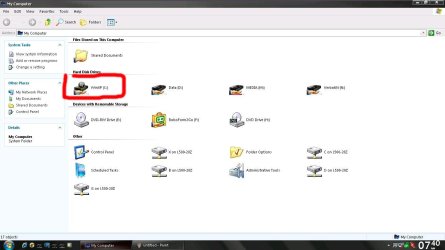
Yip, same account name and same password, also both are Administartor accounts.
Post#21 doesn't work, however...


What now? :) I don't understand - The whole pc is shared!
 

Attachments

  • Capture.JPG
    Capture.JPG
    100.5 KB · Views: 11
  • untitled.JPG
    untitled.JPG
    63.7 KB · Views: 15
Last edited:

My Computer

Computer Manufacturer/Model Number
Toshiba Satellite L500
OS
Windows 7 Home Premium x64 OEM --> RTM clean install
CPU
Intel T4400
Motherboard
? - laptop inbuilt ?
Memory
4Gb
Graphics Card(s)
? - Mobile Intel(R) 4 Series Express Chipset Family ?
Sound Card
Realtek
Monitor(s) Displays
? + extended to a 42" LG55PC plasma tele!
Screen Resolution
1366 * 768
Hard Drives
320Gb 5500rpm
PSU
?
Case
?
Cooling
?
Internet Speed
3Meg, when it works.
Other Info
A LOWLY LAPTOP!
Doesn't appear this has anything to do with sharing, just permissions.

What about from the other direction, does that work? Use

shutdown /s /m \\remotecomp /t 30 /c "Remote restart of Web Server"

as before then if it does work, enter shutdown /a to terminate the shutdown.
 

My Computer

Computer type
PC/Desktop
Computer Manufacturer/Model Number
Lenovo IdeaCenter 450
OS
Windows 10 Pro X64
CPU
Intel Quad Core i7-4770 @ 3.4Ghz
Memory
16.0GB PC3-12800 DDR3 SDRAM 1600 MHz
Graphics Card(s)
Intel Integrated HD Graphics
Sound Card
Realtek HD Audio
Monitor(s) Displays
HP 22" LCD
Screen Resolution
1680 x 1050
Hard Drives
250GB Samsung EVO SATA-3 SSD
2TB Seagate ST2000DM001 SATA-2
1.5TB Seagate ST3150041AS SATA
Keyboard
Dell USB
Mouse
Lenovo USB
Internet Speed
Cable via Road Runner 3MB Upload, 30MB Download
Antivirus
Windows Defender, MBAM Pro, MBAE
Browser
Seamonkey
Other Info
UEFI/GPT
PLDS DVD-RW DH16AERSH
This is just a shot in the dark here.... but windows 7 does come with a Telnet Server and Client.
or even FTP execution....

What about creating a script that will execute a bat file on the remote computer to put the computer into sleep mode.

Execute the bat file on the root directory:

Sleep.bat

%windir%\System32\rundll32.exe powrprof.dll,SetSuspendState Standby
 

My Computer

Computer Manufacturer/Model Number
HP Pavilion Elite HPE-410f
OS
Windows 7 Ultimate x64
CPU
AMD Phenom x6 1045t
Motherboard
N/A
Memory
8 GB
Graphics Card(s)
ATI Radeon HD 5570
Sound Card
Realtek Highdefinition Audio / 5.1 Dolby Setup
Monitor(s) Displays
HP w2207h Widescreen
Screen Resolution
1680*1050
Hard Drives
1 TB (fixed), 320 Portable maxtor, Server Hard drives
PSU
350 Watt
Case
HP CASE
Cooling
Bass
Keyboard
Logitech MX 5500
Mouse
Logitech MX 5500
Internet Speed
ROAD RUNNER 16MB D/512 U
Doesn't appear this has anything to do with sharing, just permissions.

What about from the other direction, does that work? Use

shutdown /s /m \\remotecomp /t 30 /c "Remote restart of Web Server"

as before then if it does work, enter shutdown /a to terminate the shutdown.

Thanks but this stubborn little bugger says:
"M30-861: Access is denied. (5)"

Permissions, you say? :confused:
 

My Computer

Computer Manufacturer/Model Number
Toshiba Satellite L500
OS
Windows 7 Home Premium x64 OEM --> RTM clean install
CPU
Intel T4400
Motherboard
? - laptop inbuilt ?
Memory
4Gb
Graphics Card(s)
? - Mobile Intel(R) 4 Series Express Chipset Family ?
Sound Card
Realtek
Monitor(s) Displays
? + extended to a 42" LG55PC plasma tele!
Screen Resolution
1366 * 768
Hard Drives
320Gb 5500rpm
PSU
?
Case
?
Cooling
?
Internet Speed
3Meg, when it works.
Other Info
A LOWLY LAPTOP!
This is just a shot in the dark here.... but windows 7 does come with a Telnet Server and Client.
or even FTP execution....

What about creating a script that will execute a bat file on the remote computer to put the computer into sleep mode.

Execute the bat file on the root directory:

Sleep.bat

%windir%\System32\rundll32.exe powrprof.dll,SetSuspendState Standby

Thanks for the input, though you'll have to explain a little the Telnet / FTP line of thought.-- Set up a Telnet account on both machines?
 

My Computer

Computer Manufacturer/Model Number
Toshiba Satellite L500
OS
Windows 7 Home Premium x64 OEM --> RTM clean install
CPU
Intel T4400
Motherboard
? - laptop inbuilt ?
Memory
4Gb
Graphics Card(s)
? - Mobile Intel(R) 4 Series Express Chipset Family ?
Sound Card
Realtek
Monitor(s) Displays
? + extended to a 42" LG55PC plasma tele!
Screen Resolution
1366 * 768
Hard Drives
320Gb 5500rpm
PSU
?
Case
?
Cooling
?
Internet Speed
3Meg, when it works.
Other Info
A LOWLY LAPTOP!
What I meant was to be on the M30-861 computer and try the shutdown to the L500 system.
 

My Computer

Computer type
PC/Desktop
Computer Manufacturer/Model Number
Lenovo IdeaCenter 450
OS
Windows 10 Pro X64
CPU
Intel Quad Core i7-4770 @ 3.4Ghz
Memory
16.0GB PC3-12800 DDR3 SDRAM 1600 MHz
Graphics Card(s)
Intel Integrated HD Graphics
Sound Card
Realtek HD Audio
Monitor(s) Displays
HP 22" LCD
Screen Resolution
1680 x 1050
Hard Drives
250GB Samsung EVO SATA-3 SSD
2TB Seagate ST2000DM001 SATA-2
1.5TB Seagate ST3150041AS SATA
Keyboard
Dell USB
Mouse
Lenovo USB
Internet Speed
Cable via Road Runner 3MB Upload, 30MB Download
Antivirus
Windows Defender, MBAM Pro, MBAE
Browser
Seamonkey
Other Info
UEFI/GPT
PLDS DVD-RW DH16AERSH
This is just a shot in the dark here.... but windows 7 does come with a Telnet Server and Client.
or even FTP execution....

What about creating a script that will execute a bat file on the remote computer to put the computer into sleep mode.

Execute the bat file on the root directory:

Sleep.bat

%windir%\System32\rundll32.exe powrprof.dll,SetSuspendState Standby

Thanks for the input, though you'll have to explain a little the Telnet / FTP line of thought.-- Set up a Telnet account on both machines?

I take it that you get a dynamic IP from your ISP... so knowing your IP is going to be difficult. So that is why you use DDNS to your router.
Get yourself a web address and then you have to give your server computer static IP's to forward port to the server.
Then you activate the Telnet server on your computer that you want to control or (log into). It is in your add and remove programs.

You log into your computer using user name and password for admin rights. Then execute the bat file or any file that will run the:

%windir%\System32\rundll32.exe powrprof.dll,SetSuspendState Standby

command
 

My Computer

Computer Manufacturer/Model Number
HP Pavilion Elite HPE-410f
OS
Windows 7 Ultimate x64
CPU
AMD Phenom x6 1045t
Motherboard
N/A
Memory
8 GB
Graphics Card(s)
ATI Radeon HD 5570
Sound Card
Realtek Highdefinition Audio / 5.1 Dolby Setup
Monitor(s) Displays
HP w2207h Widescreen
Screen Resolution
1680*1050
Hard Drives
1 TB (fixed), 320 Portable maxtor, Server Hard drives
PSU
350 Watt
Case
HP CASE
Cooling
Bass
Keyboard
Logitech MX 5500
Mouse
Logitech MX 5500
Internet Speed
ROAD RUNNER 16MB D/512 U
What I meant was to be on the M30-861 computer and try the shutdown to the L500 system.

Sorry for my denseness, Rich... ok, so I tried what you wrote (copied/pasted) and as soon as I hit enter, I heard a beep from my L500 (Win7) box. Pop up window "You are about to be logged off". The machine then powered down with no reboot.

So it seems there's a permission issue to do it the other way round L500 --> M30.

I'm sure you've got this covered and this is just for testing purposes, but I wanted to remote sleep the M30 from L500, but you knew that, right.
Thanks
D
 

My Computer

Computer Manufacturer/Model Number
Toshiba Satellite L500
OS
Windows 7 Home Premium x64 OEM --> RTM clean install
CPU
Intel T4400
Motherboard
? - laptop inbuilt ?
Memory
4Gb
Graphics Card(s)
? - Mobile Intel(R) 4 Series Express Chipset Family ?
Sound Card
Realtek
Monitor(s) Displays
? + extended to a 42" LG55PC plasma tele!
Screen Resolution
1366 * 768
Hard Drives
320Gb 5500rpm
PSU
?
Case
?
Cooling
?
Internet Speed
3Meg, when it works.
Other Info
A LOWLY LAPTOP!
This is just a shot in the dark here.... but windows 7 does come with a Telnet Server and Client.
or even FTP execution....

What about creating a script that will execute a bat file on the remote computer to put the computer into sleep mode.

Execute the bat file on the root directory:

Sleep.bat

%windir%\System32\rundll32.exe powrprof.dll,SetSuspendState Standby

Thanks for the input, though you'll have to explain a little the Telnet / FTP line of thought.-- Set up a Telnet account on both machines?

I take it that you get a dynamic IP from your ISP... so knowing your IP is going to be difficult. So that is why you use DDNS to your router.
Get yourself a web address and then you have to give your server computer static IP's to forward port to the server.
Then you activate the Telnet server on your computer that you want to control or (log into). It is in your add and remove programs.

You log into your computer using user name and password for admin rights. Then execute the bat file or any file that will run the:

%windir%\System32\rundll32.exe powrprof.dll,SetSuspendState Standby

command

Thanks for the input. ISP gives me dynamic ip on each boot, but I usually leave things on for days at a time. I already use static ips from my router to control torrents and ports and the like. I'll have a mess around with this and post back...
 

My Computer

Computer Manufacturer/Model Number
Toshiba Satellite L500
OS
Windows 7 Home Premium x64 OEM --> RTM clean install
CPU
Intel T4400
Motherboard
? - laptop inbuilt ?
Memory
4Gb
Graphics Card(s)
? - Mobile Intel(R) 4 Series Express Chipset Family ?
Sound Card
Realtek
Monitor(s) Displays
? + extended to a 42" LG55PC plasma tele!
Screen Resolution
1366 * 768
Hard Drives
320Gb 5500rpm
PSU
?
Case
?
Cooling
?
Internet Speed
3Meg, when it works.
Other Info
A LOWLY LAPTOP!
What I meant was to be on the M30-861 computer and try the shutdown to the L500 system.

Sorry for my denseness, Rich... ok, so I tried what you wrote (copied/pasted) and as soon as I hit enter, I heard a beep from my L500 (Win7) box. Pop up window "You are about to be logged off". The machine then powered down with no reboot.

So it seems there's a permission issue to do it the other way round L500 --> M30.

I'm sure you've got this covered and this is just for testing purposes, but I wanted to remote sleep the M30 from L500, but you knew that, right.
Thanks
D

Still can't get the damn thing to work, though it's no biggy to remote in and double click the sleep shortcut on the XP Pro box. RDP then automatically disconnects, but even so...
 

My Computer

Computer Manufacturer/Model Number
Toshiba Satellite L500
OS
Windows 7 Home Premium x64 OEM --> RTM clean install
CPU
Intel T4400
Motherboard
? - laptop inbuilt ?
Memory
4Gb
Graphics Card(s)
? - Mobile Intel(R) 4 Series Express Chipset Family ?
Sound Card
Realtek
Monitor(s) Displays
? + extended to a 42" LG55PC plasma tele!
Screen Resolution
1366 * 768
Hard Drives
320Gb 5500rpm
PSU
?
Case
?
Cooling
?
Internet Speed
3Meg, when it works.
Other Info
A LOWLY LAPTOP!
Back
Top