Solved Sleep Option greyed out.

BPetkus

New member
Local time
4:49 PM
Messages
6
Location
Atlanta, GA
Title says it all. I have all the power down options available EXCEPT Sleep. It is greyed out(even in safe mode). I've searched the forums and found multiple threads. I have tried the registry tweaks, self-executable files to reactivate sleep, etc. all to no avail. The only other unfortunate option left is to reinstall 7 :cry:
Other suggestions are much appreciated!

FYI: AND no, it's not related to graphics card. This option WAS available until, I believe, after an automatic win7 update. I DID try to revert; no luck.

P.S. I apologize if not in right forum.
 
Last edited:

My Computer

Computer Manufacturer/Model Number
Acer Aspire 3610
OS
Windows 7 Home Premium
CPU
1.5GHz Celeron M
Memory
2GB
Press the Start button, then press the right arrow key twice, then press the letter S - what happens?
 

My Computer

Computer Manufacturer/Model Number
HP, Dell, Gateway, Toshiba - 4 laptops and 2 desktops
OS
Vista, Windows7, Mint Mate, Zorin, Windows 8
CPU
from 1.6GHz Duo to i7
Monitor(s) Displays
2x HP w2207
Hard Drives
5x HDD, 7x SSD, 12x Externals
Keyboard
with trackball - no mices
Mouse
Trackball mice
Internet Speed
DSL 6000
Nothing happened, still showing greyed out.
 

My Computer

Computer Manufacturer/Model Number
Acer Aspire 3610
OS
Windows 7 Home Premium
CPU
1.5GHz Celeron M
Memory
2GB

My Computer

Computer type
PC/Desktop
Computer Manufacturer/Model Number
Self built custom
OS
64-bit Windows 11 Pro for Workstations
CPU
Intel i7-8700K OC'd to 5 GHz
Motherboard
ASUS ROG Maximus XI Formula Z390
Memory
64 GB (4x16GB) G.SKILL TridentZ RGB DDR4 3600 MHz
Graphics Card(s)
ASUS ROG-STRIX-GTX1080TI-O11G-GAMING
Sound Card
Integrated
Monitor(s) Displays
2 x Samsung Odyssey G7 27"
Screen Resolution
2560x1440
Hard Drives
1TB Samsung 990 PRO M.2,
4TB Samsung 990 PRO PRO M.2,
TerraMaster F8 SSD Plus NAS
PSU
Seasonic Prime Titanium 850W
Case
Thermaltake Core P3
Cooling
Corsair Hydro H115i
Keyboard
Logitech wireless K800
Mouse
Logitech MX Master 4
Internet Speed
2 Gb/s Download and 100 Mb/s Upload
Antivirus
Malwarebyte Anti-Malware Premium
Browser
Google Chrome
Other Info
Logitech Z625 speaker system,
Logitech BRIO 4K Pro webcam,
HP Color LaserJet Pro MFP M477fdn,
APC SMART-UPS RT 1000 XL - SURT1000XLI,
Galaxy S23 Plus phone
Nope, I already tried that one too. Reset value to 1.....no luck.
 

My Computer

Computer Manufacturer/Model Number
Acer Aspire 3610
OS
Windows 7 Home Premium
CPU
1.5GHz Celeron M
Memory
2GB
Nope, I already tried that one too. Reset value to 1.....no luck.
If you go back into the registry, is it set to 0 again?
 

My Computer

Computer Manufacturer/Model Number
HP 6000 Pro Micro Tower
OS
W7 Professional x64
CPU
Core 2 Duo 2.93
Memory
2 GB
Graphics Card(s)
ATI Radeon 4695
Monitor(s) Displays
Two HP 17's
Hard Drives
150GB Sata Drive
Case
Tiny. Kinda cute.
Keyboard
HP Supplied. Surprisingly nice.
Mouse
Gateway Mouse from an E2610D
Internet Speed
45 mbps
Hi,

Can you try this:

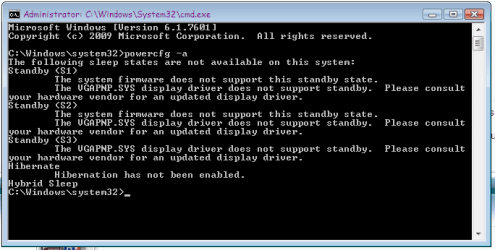
Open an elevated CMD window, and then type powercfg -a and hit enter.

Post the resultant output here.

Regards,
Golden
 

My Computer

Computer type
PC/Desktop
Computer Manufacturer/Model Number
Golden Mk. I.4
OS
Windows 10 Pro x64 ; Xubuntu x64
CPU
Intel i7 860 @ 2.80 GHz O/C'ed to 4.0GHz
Motherboard
Gigabyte P55A-UD3R Rev.1. Award BIOS F13
Memory
16GB Corsair Vengance DDR3 @ 661 MHz Dual Channel (9-9-9-24)
Graphics Card(s)
EVGA NVidia GTX 560 1024MB
Sound Card
Realtek Integrated
Monitor(s) Displays
Dual Samsung SyncMaster 2494HS
Screen Resolution
1920*1080 and 1920*1080
Hard Drives
1*Samsung 840 EVO 120GB SSD;
1*OCZ Vertex 2 60GB SSD;
2*Samsung F3 SpinPoint 1TB in RAID0;
1*Samsung F1 SpinPoint 1TB;
2*Western Digital 1TB External USB 3.0
1*Western Digital 500GB External USB 3.0
1*Seagate 500GB External USB 2.0
PSU
Thermaltake ToughPower QFan 750W
Case
Thermaltake Element S VK60001W2Z
Cooling
Corsair H60 Water Cooling, 2*230mm and 2*80mm case fans
Keyboard
Logitech G110
Mouse
Logitech MX518
Results of Powercfg

Here's the results(below) of the powercfg -a. I disabled Hibernation on purpose. What I don't understand is display driver(from scrn shot) is indicating Sleep State is unsupported. It was just fine until Windows did an automatic update. I tried resorting back to an earlier restore but as I said, it didn't work. I guess backups are not such a bad idea after all, ahe?

powecfg.png
 

My Computer

Computer Manufacturer/Model Number
Acer Aspire 3610
OS
Windows 7 Home Premium
CPU
1.5GHz Celeron M
Memory
2GB
Hi,

Try the following :

1. Download and install latest display driver from the manufacturers website.
2. In an elevated CMD window, type powercfg /hibernate on

Run powercfg -a again, and post result here - it should say that hibernation has been turned back on, and that sleep is now supported.

If it is, see if SLEEP is nowavailable, or still greyed out.

Regards,
Golden
 

My Computer

Computer type
PC/Desktop
Computer Manufacturer/Model Number
Golden Mk. I.4
OS
Windows 10 Pro x64 ; Xubuntu x64
CPU
Intel i7 860 @ 2.80 GHz O/C'ed to 4.0GHz
Motherboard
Gigabyte P55A-UD3R Rev.1. Award BIOS F13
Memory
16GB Corsair Vengance DDR3 @ 661 MHz Dual Channel (9-9-9-24)
Graphics Card(s)
EVGA NVidia GTX 560 1024MB
Sound Card
Realtek Integrated
Monitor(s) Displays
Dual Samsung SyncMaster 2494HS
Screen Resolution
1920*1080 and 1920*1080
Hard Drives
1*Samsung 840 EVO 120GB SSD;
1*OCZ Vertex 2 60GB SSD;
2*Samsung F3 SpinPoint 1TB in RAID0;
1*Samsung F1 SpinPoint 1TB;
2*Western Digital 1TB External USB 3.0
1*Western Digital 500GB External USB 3.0
1*Seagate 500GB External USB 2.0
PSU
Thermaltake ToughPower QFan 750W
Case
Thermaltake Element S VK60001W2Z
Cooling
Corsair H60 Water Cooling, 2*230mm and 2*80mm case fans
Keyboard
Logitech G110
Mouse
Logitech MX518
Hip hip hooray!

:D Well, finally found the problem thx to Golden. After last Win7 update, unbeknownst to me, 7 reverted back to generic display driver. Installed Vista driver and everything hunky dory. FYI; Intel too lazy to create W7 driver for Intel 915 so had to use Vista.
Thanks for the help, ppl.
 

My Computer

Computer Manufacturer/Model Number
Acer Aspire 3610
OS
Windows 7 Home Premium
CPU
1.5GHz Celeron M
Memory
2GB
Nice one - glad to have helped :D
 

My Computer

Computer type
PC/Desktop
Computer Manufacturer/Model Number
Golden Mk. I.4
OS
Windows 10 Pro x64 ; Xubuntu x64
CPU
Intel i7 860 @ 2.80 GHz O/C'ed to 4.0GHz
Motherboard
Gigabyte P55A-UD3R Rev.1. Award BIOS F13
Memory
16GB Corsair Vengance DDR3 @ 661 MHz Dual Channel (9-9-9-24)
Graphics Card(s)
EVGA NVidia GTX 560 1024MB
Sound Card
Realtek Integrated
Monitor(s) Displays
Dual Samsung SyncMaster 2494HS
Screen Resolution
1920*1080 and 1920*1080
Hard Drives
1*Samsung 840 EVO 120GB SSD;
1*OCZ Vertex 2 60GB SSD;
2*Samsung F3 SpinPoint 1TB in RAID0;
1*Samsung F1 SpinPoint 1TB;
2*Western Digital 1TB External USB 3.0
1*Western Digital 500GB External USB 3.0
1*Seagate 500GB External USB 2.0
PSU
Thermaltake ToughPower QFan 750W
Case
Thermaltake Element S VK60001W2Z
Cooling
Corsair H60 Water Cooling, 2*230mm and 2*80mm case fans
Keyboard
Logitech G110
Mouse
Logitech MX518
As suggested by Golden, I updated the display adapter and bingo!

Grey sleep button now active.

Well done buddy!
 

My Computer

Computer type
PC/Desktop
OS
Windows 7 Ultimate x86
Back
Top