
Slideshow Gadget bug

TechOutsider

Banned
Local time
11:34 AM
Messages
167
Why doesn't the Slideshow Gadget stretch some pictures to fill the entire box? On most pictures, all of identical resolution from an identical camera, it stretches the picture to fill the box. On some, there is letterboxing going on -- all four sides of the picture. And no, I'm not talking about pictures where the camera is held vertically.
 

Attachments
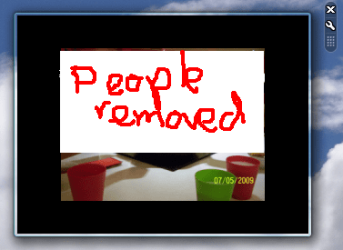
  • untitled.PNG
    untitled.PNG
    16.7 KB · Views: 38
Last edited:

My Computer

Computer Manufacturer/Model Number
Asus EEE PC 900HD
OS
Windows XP
CPU
Intel Celeron ULV (max 900 mhz; set to 630 mhz)
Memory
1 GB DDR2
Graphics Card(s)
Intel GMA 900 64 MB
Sound Card
Realtek HD Audio
Monitor(s) Displays
8.9 inch LED backlight display
Screen Resolution
1024 by 600
Hard Drives
160 GB
PSU
35 watt
Keyboard
just fine
Mouse
multi-touch touchpad
Internet Speed
slow
Other Info
Using a netbook currently for travel. Also own a Dell 755 and a T500 and a Toshiba P105.
Did you edit or crop the letterboxed photos?
 

My Computer

Computer Manufacturer/Model Number
HP Touchsmart
OS
XP Media Edition / Vista /Win 7 Home Premium
CPU
Win 7 Machine: Intel Core 2 Duo T5850 @ 2.16GHz Merom 65nm
Motherboard
Pegatron Corp. EVE Model
Memory
4GB Dual Channel DDR2 @ 333MHz 5-5-5-15
Graphics Card(s)
Nvidia Defaul 1920X1200 256MB GeForce 9300M
Sound Card
SoundMAX Integrated Digital HD Audio
Monitor(s) Displays
HP 25" Flat Panel Touch Screen
Screen Resolution
1900X1200
Hard Drives
500 GB Seagate ST3500620as (Sata) 1.5 TB Seagate External
Keyboard
HP Model RK713A
Internet Speed
3.0Gb
I am too facing the same problem . some photos do not stretched completely to fill the box, but the same photo fill the box compeletly if it come another time ( you can try it by using backward and forward button on the gadget ). so its not the problem with the photo.

so same photo some time fills the box completely and sometimes not.

it seems to be the bug with gadget and nothing to do with photo.
 

My Computer

OS
windows 7
CPU
pentium-D 3.0GHz
Motherboard
intel D945GNT
Memory
512MB 553MHz + 512MB 667MHz + 1GB 667MHz
Graphics Card(s)
intel integrated graphic card
Sound Card
intel integrated sound card
Monitor(s) Displays
samsung syncmaster 740N 17"
Hard Drives
seagate 160GB + seagate 250GB
I know this post is two years old, but it seems this issue has not been resolved. I have both Vista and Windows 7 computers and the slide show gadget has the same problem on both. I have the slideshow set to 320x240, yet sometimes the gadget decides to show a reduced image with a lot of black around it and sometimes the image fills the entire canvas. The photos are not the issue. They are all 320x240 @ 72dpi. The same photo will sometimes display smaller with all the black around it and next time around it will ill the canvas. Very annoying problem.
 

My Computer

OS
Desktop: Vista / Laptop: Windows 7
Back
Top