I have hooked up my oldsih Benq GL 2440 24" monitor via HDMI to my Asus ROG laptop and the screen comes up ok but the taskbar is only just visible the Start button is totally obscured as are the min max and close buttons at the top.
Now as far as I know the graphics are going through the Intel HD 4600 chip and try as I may I cannot get the screen to the correct size - even using the monitor controls the horizontal and vertical control buttons are non functioning for some reason but I don't think (I could be wrong) it is what is controlling the screen size on the Benq .
Now I recently has a Philips 24" monitor hooked up and it was ok but this monitor is slightly better quality - so the swap over.
Any ideas appreciated otherwise I shall just have to wait until I can go get the Philips back or afford a new dedicated 24" for the job at hand.
My Computer
At a glance
Desk1 7 Home Prem / Desk2 10 Pro / Main lap A...Desk1 i5 3750K / Laptop i7 GTX 860M / Desk2 i...Desk1 8GB (1866) / Desk2 16GB (1333) / Laptop...Desk 1& 2NVidia GTX 650 & Laptops on board Intel
Computer type
PC/Desktop
Computer Manufacturer/Model Number
Own build (new) Desk1 / Asus ROG Win 7 / Desk2 1st build
OS
Desk1 7 Home Prem / Desk2 10 Pro / Main lap Asus ROG 10 Pro 2 laptop Toshiba 7 Pro Asus P2520 7 & 10
One other Desktop (tester) and spare Toshba laptop both with SSD's
Running Kaspersky 2016 ISS on all machines config'd identically
Logitec audio stereo systems on each machine (x3)
Canon MG5250MFC
Router/modem TP-Link running WPA2SK
Gav sorry late reply mate (at work night shift) the lappy is the Asus G750JM (ROG) that comes with the GTX 860M but apparently it doesn't come into play until there is heavy gaming going on. https://www.asus.com/Notebooks_Ultrabooks/ASUS_ROG_G750JM/ all the drivers are done because I had a dickens of a job with it when I bought it having to update BIOS before any 7 drivers could be downloaded.
My Computer
At a glance
Desk1 7 Home Prem / Desk2 10 Pro / Main lap A...Desk1 i5 3750K / Laptop i7 GTX 860M / Desk2 i...Desk1 8GB (1866) / Desk2 16GB (1333) / Laptop...Desk 1& 2NVidia GTX 650 & Laptops on board Intel
Computer type
PC/Desktop
Computer Manufacturer/Model Number
Own build (new) Desk1 / Asus ROG Win 7 / Desk2 1st build
OS
Desk1 7 Home Prem / Desk2 10 Pro / Main lap Asus ROG 10 Pro 2 laptop Toshiba 7 Pro Asus P2520 7 & 10
One other Desktop (tester) and spare Toshba laptop both with SSD's
Running Kaspersky 2016 ISS on all machines config'd identically
Logitec audio stereo systems on each machine (x3)
Canon MG5250MFC
Router/modem TP-Link running WPA2SK
Sorry late reply Gav I will try that when I get back home as I haven't been online for any length of the day and now at work.
In hindsight I had a similar problem with this particular monitor when I was suing the AMD graphics set up but that was along time ago pre my NVidia days
Oh meant to ask what are your thoughts on downloading the latest Intel drivers that include some ? Iris feature the current driver is from the Asus site.
My Computer
At a glance
Desk1 7 Home Prem / Desk2 10 Pro / Main lap A...Desk1 i5 3750K / Laptop i7 GTX 860M / Desk2 i...Desk1 8GB (1866) / Desk2 16GB (1333) / Laptop...Desk 1& 2NVidia GTX 650 & Laptops on board Intel
Computer type
PC/Desktop
Computer Manufacturer/Model Number
Own build (new) Desk1 / Asus ROG Win 7 / Desk2 1st build
OS
Desk1 7 Home Prem / Desk2 10 Pro / Main lap Asus ROG 10 Pro 2 laptop Toshiba 7 Pro Asus P2520 7 & 10
One other Desktop (tester) and spare Toshba laptop both with SSD's
Running Kaspersky 2016 ISS on all machines config'd identically
Logitec audio stereo systems on each machine (x3)
Canon MG5250MFC
Router/modem TP-Link running WPA2SK
It's always worth a try John, I'm no dab hand with Intel graphics drivers but if you make a Macrium image or whatever backup you prefer then install it to give it a shot there should be nothing lost.
My Computer
At a glance
W7 Pro x64 SP1 | W10 Pro IP x64 | W8.1 Pro x6...i7-4790k @ 4GHz (4.4GHz Boost)16GB DDR3 Kingston HyperX Fury @ 1600MHz CL 9...EVGA GTX 980 Classified
Computer type
PC/Desktop
Computer Manufacturer/Model Number
Custom Build
OS
W7 Pro x64 SP1 | W10 Pro IP x64 | W8.1 Pro x64 VM | Linux Mint VM
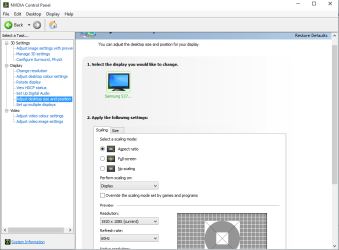
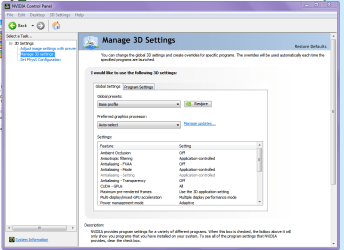
Ok Gav I have just v pulled up the NVidia stuff and you can see it is not the same as your pic.
I installed the latest Intel graphics driver (one that says something about IRIS etc ) too but it has no adjusting mechanism that I can see I can use. Plus I downloaded the Benq update from Windows.
My other little issue which has just started too is my IE page is not opening in full and I don't know if the two are the same or separate issues.
Attachments
NVIDIA.PNG
35.7 KB
· Views: 0
My Computer
At a glance
Desk1 7 Home Prem / Desk2 10 Pro / Main lap A...Desk1 i5 3750K / Laptop i7 GTX 860M / Desk2 i...Desk1 8GB (1866) / Desk2 16GB (1333) / Laptop...Desk 1& 2NVidia GTX 650 & Laptops on board Intel
Computer type
PC/Desktop
Computer Manufacturer/Model Number
Own build (new) Desk1 / Asus ROG Win 7 / Desk2 1st build
OS
Desk1 7 Home Prem / Desk2 10 Pro / Main lap Asus ROG 10 Pro 2 laptop Toshiba 7 Pro Asus P2520 7 & 10
One other Desktop (tester) and spare Toshba laptop both with SSD's
Running Kaspersky 2016 ISS on all machines config'd identically
Logitec audio stereo systems on each machine (x3)
Canon MG5250MFC
Router/modem TP-Link running WPA2SK
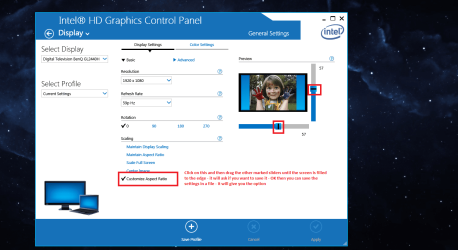
On the plain desktop right click and it will give you a window with some options - choose the Graphics Properties - that will open the Intel graphics control panel as per pic - choose Display - select Customise Aspect Ratio - there are two sliders one for horizontal and one for vertical - slide them in their respective directions until you see the edge of the screen come in and them just slide them back to where they are sitting exactly where you want them - click Apply and then it will ask you if you want to keep this configuration - OK - done!! You also get the option to save the settings in a dedicated file - I just named mine ASPECT BENQ - for this particular monitor.
See pic.
NB if you are using the monitor from another machine ie a large screen from a laptop you must first pick the large monitor in Control Panel - Display and the option or dual monitors or a single choice see pic
I think I might do a little ditty for the forum replies I do and maybe stick this fix in hardware as I know NVidia does it and the Intel one is just as easy - now
Attachments
ASPECT 3.PNG
28.7 KB
· Views: 0
ASPECT RATIO2.PNG
158.4 KB
· Views: 0
My Computer
At a glance
Desk1 7 Home Prem / Desk2 10 Pro / Main lap A...Desk1 i5 3750K / Laptop i7 GTX 860M / Desk2 i...Desk1 8GB (1866) / Desk2 16GB (1333) / Laptop...Desk 1& 2NVidia GTX 650 & Laptops on board Intel
Computer type
PC/Desktop
Computer Manufacturer/Model Number
Own build (new) Desk1 / Asus ROG Win 7 / Desk2 1st build
OS
Desk1 7 Home Prem / Desk2 10 Pro / Main lap Asus ROG 10 Pro 2 laptop Toshiba 7 Pro Asus P2520 7 & 10
One other Desktop (tester) and spare Toshba laptop both with SSD's
Running Kaspersky 2016 ISS on all machines config'd identically
Logitec audio stereo systems on each machine (x3)
Canon MG5250MFC
Router/modem TP-Link running WPA2SK