Slightly confused about Motherboard sound options

Fantail

New member
Power User
Local time
9:11 PM
Messages
852
Location
Syracuse NY, USA
Ok this post is probably going to make me 'sound' like a wing-nut but here it goes.
First, always been happy with plain old stereo speakers before, no frills decent sound. Now, with 7 and media center I'm looking to go 2.1 maybe 4/5.1 for movies and jazz up a few games.

Good plan? So I check the manual and this is the jazz I see:

Center/Subwoofer Speaker Out Jack (Orange)
Use this audio jack to connect center/subwoofer speakers in a 5.1/7.1-channel audio configuration.
Rear Speaker Out Jack (Black)
Use this audio jack to connect rear speakers in a 4/5.1/7.1-channel audio configuration.
Side Speaker Out Jack (Gray)
Use this audio jack to connect side speakers in a 7.1-channel audio configuration.
Line Out Jack (Green)
The default line out jack. Use this audio jack for a headphone or 2-channel speaker. This jack can be used to connect front speakers in a 4/5.1/7.1-channel audio configuration.


I don't want to buy the wrong speakers/set-up. So for a plain 2.1 I would use just the (Green) jack and I'm told this will do 2.1 but what gives with the (Orange) jack.
I guess 4.1 is out of the question unless I do two sets of stereo speakers and a seprate sub?
That leaves 5.1 I guess. I don't understand what the deal/use of the (orange) jack is all about if 2.1 4/5.1 speaker sets bleed off the (green) for .. is it to early to start drinking? :huh:
 

My Computer My Computer

At a glance

10 x64 | 7 x64AMD FX-9590 Vishera 4.7 | i5 Sandy Bridge16 gigs Crucial Ballistix | 8 gigs Adata ddr3...RX-570 4gd5 | Intel HD 3000
Computer type
PC/Desktop
Computer Manufacturer/Model Number
Self - Build | Asus K53e Laptop
OS
10 x64 | 7 x64
CPU
AMD FX-9590 Vishera 4.7 | i5 Sandy Bridge
Motherboard
MSI 990 FXA | K53e
Memory
16 gigs Crucial Ballistix | 8 gigs Adata ddr3 1600
Graphics Card(s)
RX-570 4gd5 | Intel HD 3000
Sound Card
Realtek HD OnBoard Audio
Monitor(s) Displays
Samsung 22" & 37" Toshiba | 15.6
Hard Drives
ADATA 240 ssd & 750 Caviar Black 7200 sata | 250 840 EVO ssd & samsung ssd
PSU
Thermaltake 700 | 65w
Case
CoolMaster Centurion 534+
Cooling
Corsair H60
Keyboard
Rosewill RK-800G PS/2 Gaming Keyboard | Asus Chiclet
Mouse
Ventus | MS w/side buttons
Internet Speed
RoadRunner
Other Info
I hate the smell of friggin corn chip butt breath snacks.
(d)
 

My Computer My Computer

At a glance

64-bit Windows 8.1 ProCore(TM) i5 CPU 4330 Haswell @ 3.20GHz12.00 GBIntel(R) HD Graphics
Computer type
PC/Desktop
Computer Manufacturer/Model Number
LENOVO K450 @3.0GHZ
OS
64-bit Windows 8.1 Pro
CPU
Core(TM) i5 CPU 4330 Haswell @ 3.20GHz
Motherboard
LENOVO
Memory
12.00 GB
Graphics Card(s)
Intel(R) HD Graphics
Sound Card
Intel HD integtrated
Monitor(s) Displays
HP 25' ISP Monitor
Screen Resolution
1900/1020
Hard Drives
(1) ST1000DM003-1CH162 (2) Generic STORAGE DEVICE USB Device (3) Generic STORAGE DEVICE USB Device
Internet Speed
100mb down/10mb up

My Computer My Computer

At a glance

Windows 7 Professional x64Intel Core i7 8604GB DDR3 Mushkin 1600Mhz @ 7-8-7-20MSI GTS250 1GB DDR3 Twin Frozr
Computer Manufacturer/Model Number
Keeps changing - (Custom)
OS
Windows 7 Professional x64
CPU
Intel Core i7 860
Motherboard
Gigabyte GA-P55-UD4P
Memory
4GB DDR3 Mushkin 1600Mhz @ 7-8-7-20
Graphics Card(s)
MSI GTS250 1GB DDR3 Twin Frozr
Sound Card
Onboard realtek
Monitor(s) Displays
Samsung SyncMaster 24" P2450 + Samsung 20" 2033
Screen Resolution
1920 X 1080 and 1600 X 900 (#2 system 1440 X 900)
Hard Drives
Patriot Inferno 120GB SSD + 3 WD Blue 640GB drives
PSU
Corsair 750 HX Modular
Case
Lancool PC-K62
Cooling
Cooler Master TX3 CPU cooler and 4-140mm and 1-120mm case
Keyboard
Gigabyte USB keyboard
Mouse
Microsoft wireless laser mouse 5000
Internet Speed
7 Mb down 1.5 up
Other Info
System #2: AMD Phenom II X6 1055T (Freezer 7 Pro cooler) - Gigabyte 880GMA-UD2H - WD 500GB Black - 9500GT (1GB) 500W OCZ modular PSU - Antec 200 case. System #3 (LapTop) Core 2 Duo T6670 - 320GB 7200RPM HD - 4GB DDR3 RAM.
In most cases a 2.1 set (two fronts and a sub) connect to the green on the sound card, with that cable going to the sub and the fronts running off of it. Same goes for most 5.1 sets; the fronts, rears and center/sub all connect to the appropriate jacks on the sound card (with the three cables usually in a bundle), something like this,

http://images17.newegg.com/is/image/newegg/36-121-006-S08
 

My Computer My Computer

At a glance

Win 7 Ultimate x64FX-8350 @ 4.6 GHz so farADATA XPG V1 Series Black 8GB DDR3 1600Sapphire R9 270x Dual-X
Computer type
PC/Desktop
Computer Manufacturer/Model Number
Me
OS
Win 7 Ultimate x64
CPU
FX-8350 @ 4.6 GHz so far
Motherboard
Asus M5A97 EVO
Memory
ADATA XPG V1 Series Black 8GB DDR3 1600
Graphics Card(s)
Sapphire R9 270x Dual-X
Sound Card
Xonar DGX w/ Corsair Vengence 1300
Monitor(s) Displays
Acer S232HL Abid
Screen Resolution
1920x1080
Hard Drives
120 GB OCZ Vertex 3
500 GB Seagate 7200.12
PSU
Antec Earthwatts 650W Green
Case
Antec Three Hundred
Cooling
Cooler Master 212 EVO
Keyboard
Logitech G510
Mouse
Logitech G500s
Internet Speed
35000/3000
I figured since i couldnt follow the post, might as well have a shot or two....or three.... :roflmao:♦
 

My Computer My Computer

At a glance

64-bit Windows 8.1 ProCore(TM) i5 CPU 4330 Haswell @ 3.20GHz12.00 GBIntel(R) HD Graphics
Computer type
PC/Desktop
Computer Manufacturer/Model Number
LENOVO K450 @3.0GHZ
OS
64-bit Windows 8.1 Pro
CPU
Core(TM) i5 CPU 4330 Haswell @ 3.20GHz
Motherboard
LENOVO
Memory
12.00 GB
Graphics Card(s)
Intel(R) HD Graphics
Sound Card
Intel HD integtrated
Monitor(s) Displays
HP 25' ISP Monitor
Screen Resolution
1900/1020
Hard Drives
(1) ST1000DM003-1CH162 (2) Generic STORAGE DEVICE USB Device (3) Generic STORAGE DEVICE USB Device
Internet Speed
100mb down/10mb up
Well since the center channel and subwoofer frequency ranges do not cross at all (Each set of amps/speakers would filter out the others freq range) It's apparently being used for both. So if you have a center channel AND subwoofer output you need to put a Y cable into the orange jack and run one to the center and the other to sub.

It LOOKS like the way the sound is setup you don;t get any sub if you don;t have a center channel :( but sometimes the manuals can be a bit terse and not fully explaing things. Give 2.1 a try, it'll either work or it wont. But given that 4 ch has no sub listed there may not actually be any 2.1 either. I'd try it anyway, you never know.
 

My Computer My Computer

At a glance

Windows 7 x64 Ultimatei7 96012 Gig Corsair DominatorNvidia 480
Computer Manufacturer/Model Number
Scratch built
OS
Windows 7 x64 Ultimate
CPU
i7 960
Motherboard
Asus P6X58D
Memory
12 Gig Corsair Dominator
Graphics Card(s)
Nvidia 480
Sound Card
Maudio Delta 44 + breakout box
Monitor(s) Displays
Dell UltraSharp U2410 24in and Samsung 21 dual monitors
Screen Resolution
1920x1200 and 1280x1024
Hard Drives
Primary: Intel X-25M G2 160G SSD
Secondary: Segate baracuda 1.0 TB
HDs in AHCI mode.
PSU
Corasair TX850
Case
Cooler Master HAF
Cooling
Corsair H50
Keyboard
Logitech G15 + N52 game pad
Mouse
Logitech MX518
Internet Speed
15kbs down 4.5kbps up
Other Info
WEI 7.6
CPU & RAM 7.6
Graphics 7.9
Hard disk 7.7
Well since the center channel and subwoofer frequency ranges do not cross at all (Each set of amps/speakers would filter out the others freq range) It's apparently being used for both. So if you have a center channel AND subwoofer output you need to put a Y cable into the orange jack and run one to the center and the other to sub.

It LOOKS like the way the sound is setup you don;t get any sub if you don;t have a center channel :( but sometimes the manuals can be a bit terse and not fully explaing things. Give 2.1 a try, it'll either work or it wont. But given that 4 ch has no sub listed there may not actually be any 2.1 either. I'd try it anyway, you never know.

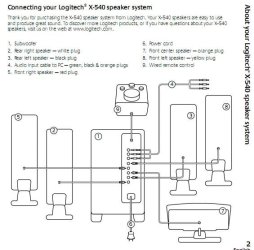
You sure about any of that? This is from the manual for the back of the speakers I linked to,

x540.JPG

and yes the sub and center both go off the same cable. And a 2.1 set will be similar in that there is only one cable connected between the speakers and the sound card, with the fronts connecting to the sub.
 

My Computer My Computer

At a glance

Win 7 Ultimate x64FX-8350 @ 4.6 GHz so farADATA XPG V1 Series Black 8GB DDR3 1600Sapphire R9 270x Dual-X
Computer type
PC/Desktop
Computer Manufacturer/Model Number
Me
OS
Win 7 Ultimate x64
CPU
FX-8350 @ 4.6 GHz so far
Motherboard
Asus M5A97 EVO
Memory
ADATA XPG V1 Series Black 8GB DDR3 1600
Graphics Card(s)
Sapphire R9 270x Dual-X
Sound Card
Xonar DGX w/ Corsair Vengence 1300
Monitor(s) Displays
Acer S232HL Abid
Screen Resolution
1920x1080
Hard Drives
120 GB OCZ Vertex 3
500 GB Seagate 7200.12
PSU
Antec Earthwatts 650W Green
Case
Antec Three Hundred
Cooling
Cooler Master 212 EVO
Keyboard
Logitech G510
Mouse
Logitech G500s
Internet Speed
35000/3000
Well weather there is a single wire going to your center and sub for your speaker system or weather you need a Y cable because the amp inputs are seperate is a matter of your exact speaker setup.

I don't use PC speakers myself, I use a pair of autio monitoers and a seperate sub so in that case you need to run the sub off a seperate wire from center (if you wanted to use center). If you have a PC speaker set that is relatively current to your MB and all the wire colors match then you can just match color for color and go :)
 

My Computer My Computer

At a glance

Windows 7 x64 Ultimatei7 96012 Gig Corsair DominatorNvidia 480
Computer Manufacturer/Model Number
Scratch built
OS
Windows 7 x64 Ultimate
CPU
i7 960
Motherboard
Asus P6X58D
Memory
12 Gig Corsair Dominator
Graphics Card(s)
Nvidia 480
Sound Card
Maudio Delta 44 + breakout box
Monitor(s) Displays
Dell UltraSharp U2410 24in and Samsung 21 dual monitors
Screen Resolution
1920x1200 and 1280x1024
Hard Drives
Primary: Intel X-25M G2 160G SSD
Secondary: Segate baracuda 1.0 TB
HDs in AHCI mode.
PSU
Corasair TX850
Case
Cooler Master HAF
Cooling
Corsair H50
Keyboard
Logitech G15 + N52 game pad
Mouse
Logitech MX518
Internet Speed
15kbs down 4.5kbps up
Other Info
WEI 7.6
CPU & RAM 7.6
Graphics 7.9
Hard disk 7.7
Alrighty well I think with this new ammunition I can tackle a problem if one pops up. Thanks guys, I'll look at a decent 2.1 system and if that works out - upgrade.
 

My Computer My Computer

At a glance

10 x64 | 7 x64AMD FX-9590 Vishera 4.7 | i5 Sandy Bridge16 gigs Crucial Ballistix | 8 gigs Adata ddr3...RX-570 4gd5 | Intel HD 3000
Computer type
PC/Desktop
Computer Manufacturer/Model Number
Self - Build | Asus K53e Laptop
OS
10 x64 | 7 x64
CPU
AMD FX-9590 Vishera 4.7 | i5 Sandy Bridge
Motherboard
MSI 990 FXA | K53e
Memory
16 gigs Crucial Ballistix | 8 gigs Adata ddr3 1600
Graphics Card(s)
RX-570 4gd5 | Intel HD 3000
Sound Card
Realtek HD OnBoard Audio
Monitor(s) Displays
Samsung 22" & 37" Toshiba | 15.6
Hard Drives
ADATA 240 ssd & 750 Caviar Black 7200 sata | 250 840 EVO ssd & samsung ssd
PSU
Thermaltake 700 | 65w
Case
CoolMaster Centurion 534+
Cooling
Corsair H60
Keyboard
Rosewill RK-800G PS/2 Gaming Keyboard | Asus Chiclet
Mouse
Ventus | MS w/side buttons
Internet Speed
RoadRunner
Other Info
I hate the smell of friggin corn chip butt breath snacks.
Back
Top