Slow (10 min) start-up BEFORE login screen

RProsser

New member
Member
Local time
3:34 PM
Messages
34
[FONT=&quot]Hey all. Need some advice please. I have reviewed past threads, but replies are specific to that person's computer's specifics, so I am posting yet another question on this same issue. [/FONT]

Over the last year, this computer has been taking longer and longer to restart and reach the login screen, but as of a few days ago, it now takes about 7-10 minutes after the BIOS window and before the login screen. It’s a consistent issue.

As far as I can tell, the PC is fairly healthy:

  1. Windows 7 updates are current
  2. All drivers are up to date
  3. Kaspersky says there are zero issues
  4. CCleaner shows a clean registry and there are not many items in the startup
  5. Defragger says the HD is 4% fragmented, is in “Good” health and is only ~25% full
  6. SFC/SCANNOW says there are no integrity violation
  7. All temp directories are regularly flushed.
  8. There is only one peripheral — a Verbatim 25GB NTFS HD — for backup and it appears healthy
Other than that, I have not done anything unusual in the last week or so. The last software install was three weeks ago when I installed Office 365 -- but that would not affect startup would it?

Where do I start? I assume something is hanging but how do I access and interpret logs related to startup? Any advice will be appreciated. : )
 
Last edited:

My Computer My Computer

Computer type
PC/Desktop
Computer Manufacturer/Model Number
Lenovo H405
OS
Microsoft Windows 7 Home Premium 64-bit 7601 Multiprocessor Free Service Pack 1
CPU
AMD Athlon(tm) II X4 645 Processor
Motherboard
LENOVO Tilapia CRB
Memory
8.00 GB
Graphics Card(s)
(1) NVIDIA GeForce 9500 GT (2) LogMeIn Mirror Driver
Sound Card
(1) Realtek High Definition Audio (2) NVIDIA Virtual Audio
Screen Resolution
(1) 1920 x 1080 x 32 bits (4294967296 colors) @ 60 Hz (2)
Hard Drives
(1) Hitachi HDS721010CLA332 ATA Device (2) SAMSUNG HD103SI USB Device
Antivirus
Kaspersky 17.*
Browser
FF, Chrome
Hello how much hard drive space do you have left.
Windows needs at least 15% of the hard drive to work properly.
 

My Computer My Computer

Computer type
PC/Desktop
Computer Manufacturer/Model Number
Lenovo
OS
Windows 7 Home Premium 64-Bit SP1
CPU
Intel Core i7 2600
Motherboard
Lenovo
Memory
8.00 GB Dual-Channel DDR3
Graphics Card(s)
1024MB GeForce GT 420
Sound Card
Intergrated Realtex ALC888S
Monitor(s) Displays
LG W40 series Widescreen
Screen Resolution
1920 by 1080 widescreen
Hard Drives
932GB Hitachi HDS TB
External drive 640 GB also
PSU
300W
Case
Tower
Cooling
yes came installed
Keyboard
Lenovo
Mouse
Laser wirless 5000
Antivirus
MBAM / Superantispyware pro paid for.
Browser
Google /
Other Info
PLDS DVD-RW DH16ABSH
I had a similar problem quite a while back.
I disconnected my external HD before switching on and all returned to normal.
Never did get to the bottom of it!!
 

My Computer My Computer

Computer type
PC/Desktop
Computer Manufacturer/Model Number
custom
OS
win7 home premium 64bit
CPU
3.47 gigahertz AMD Phenom II X4 955
Motherboard
ASUSTeK Computer INC. M4A89TD PRO USB3 Rev 1.xx
Memory
8192Mb
Graphics Card(s)
ATI Radeon HD 5700 Series [Display adapter]
Sound Card
asus xonar essence stx
Monitor(s) Displays
prolite E2472HD
Hard Drives
ST31500341AS [Hard drive] (1500.30 GB) -- drive 0, s/n 9VS42ED0, rev CC1H, SMART Status: Healthy
ST3750528AS [Hard drive] (750.16 GB) -- drive 1, s/n 9VP8EPRF, rev CC44, SMART Status: Healthy
Case
antec
Cooling
4 inner and 1 top
Keyboard
logitech
Mouse
MS
Internet Speed
80/20
Antivirus
ESET
Browser
firefox
americancritic2:

Thanks for the input. In my original post, in item #5 I wrote:

"... in 'Good' health and is only ~25% full"

In other words, there is ~75% free space on the HD.
 

My Computer My Computer

Computer type
PC/Desktop
Computer Manufacturer/Model Number
Lenovo H405
OS
Microsoft Windows 7 Home Premium 64-bit 7601 Multiprocessor Free Service Pack 1
CPU
AMD Athlon(tm) II X4 645 Processor
Motherboard
LENOVO Tilapia CRB
Memory
8.00 GB
Graphics Card(s)
(1) NVIDIA GeForce 9500 GT (2) LogMeIn Mirror Driver
Sound Card
(1) Realtek High Definition Audio (2) NVIDIA Virtual Audio
Screen Resolution
(1) 1920 x 1080 x 32 bits (4294967296 colors) @ 60 Hz (2)
Hard Drives
(1) Hitachi HDS721010CLA332 ATA Device (2) SAMSUNG HD103SI USB Device
Antivirus
Kaspersky 17.*
Browser
FF, Chrome
sobraine: Thanks for the input. I will unplug my external drive next time I restart. Who knows ... maybe it'll help.
 

My Computer My Computer

Computer type
PC/Desktop
Computer Manufacturer/Model Number
Lenovo H405
OS
Microsoft Windows 7 Home Premium 64-bit 7601 Multiprocessor Free Service Pack 1
CPU
AMD Athlon(tm) II X4 645 Processor
Motherboard
LENOVO Tilapia CRB
Memory
8.00 GB
Graphics Card(s)
(1) NVIDIA GeForce 9500 GT (2) LogMeIn Mirror Driver
Sound Card
(1) Realtek High Definition Audio (2) NVIDIA Virtual Audio
Screen Resolution
(1) 1920 x 1080 x 32 bits (4294967296 colors) @ 60 Hz (2)
Hard Drives
(1) Hitachi HDS721010CLA332 ATA Device (2) SAMSUNG HD103SI USB Device
Antivirus
Kaspersky 17.*
Browser
FF, Chrome
I don't know if it would make a difference, but you can try booting into safe mode (press F8 after BIOS splash) and see if Windows loads any more quickly.
 

My Computer My Computer

Computer type
PC/Desktop
OS
Windows 7 Professional x64 SP1

My Computer My Computer

Computer type
Laptop
Computer Manufacturer/Model Number
ASUS
OS
Microsoft Windows 7 Home Premium 64-bit 7601 Multiprocessor Free Service Pack 1
CPU
AMD C-60 APU with Radeon(tm) HD Graphics
Motherboard
ASUSTeK COMPUTER INC. X501U
Memory
4.00 GB
Graphics Card(s)
AMD Radeon HD 6290 Graphics
Sound Card
(1) AMD High Definition Audio Device (2) Realtek High Defi
Screen Resolution
1366 x 768 x 32 bits (4294967296 colors) @ 60 Hz
Hard Drives
Hitachi HTS545050A7E380 SATA Disk Device
Antivirus
Comodo CIS & FW, SecureAplus App Whitelisting, Threatfire
Browser
Cyberfox 64bit, Opera 64bit, Airfox
Other Info
Spy-The-Spy, HitmanPro.Alert, Norton Connect Safe, MJRegWatcher, BitDefender TrafficLight, Voodoo Shield, Zemana AntiMalware
90% of the time, slow boot-times are due to start-up applications; Which you can disable using a built-in tool called msconfig.
 

My Computer My Computer

Computer type
PC/Desktop
Computer Manufacturer/Model Number
Gateway
OS
Windows 7 Ultimate x64
CPU
3rd Generation i5
Memory
8GB GDDR3
Hard Drives
Samsung 840 Evo 250GB
Antivirus
None
Browser
Firefox Extended Support Release
Callender: thanks for the input. That sounds like a good place to start.

YaMoonSun: I am very aware of the startup directory. Things are tidy, however this is before I even get to the Explorer phase -- this is as Windows is initially starting up.

tetraps: I've been meaning to do that, but have been too busy ESPECIALLY when it's now taking like 15 minutes to restart.
 

My Computer My Computer

Computer type
PC/Desktop
Computer Manufacturer/Model Number
Lenovo H405
OS
Microsoft Windows 7 Home Premium 64-bit 7601 Multiprocessor Free Service Pack 1
CPU
AMD Athlon(tm) II X4 645 Processor
Motherboard
LENOVO Tilapia CRB
Memory
8.00 GB
Graphics Card(s)
(1) NVIDIA GeForce 9500 GT (2) LogMeIn Mirror Driver
Sound Card
(1) Realtek High Definition Audio (2) NVIDIA Virtual Audio
Screen Resolution
(1) 1920 x 1080 x 32 bits (4294967296 colors) @ 60 Hz (2)
Hard Drives
(1) Hitachi HDS721010CLA332 ATA Device (2) SAMSUNG HD103SI USB Device
Antivirus
Kaspersky 17.*
Browser
FF, Chrome
Callender: On your advice, I followed the article mentioned and don't find much other than confirmation that my PC is booting slowly before I get to the login screen. Well, I'm bummed. :/

FWIW, here's info on the most recent restart:

Windows has started up:
Boot Duration : 352900ms
IsDegradation : false
Incident Time (UTC) : ‎2017‎-‎04‎-‎20T17:21:48.671600300Z


[FONT=&quot]- System
- Provider
[ Name] Microsoft-Windows-Diagnostics-Performance
[ Guid] {CFC18EC0-96B1-4EBA-961B-622CAEE05B0A}
EventID 100
Version 2
Level 1
Task 4002
Opcode 34

Keywords 0x8000000000010000

- TimeCreated
[ SystemTime] 2017-04-20T17:28:02.154274200Z

EventRecordID 6116

- Correlation
[ ActivityID] {036FEC48-F800-0001-6AD8-C997FAB9D201}

- Execution
[ ProcessID] 1724
[ ThreadID] 4464

Channel Microsoft-Windows-Diagnostics-Performance/Operational

Computer OfficePC

- Security
[ UserID] S-1-5-19

- EventData
BootTsVersion 2
BootStartTime 2017-04-20T17:21:48.671600300Z
BootEndTime 2017-04-20T17:27:51.530655700Z
SystemBootInstance 922
UserBootInstance 780
BootTime 352900
MainPathBootTime 131279
BootKernelInitTime 29
BootDriverInitTime 3109
BootDevicesInitTime 4286
BootPrefetchInitTime 0
BootPrefetchBytes 0
BootAutoChkTime 0
BootSmssInitTime 20227
BootCriticalServicesInitTime 6283
BootUserProfileProcessingTime 4179
BootMachineProfileProcessingTime 10
BootExplorerInitTime 39802
BootNumStartupApps 15
BootPostBootTime 221621
BootIsRebootAfterInstall false
BootRootCauseStepImprovementBits 0
BootRootCauseGradualImprovementBits 0
BootRootCauseStepDegradationBits 0
BootRootCauseGradualDegradationBits 0
BootIsDegradation false
BootIsStepDegradation false
BootIsGradualDegradation false
BootImprovementDelta 0
BootDegradationDelta 0
BootIsRootCauseIdentified false
OSLoaderDuration 2812
BootPNPInitStartTimeMS 29
BootPNPInitDuration 4400
OtherKernelInitDuration 43201
SystemPNPInitStartTimeMS 47454
SystemPNPInitDuration 2995
SessionInitStartTimeMS 50597
Session0InitDuration 7706
Session1InitDuration 604
SessionInitOtherDuration 11916
WinLogonStartTimeMS 70824
OtherLogonInitActivityDuration 16462
UserLogonWaitDuration 9958
[/FONT]
 

My Computer My Computer

Computer type
PC/Desktop
Computer Manufacturer/Model Number
Lenovo H405
OS
Microsoft Windows 7 Home Premium 64-bit 7601 Multiprocessor Free Service Pack 1
CPU
AMD Athlon(tm) II X4 645 Processor
Motherboard
LENOVO Tilapia CRB
Memory
8.00 GB
Graphics Card(s)
(1) NVIDIA GeForce 9500 GT (2) LogMeIn Mirror Driver
Sound Card
(1) Realtek High Definition Audio (2) NVIDIA Virtual Audio
Screen Resolution
(1) 1920 x 1080 x 32 bits (4294967296 colors) @ 60 Hz (2)
Hard Drives
(1) Hitachi HDS721010CLA332 ATA Device (2) SAMSUNG HD103SI USB Device
Antivirus
Kaspersky 17.*
Browser
FF, Chrome
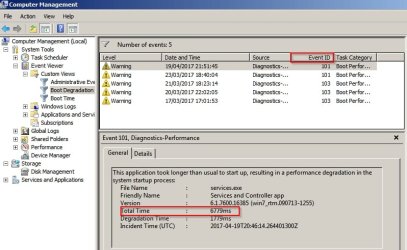
That's not the correct report (the one you posted) - Sid you create the second custom view "Boot Degradation" because that's what you need to look at.

You'd be looking for anything with Event ID's 101. 102, 103, 106 and 109 with 102 and 103 as gthe place to start.

You are looking for any entry with a high number of milliseconds (higher than any other similar entry)

Here's a screenshot of where to look.

Computer Management.jpg

Particularly check any service or driver that is to do with security software as it's often the culprit but of couse it could be something else.
 

My Computer My Computer

Computer type
Laptop
Computer Manufacturer/Model Number
ASUS
OS
Microsoft Windows 7 Home Premium 64-bit 7601 Multiprocessor Free Service Pack 1
CPU
AMD C-60 APU with Radeon(tm) HD Graphics
Motherboard
ASUSTeK COMPUTER INC. X501U
Memory
4.00 GB
Graphics Card(s)
AMD Radeon HD 6290 Graphics
Sound Card
(1) AMD High Definition Audio Device (2) Realtek High Defi
Screen Resolution
1366 x 768 x 32 bits (4294967296 colors) @ 60 Hz
Hard Drives
Hitachi HTS545050A7E380 SATA Disk Device
Antivirus
Comodo CIS & FW, SecureAplus App Whitelisting, Threatfire
Browser
Cyberfox 64bit, Opera 64bit, Airfox
Other Info
Spy-The-Spy, HitmanPro.Alert, Norton Connect Safe, MJRegWatcher, BitDefender TrafficLight, Voodoo Shield, Zemana AntiMalware
tetraps: I restarted the machine and went to Safe Mode. It loaded fast, no problem.

Now get this: I restarted the machine to see how long it would take this time to get to the login window. It took only 48 SECONDS!

What the heck? I restarted twice. Same time. A head scratcher for sure!
 

My Computer My Computer

Computer type
PC/Desktop
Computer Manufacturer/Model Number
Lenovo H405
OS
Microsoft Windows 7 Home Premium 64-bit 7601 Multiprocessor Free Service Pack 1
CPU
AMD Athlon(tm) II X4 645 Processor
Motherboard
LENOVO Tilapia CRB
Memory
8.00 GB
Graphics Card(s)
(1) NVIDIA GeForce 9500 GT (2) LogMeIn Mirror Driver
Sound Card
(1) Realtek High Definition Audio (2) NVIDIA Virtual Audio
Screen Resolution
(1) 1920 x 1080 x 32 bits (4294967296 colors) @ 60 Hz (2)
Hard Drives
(1) Hitachi HDS721010CLA332 ATA Device (2) SAMSUNG HD103SI USB Device
Antivirus
Kaspersky 17.*
Browser
FF, Chrome
Keep an eye on it. A safe mode boot is said to fix problems sometimes. Also on my machine (laptop) I sometimes do a power drain by holding the power button for 15 seconds or so.

Safe Mode boot only loads essential drivers and services so if it happens again check boot degradation for drivers and services particularly those for security software.
 

My Computer My Computer

Computer type
Laptop
Computer Manufacturer/Model Number
ASUS
OS
Microsoft Windows 7 Home Premium 64-bit 7601 Multiprocessor Free Service Pack 1
CPU
AMD C-60 APU with Radeon(tm) HD Graphics
Motherboard
ASUSTeK COMPUTER INC. X501U
Memory
4.00 GB
Graphics Card(s)
AMD Radeon HD 6290 Graphics
Sound Card
(1) AMD High Definition Audio Device (2) Realtek High Defi
Screen Resolution
1366 x 768 x 32 bits (4294967296 colors) @ 60 Hz
Hard Drives
Hitachi HTS545050A7E380 SATA Disk Device
Antivirus
Comodo CIS & FW, SecureAplus App Whitelisting, Threatfire
Browser
Cyberfox 64bit, Opera 64bit, Airfox
Other Info
Spy-The-Spy, HitmanPro.Alert, Norton Connect Safe, MJRegWatcher, BitDefender TrafficLight, Voodoo Shield, Zemana AntiMalware
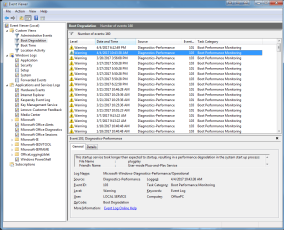
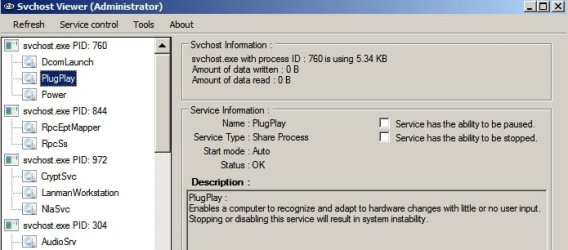
Callender: Oops. Thanks for the note. So, I went back to the Boot Degradation, and noticed that there are no warnings for the last twenty days. The last "103" was something about plug-and-play service.
 

Attachments

  • Untitled.png
    Untitled.png
    39.9 KB · Views: 1

My Computer My Computer

Computer type
PC/Desktop
Computer Manufacturer/Model Number
Lenovo H405
OS
Microsoft Windows 7 Home Premium 64-bit 7601 Multiprocessor Free Service Pack 1
CPU
AMD Athlon(tm) II X4 645 Processor
Motherboard
LENOVO Tilapia CRB
Memory
8.00 GB
Graphics Card(s)
(1) NVIDIA GeForce 9500 GT (2) LogMeIn Mirror Driver
Sound Card
(1) Realtek High Definition Audio (2) NVIDIA Virtual Audio
Screen Resolution
(1) 1920 x 1080 x 32 bits (4294967296 colors) @ 60 Hz (2)
Hard Drives
(1) Hitachi HDS721010CLA332 ATA Device (2) SAMSUNG HD103SI USB Device
Antivirus
Kaspersky 17.*
Browser
FF, Chrome
Okay if that's the only thing showing up then you'll need to investigate. I don't know much about plug and play service so if anyone else has ideas on diagnosis or possible fix please post.

On my machine for comparison:

PlugPlay.jpg

PlugPlay 2.jpg

I'm thinking that if it was my own machine with a system image backup available I'd have a go at replacing "C:\Windows\System32\umpnpmgr.dll" but that would be a shot in the dark.
 

My Computer My Computer

Computer type
Laptop
Computer Manufacturer/Model Number
ASUS
OS
Microsoft Windows 7 Home Premium 64-bit 7601 Multiprocessor Free Service Pack 1
CPU
AMD C-60 APU with Radeon(tm) HD Graphics
Motherboard
ASUSTeK COMPUTER INC. X501U
Memory
4.00 GB
Graphics Card(s)
AMD Radeon HD 6290 Graphics
Sound Card
(1) AMD High Definition Audio Device (2) Realtek High Defi
Screen Resolution
1366 x 768 x 32 bits (4294967296 colors) @ 60 Hz
Hard Drives
Hitachi HTS545050A7E380 SATA Disk Device
Antivirus
Comodo CIS & FW, SecureAplus App Whitelisting, Threatfire
Browser
Cyberfox 64bit, Opera 64bit, Airfox
Other Info
Spy-The-Spy, HitmanPro.Alert, Norton Connect Safe, MJRegWatcher, BitDefender TrafficLight, Voodoo Shield, Zemana AntiMalware
EDIT: Forget that. No warnings for twenty days means that it can't be the problem!
 

My Computer My Computer

Computer type
Laptop
Computer Manufacturer/Model Number
ASUS
OS
Microsoft Windows 7 Home Premium 64-bit 7601 Multiprocessor Free Service Pack 1
CPU
AMD C-60 APU with Radeon(tm) HD Graphics
Motherboard
ASUSTeK COMPUTER INC. X501U
Memory
4.00 GB
Graphics Card(s)
AMD Radeon HD 6290 Graphics
Sound Card
(1) AMD High Definition Audio Device (2) Realtek High Defi
Screen Resolution
1366 x 768 x 32 bits (4294967296 colors) @ 60 Hz
Hard Drives
Hitachi HTS545050A7E380 SATA Disk Device
Antivirus
Comodo CIS & FW, SecureAplus App Whitelisting, Threatfire
Browser
Cyberfox 64bit, Opera 64bit, Airfox
Other Info
Spy-The-Spy, HitmanPro.Alert, Norton Connect Safe, MJRegWatcher, BitDefender TrafficLight, Voodoo Shield, Zemana AntiMalware
Got it. Thanks : )
 

My Computer My Computer

Computer type
PC/Desktop
Computer Manufacturer/Model Number
Lenovo H405
OS
Microsoft Windows 7 Home Premium 64-bit 7601 Multiprocessor Free Service Pack 1
CPU
AMD Athlon(tm) II X4 645 Processor
Motherboard
LENOVO Tilapia CRB
Memory
8.00 GB
Graphics Card(s)
(1) NVIDIA GeForce 9500 GT (2) LogMeIn Mirror Driver
Sound Card
(1) Realtek High Definition Audio (2) NVIDIA Virtual Audio
Screen Resolution
(1) 1920 x 1080 x 32 bits (4294967296 colors) @ 60 Hz (2)
Hard Drives
(1) Hitachi HDS721010CLA332 ATA Device (2) SAMSUNG HD103SI USB Device
Antivirus
Kaspersky 17.*
Browser
FF, Chrome
best way to deal with boot delay imo is to run microsoft's process monitor, selecting options > enable boot logging, then reboot, then restart process monitor. It will show you a play by play down to the second of everything that happens during the boot up, so you just look for a big time gap in the log and you know what is causing the delay.

Process Monitor
 

My Computer My Computer

Computer type
PC/Desktop
Computer Manufacturer/Model Number
diy
OS
Win7 pro x64
CPU
stock i7 7700k
Motherboard
Gigabyte Z270N-WIFI mini-ITX
Memory
Corsair Vengeance LPX 16GB (2x8GB) DDR4 @ 3200MHz
Graphics Card(s)
integrated Intel HD 630
Sound Card
onboard Realtek ALC1220
Monitor(s) Displays
two vertically mounted samsung 55" 4k un55mu8000
Screen Resolution
1920x1280
Hard Drives
256GB Samsung EVO 960 M.2 pci-e NVMe SSD
PSU
SilverStone Nightjar ST45NF 450Watt Fanless
Case
No case. Motherboard is mounted directly onto power supply
Cooling
Evercool low profile 815EP with Panaflow 12L fan at 7v
Keyboard
Ortek MCK-86 mini
Mouse
Belkin 5-button USB
Internet Speed
spectrum 400mbps
Groan ... I clicked "resolved" earlier today far too soon.

johnhoh: thanks very much for the input. I took your advice, installed the program, and restarted.

Groan ... I clicked "resolved" earlier today far too soon. As noted in a few posts back, I thought all was well after a Safe Mode restart, and then a normal restart which took only 48 seconds to the login insted of the 10 minutes it took last week when I posted this thread.

CRAP! The restart after installing MS Process Monitor took over 18 minutes to get to the login screen!

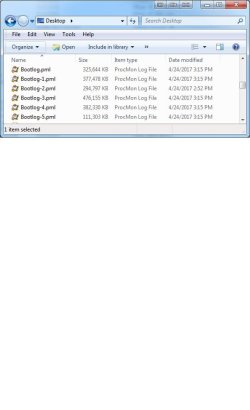
What the heck is going on here? I now have 5 big Bootlog Process Monitor PML files — 1.87GB worth (see attached screen shot). There is so much info in there I can't make sense of it while going through it.
———————
colander: FYI, at this point, I also checked Event Viewer and there are no changes to the data I posted earlier, which seems odd, i.e., no new entries.
———————
Next, I restarted into Safe Mode again. As before it took ~45 seconds to login. I then restarted into normal mode: it took about 50 seconds to login screen (as opposed to 18+ min as noted above) and this time there are only two Boot Log PML files @ "only" 525MB instead of 1.87GB.

And then, out of curiosity, I did another restart to see if it would still behave. It did not. It's taken over 10 minutes to get to login screen.

So, the question begs, why would I need to go to safe mode first to get the subsequent restart to be under 1 minute?

Boy this computer is has issues. Not sure what to make of all this but thanks for listening!
 

Attachments

  • bootlog.jpg
    bootlog.jpg
    33.1 KB · Views: 2
Last edited:

My Computer My Computer

Computer type
PC/Desktop
Computer Manufacturer/Model Number
Lenovo H405
OS
Microsoft Windows 7 Home Premium 64-bit 7601 Multiprocessor Free Service Pack 1
CPU
AMD Athlon(tm) II X4 645 Processor
Motherboard
LENOVO Tilapia CRB
Memory
8.00 GB
Graphics Card(s)
(1) NVIDIA GeForce 9500 GT (2) LogMeIn Mirror Driver
Sound Card
(1) Realtek High Definition Audio (2) NVIDIA Virtual Audio
Screen Resolution
(1) 1920 x 1080 x 32 bits (4294967296 colors) @ 60 Hz (2)
Hard Drives
(1) Hitachi HDS721010CLA332 ATA Device (2) SAMSUNG HD103SI USB Device
Antivirus
Kaspersky 17.*
Browser
FF, Chrome
CRAP! The restart after installing MS Process Monitor took over 18 minutes to get to the login screen! What the heck is going on here? I now have 5 big Bootlog Process Monitor PML files — 1.87GB worth (see attached screen shot). There is so much info in there I can't make sense of it while going through it.
When you ran process monitor and checked enable boot logging, did you also check the box that says "generate thread profiling events?" If so, try again with the box unchecked. But if you already had it unchecked the first time, procmon must have created several log files because they were so large. No biggie. You open those files within procmon by clicking on them one at a time.

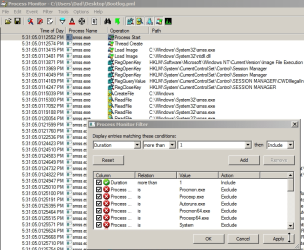
But since they are so large, you will need to filter out all but the time consuming line items. To do that, once you have a log file opened, first right click on the column area so its says "select columns" and then add in a new column called "duration". This just adds a column which says how long each task took, and you'll see that most took only a few microseconds. (.000001)

After you've added the duration column, now you want to eliminate all but the lines with highest duration, so on the main procmon menu bar select "filter", then "add filter", then "duration more than 1 second", then hit apply. Below is a screenshot of what that should look like. After hitting apply, you will then be looking at ONLY those start up processes that took more than 1 second. On my system that is only three lines and the slowest one is three seconds. On your system, we're looking for something that took up to 600 seconds. Once you find that line, you may need help interpreting what it means, so post a screenshot once you find it. Unfortunately, you may need to do this for every log file in order to find the primary culprit.
 

Attachments

  • 1.png
    1.png
    79.3 KB · Views: 22

My Computer My Computer

Computer type
PC/Desktop
Computer Manufacturer/Model Number
diy
OS
Win7 pro x64
CPU
stock i7 7700k
Motherboard
Gigabyte Z270N-WIFI mini-ITX
Memory
Corsair Vengeance LPX 16GB (2x8GB) DDR4 @ 3200MHz
Graphics Card(s)
integrated Intel HD 630
Sound Card
onboard Realtek ALC1220
Monitor(s) Displays
two vertically mounted samsung 55" 4k un55mu8000
Screen Resolution
1920x1280
Hard Drives
256GB Samsung EVO 960 M.2 pci-e NVMe SSD
PSU
SilverStone Nightjar ST45NF 450Watt Fanless
Case
No case. Motherboard is mounted directly onto power supply
Cooling
Evercool low profile 815EP with Panaflow 12L fan at 7v
Keyboard
Ortek MCK-86 mini
Mouse
Belkin 5-button USB
Internet Speed
spectrum 400mbps
Back
Top